DV360 connector for ChatGPT

Use Porter’s DV360 connector for ChatGPT to check pacing, viewability, reach and fees across your advertisers, then pause line items or build campaigns you confirm on Business, Enterprise or Edu.

  • Flag line items that are under-pacing or overspending
  • Rank exchanges by viewability, eCPM and media cost
  • Show what fees add to each insertion order’s cost
  • Match DV360 spend with GA4 sessions by campaign
G2★★★★★Rated 4.6/5 from 288 G2 reviews (October 2026)

By Porter Metrics team · Last updated October 20, 2026

ChatGPTPorter connected
Show Impressions, Clicks, CTR and Media Cost by Insertion Order for the last 7 full days.
Porter / DV360 / Trailgear Demo✓ 4 rows
IO – Prospecting Video has the highest CTR at 0.41%. IO – Open Exchange Display spends most with the lowest CTR.
Insertion orderImpr.CTRMedia cost
IO – Prospecting Video412K0.41%$3,180
IO – Retargeting Display288K0.33%$1,940
IO – CTV Awareness195K0.12%$4,050
IO – Open Exchange Display920K0.08%$4,620
Demo data, Trailgear Demo account
800+ DV360 fields
01Setup

How to connect DV360 to ChatGPT

Porter’s DV360 connector for ChatGPT takes 3 steps, with no code or server. Pick your advertisers in Porter’s Google DV360 connector, then add one MCP URL to ChatGPT as a custom MCP server and ask. For more screenshots, see Porter’s guide on how to connect DV360 to ChatGPT. MCP (Model Context Protocol) is the open standard ChatGPT uses to connect to tools.

What you need first

  • Before you start, you need a Google account with a DV360 user role on the partner or advertiser. You also need a free Porter account and a ChatGPT plan that supports custom MCP servers. Under Google’s DV360 reporting roles, users with Reporting only, Read, Standard, Admin or Reporting only – limited can run reports.
  • Custom MCP servers are in beta in ChatGPT on the web, so set up Porter and ask your questions from a browser. On Business, Enterprise or Edu, an admin or owner turns on developer mode, and then ChatGPT can also make the changes you confirm. On Pro, you turn on developer mode yourself, and ChatGPT reads and recommends (OpenAI’s guide to custom MCP apps).
  • Works in ChatGPT on the web (chatgpt.com, custom MCP servers in beta) and in Codex, with the same Porter MCP URL.
  1. Step 1: Connect DV360 in Porter

    Sign up free at Porter, then pick Google DV360 as the source and sign in with Google. Pick the advertisers ChatGPT should read, then pick ChatGPT as the destination.

  2. Step 2: Add the connector to ChatGPT

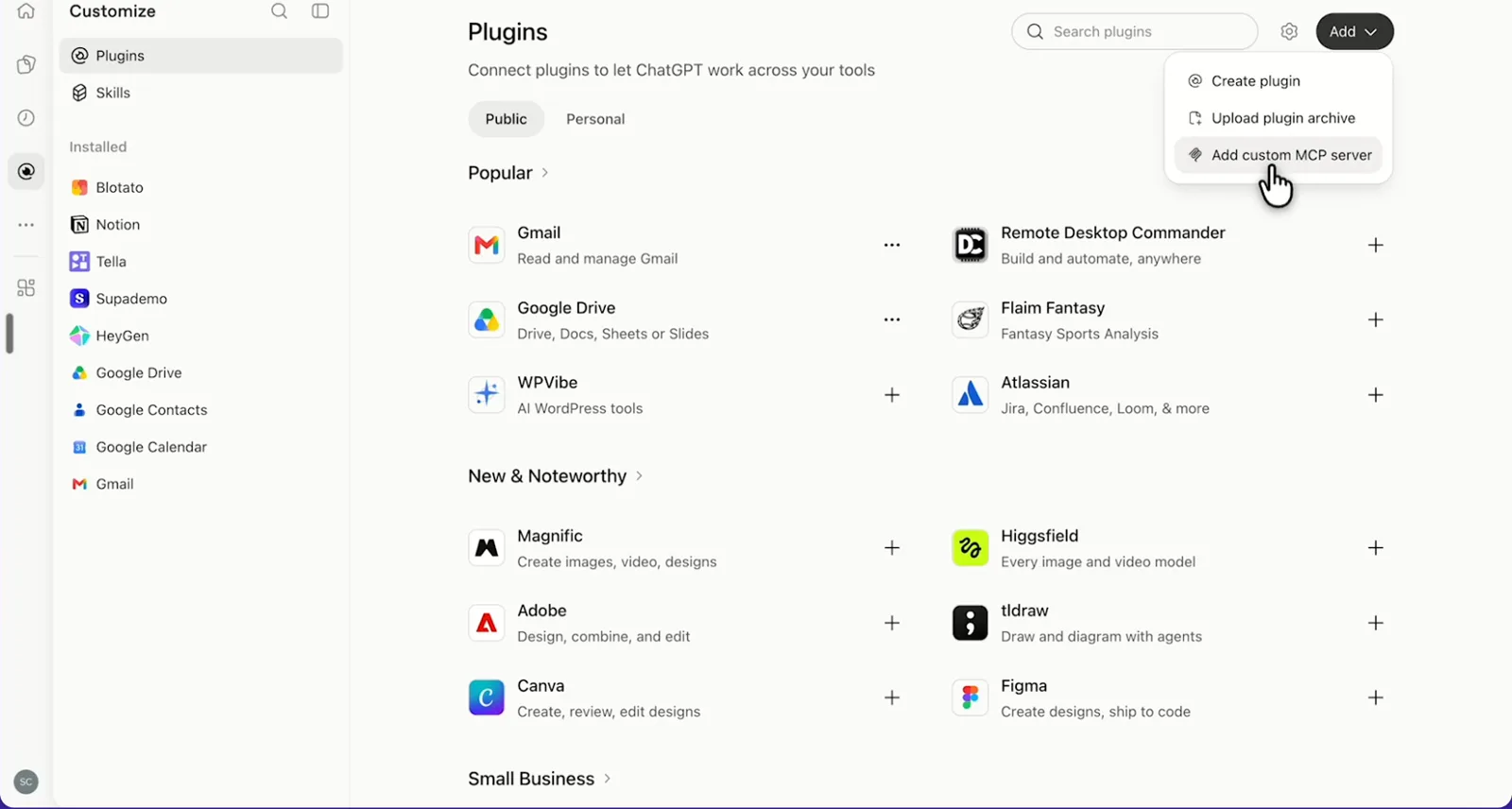
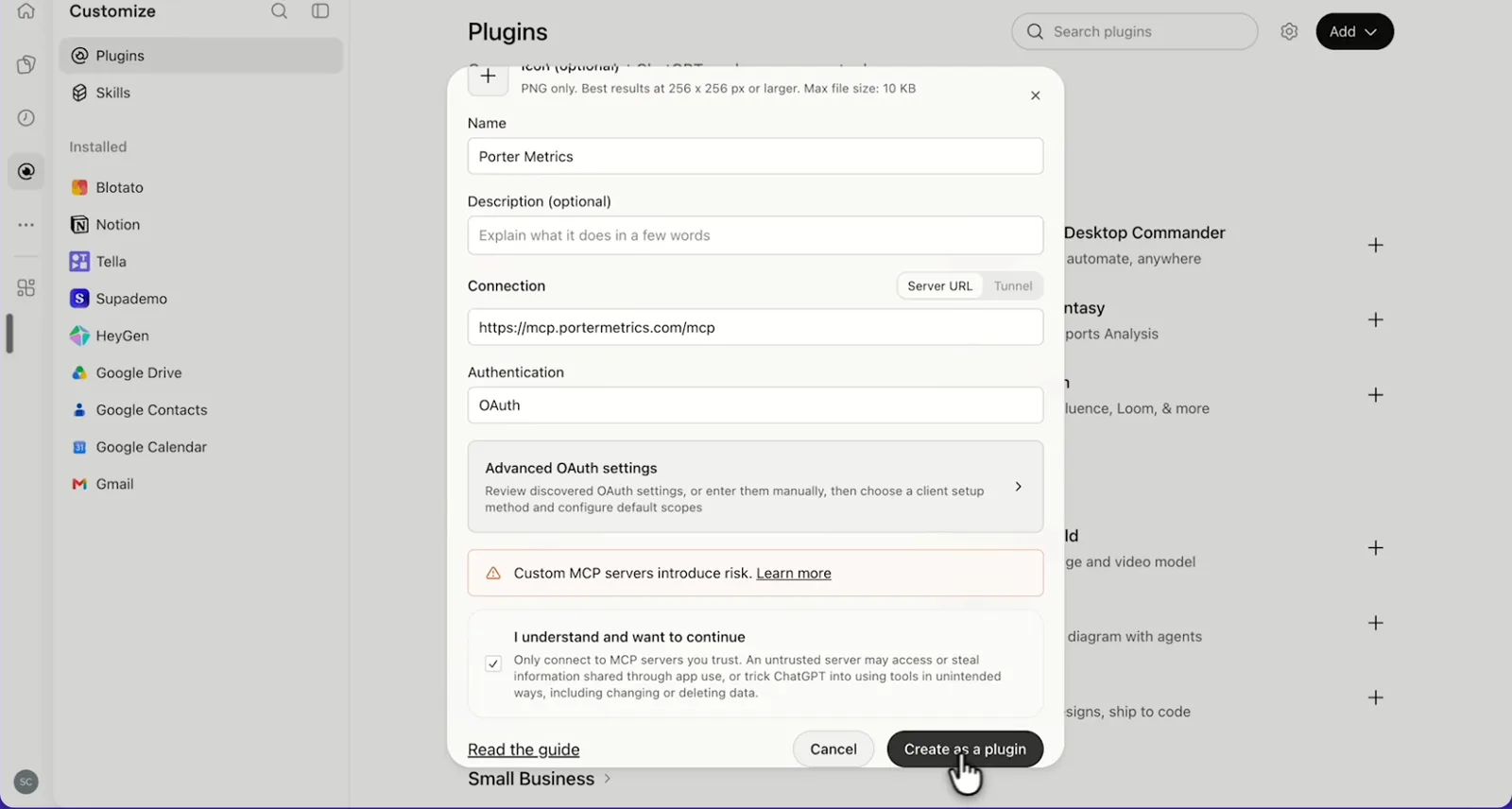
    In ChatGPT, open Customize › Plugins, click Add and choose Add custom MCP server. On Business, an admin does this from Workspace settings › Apps › Create. Name it Porter Metrics, paste this URL as the Server URL and keep OAuth as the authentication:

    MCP URL
    https://mcp.portermetrics.com/mcp

    Tick “I understand and want to continue”, then select Create as a plugin.

  3. Step 3: Ask ChatGPT about DV360

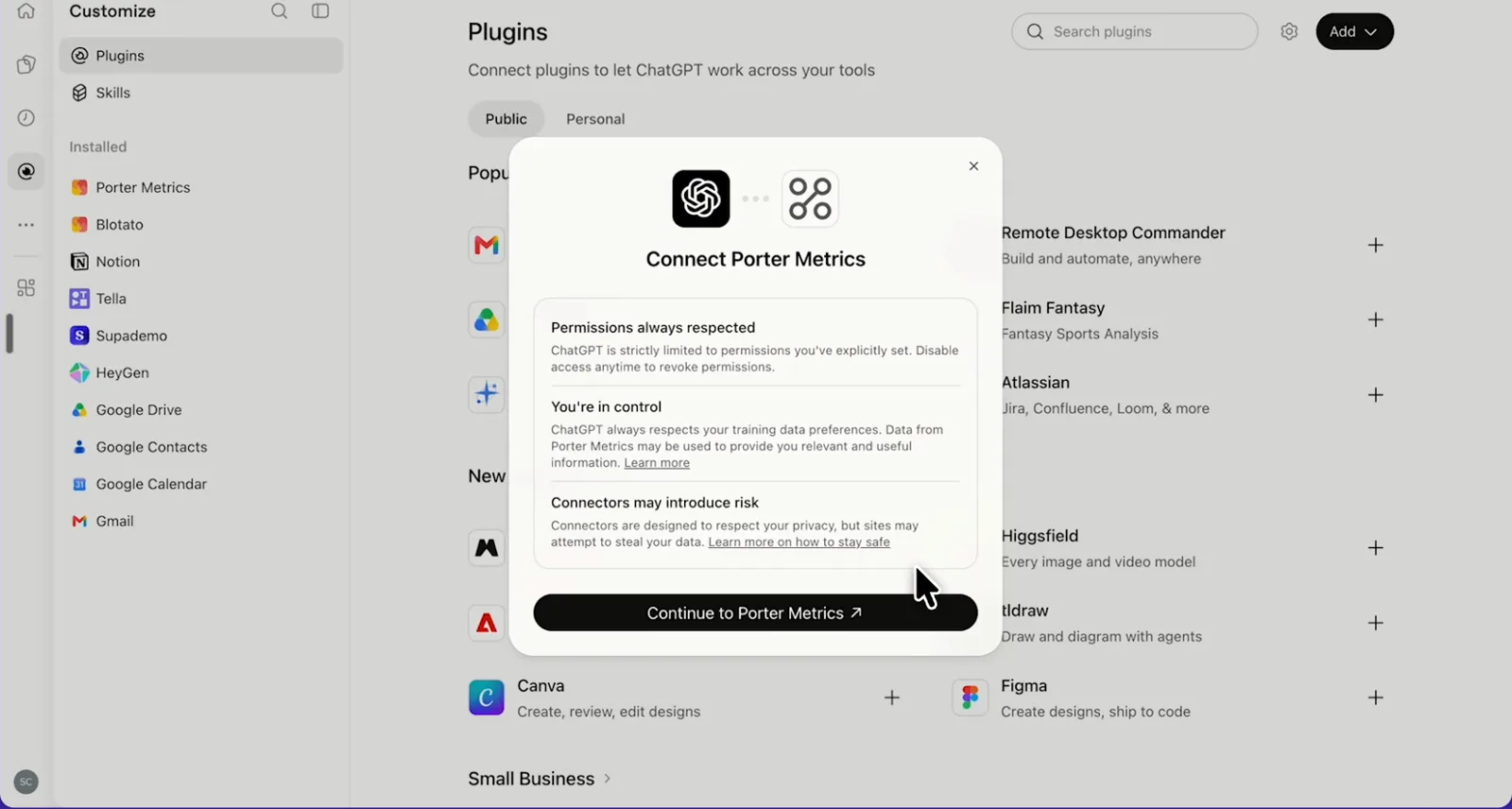
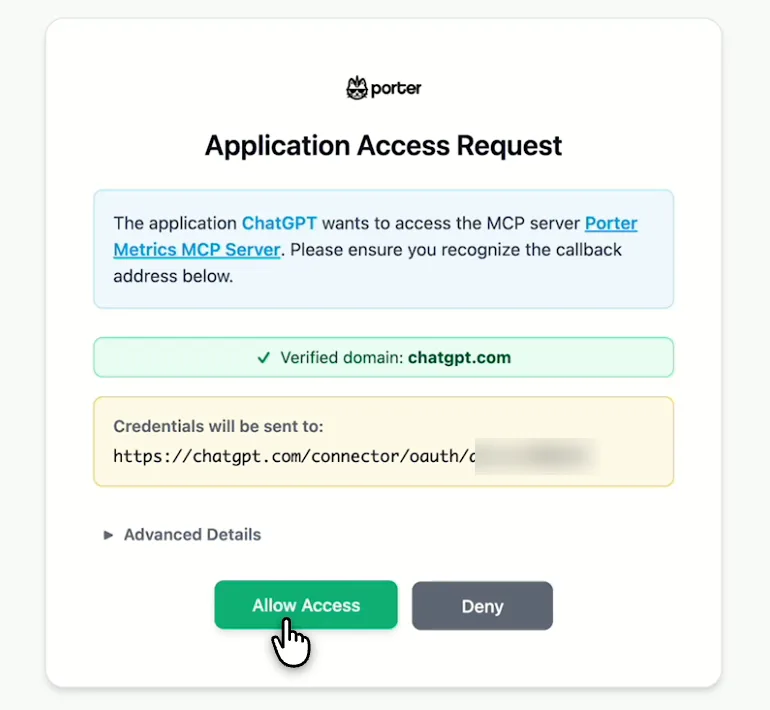
    Next, select Continue to Porter Metrics, sign in to Porter and click Allow Access. Then select Try in chat and paste this prompt:

    Prompt
    For my DV360 advertisers, show Impressions, Clicks, Click Rate (CTR) and Media Cost (Advertiser Currency) by Insertion Order for the last 7 full days.

Guides and videos

Connect DV360 to ChatGPT free

app.portermetrics.com / create
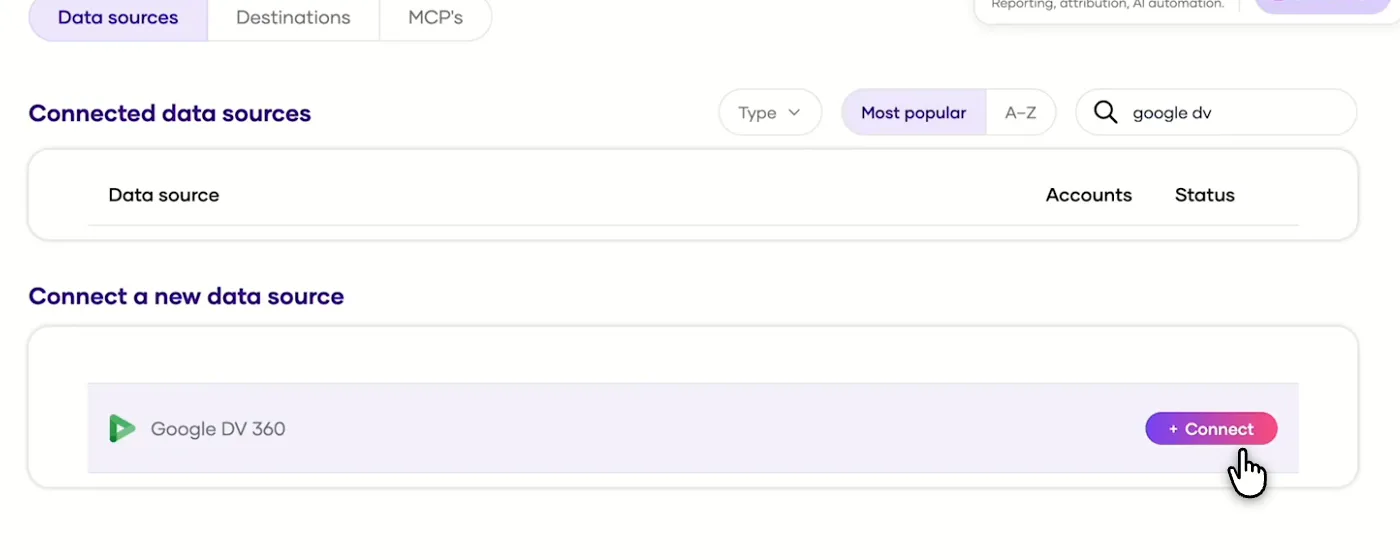
Porter's Integrations page with DV360 found and the Connect button
First, in Porter, find DV360 and select Connect.
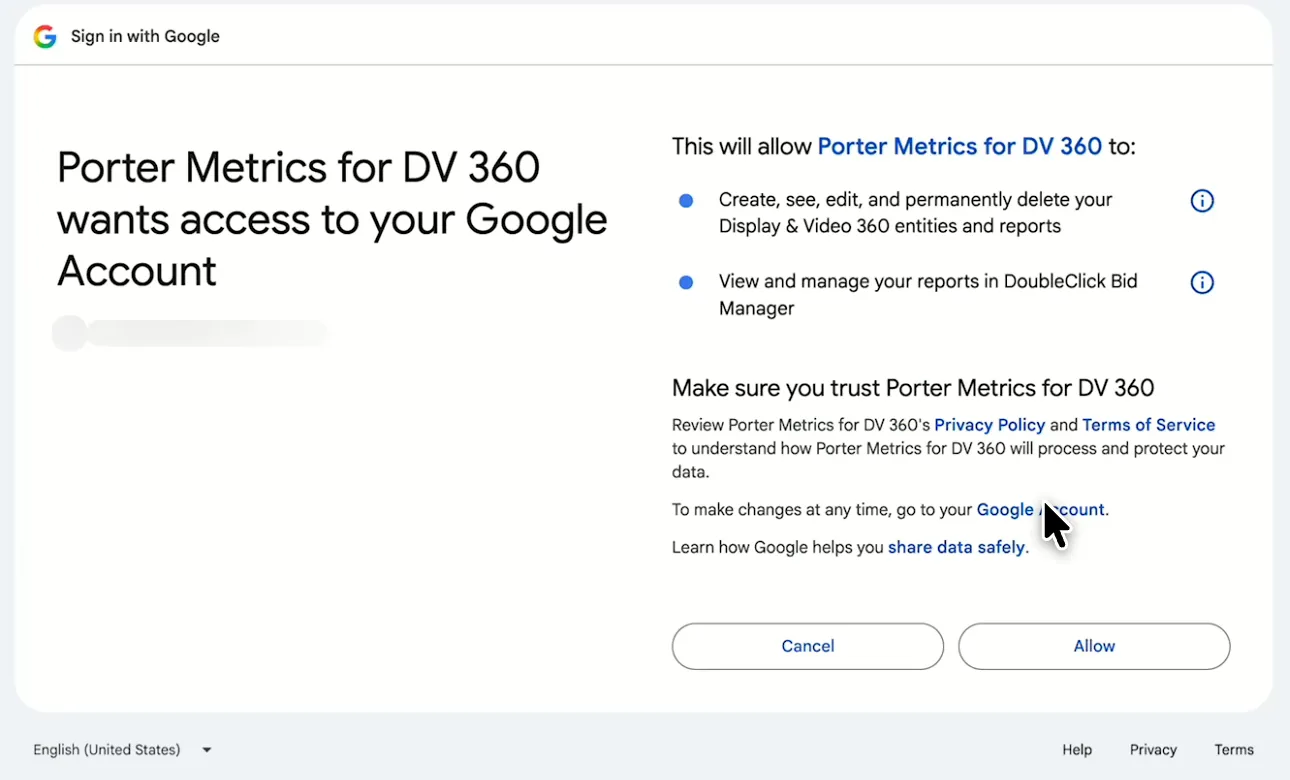
Google screen asking you to allow Porter Metrics for DV 360
Then, sign in with Google and allow Porter Metrics for DV 360.
ChatGPT's Plugins page with the Add menu open on Add custom MCP server
In ChatGPT, open Customize, then Plugins, and choose Add custom MCP server.
ChatGPT's Add custom MCP server form with the name Porter Metrics, Porter's MCP URL and OAuth filled in
Then, paste Porter's MCP URL, keep OAuth, tick the box and select Create as a plugin.
ChatGPT's Connect Porter Metrics window with the Continue to Porter Metrics button
Next, ChatGPT asks you to continue to Porter Metrics to sign in.
Porter's Application Access Request screen asking you to let ChatGPT use the Porter MCP server
Finally, sign in to Porter and select Allow Access.
If you prefer video, watch the whole DV360 to ChatGPT setup (1:30, no sound).
Interactive walkthrough, so you can click along here
02Use cases and prompts

What you can ask ChatGPT

Here are 8 things to try, and each starts from a real problem. Each use case comes with a prompt to copy, the fields it uses from the DV360 fields list and who it’s for. Every prompt uses the exact labels a Bid Manager report shows, so ChatGPT asks for the right columns. On Business, Enterprise or Edu, ChatGPT can also make the changes you confirm; on Pro it reads and recommends.

Can ChatGPT find DV360 line items that are under-pacing or overspending?

The problemA line item quietly stops spending, and nobody notices until the flight is nearly over.

What ChatGPT doesChatGPT reads each active line item’s budget and pacing, as well as its billable cost this month. Then it ranks the worst pacers so you can fix delivery before the flight ends.

What you getThe ranked list replaces the weekly pacing report, so the worst pacers get your attention first.

Prompt
For this month, by Line Item and Line Item Status, show Line Item Budget, Line Item Pacing Percentage, Billable Cost (Advertiser Currency) and Impressions. List active line items with Line Item Pacing Percentage below 70% or above 110%, most under-paced first, with one line on what to check.

For: programmatic traders · agency account leads · in-house media managers

Fields used: Line ItemLine Item StatusLine Item BudgetLine Item Pacing PercentageBillable Cost (Advertiser Currency)ImpressionsAction (budget and pacing per insertion order): insertionorder_list

Can ChatGPT find exchanges and inventory sources that sell unseen impressions?

The problemThe cheapest exchange on the plan looks like a win until Active View shows most of those impressions were never in view.

What ChatGPT doesChatGPT ranks exchanges and inventory sources by Active View viewable rate, as well as eCPM and media cost. It also flags supply where a low CPM hides low viewability.

What you getYour next deal or exclusion decision starts from named exchanges and inventory sources instead of a blended CPM.

Prompt
For the last 30 days, by Exchange and Inventory Source, show Impressions, Active View: Measurable Impressions, Active View: Viewable Impressions, Active View: % Viewable Impressions, Media Cost (Advertiser Currency) and Media Cost eCPM (Advertiser Currency). List sources with at least 50,000 Impressions and Active View: % Viewable Impressions below 50%, sorted by Media Cost.

For: programmatic traders · agencies · in-house media managers

Fields used: ExchangeInventory SourceImpressionsMeasurable ImpressionsViewable Impressions% Viewable ImpressionsMedia Cost (Advertiser Currency)Media Cost eCPM (Advertiser Currency)

Can ChatGPT check reach and frequency per insertion order?

The problemThe same people keep seeing one insertion order’s ads, but checking means building yet another reach query in Bid Manager.

What ChatGPT doesChatGPT returns deduplicated reach and average frequency per insertion order for up to 92 days, then flags those over your frequency limit. You can cap them before ad fatigue sets in.

What you getYou spot over-frequency per insertion order without a separate reach report, before the brand team asks why the ads feel everywhere.

Prompt
For the last 30 days, by Insertion Order, show Impressions, Unique Reach: Impression Reach, Unique Reach: Total Reach and Unique Reach: Average Impression Frequency. Flag insertion orders with Unique Reach: Average Impression Frequency above 5.

For: in-house brand and media managers · agencies · programmatic traders

Fields used: Insertion OrderImpressionsImpression ReachTotal ReachAverage Impression Frequency

Can ChatGPT find creatives that are losing click rate?

The problemCTR on a creative slides, and you can’t tell whether it’s fatigue or a line item that drifted onto worse placements.

What ChatGPT doesChatGPT compares the last 7 days with the 7 before for every creative and flags those whose CTR fell while impressions held. Viewability sits alongside, so a placement change isn’t mistaken for fatigue.

What you getYou can tell fatigue from a placement problem before you ask the studio for new creative.

Prompt
Compare the last 7 days with the previous 7 days by Creative, Creative Type and Creative Size: Impressions, Clicks, Click Rate (CTR), Active View: % Viewable Impressions and Post-Click Conversions. Flag creatives where Click Rate (CTR) fell more than 20% while Impressions stayed flat or rose.

For: agency creative and media teams · in-house media managers

Fields used: CreativeCreative TypeCreative SizeDateImpressionsClicksClick Rate (CTR)% Viewable ImpressionsPost-Click Conversions

Can ChatGPT compare which video gets watched: YouTube or open web?

The problemYouTube and open-web video count views differently, so comparing what actually gets watched ends up in a spreadsheet.

What ChatGPT doesChatGPT lists video line items, including YouTube views, view rate, completed views, completion rate and cost per completed view. You then see which buys get watched to the end.

What you getAs a result, one table settles which video buys earn the next flight’s budget.

Prompt
For the last 30 days, by Line Item and Line Item Type, show Impressions, TrueView: Views, TrueView: View Rate, Complete Views (Video), Completion Rate (Video), Media Cost (Advertiser Currency) and Video Media Cost eCPCV (Advertiser Currency). Rank video line items by Completion Rate (Video).

For: in-house brand and media managers · agency video teams

Fields used: Line ItemLine Item TypeImpressionsViewsView RateComplete Views (Video)Completion Rate (Video)Media Cost (Advertiser Currency)Video Media Cost eCPCV (Advertiser Currency)

Can ChatGPT show what fees add to each insertion order?

The problemClients ask what each insertion order cost all in, but media cost alone leaves out data fees and the platform fee.

What ChatGPT doesChatGPT puts media cost, data fees, platform fee and total media cost side by side per insertion order. It adds the fee share and total eCPM, so client reports show the full cost of each buy.

What you getThe fee breakdown goes straight into the client report instead of manual math on top of a Bid Manager export.

Prompt
For last month, by Insertion Order, show Impressions, Media Cost (Advertiser Currency), Data Fees (Advertiser Currency), Platform Fee (Advertiser Currency), Total Media Cost (Advertiser Currency), Total Media Cost eCPM (Advertiser Currency) and Total Conversions. Add fees as a share of Total Media Cost and flag insertion orders where fees are above 25%.

For: agency account leads · in-house media managers (several advertisers: one advertiser per row)

Fields used: Insertion OrderImpressionsMedia Cost (Advertiser Currency)Data Fees (Advertiser Currency)Platform Fee (Advertiser Currency)Total Media Cost (Advertiser Currency)Total Media Cost eCPM (Advertiser Currency)Total Conversions

Can ChatGPT put spend next to GA4 sessions?

The problemDV360 says the campaign delivered while GA4 holds the sessions, so matching the two takes two exports and a lookup formula.

What ChatGPT doesWhen GA4 is also connected in Porter, ChatGPT reads media cost by campaign. It then reads GA4 sessions by session campaign for the same dates. It lines them up wherever your UTM campaign names match DV360 campaign names.

What you getCost per engaged session by campaign tells you whether the display spend brought anyone to the site.

Prompt
For the last 30 days, show DV360 Impressions, Clicks and Media Cost (Advertiser Currency) by Campaign, then GA4 Sessions and Engaged sessions by Session campaign where Session source / medium contains dv360 or display. Match the campaigns by name and show cost per engaged session.

For: performance marketers · agencies · in-house media managers

Fields used: CampaignImpressionsClicksMedia Cost (Advertiser Currency)Session campaignSession source / mediumSessionsEngaged sessions

Can ChatGPT pause line items or build a paused campaign?

The problemLow-viewability line items keep spending while you click through the DV360 UI to pause them one at a time.

What ChatGPT doesOn Business, Enterprise or Edu, ChatGPT pauses or activates campaigns, insertion orders and line items, and also creates new ones once you confirm. Targeting and creatives stay in DV360, exactly as you set them.

What you getThe pause list comes straight from viewability data, so you stop paying for unseen impressions without all the clicking.

Prompt
In advertiser {advertiser ID}, list line items with Active View: % Viewable Impressions below 40% and more than 50,000 Impressions in the last 7 days. Show me the list and pause them only after I confirm.
Then ask
Prompt
Create a paused campaign 'Q1 Prospecting' in the same advertiser with one insertion order 'Q1 Prospecting – Display' using even pacing. Show me every setting before you create it.

For: ad ops and traffickers · programmatic traders · agencies

Fields used: Line ItemImpressions% Viewable Impressions
Actions: lineitem_list · lineitem_update · campaign_create · insertionorder_create
03Why Porter

Why Porter for DV360 in ChatGPT

Google publishes no MCP server for DV360, so Porter’s hosted connector is the quickest route to ChatGPT without a Google Cloud project. If you also want an AI agent to edit targeting, audiences or creatives, a custom build on Google’s DV360 API is the route for that.

✓

No Google Cloud project

Sign in with Google in Porter and add one MCP URL to ChatGPT on the web. There’s no OAuth app or local server to set up, and Porter handles the report runs and Google’s quotas.

⊞

Read and change campaigns

On Business, Enterprise or Edu, ChatGPT pauses, activates, renames or creates the campaigns, insertion orders and line items you confirm. On Pro it reads and recommends. New campaigns start paused.

⚙

812 ready-made fields

ChatGPT reads 534 metrics and 278 dimensions by their Bid Manager labels, from Line Item Pacing Percentage to Active View: % Viewable Impressions, plus 16 actions.

Aa

Answers in the chat

Ask a pacing or viewability question and get the answer in the same chat, instead of waiting for a scheduled Bid Manager report.

↻

DV360 next to GA4 and Google Ads

Put DV360 media cost next to GA4 sessions, Google Ads or Meta Ads in one chat. The community MCP server on GitHub reads DV360 only.

✓

Every advertiser, every destination

Compare several advertisers with Advertiser as a column. The same Porter connection also feeds Claude, Data Studio and BigQuery.

⊞

Live dashboards, not only chat answers

Ask ChatGPT for a dashboard and Porter’s AI dashboards publish it at its own link, synced automatically and ready to share. Official MCP servers answer inside the chat and stop there.

04Dashboard

Dashboard template

Start from a ready-made DV360 template, or ask ChatGPT to build a live one with AI dashboards.

AI dashboards

Build a live DV360 dashboard from the chat

Describe the dashboard in one sentence and Porter builds it. A client-ready dashboard in minutes, with no chart dragging and no BI tool to learn. Ask ChatGPT:

Prompt
Build a live DV360 dashboard for my account with the last 30 days, the main KPIs and a weekly trend.
Live URLEach dashboard at its own link: no login, no app, no download
Auto-syncFresh DV360 data, nobody re-exports each period
Scheduled deliveryEmail or PDF sends on a set day
White labelYour logo and branding for clients
Sharing permissionsView or edit access per person

Or start from a template

05Pricing

Pricing

You can start free, since Porter’s DV360 connector for ChatGPT comes with every plan. Use the calculator for your number of accounts, or see Porter pricing for every plan.

What you get

  • Free plan: never expires, with unlimited connected accounts and the last 15 days of data in ChatGPT (30 days in Data Studio and Sheets)
  • Reporting: from $12.50 per account a month billed annually, or $15 month to month for one account
  • Billing: each connected DV360 account counts as one account, with volume discounts and no per-seat fee
  • Changes: 1 AI credit per completed change; failed tasks are free, and the Free plan includes 100 credits a month
  • Trial: 14 days of full access, no card

Price calculator

$33.33/mo$6.67 per account

An account is one ad account, Stripe account, store, page or GA4 property. The Free plan never expires and has unlimited accounts, with the last 15 days of data in AI chats.

06Data and actions

DV360 data and actions in ChatGPT

The connector gives ChatGPT 812 DV360 fields, 534 metrics and 278 dimensions, as well as 16 actions to read, create, pause and delete. Money metrics come in USD, Partner and Advertiser currency, so pick one per question. The Google DV360 field list has every label, including everything from partners and advertisers down to line items, creatives, exchanges and inventory sources.

The 12 fields you'll use most

These 12 answer most pacing, supply, reach and cost questions, so start with them.

FieldWhat it's for
Advertiser · Insertion Order · Line ItemFILTER_ADVERTISER_NAME · FILTER_INSERTION_ORDER_NAME · FILTER_LINE_ITEM_NAMEOne level of the account per question
Line Item Pacing PercentageFILTER_LINE_ITEM_PACING_PERCENTAGEUnder- and over-delivery
Impressions · Click Rate (CTR)METRIC_IMPRESSIONS · METRIC_CTRVolume and response
Media Cost (Advertiser Currency) · Total Media Cost (Advertiser Currency)METRIC_MEDIA_COST_ADVERTISER · METRIC_TOTAL_MEDIA_COST_ADVERTISERSpend without and with fees
Media Cost eCPM (Advertiser Currency)METRIC_MEDIA_COST_ECPM_ADVERTISERPrice of supply
Active View: % Viewable ImpressionsMETRIC_ACTIVE_VIEW_PCT_VIEWABLE_IMPRESSIONSQuality of supply
Unique Reach: Impression Reach · Unique Reach: Average Impression FrequencyMETRIC_UNIQUE_REACH_IMPRESSION_REACH · METRIC_UNIQUE_REACH_AVERAGE_IMPRESSION_FREQUENCYDeduplicated reach and frequency
Post-Click Conversions · Post-View Conversions · Total ConversionsMETRIC_LAST_CLICKS · METRIC_LAST_IMPRESSIONS · METRIC_TOTAL_CONVERSIONSFloodlight conversions
TrueView: Views · Completion Rate (Video)METRIC_TRUEVIEW_VIEWS · METRIC_VIDEO_COMPLETION_RATEYouTube and open-web video
Exchange · Inventory SourceFILTER_EXCHANGE · FILTER_INVENTORY_SOURCE_NAMEWhere impressions were bought
Invalid ImpressionsMETRIC_INVALID_IMPRESSIONSFiltered traffic
Creative · Creative SizeFILTER_CREATIVE · FILTER_CREATIVE_SIZECreative comparison

Can ChatGPT create, pause or change campaigns through the connector?

Yes. Porter gives ChatGPT reporting and campaign management in one connector, with 9 write actions:

  • create campaigns under an advertiser
  • create insertion orders with pacing and budget unit
  • create line items with type, bid strategy, bid amount and performance goal
  • pause, activate or rename campaigns, insertion orders and line items
  • delete campaigns, insertion orders and line items

How fresh is the data, and how far back?

Porter runs a report when you ask. DV360 updates impressions and clicks every 3–4 hours, while conversions update about every 6 hours. It can still update a day's data for up to 31 days. Most data goes back 24 months, according to Google's DV360 data freshness and availability page.

Product stats

WhatDV360 connector
Fields812 (534 metrics, 278 dimensions)
Actions16, including 9 write actions on campaigns, insertion orders and line items
FreshnessReport runs when you ask; DV360 updates impressions and clicks every 3 to 4 hours, conversions about every 6
HistoryMost data 24 months, keyword data 60 days, reach up to 92 days per question; 30 days on the Free plan, 15 in AI chats
Write quotaGoogle allows 150 writes a minute per advertiser
CurrenciesMoney metrics in USD, Partner and Advertiser currency; one per question
ChatGPT plansReads on Pro; reads and changes you confirm on Business, Enterprise and Edu (web, beta)
AccessGoogle sign-in (OAuth) with a DV360 user role; changes only after you confirm

See all 812 DV360 fields

07Security

Is it safe?

Yes. ChatGPT changes DV360 only on Business, Enterprise or Edu, and only what you confirm; on Pro it reads and recommends. Every change is one of 9 Porter actions on campaigns, insertion orders or line items, and Google's own limits still apply to each one.

How approvals work

ChatGPT asks you to confirm changes based on the app's permissions and holds back some high-risk actions for extra care. When ChatGPT creates a campaign, it starts paused, and each completed change costs one AI credit.

Deleting a campaign, insertion order or line item is permanent, so pause it when you might want it back. Bulk changes count one credit per change, and failed tasks are free.

Google also limits writes to 150 a minute per advertiser, as Google's DV360 write quota states.

What the ChatGPT connector needs from your account

Before you connect, you need a Google account with a DV360 user role on each partner or advertiser ChatGPT should use. Porter signs in with Google (OAuth) for both reports and changes. ChatGPT also needs the advertiser ID before it makes a change.

08FAQ

FAQ

Here are short answers to what programmatic teams ask before they connect DV360 to ChatGPT.

What does DV360 stand for?

DV360 stands for Display & Video 360, the Google demand-side platform whose reports Porter brings into ChatGPT. It was formerly DoubleClick Bid Manager and sits in the Google Marketing Platform. Advertisers and agencies use it to buy display, video, audio and connected TV ads programmatically, according to Google's DV360 overview.

Can I use Porter in Claude too?

Yes. Porter's MCP URL, the same one behind the DV360 connector for ChatGPT, also works in Claude as a custom connector, so one Porter account serves both. See Porter's DV360 connector for Claude for the Claude setup and what it covers.

Can I connect several DV360 advertisers or partners, like an agency?

Yes. Pick several advertisers when you connect Porter, and ChatGPT can compare them, or look at each client alone, with Advertiser as a column. Each connected account is billed once on Porter's paid plans, so adding a client means adding one account.

I already send DV360 to Data Studio with Porter. Do I need to reconnect?

No. Porter includes the MCP in every plan, so the account behind your Data Studio (formerly Looker Studio) reports can also answer in ChatGPT. Add the MCP URL to ChatGPT, then sign in with the same Porter account and ask. The DV360 connector for Data Studio still covers the dashboard side.

Can ChatGPT see Floodlight and Campaign Manager 360 conversions?

Yes. Porter passes Floodlight conversions to ChatGPT as Post-Click Conversions, Post-View Conversions, Total Conversions and Total Revenue. It also passes CM360 Post-Click Revenue and CM360 Post-View Revenue. Ask by line item or creative so you see which buys drive conversions. Note that DV360 updates them about every 6 hours.

Troubleshooting

Why don't ChatGPT's numbers match DV360?

Ask in the currency the DV360 UI shows and use the same date field, and ChatGPT's DV360 numbers through Porter should line up. Recent days can still shift, since DV360 keeps updating a day's data for up to 31 days (Google's report freshness page). Date and Date (UTC) also split days differently when the advertiser isn't on UTC.

Why does ChatGPT return no DV360 data or no advertisers?

Reconnect DV360 in Porter with a Google account that has a DV360 role on that partner or advertiser, then ask ChatGPT again. ChatGPT returns no DV360 data when that role is missing or the Google grant was revoked. A connection made in another Porter company, where you have no role, still shows as connected with no data.

Why is DV360 reach empty, or a question failing?

Keep the range inside DV360's reach window and the line items above its minimum volume, and ChatGPT gets DV360 reach through Porter (Google's reach and frequency rules). If a question fails, split it or test the filter and metric pair in DV360's report builder, since DV360 combines only some pairs.


09Next

More ChatGPT connectors

Porter brings more than DV360 into ChatGPT and sends DV360 to more than ChatGPT. Besides the DV360 connector, browse all ChatGPT connectors or the pages below. Each lists that source's or destination's setup, fields and limits, so you can plan a cross-channel setup before connecting anything else.

Not only ChatGPT. Send DV360 data anywhere

The same Porter account and connection also send DV360 data to these destinations, at no extra cost.

Try the connector in ChatGPT

Setting up the DV360 connector for ChatGPT takes 3 steps, so your first pacing question can go out today. Ask which line items are behind, which exchanges waste impressions or how fees stack up per insertion order. On Business, Enterprise or Edu, pause what isn't working in the same chat.

Free plan · 14-day full trial · No card

Programmatic traders: pacing and viewability checks become one question instead of a rebuilt Bid Manager report.

Agencies: fees, reach and delivery per client come back in one answer, so they're ready for the client report.

In-house media teams: you see where the budget went by insertion order and exchange whenever someone asks.