Pinterest Ads connector for ChatGPT

Use Porter’s Pinterest Ads connector for ChatGPT to rank promoted Pins, track ROAS and pace budgets, then build campaigns and change budgets you confirm on Business, Enterprise or Edu.

  • Rank promoted Pins by cost per outbound click and save rate
  • Pace campaign budgets and lower the ones set to overspend
  • Find the video Pins people watch to the end
  • Compare Pinterest and Meta Ads cost per purchase in one table
G2★★★★★Rated 4.6/5 from 288 Porter Metrics reviews on G2 (October 2026)

By Porter Metrics team · Last updated October 20, 2026

ChatGPTPorter connected
Show Ad Spend, Clicks and Outbound Clicks by Campaign Name for the last 7 full days, with cost per outbound click.
Porter / Pinterest Ads / Trailgear Demo✓ 4 rows
Shopping – Spring Catalog has the cheapest outbound click at $0.38. Awareness – Video Pins spends the most per click.
Campaign nameSpendOutbound clicksCost / click
Shopping – Spring Catalog$6401,690$0.38
Consideration – Boards$410720$0.57
Retargeting – Cart$290610$0.48
Awareness – Video Pins$520340$1.53
Demo data, Trailgear Demo account
365 Pinterest Ads fields
01Setup

How to connect Pinterest Ads to ChatGPT

Porter’s Pinterest Ads connector for ChatGPT takes 3 steps and no code. Sign in with Pinterest in Porter to connect your ad accounts, add one MCP URL to ChatGPT as a custom MCP server, then ask. You don’t need a Pinterest developer app, so there’s nothing to build. For more screenshots, see Porter’s guide on how to connect Pinterest Ads to ChatGPT. MCP (Model Context Protocol) is the open standard ChatGPT uses to connect to tools like Porter.

What you need first

  • Before you start, you need a Pinterest login that owns the ad account or has a Business Access role on it. You also need a free Porter account and a ChatGPT plan that supports custom MCP servers. Pinterest’s Business Access roles decide what each person sees. For example, reading analytics takes the Admin, Analyst or Campaign role. For ChatGPT to make changes, you need a role that can create and edit campaigns, such as Admin or Campaign.
  • Custom MCP servers are in beta in ChatGPT on the web, so set up Porter and ask your questions from a browser. On Business, Enterprise or Edu, an admin or owner turns on developer mode, and then ChatGPT can also make the changes you confirm. On Pro, you turn on developer mode yourself, and ChatGPT reads and recommends (OpenAI’s guide to custom MCP apps).
  • Works in ChatGPT on the web (chatgpt.com, custom MCP servers in beta) and in Codex, with the same Porter MCP URL.
  1. Step 1: Connect Pinterest Ads in Porter

    Sign up free at Porter, then pick Pinterest Ads as the source and sign in with Pinterest. Pick the ad accounts ChatGPT should read, then pick ChatGPT as the destination.

  2. Step 2: Add the Pinterest Ads connector to ChatGPT

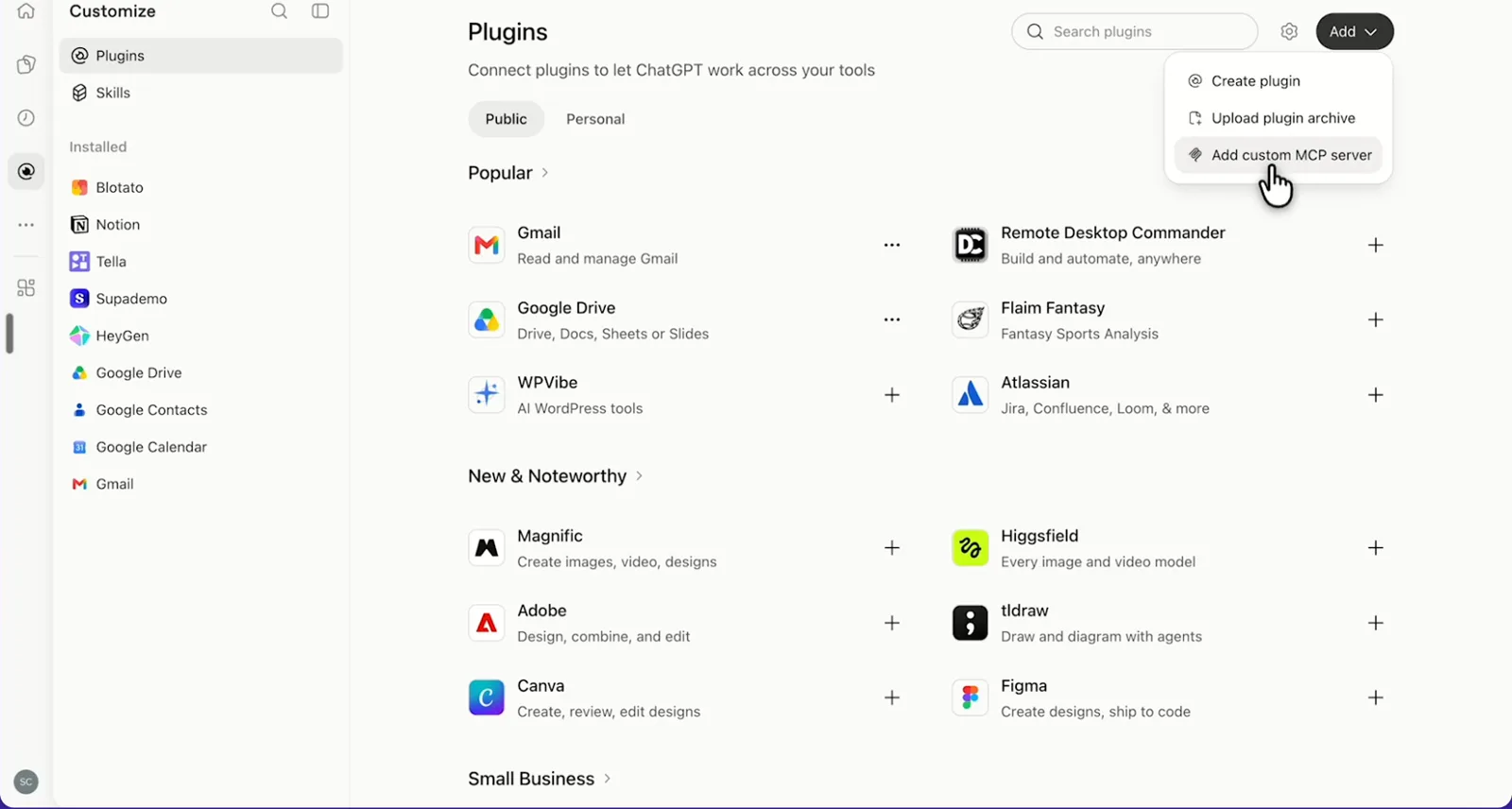
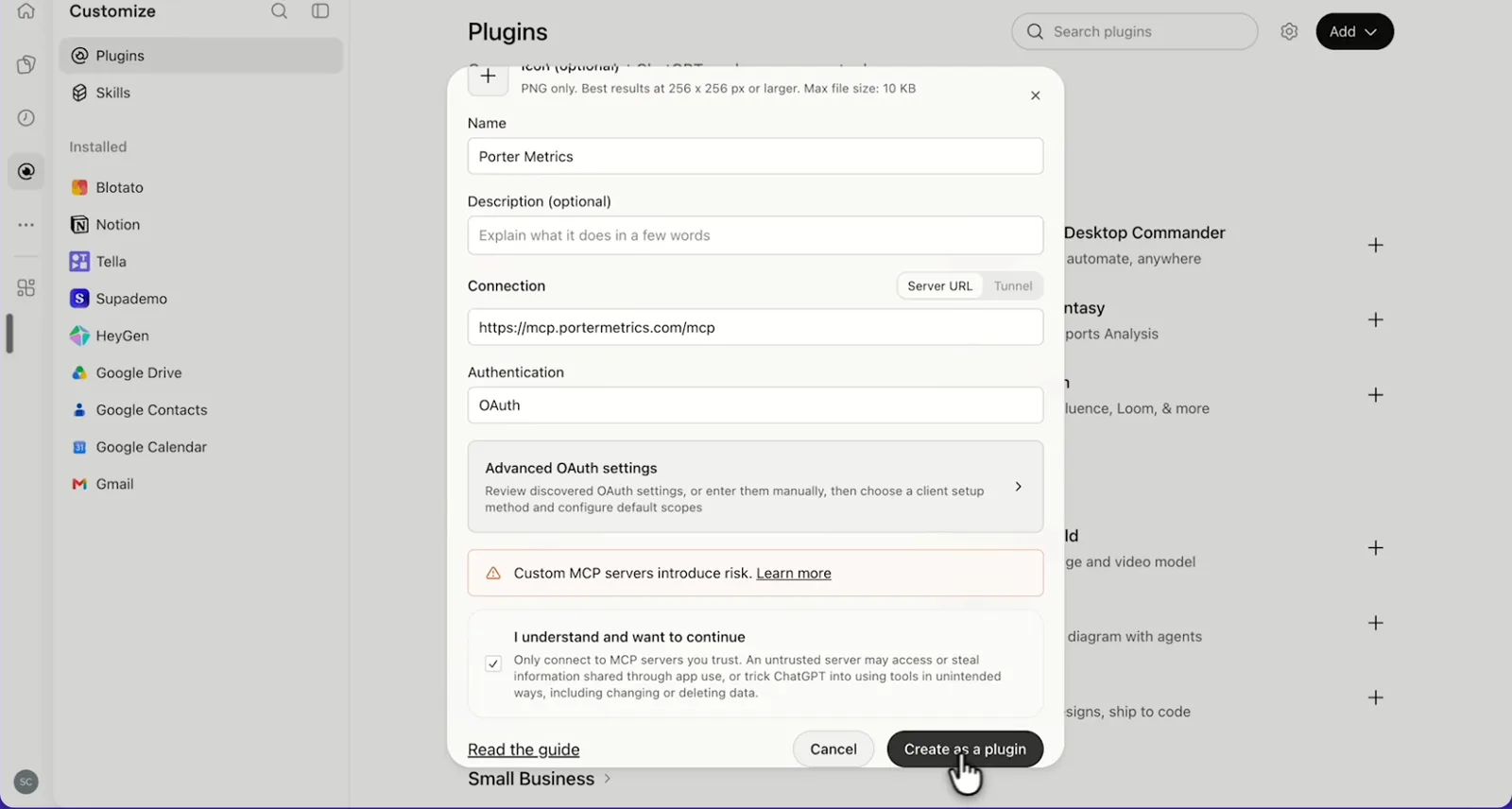
    In ChatGPT, open Customize › Plugins, click Add and choose Add custom MCP server. On Business, an admin does this from Workspace settings › Apps › Create. Name it Porter Metrics, paste this URL as the Server URL and keep OAuth as the authentication:

    MCP URL
    https://mcp.portermetrics.com/mcp

    Tick “I understand and want to continue”, then select Create as a plugin.

  3. Step 3: Ask ChatGPT about Pinterest Ads

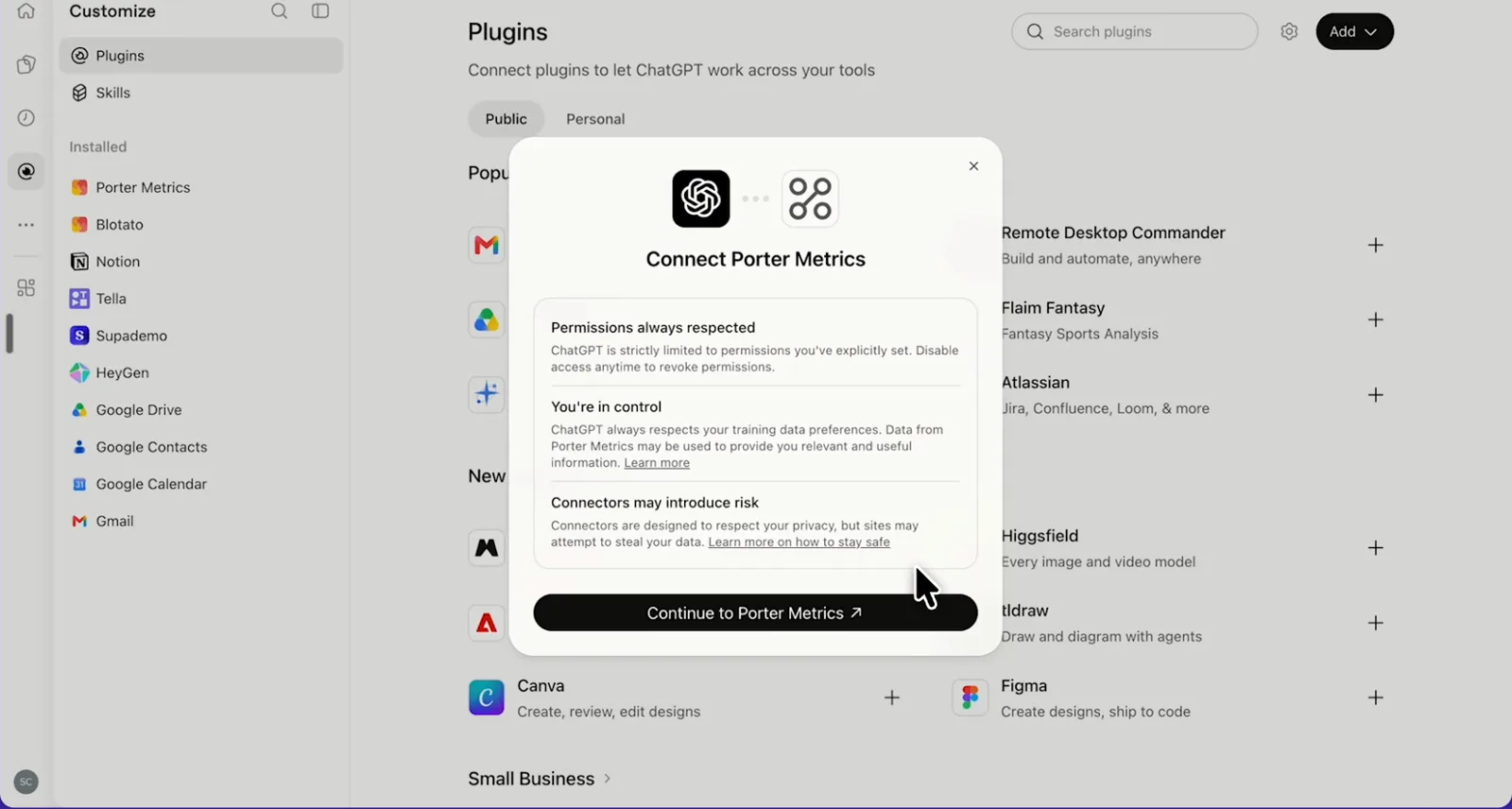
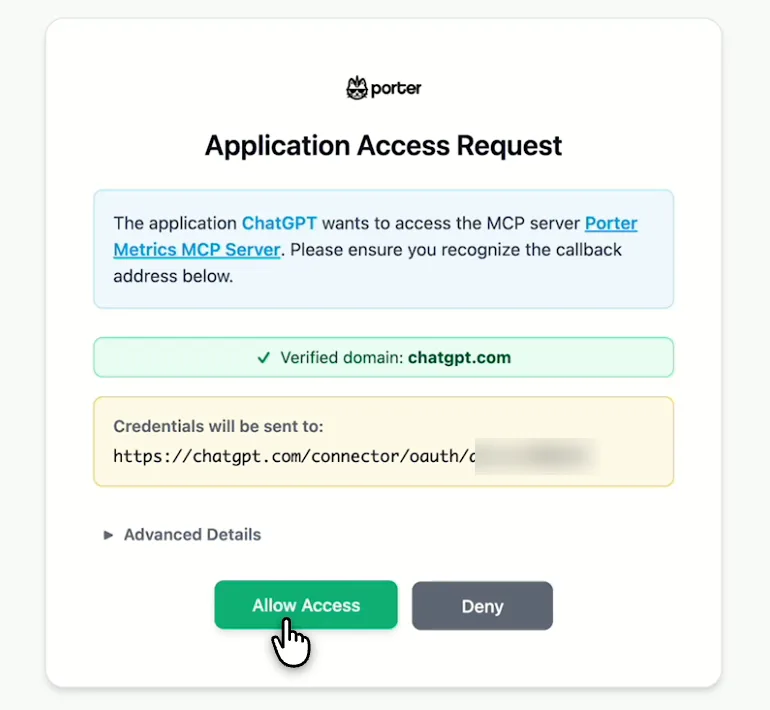
    Next, select Continue to Porter Metrics, sign in to Porter and click Allow Access. Then select Try in chat and paste this prompt:

    Prompt
    List my Pinterest ad accounts and show Ad Spend, Impressions, Clicks and Outbound Clicks by Campaign Name for the last 7 full days. Calculate CPC and cost per outbound click yourself.

Guides and videos

Connect Pinterest Ads to ChatGPT free

app.portermetrics.com / create
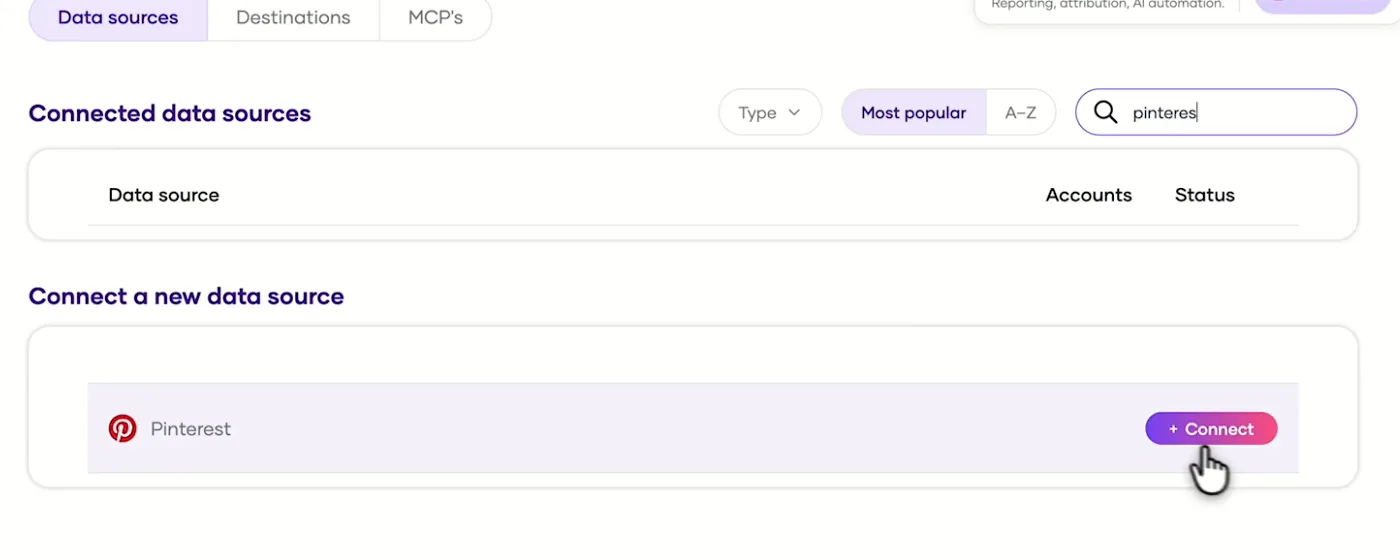
Porter's Integrations page with Pinterest found and the Connect button
First, in Porter, find Pinterest and select Connect.
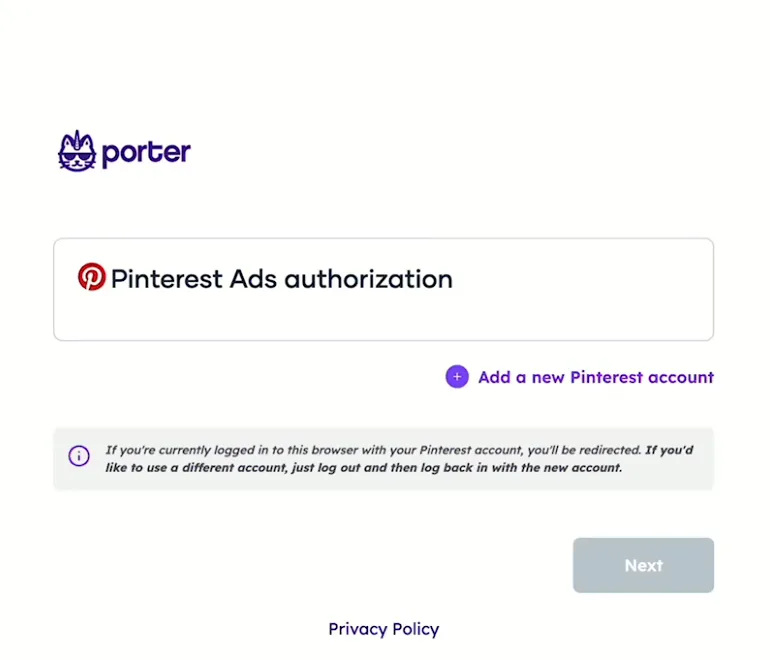
Porter's Pinterest Ads authorization page with Add a new Pinterest account
Then, add your Pinterest account and sign in.
ChatGPT's Plugins page with the Add menu open on Add custom MCP server
In ChatGPT, open Customize, then Plugins, and choose Add custom MCP server.
ChatGPT's Add custom MCP server form with the name Porter Metrics, Porter's MCP URL and OAuth filled in
Then, paste Porter's MCP URL, keep OAuth, tick the box and select Create as a plugin.
ChatGPT's Connect Porter Metrics window with the Continue to Porter Metrics button
Next, ChatGPT asks you to continue to Porter Metrics to sign in.
Porter's Application Access Request screen asking you to let ChatGPT use the Porter MCP server
Finally, sign in to Porter and select Allow Access.
If you prefer video, watch the whole Pinterest Ads to ChatGPT setup (1:20, no sound).
Interactive walkthrough, so you can click along here
02Use cases and prompts

What you can ask ChatGPT

Each use case comes with a prompt to copy, the fields it uses from the Pinterest Ads field list and who it’s for. The prompts break results down by ad group and ad IDs and let ChatGPT work out CPC, CPM and save rate, so totals stay right. On Business, Enterprise or Edu, ChatGPT can also make the changes you confirm; on Pro it reads and recommends.

Can ChatGPT find the promoted Pins that earn outbound clicks and saves cheapest?

The problemSome Pins win on saves, while others win on site visits. You want cost per outbound click and save rate side by side instead of in two exports.

What ChatGPT doesChatGPT ranks promoted Pins by cost per outbound click and save rate across campaigns, then names each Pin by its title. You see which Pins send people to your site and which only collect impressions.

What you getOne question shows the Pins worth more budget and the ones that only collect saves, without a second export or a lookup by Pin ID.

Prompt
For the last 30 days, by Campaign Name, Ad Id and Pin Id, show Ad Spend, Impressions, Outbound Clicks, Repin 1 and Total Engagement. Calculate cost per outbound click, outbound click rate and save rate (Repin 1 ÷ Impressions). Rank the 15 ads with the most Ad Spend by cost per outbound click.
Then ask
Prompt
Now show Pin Title, Pin Type and Pin Url for those 15 Pin Ids.

For: e-commerce marketers · in-house paid social managers · agencies

Fields used: Campaign NameAd IdPin IdAd SpendImpressionsOutbound ClicksRepin 1Total EngagementPin TitlePin TypePin Url

Can ChatGPT compare Pinterest campaigns by objective?

The problemYour awareness, consideration and sales campaigns all show a CPC, so judged on clicks, an awareness campaign looks broken.

What ChatGPT doesChatGPT puts each campaign’s delivery next to its objective, then works out the cost that objective is bought on. That’s CPM for awareness, cost per outbound click for consideration, cost per view for video completion and cost per purchase for sales.

What you getEach campaign is judged on what its objective buys, so you don’t cut an awareness campaign for a CPC it was never meant to win.

Prompt
For the last 30 days, by Campaign Id and Campaign Name, show Ad Spend, Impressions, Clicks, Outbound Clicks, Video Views and Total Purchases. Then, in a separate table, show Campaign Id, Campaign Objective Type and Campaigns Status. Join them and calculate CPM, cost per outbound click, cost per video view and cost per purchase for each objective.

For: in-house paid social managers · agencies · e-commerce marketers

Fields used: Campaign IdCampaign NameAd SpendImpressionsClicksOutbound ClicksVideo ViewsTotal PurchasesCampaign Objective TypeCampaigns Status

Can ChatGPT pace Pinterest campaign budgets and change them?

The problemMid-month, one campaign is racing through its budget while another barely spends, and you find out from the invoice.

What ChatGPT doesChatGPT reads daily spend by campaign and each campaign’s daily and lifetime budget, then projects month-end spend from the last 7 days. When campaign budget optimization is on, the budget lives on the campaign instead of the ad group.

What you getYou catch the overspend while there’s still time to fix it, and make the change in the same chat.

Prompt
This month, by Date and Campaign Id, show Campaign Name and Ad Spend. Then, in a separate table, show Campaign Id, Campaign Daily Budget, Campaign Budget and Campaign Budget Optimization. Using the last 7 days' average Ad Spend, which campaigns will finish the month more than 10% over or 20% under budget, and by how much?
Then ask
Prompt
Lower the daily budget of the campaign most likely to overspend so it lands on budget. Show me the new amount before you change it.

For: agencies (add Account Name for one row per client) · in-house paid social managers

Fields used: DateCampaign IdCampaign NameAd SpendCampaign Daily BudgetCampaign BudgetCampaign Budget Optimization
Action: campaign_update (daily budget in micros)

Can ChatGPT spot Pinterest ad groups getting more expensive and pause them?

The problemAn ad group that used to run cheaply now costs more per click and sends fewer people off Pinterest, but nobody noticed.

What ChatGPT doesChatGPT pulls daily spend, impressions, clicks and outbound clicks per ad group, then works out weekly CPC, CPM and outbound click rate. It flags ad groups whose CPC rose while outbound click rate fell two weeks in a row, names them and pauses the ones you pick.

What you getThe weekly cost check you’d run in a spreadsheet becomes one prompt, and the slipping ad groups stop spending from the same chat.

Prompt
For the last 6 weeks, by Date, Campaign Name and Ad Group Id, show Ad Spend, Impressions, Clicks and Outbound Clicks. Group the days into weeks, calculate weekly CPC, CPM and outbound click rate, and flag ad groups where CPC rose and outbound click rate fell two weeks in a row. List their names.
Then ask
Prompt
Pause the flagged ad groups after I confirm, and list each one first.

For: in-house paid social managers · agencies

Fields used: DateCampaign NameAd Group IdAd SpendImpressionsClicksOutbound Clicks
Actions: adgroup_list (names) · adgroup_update (status)

Can ChatGPT show which Pinterest campaigns drive purchases and ROAS?

The problemPinterest takes credit for purchases that happen days after someone saves a Pin, so you’re never sure which campaigns really sell.

What ChatGPT doesChatGPT ranks campaigns by Pinterest Tag purchases and ROAS, both by the day of the ad action and by the day of the purchase.

What you getYou see both attribution views side by side, so a campaign that only looks good in one stands out.

Prompt
For the last 30 days, by Campaign Name, show Ad Spend, Total Purchases, Website Purchases, Web Purchases Roas, Total Purchases (on conversion date) and Web Purchases Roas (on conversion date). Calculate cost per purchase and rank campaigns by Web Purchases Roas, flagging any with Ad Spend over 500 and fewer than 5 purchases.

For: e-commerce marketers · agencies

Fields used: Campaign NameAd SpendTotal PurchasesWebsite PurchasesWeb Purchases RoasTotal Purchases (on conversion date)Web Purchases Roas (on conversion date)

Can ChatGPT find the video Pins people actually watch?

The problemVideo Pins autoplay as people scroll, so views pile up, but you can’t tell if anyone watches long enough to see the product.

What ChatGPT doesChatGPT ranks video ads by video views, 3-second views and average watch time, then works out cost per view. It also shows the 25%, 50%, 75% and 100% view counts for each video, so you see where viewers stop watching.

What you getDrop-off by quarter shows which Pins lose people before the product appears, so you know which video to recut.

Prompt
For the last 30 days, by Ad Id and Pin Id, show Ad Spend, Impressions, Video Views, Video 3Sec Views, Video Views 25%, Video Views 50%, Video Views 75%, Video 100% Complete and Video Avg Watchtime In Second. Calculate cost per video view and the drop-off between each step, and rank the 10 video ads with the most Ad Spend.

For: creative strategists · e-commerce marketers · agencies

Fields used: Ad IdPin IdAd SpendImpressionsVideo ViewsVideo 3Sec ViewsVideo Views 25%Video Views 50%Video Views 75%Video 100% CompleteVideo Avg Watchtime In Second

Can ChatGPT set up a campaign from a brief?

The problemLaunching on Pinterest means creating the Pin, then building the campaign, ad group and targeting by hand in Ads Manager.

What ChatGPT doesChatGPT publishes your image as a Pin on a board you name. Then it builds the campaign with its budget, an ad group with billable event, bid and targeting, and the ad that promotes the Pin.

What you getYou review a full campaign setup instead of spending an afternoon in Ads Manager forms.

Prompt
Using the image at {URL}, publish a Pin titled '{title}' linking to {landing page} on board {board ID}. Then create a campaign 'Spring launch' with the Consideration objective and a {amount} daily budget, an ad group billed on clicks targeting {country} and ages 25–44 with a {bid} bid, and an ad that promotes the Pin. Keep everything paused and show me each item before you create it.

For: media buyers · agencies · e-commerce marketers

Fields used: optional keyword_create
Actions: targeting_options · pin_create_image · campaign_create · adgroup_create · ad_create · read-back campaign_list · adgroup_list · ad_list · audience_create

Can ChatGPT compare Pinterest and Meta Ads?

The problemPinterest and Meta both claim the same shoppers, so the budget meeting turns into a debate over whose ROAS to believe.

What ChatGPT doesWhen both platforms are connected in Porter, ChatGPT pulls spend, impressions, outbound clicks, website purchases and ROAS by campaign from each. Then it puts them side by side. You see where the next share of your visual-commerce budget works harder.

What you getOne table replaces two exports, so the budget talk starts from cost per purchase on both platforms.

Prompt
For the last 30 days, show my Pinterest Ads campaigns with Campaign Name, Ad Spend, Impressions, Outbound Clicks, Website Purchases and Web Purchases Roas, and my Meta Ads campaigns with Campaign name, Amount spent, Impressions, Outbound clicks, Website purchases and Website purchase ROAS. Put both platforms in one table, calculate cost per outbound click and cost per purchase, and tell me which three campaigns should get more budget.

For: e-commerce marketers · agencies · marketing leads

Fields used: Campaign NameAd SpendImpressionsOutbound ClicksWebsite PurchasesWeb Purchases RoasCampaign nameAmount spentImpressionsOutbound clicksWebsite purchasesWebsite purchase ROAS
03Why Porter

Why Porter for Pinterest Ads in ChatGPT

Porter brings Pinterest Ads into ChatGPT today, on any Porter plan, with changes you confirm and your other marketing sources in the same chat. Pinterest’s official MCP server is in alpha with partners such as PMG, Pacvue and Dentsu, per Pinterest’s Cannes 2026 announcement, and Pinterest’s official MCP page takes sign-ups for launch news (as of October 2026). Once it opens, it may fit better for Pinterest trends and keyword insights.

✓

Read and change campaigns

On Business, Enterprise or Edu, ChatGPT builds the campaigns, ad groups and ads and makes the budget, bid and targeting changes you confirm. On Pro it reads and recommends. It also converts Pinterest’s budget micros for you.

⊞

365 ready-made fields

ChatGPT gets named fields for spend, outbound clicks, saves, video views, Pinterest Tag purchases and ROAS, budgets, keywords and audiences, then works out CPC, CPM and save rate from raw counts.

⚙

History past Pinterest's 90 days

Pinterest’s live analytics API looks back 90 days. Porter’s paid plans have no history cap, so ChatGPT reads older daily delivery too, up to 90 days per question, and compares this quarter with last year’s.

Aa

Pinterest next to Meta Ads

Ask about Pinterest Ads next to Meta Ads, Google Ads, Shopify and GA4 in the same chat, so the budget split between platforms starts from one table.

↻

Ready in ChatGPT today

Porter’s connector works in ChatGPT on the web now, on every Porter plan including the free one, with 13 Pinterest actions behind it.

✓

One URL, nothing to host

Sign in with Pinterest in Porter and paste one MCP URL in ChatGPT on the web. There’s no Pinterest developer app to build, and Porter works through Pinterest’s own API v5.

⊞

One connection, every destination

One Pinterest ad account connected in Porter also feeds Claude and Data Studio at no extra cost, so you don’t reconnect for each tool.

⚙

Live dashboards, not only chat answers

Ask ChatGPT for a dashboard and Porter’s AI dashboards publish it at its own link, synced automatically and ready to share. Official MCP servers answer inside the chat and stop there.

04Dashboard

Dashboard template

Start from a ready-made Pinterest Ads template, or ask ChatGPT to build a live one with AI dashboards.

AI dashboards

Build a live Pinterest Ads dashboard from the chat

Describe the dashboard in one sentence and Porter builds it. A client-ready dashboard in minutes, with no chart dragging and no BI tool to learn. Ask ChatGPT:

Prompt
Build a live Pinterest Ads dashboard for my account with the last 30 days, the main KPIs and a weekly trend.
Live URLEach dashboard at its own link: no login, no app, no download
Auto-syncFresh Pinterest Ads data, nobody re-exports each period
Scheduled deliveryEmail or PDF sends on a set day
White labelYour logo and branding for clients
Sharing permissionsView or edit access per person

Or start from a template

05Pricing

Pricing

You can start free, since Porter’s Pinterest Ads connector for ChatGPT comes with every plan. Use the calculator for your number of accounts, or see Porter pricing for every plan.

What you get

  • Free plan: never expires, with unlimited connected accounts and the last 15 days of data in ChatGPT (30 days in Data Studio and Sheets)
  • Reporting: from $12.50 per account a month billed annually, or $15 month to month for one account
  • Billing: each connected Pinterest ad account counts as one account, whatever destinations it feeds, with volume discounts and no per-seat fee
  • Changes: 1 AI credit per completed change; failed tasks are free, and the Free plan includes 100 credits a month
  • Trial: 14 days of full access, no card

Price calculator

$33.33/mo$6.67 per account

An account is one ad account, Stripe account, store, page or GA4 property. The Free plan never expires and has unlimited accounts, with the last 15 days of data in AI chats.

06Data and actions

Pinterest Ads data and actions in ChatGPT

The connector gives ChatGPT 365 Pinterest Ads fields and 13 write actions across campaigns, ad groups, ads and Pins. The fields cover spend, delivery, saves, video and Pinterest Tag conversions, as well as budgets, keywords, audiences and your profile's current counts. ChatGPT then works out CPC, CPM, save rate and cost per outbound click from the raw counts in every Pinterest Ads field Porter reads.

The 12 fields you'll use most

These 12 answer most questions. Use the labels in prompts exactly as written, while the IDs are for code.

FieldWhat it's for
Datepinterest_ads_dateTrends over time; use it instead of Week or Year Month for older ranges
Account Namepinterest_ads_ad_accounts_nameOne row per ad account for agency rollups
Campaign Name · Campaign Idpinterest_ads_campaign_name · pinterest_ads_campaign_idRankings; Campaign Id joins delivery to setup tables
Ad Group Id · Ad Idpinterest_ads_ad_group_id · pinterest_ads_ad_idBreakdowns under the campaign; use IDs, not names
Pin Id → Pin Title · Pin Typepinterest_ads_pin_id → pinterest_ads_title · pinterest_ads_creative_typeWhich Pins ran; ask titles in a second question
Ad Spendpinterest_ads_spend_in_dollarSpend in the ad account's currency
Impressionspinterest_ads_impression_1CPM and every rate
Clicks · Outbound Clickspinterest_ads_total_clickthrough · pinterest_ads_outbound_click_1CPC and cost per outbound click
Repin 1 · Total Engagementpinterest_ads_repin_1 · pinterest_ads_total_engagementSave rate and engagement rate
Total Purchases · Website Purchases · Web Purchases Roaspinterest_ads_total_checkout · pinterest_ads_total_web_checkout · pinterest_ads_web_checkout_roasCost per purchase and ROAS
Video Views · Video 3Sec Views · Video Avg Watchtime In Secondpinterest_ads_total_video_mrc_views · pinterest_ads_total_video_3sec_views · pinterest_ads_total_video_avg_watchtime_in_secondCost per view and watch time
Campaign Objective Type · Campaign Daily Budgetpinterest_ads_objective_type · pinterest_ads_campaign_daily_spend_capObjective comparisons and pacing; ask in a separate table

Can ChatGPT create, pause or change Pinterest Ads campaigns?

Yes, on Business, Enterprise or Edu, after you confirm. ChatGPT creates campaigns with objective and budget, as well as ad groups with billable event, bid, schedule, placement and targeting. It also creates ads that promote an existing Pin, in standard, video, carousel and other creative types.

ChatGPT changes status, budgets, bids, targeting, destination URL and CTA, and adds keywords and negative keywords. It also creates customer list, visitor, engagement and lookalike audiences and Pinterest Tags.

Finally, ChatGPT uploads videos and publishes image, carousel and video Pins. On Pro, ChatGPT reads the account and lists the changes for you to make in Pinterest Ads Manager.

How fresh is the data, and how far back?

Data runs up to the last few days, and Pinterest's newest figures are still estimates. Pinterest's note on real-time estimates says figures from the last 48 hours can still go down.

Porter's daily rows can stop a few days before today, and ChatGPT tells you when they do. Porter's live analytics return at most 90 days per question. Profile and board counts, in contrast, are a current snapshot that refreshes on its own schedule.

The Free plan reads the last 15 days in ChatGPT (30 days in Data Studio and Sheets), while paid plans have no history cap.

Product stats

WhatPinterest Ads connector
Fields365 across campaigns, ad groups, ads, Pins, delivery, saves, video, Pinterest Tag conversions, budgets, keywords and audiences
Actions13 to create and change campaigns, ad groups, ads, keywords, audiences, Pinterest Tags and Pins, after you confirm on Business, Enterprise or Edu
FreshnessUp to the last few days; Pinterest's last 48 hours are estimates that can still go down
HistoryNo cap on paid plans, up to 90 days per question; the last 15 days in ChatGPT on the Free plan (30 days in Data Studio and Sheets)
ChatGPT plansReads on Pro; reads and changes you confirm on Business, Enterprise and Edu (web, beta)
AccessPinterest sign-in (OAuth 2.0); changes need a role that can create and edit campaigns, such as Admin or Campaign
Sign-inRenews while in use, expires after 60 days without use
APIPinterest API v5

See all 365 Pinterest Ads fields

07Security

Is it safe?

Yes. ChatGPT changes Pinterest Ads only on Business, Enterprise or Edu, and only what you confirm; on Pro it reads and recommends. Porter also signs in with Pinterest's own OAuth and works only with the access your login already has. Archiving is permanent, so pause when you want to stop delivery.

How approvals work

ChatGPT asks you to confirm changes based on the app's permissions and holds back some high-risk actions for extra care. New campaigns and ads start paused and go live only when you ask, from ad to ad group to campaign. Budgets and bids travel in Pinterest's micros (1 unit = 1,000,000), so ChatGPT converts them for you.

Under campaign budget optimization, ChatGPT sets the budget on the campaign instead of the ad group. Archiving a campaign or ad group archives everything under it, permanently. Each completed change also uses one AI credit.

What the ChatGPT connector needs from your Pinterest login

You need a Pinterest user who owns the ad account or has a Business Access role on it. One login then brings in every ad account it can reach.

Under Pinterest's OAuth token rules, the sign-in renews while it's in use and expires after 60 days without use. If an account stops returning data, reconnect it in Porter.

Porter's access ends when you disconnect the account in Porter or remove the login's role in Pinterest Business Access.

08FAQ

FAQ

Pinterest advertisers mostly ask about organic Pins, other AI tools, agencies with many ad accounts, Data Studio and Pinterest's API. The last three answers help when numbers don't match Pinterest Ads Manager, organic Pins show 0 or a question fails.

Can ChatGPT read my organic Pins and boards?

Through the same Porter connection, ChatGPT reads your profile's current monthly views, followers and Pin count, plus each board's Pins and followers. It can also publish new Pins.

For organic Pin impressions and saves over time, use Pinterest Analytics.

Can I use Porter in Claude too?

Yes. Porter's MCP URL, the same one behind the Pinterest Ads connector for ChatGPT, also works in Claude as a custom connector, so one Porter account serves both. See Porter's Pinterest Ads connector for Claude for the Claude setup and what it covers.

Can I connect several Pinterest ad accounts, like an agency?

Yes. One Pinterest login brings in every ad account it owns or has Business Access to, and ChatGPT sees each one separately. If you add Account Name as a column, ChatGPT compares them in one answer.

Porter bills each ad account once it's connected, whatever destinations it feeds.

I already send Pinterest Ads to Data Studio with Porter. Do I need to reconnect?

No. One Pinterest ad account connected to Porter feeds every Porter destination, including ChatGPT and Data Studio (formerly Looker Studio), at no extra cost. Keep using the Pinterest Ads to Data Studio connector for dashboards, then add Porter's MCP URL to ChatGPT and ask.

Does Porter use Pinterest's official API?

Yes. Porter reads and writes Pinterest Ads for ChatGPT through version 5 of Pinterest's own API and signs in with Pinterest's own OAuth. Field names and limits therefore follow the Pinterest API v5 reference.

When Pinterest retires a field or option, the field can stay listed in Porter but stop returning new data.

Can ChatGPT write and publish Pins for me?

Yes. ChatGPT drafts Pin titles and descriptions and, on Business, Enterprise or Edu, publishes the image, carousel or video Pins you confirm to a board you choose. Each Pin goes live as soon as ChatGPT publishes it.

You edit or delete Pins in the Pinterest app as usual.

Troubleshooting

Why don't ChatGPT's numbers match Pinterest Ads Manager?

Check four things before you compare Porter's numbers in ChatGPT with Pinterest Ads Manager. Pinterest's conversion window settings may differ from the report's window, and Porter offers both ad-action date and conversion date fields.

Money is in the ad account's currency, even though field IDs say "dollar". Names multiply spend, so break down by Ad Group Id or Ad Id.

Why does ChatGPT show 0 impressions or saves for my organic Pins?

Use Pinterest Analytics for organic Pin performance, and ChatGPT for Pinterest Ads results and profile totals like monthly views and followers. Organic Pin metrics return 0 through Porter right now, a known issue on Porter's side. Paid Pins promoted as ads report their impressions and saves normally.

Why did a Pinterest Ads question fail in ChatGPT?

Ask board, keyword, Pinterest Tag and catalog fields in their own question, apart from spend or impressions. Ask for budgets and objectives in their own table, then join on Campaign Id. Keep each range to 90 days, and use Date instead of Week or Year Month for older ranges.


09Next

More ChatGPT connectors

The MCP URL behind the Pinterest Ads connector also connects ChatGPT to the rest of your marketing data. Add your store, analytics and other ad platforms from all ChatGPT connectors so you can compare them with Pinterest in one chat. Or send Pinterest Ads to a warehouse instead.

Not only ChatGPT. Send Pinterest Ads data anywhere

The same Porter account and connection also send Pinterest Ads data to these destinations, at no extra cost.

Try the ChatGPT connector on your ads

Connect your account, add one URL, then ask your first question. Start with the Pins that get outbound clicks cheapest, this month's pacing or your next campaign, all in the same chat. The free plan includes the Pinterest Ads connector for ChatGPT, and setup takes 3 steps.

Free plan · 14-day trial · No card needed

E-commerce marketers: purchases, ROAS and cost per outbound click by campaign in one answer, with the budget change in the same chat.

Paid social managers: pacing and cost checks become prompts you rerun instead of spreadsheets you rebuild.

Agencies: every client's ad account answers the same prompt, one row per Account Name.