LinkedIn connector for ChatGPT

Use Porter’s LinkedIn Pages connector for ChatGPT to rank posts, track follower growth, see who follows your Company Page and publish posts you confirm on Business, Enterprise or Edu.

  • Rank posts by engagement rate and see what works
  • Split new followers into organic and paid by week
  • See followers by seniority, industry and company size
  • Compare your Company Page with Instagram in one table
G2★★★★★Rated 4.6/5 from 288 G2 reviews (October 2026)

By Porter Metrics team · Last updated October 20, 2026

ChatGPTPorter connected
Show Impressions, Clicks, Engagements and New Followers by week for the last 4 full weeks.
Porter / LinkedIn Pages / Trailgear Demo✓ 4 rows
The week of Sep 28 had the most engagements (1,240) and brought 96 new followers.
WeekImpressionsEngagementsNew followers
Sep 1418.2K88061
Sep 2121.5K1,02074
Sep 2824.9K1,24096
Oct 519.7K91068
Demo data, Trailgear Demo account
150+ LinkedIn Page fields
01Setup

How to connect LinkedIn Pages to ChatGPT

Porter’s LinkedIn connector for ChatGPT takes just 3 steps, so you don’t write code or host a server. Sign in to LinkedIn in Porter and pick your Pages, add one URL to ChatGPT as a custom MCP server, then sign in and ask. Porter’s guide on how to connect LinkedIn Pages to ChatGPT also has screenshots.

What you need

  • Before you start, you need a LinkedIn member account that is a Page administrator of the Company Page. You also need a free Porter account and a ChatGPT plan that supports custom MCP servers. Other Page roles, however, return no Pages to pick.
  • Custom MCP servers are in beta in ChatGPT on the web, so set up Porter and ask your questions from a browser. On Business, Enterprise or Edu, an admin or owner turns on developer mode, and then ChatGPT can also make the changes you confirm. On Pro, you turn on developer mode yourself, and ChatGPT reads and recommends (OpenAI’s guide to custom MCP apps).
  • Works in ChatGPT on the web (chatgpt.com, custom MCP servers in beta) and in Codex, with the same Porter MCP URL.
  1. Step 1 · Connect your Page in Porter

    Sign up free at Porter, then pick LinkedIn Pages as the source and sign in with LinkedIn. Tick the Company Pages ChatGPT should read, then pick ChatGPT as the destination.

  2. Step 2 · Add the connector to ChatGPT

    In ChatGPT, open Customize › Plugins, click Add and choose Add custom MCP server. On Business, an admin does this from Workspace settings › Apps › Create. Name it Porter Metrics, paste this URL as the Server URL and keep OAuth as the authentication:

    MCP URL
    https://mcp.portermetrics.com/mcp

    Tick “I understand and want to continue”, then select Create as a plugin.

  3. Step 3 · Ask ChatGPT about your LinkedIn Page

    Next, select Continue to Porter Metrics, sign in to Porter and click Allow Access. Then select Try in chat and paste this prompt:

    Prompt
    For my LinkedIn Company Page, show Impressions, Reach, Clicks, Reactions, Comments, Shares and Engagements by Week for the last 4 full weeks, then New Followers by Week in a second table.

Guides and videos

Connect your LinkedIn Page in Porter free

app.portermetrics.com / create
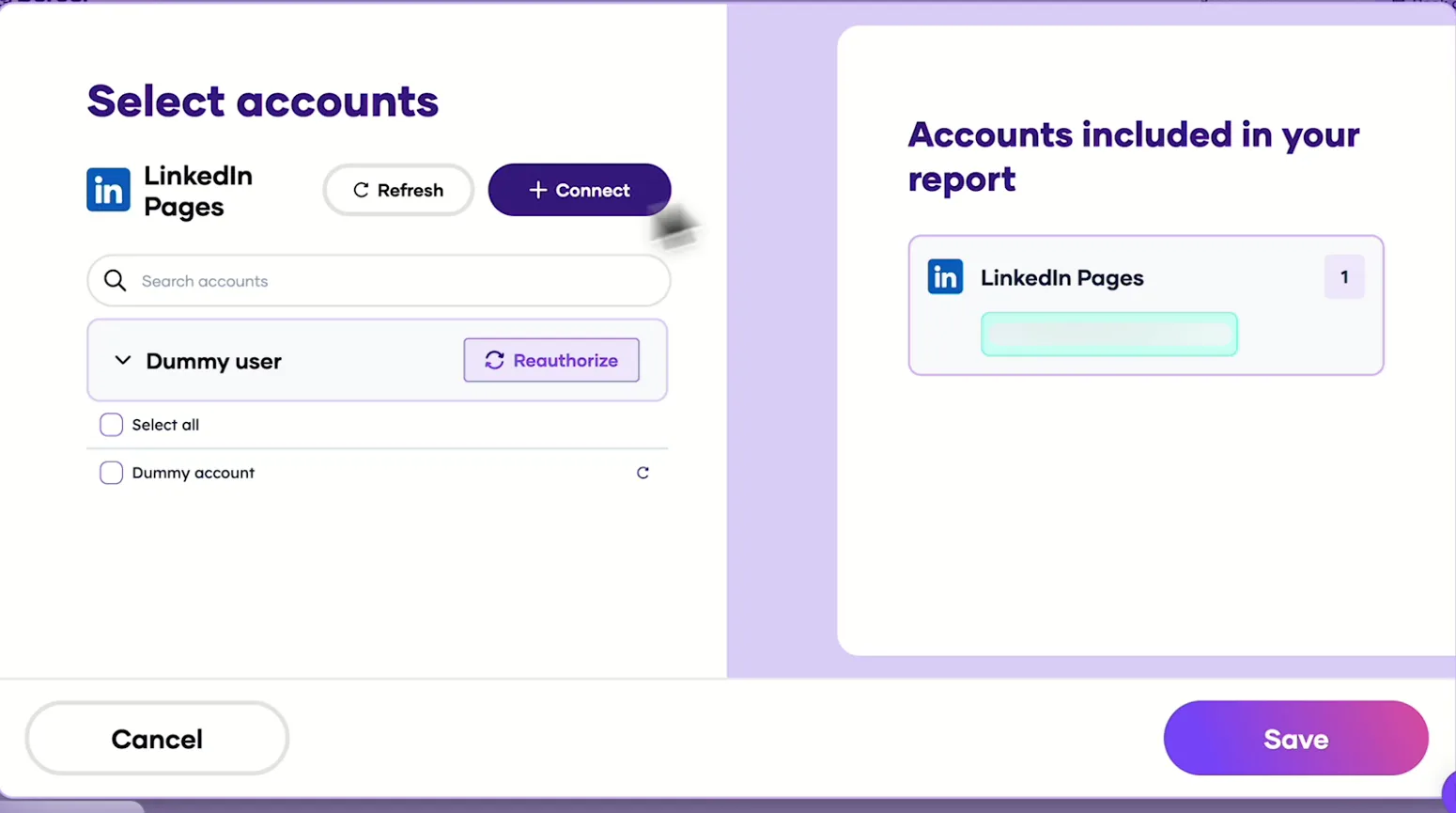
Porter's Select accounts window for LinkedIn Pages with a demo account and the Connect button
First, in Porter, open LinkedIn Pages and select Connect.
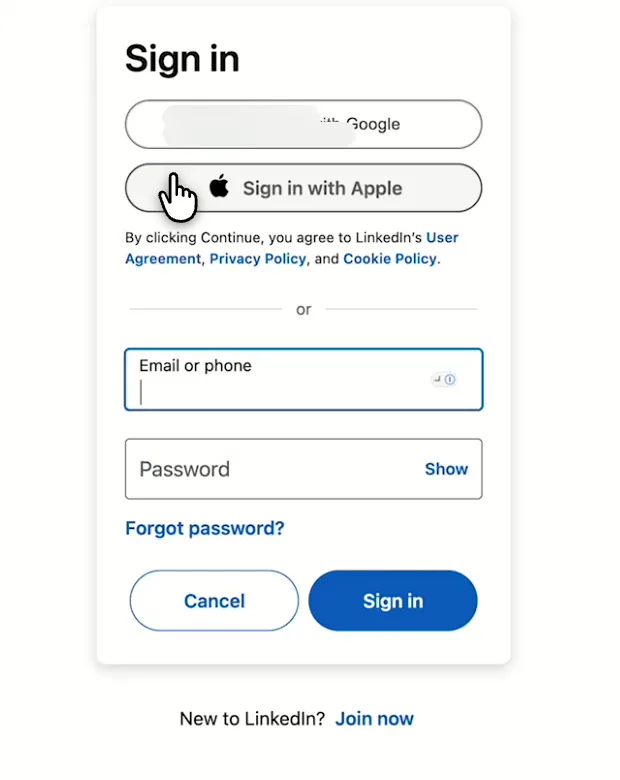
LinkedIn sign-in screen you see when you connect LinkedIn Pages to Porter
Then, sign in to LinkedIn and approve Porter's access.
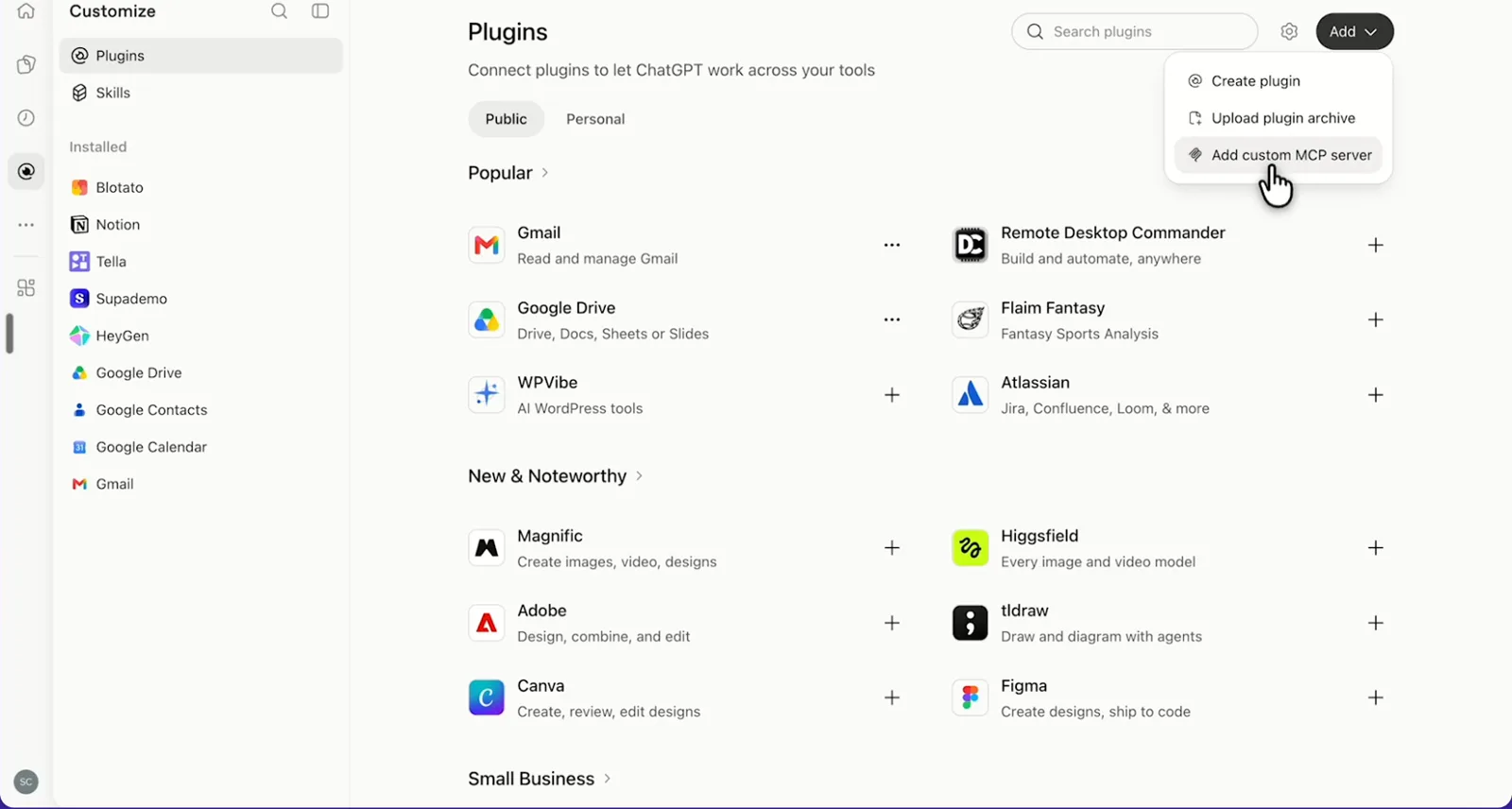
ChatGPT's Plugins page with the Add menu open on Add custom MCP server
In ChatGPT, open Customize, then Plugins, and choose Add custom MCP server.
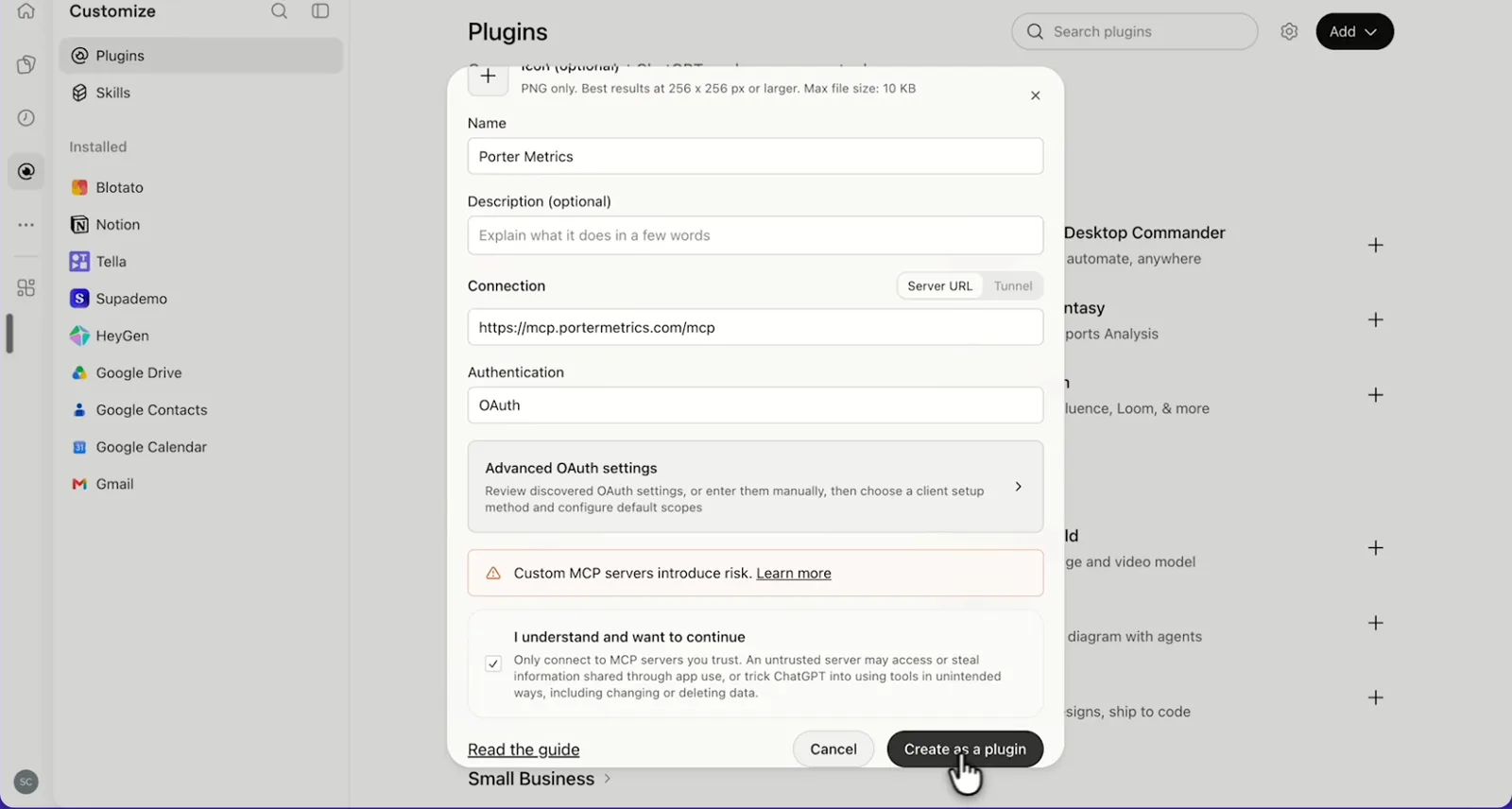
ChatGPT's Add custom MCP server form with the name Porter Metrics, Porter's MCP URL and OAuth filled in
Then, paste Porter's MCP URL, keep OAuth, tick the box and select Create as a plugin.
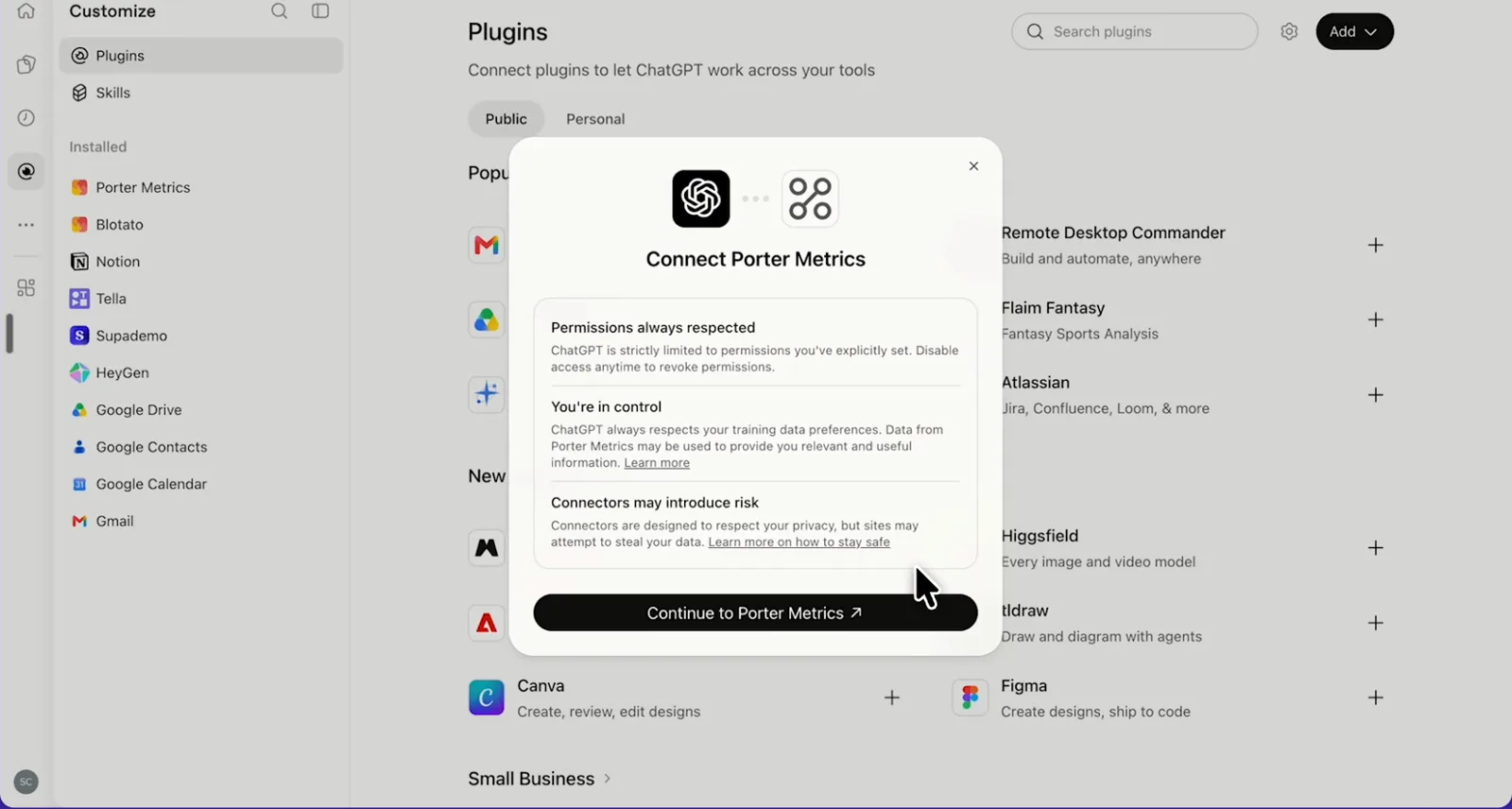
ChatGPT's Connect Porter Metrics window with the Continue to Porter Metrics button
Next, ChatGPT asks you to continue to Porter Metrics to sign in.
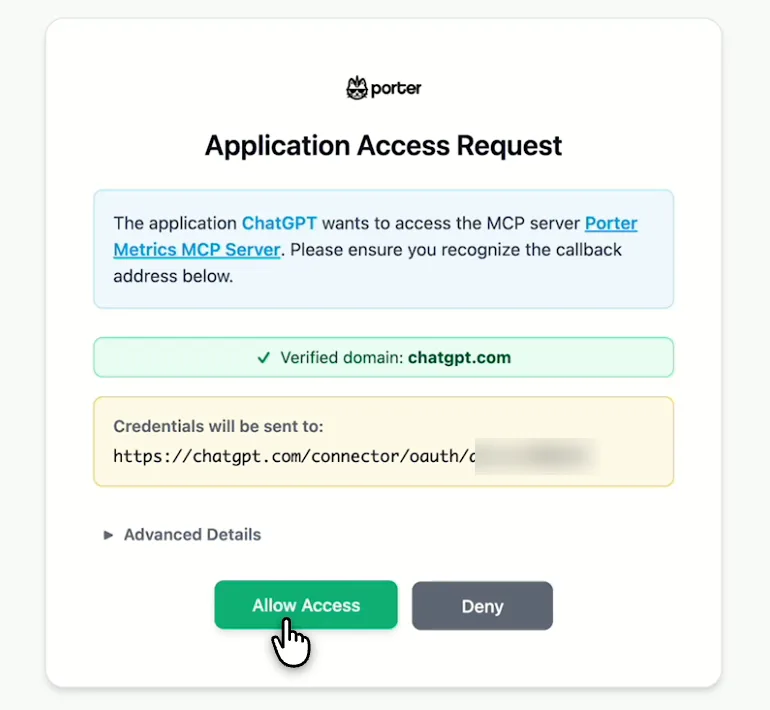
Porter's Application Access Request screen asking you to let ChatGPT use the Porter MCP server
Finally, sign in to Porter and select Allow Access.
If you prefer video, watch the whole LinkedIn Pages to ChatGPT setup (1:32, no sound).
Interactive walkthrough, so you can click along here
02Use cases and prompts

What you can ask ChatGPT

Each use case comes with a prompt to copy, the fields it uses from the LinkedIn Pages fields list and who it’s for. Post lists and Page totals stay in separate questions, because LinkedIn reports posts as lifetime totals and the Page by day. On Business, Enterprise or Edu, ChatGPT can also publish the posts you confirm; on Pro it reads and recommends.

Can ChatGPT show which posts got the most engagement?

The problemThe impressions look fine, but the post list in Page analytics won’t tell you which topics earned comments and which just got scrolled past.

What ChatGPT doesChatGPT lists the posts you created last month with impressions, reach, clicks, reactions, comments and reposts, and ranks them by engagement rate. Then it names what the top posts share: topic, length, link or image. Note that the date range picks posts by the day they were created.

What you getNext month’s content calendar starts from the topics that got people talking instead of a hunch.

Prompt
For my LinkedIn Company Page, list posts created last month with Post Creation Date, the first 80 characters of Post Text, Post URL, Post Image URL, Impressions, Reach, Clicks, Reactions, Comments, Shares and Engagement rate. Rank by Engagement rate, keep posts with at least 300 Impressions, and tell me what the top 5 have in common.

For: B2B social media managers · agency social teams · founders

Fields used: Post Creation DatePost TextPost URLPost Image URLImpressionsReachClicksReactionsCommentsSharesEngagement rate

Are new followers organic or paid?

The problemThe follower count jumped one week, and nobody on the team can say whether a post or a paid push caused it.

What ChatGPT doesChatGPT splits new followers into organic and paid by week, then flags the spike weeks. A second question then lists the posts created in those weeks. Follower gains stop 2 days before today.

What you getYou see which posts pull followers, so the next one builds on them.

Prompt
For the last 12 full weeks, show New Followers, New Organic Followers and New Paid Followers by Week for my LinkedIn Company Page. Flag weeks where New Organic Followers were 50% above the 12-week average. Then list posts created in those weeks with Post Creation Date, Post Text and Impressions.

For: B2B social media managers · demand gen leads

Fields used: WeekNew FollowersNew Organic FollowersNew Paid FollowersPost Creation DatePost TextImpressions

Can ChatGPT show who follows the Page, by seniority and industry?

The problemSales keeps asking whether your followers are decision-makers or job seekers, and you answer with a screenshot of a pie chart.

What ChatGPT doesChatGPT shows followers by seniority, job function, industry, company size and country, one breakdown per table. Each breakdown is a snapshot of everyone following today.

What you getThe audience slide for sales becomes four clean tables you can paste instead of an image nobody can sort.

Prompt
Show Total Followers of my LinkedIn Company Page by Seniority, then by Job Function, then by Industry, then by Company Size, as four separate tables with the top 10 values and their share of Total Followers. Tell me how many followers have no value in each breakdown.

For: demand gen and B2B marketing leads · agency strategists

Fields used: Total FollowersSeniorityJob FunctionIndustryCompany SizeCountry

Can ChatGPT show which tabs visitors open?

The problemYou want to know which Page tabs visitors actually open, such as Life and Jobs, and answering means clicking through Page analytics one filter at a time.

What ChatGPT doesChatGPT shows weekly page views for Overview, About, People, Jobs, Life and Products by mobile and desktop, as well as custom button clicks. It also flags tabs that dropped over 20%. Unique page views are counted per day, so ChatGPT keeps them day by day.

What you getSocial media managers see which tab to update first, backed by weekly views instead of a guess.

Prompt
For the last 90 days, show by Week: Page Views, Overview Page Views, About Page Views, People Page Views, Jobs Page Views, Life At Page Views, Products Page Views, Mobile Page Views, Desktop Page Views and Custom Button Clicks for my LinkedIn Company Page. Flag any tab whose views fell more than 20% versus the previous 4 weeks.

For: B2B social media managers · content marketers · B2B marketing leads

Fields used: WeekPage ViewsOverview Page ViewsAbout Page ViewsPeople Page ViewsJobs Page ViewsLife At Page ViewsProducts Page ViewsMobile Page ViewsDesktop Page ViewsCustom Button Clicks

Can ChatGPT write your weekly report?

The problemLeadership wants the LinkedIn update by Monday, which means another Page analytics export and engagement rate worked out by hand.

What ChatGPT doesChatGPT pulls the Page’s weekly impressions, reach, clicks, reactions, comments, reposts and engagements and compares each week with the one before. Engagement rate comes out as Engagements ÷ Impressions, then a short summary closes the report.

What you getYour leadership update is drafted from live numbers, so the Monday export goes away.

Prompt
For my LinkedIn Company Page, show Impressions, Reach, Clicks, Reactions, Comments, Shares and Engagements by Week for the last 8 full weeks. Add engagement rate as Engagements divided by Impressions for each week, the week-over-week change, and a 4-bullet summary for leadership.

For: agency social teams (one report per client Page) · B2B social media managers · founders

Fields used: WeekImpressionsReachClicksReactionsCommentsSharesEngagements

Can ChatGPT write and publish a post?

The problemThe next Company Page post is due tomorrow, and the draft is a guess because nobody checked which past posts earned engagement.

What ChatGPT doesChatGPT reads which posts performed best, then drafts the next one in the same style. On Business, Enterprise or Edu, it publishes the draft to your Company Page once you confirm, and it can also add an image, edit a post’s text or comment as your Page.

What you getThe numbers you read and the post you publish live in one chat, so the draft starts from evidence.

Prompt
Look at my 10 LinkedIn Company Page posts with the highest Engagement rate in the last 90 days. Draft one new post (under 150 words) on the topic that performed best, in the same tone. Show me the draft and wait for my approval before publishing it to the Page.

For: B2B social media managers · agency social teams

Fields used: Post TextEngagement rateImpressions
Actions: post_create · image_upload · post_update · comment_create

Can ChatGPT compare your LinkedIn Page with Instagram?

The problemLeadership asks whether LinkedIn or Instagram deserves the next content hire, and the numbers sit in two analytics tabs that never line up.

What ChatGPT doesIf you also connect Instagram in Porter, ChatGPT puts your Company Page next to your Instagram account month by month. Posts, impressions, reach, engagement, comments, reposts and new followers sit in one table, together with engagement per post for each network. The Instagram connector for ChatGPT lists the Instagram fields, which use the same Porter connection.

What you getYour channel plan rests on engagement per post across both networks, not on whichever dashboard someone opened last.

Prompt
Using Porter's blended social fields, compare my LinkedIn Company Page and my Instagram account for the last 3 full months by month: Blended Post Count, Blended Post impressions, Blended Post reach, Blended Post engagement, Blended Post comments, Blended Post shares and Blended Page new followers. Add engagement per post for each network.

For: cross-channel social leads · agency social teams

Fields used: Blended Post CountBlended Post impressionsBlended Post reachBlended Post engagementBlended Post commentsBlended Post sharesBlended Page new followers (page_new_followers), each covering LinkedIn Pages and Instagram
03Why Porter

Why Porter for LinkedIn Pages in ChatGPT

LinkedIn publishes no MCP server for Company Pages, so Porter reads your Page through LinkedIn’s Community Management API. Need ChatGPT to read public profiles, companies or jobs instead? A community LinkedIn MCP server does that, although LinkedIn’s User Agreement bars scraping tools.

✓

LinkedIn's official API

Porter works through LinkedIn’s official API with the permissions you grant, instead of scraping, browser automation or session cookies. You sign in as a Page admin, with no developer app.

⊞

Posts only after you confirm

On Business, Enterprise or Edu, ChatGPT drafts, publishes, edits and deletes posts and comments as your Page once you confirm. On Pro it reads and recommends. Reports and questions never change the Page.

⚙

150+ ready-made fields

ChatGPT gets 150+ fields with LinkedIn’s exact names across posts, followers, follower and visitor demographics, and page views by tab and device.

Aa

Follower history LinkedIn doesn't keep

LinkedIn’s API serves new followers for the last 12 months and total followers for today only. On paid plans, Porter stores both day by day from the day you start paying, so you can compare months later.

↻

Your other channels in the same chat

Compare your Company Page with Instagram, Facebook, GA4 or LinkedIn Ads in one chat, through the same MCP URL.

✓

One URL, nothing to host

Add one URL to ChatGPT on the web, with no code or server. The same LinkedIn sign-in in Porter also feeds Claude, Data Studio and Google Sheets.

⊞

Live dashboards, not only chat answers

Ask ChatGPT for a dashboard and Porter’s AI dashboards publish it at its own link, synced automatically and ready to share. Official MCP servers answer inside the chat and stop there.

04Dashboard

Dashboard template

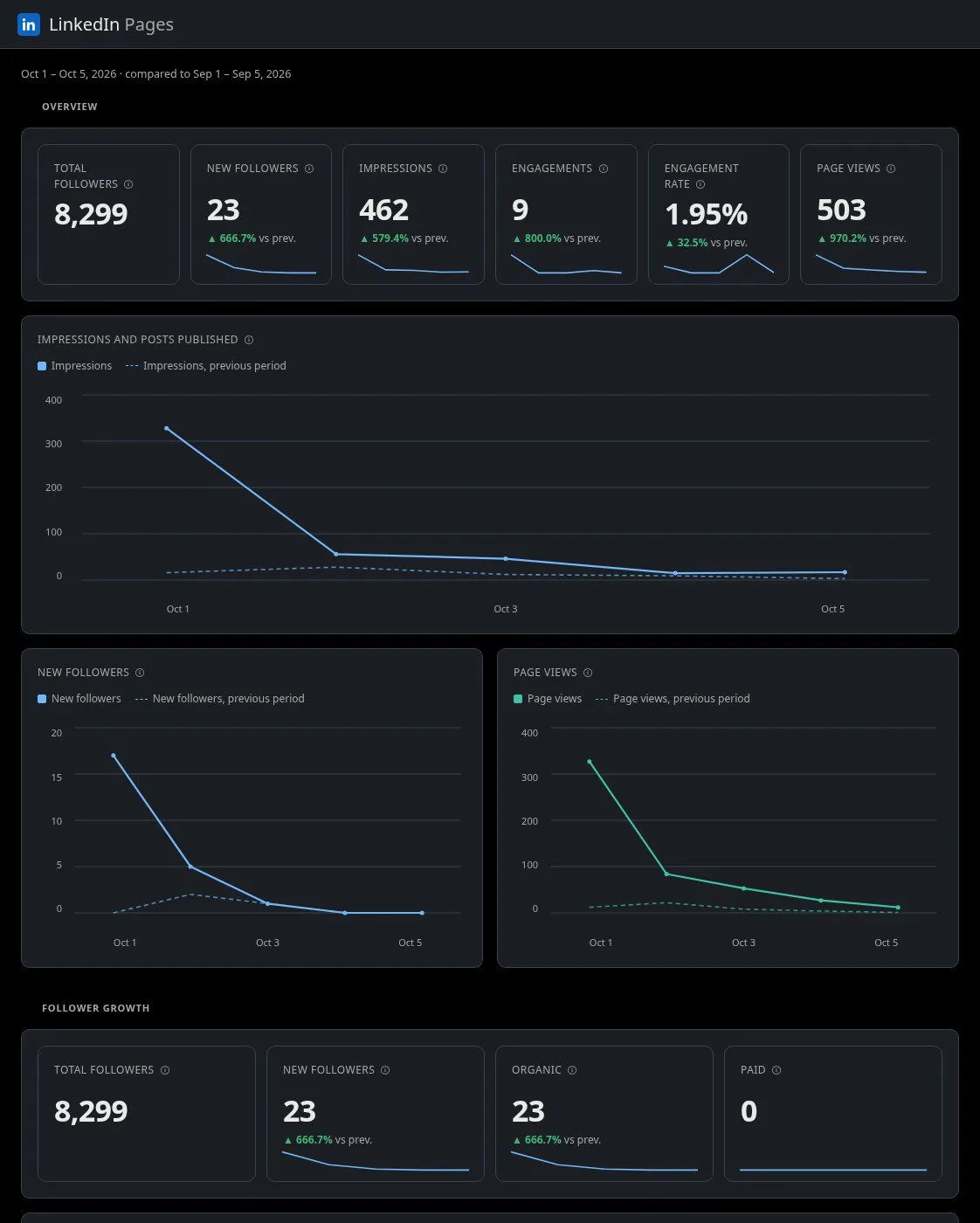
Want a shared view instead of a ChatGPT chat? Porter’s free LinkedIn Pages dashboard template tracks posts and engagement, as well as audience, for a Company Page. Use the template for a fixed weekly report, and ask ChatGPT for a one-off answer.

AI dashboards

Build a live LinkedIn Pages dashboard from the chat

Describe the dashboard in one sentence and Porter builds it. A client-ready dashboard in minutes, with no chart dragging and no BI tool to learn. Ask ChatGPT:

Prompt
Build a live LinkedIn Pages dashboard for my account with the last 30 days, the main KPIs and a weekly trend.
Live URLEach dashboard at its own link: no login, no app, no download
Auto-syncFresh LinkedIn Pages data, nobody re-exports each period
Scheduled deliveryEmail or PDF sends on a set day
White labelYour logo and branding for clients
Sharing permissionsView or edit access per person
05Pricing

Pricing

You can start free, since Porter’s LinkedIn Pages connector for ChatGPT comes with every plan. Use the calculator for your number of accounts, or see Porter pricing for every plan.

What you get

  • Free plan: never expires, with unlimited connected accounts and the last 15 days of data in ChatGPT (30 days in Data Studio and Sheets)
  • Reporting: from $12.50 per account a month billed annually, or $15 month to month for one account
  • Billing: each LinkedIn Company Page counts as one account, with volume discounts and no per-seat fee
  • Changes: 1 AI credit per completed change you confirm on Business, Enterprise or Edu; failed tasks are free, and the Free plan includes 100 credits a month
  • Trial: 14 days of full access, no card

Price calculator

$33.33/mo$6.67 per account

An account is one ad account, Stripe account, store, page or GA4 property. The Free plan never expires and has unlimited accounts, with the last 15 days of data in AI chats.

06Data and actions

LinkedIn data and actions in ChatGPT

Altogether, ChatGPT can read 150+ LinkedIn Pages fields through the connector. They come in five groups, namely posts, Page content, followers, follower and visitor demographics, and page views by tab and device. The full list of LinkedIn Pages fields shows each field's label and ID, including the 12 used most below.

12 LinkedIn fields ChatGPT uses most

FieldWhat it's for
Post Text · Post URL · Post Creation DateIdentify and date each post
ImpressionsHow often posts were seen
ReachUnique impressions
Reactions · Comments · SharesWhat people did with a post; Shares counts reposts
ClicksClicks from posts
Engagement rateRate for each post; recompute it for periods
New Organic Followers · New Paid FollowersWhere follower growth came from
Total FollowersBase for follower demographics
Seniority · Job Function · Industry · Company SizeWho follows the Page
Page Views · Unique Page ViewsVisits to the Page
Jobs Page Views · Life At Page ViewsInterest from candidates
Custom Button ClicksClicks on the Page's custom button

How fresh is the data, and how far back?

Page views and post numbers in ChatGPT run through yesterday, while follower gains stop 2 days before today, as LinkedIn's follower statistics docs set out. LinkedIn's 12-month window for post statistics also limits post data to the past year.

Page views go back to 2022 in Porter's tests, and new followers to 2023. On the free plan, AI chats cover 15 days (30 days in Data Studio and Sheets).

Product stats

WhatLinkedIn Pages connector
Fields150+ in five groups: posts, Page content, followers, follower and visitor demographics, page views by tab and device
ActionsCreate, edit and delete posts, upload images and video, and comment as the Page, after you confirm
ChatGPT plansReads on Pro; reads and changes you confirm on Business, Enterprise and Edu (web, beta)
FreshnessPage views and post numbers through yesterday; follower gains stop 2 days before today
HistoryPage content stats for the past 12 months, lifetime totals per post; page views back to 2022 and new followers to 2023 in Porter's tests; 30 days on the Free plan, 15 in AI chats
FollowersLinkedIn's API keeps new followers for 12 months and total followers for today only; Porter stores both daily on paid plans, from the day you start paying
DemographicsA snapshot of today, one breakdown per question
AccessLinkedIn sign-in as a Page administrator; sign in again at least once a year

See all 150+ LinkedIn Pages fields

07Security

Is it safe?

Through the LinkedIn connector, ChatGPT on Business, Enterprise or Edu can publish, edit and delete posts on your Page, and also comment as the Page, once you confirm. Everything else is a read, so reports and questions leave your Page exactly as you set it. Porter also connects with LinkedIn's own sign-in and the permissions you grant at setup.

What ChatGPT can read and change on LinkedIn

  • Reads: posts, Page impressions and engagement, followers, follower and visitor demographics, page views by tab and device, as well as company details.
  • Can change (Business, Enterprise, Edu, after you confirm): create, edit and delete posts, upload images and video for posts, and also comment as the Page.

How changes get confirmed

ChatGPT asks you to confirm changes based on the app's permissions and holds back some high-risk actions for extra care, so you see the draft first. Deleting a post is permanent and a published comment stays on the post, so check each one before you confirm it. You can still delete a post you published later, and failed tasks use no credits.

Does the Page still need a personal account?

Yes, because Porter signs in as a LinkedIn member who is an administrator of the Company Page. LinkedIn's 60-day access tokens and one-year refresh tokens keep the connection alive for at most a year. After that, you sign in again.

Will LinkedIn ban my account for using ChatGPT?

No, not for using Porter. Porter works through LinkedIn's official API with the permissions you grant instead of scraping, browser automation or session cookies.

08FAQ

FAQ

Before connecting, B2B teams usually ask about profiles, API access, several Pages, Claude, ads and Data Studio. The last three answers help when numbers differ from Page analytics, a Page doesn't show up or a question returns an error.

Can I connect my profile, messages or Sales Navigator?

Porter's LinkedIn connector is built for Company Pages, so ChatGPT reads your Page posts, followers, demographics and visitors. Your personal profile, messages and Sales Navigator stay private and outside Porter. For job search or outreach, pair Porter with a tool made for that.

Do I need LinkedIn API access or a developer app?

No, because you just sign in with LinkedIn in Porter. Porter's LinkedIn app handles the API side, so ChatGPT reads the Page through Porter. LinkedIn's Community Management API carries Company Page data and is open only to apps LinkedIn approves, so building your own app means applying for access.

Can I connect several LinkedIn Company Pages, for example as an agency?

Yes. Tick every Company Page ChatGPT should read when you connect LinkedIn in Porter, and ChatGPT answers for each client Page in the same chat. Porter bills per data source account, so each Page counts as one account on a paid plan.

Can I use Porter in Claude too?

Yes. Porter's MCP URL, the same one behind the LinkedIn connector for ChatGPT, also works in Claude as a custom connector, with the same Porter account and Pages. See Porter's LinkedIn Pages connector for Claude for the Claude setup and what it covers.

Does the LinkedIn Pages connector include LinkedIn Ads data?

LinkedIn Ads results come through Porter's own LinkedIn Ads connector, while the LinkedIn Pages connector covers organic Company Page data. Connect LinkedIn Ads in Porter too, and ChatGPT compares organic and paid numbers side by side in one chat through the same MCP URL. The LinkedIn Ads connector for ChatGPT lists what it covers.

Can I use the same LinkedIn connection for Looker Studio reports?

Yes, one LinkedIn sign-in in Porter serves both ChatGPT and your Data Studio reports, so you don't reconnect the Page. In Data Studio, add the LinkedIn Pages connector for Data Studio, choose the same Porter account, then pick the Page.

Troubleshooting

Why don't ChatGPT's numbers match LinkedIn Page analytics?

ChatGPT's LinkedIn Page numbers can differ from Page analytics for a few known reasons, according to Porter's guide on how to fix LinkedIn Pages discrepancies. Post numbers are lifetime totals, so adding a post field to a question turns Page totals into post sums. Total Followers is today's count, and ratios come as fractions, so 0.0892 means 8.92%.

Why does ChatGPT find no LinkedIn Pages?

Ask a Page admin for an admin role, then reconnect LinkedIn in Porter and tick the Page. ChatGPT usually finds no Pages when the member who signed in has no admin role on the Page, or the LinkedIn authorization wasn't finished. Porter's help article on LinkedIn Pages not showing when you connect also covers the same fix.

Why does ChatGPT get an error on a LinkedIn question?

Split the question in two, or reconnect LinkedIn in Porter, then ask again. ChatGPT usually errors when one question mixes fields LinkedIn reports differently, such as lifetime and period fields, or Total Followers with New Followers. An expired LinkedIn sign-in also causes errors.


09Next

More ChatGPT connectors

These pages also cover the other organic social and web channels B2B teams report on. Browse all ChatGPT connectors, any of which can sit next to the LinkedIn connector in one chat. If you use a data warehouse, the LinkedIn Pages connector for BigQuery sends the same Page data to Google BigQuery.

Not only ChatGPT. Send LinkedIn Pages data anywhere

The same Porter account and connection also send LinkedIn Pages data to these destinations, at no extra cost.

Try the connector in ChatGPT

As soon as the LinkedIn connector links your Company Page to ChatGPT, the next review starts with a question. Ask which posts drove engagement, where followers came from or which tabs visitors open, then draft the next post in the same chat.

Free plan · 14-day trial, no card needed

B2B social media managers: the post, follower and visitor questions from your weekly review, all at once in one chat.

Agencies: one weekly report prompt that runs for each client Company Page, so no client gets a different report.

Content marketers: Jobs and Life tab views by week, so you know which tab to refresh first, without opening Page analytics.