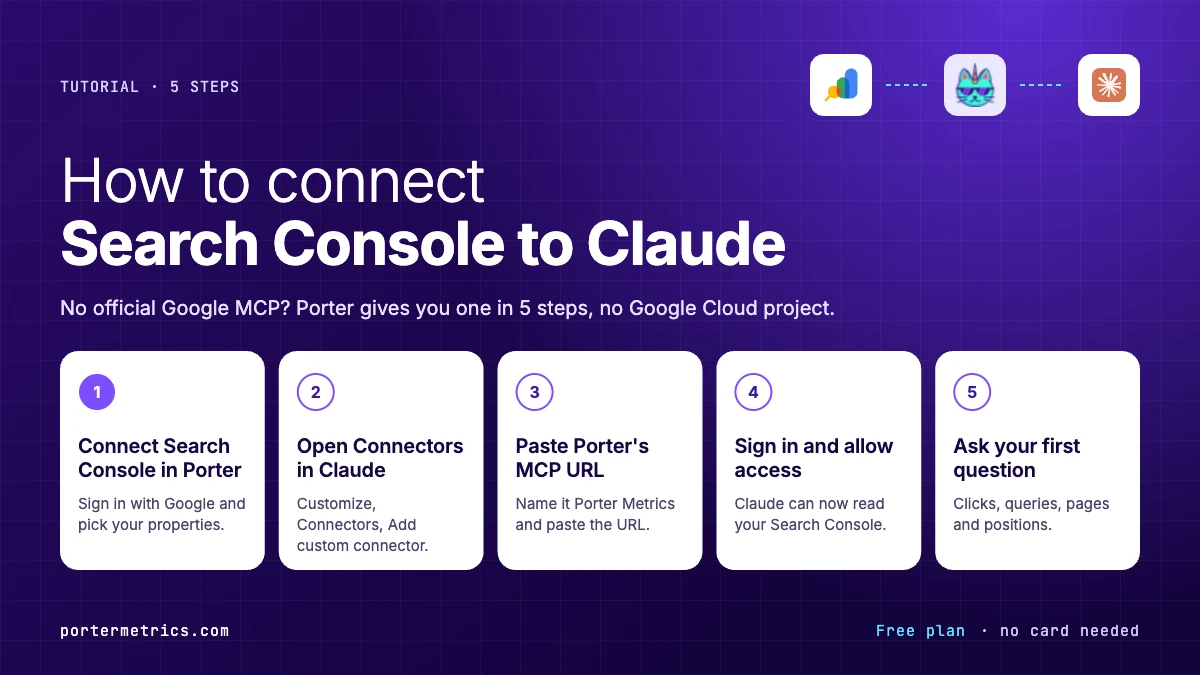
- Sign up free at Porter, choose Google Search Console and sign in with Google.
- In Claude, open Customize, then Connectors, click + Add and choose Add custom connector.
- Name it Porter Metrics and paste
https://mcp.portermetrics.com/mcp. - Click Connect, sign in to Porter and allow access.
- Open a new chat and ask about clicks, queries, pages or positions.
Is there an official Google Search Console MCP?
No. Google has not released an official Search Console MCP server. Your options are open-source servers you run on your own computer, such as mcp-gsc, or a hosted connector like Porter’s that needs no Google Cloud project and works on claude.ai.
| Method | Setup | Read or write | Works in | Free? | Best for |
|---|---|---|---|---|---|
| Porter connector (MCP) | 5 minutes, no code, no Google Cloud project | Reads performance, inspects URLs, submits sitemaps after you approve | claude.ai, Claude Desktop, Cowork, Claude Code, any Claude plan | Free plan, last 15 days | Marketers and SEOs who want answers next to GA4 and ads |
| Open-source mcp-gsc | 20 to 30 minutes: Google Cloud project, API, credentials, uv | Reads performance and index status; submits or deletes sitemaps | Claude Desktop and Claude Code on your computer, not the claude.ai website | Yes, MIT licensed | Technical SEOs who want full control |
| CSV export from Search Console | 5 minutes each time | Read only, a snapshot, 1,000 rows per table | Any Claude chat | Yes | A one-off analysis |
Comparing MCP options in more detail? See Porter’s Google Search Console MCP server.
Before you start
- A Google account with access to the Search Console property, as an owner or user
- Claude on any plan. The Free plan allows one custom connector
- A free Porter account
How to connect Google Search Console to Claude (claude.ai)
Connect Search Console in Porter
Sign up free at Porter, open Data sources and choose Google Search Console. Sign in with Google, tick both Search Console permissions and click Continue.
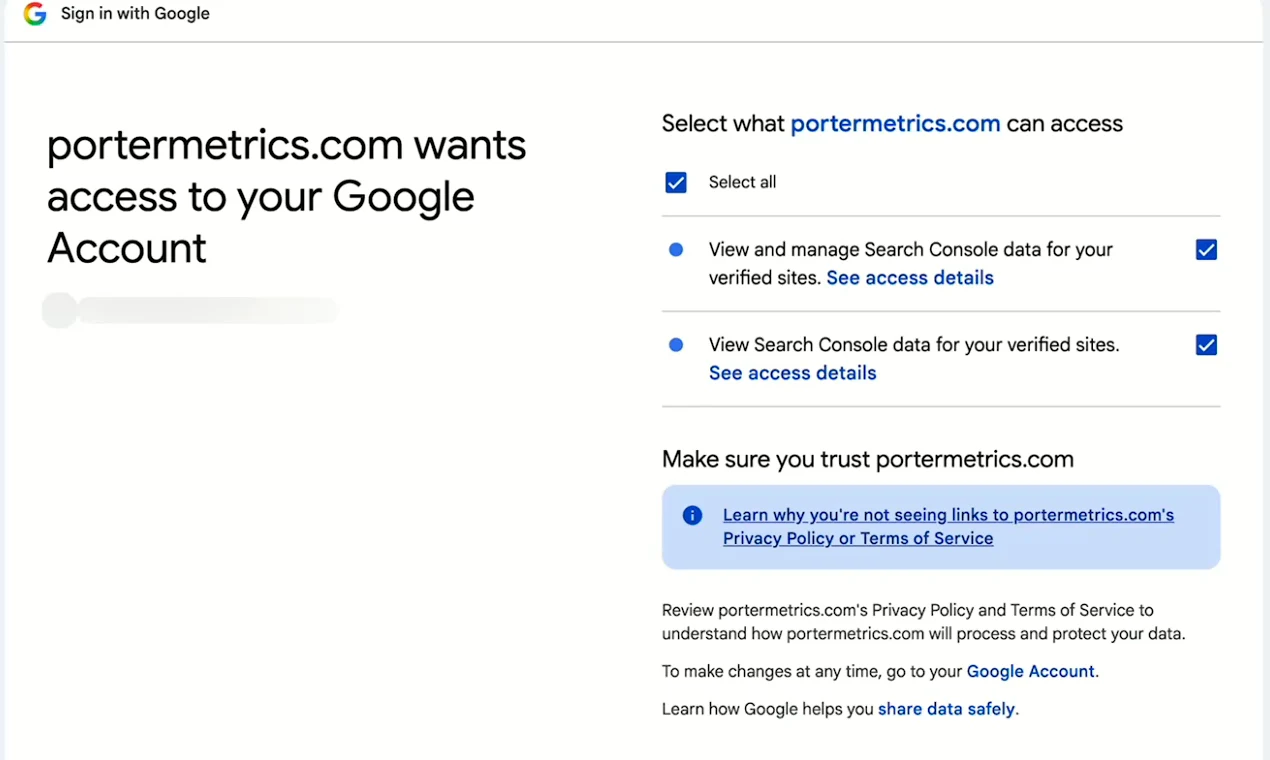
Google asks you to let Porter read your Search Console data.
Your Google account then shows as authorized. Click Next and pick the properties Claude should read.
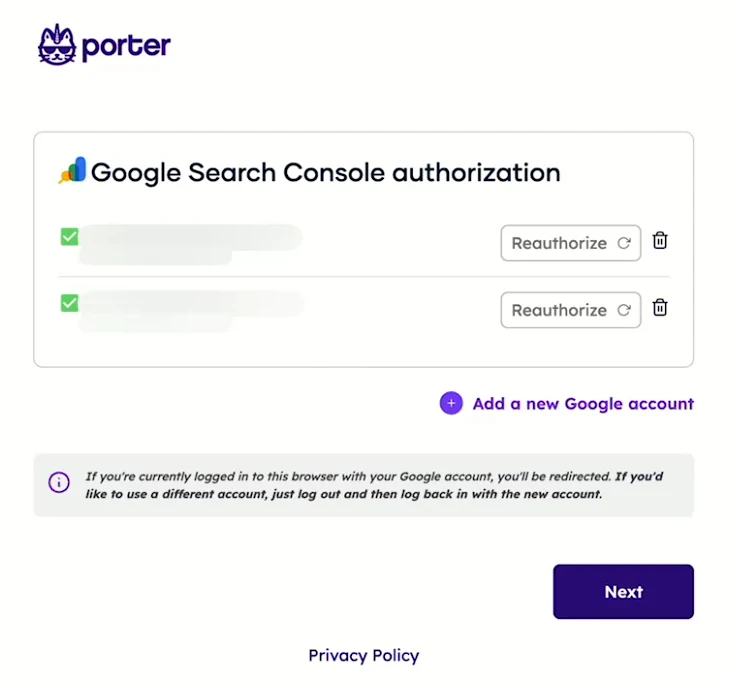
Porter, Data sources, Google Search Console, authorized accounts.
Open Connectors in Claude
In Claude, open Customize, then Connectors, click + Add and choose Add custom connector.
Where to find custom connectors in Claude.
Paste Porter’s MCP URL
Name it Porter Metrics and paste this URL, then click Add:
https://mcp.portermetrics.com/mcp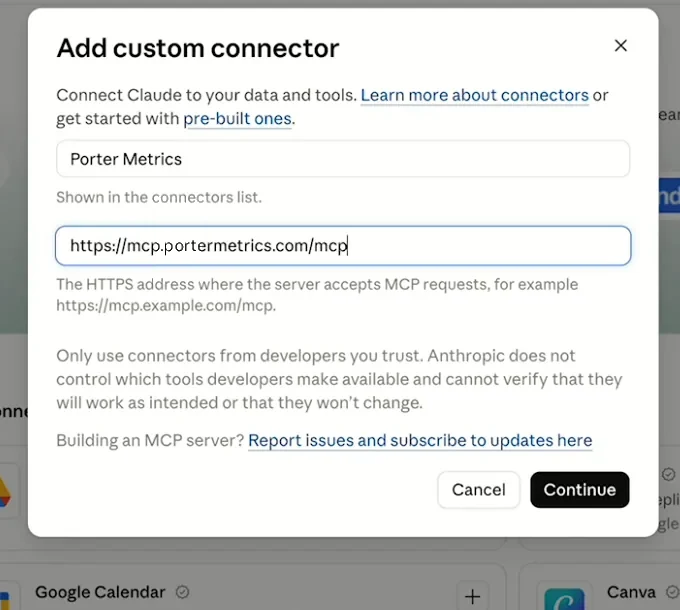
Claude, Customize, Connectors, Add custom connector.
Sign in and allow access
Click Connect next to Porter Metrics, sign in with the account you use in Porter and allow access.
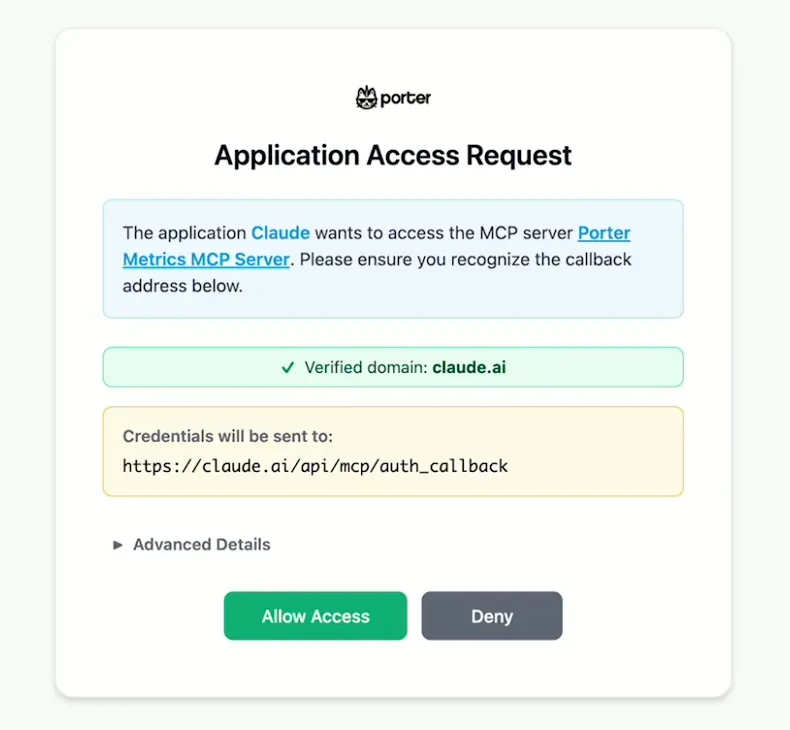
Porter asks you to allow Claude to use the Porter MCP server.
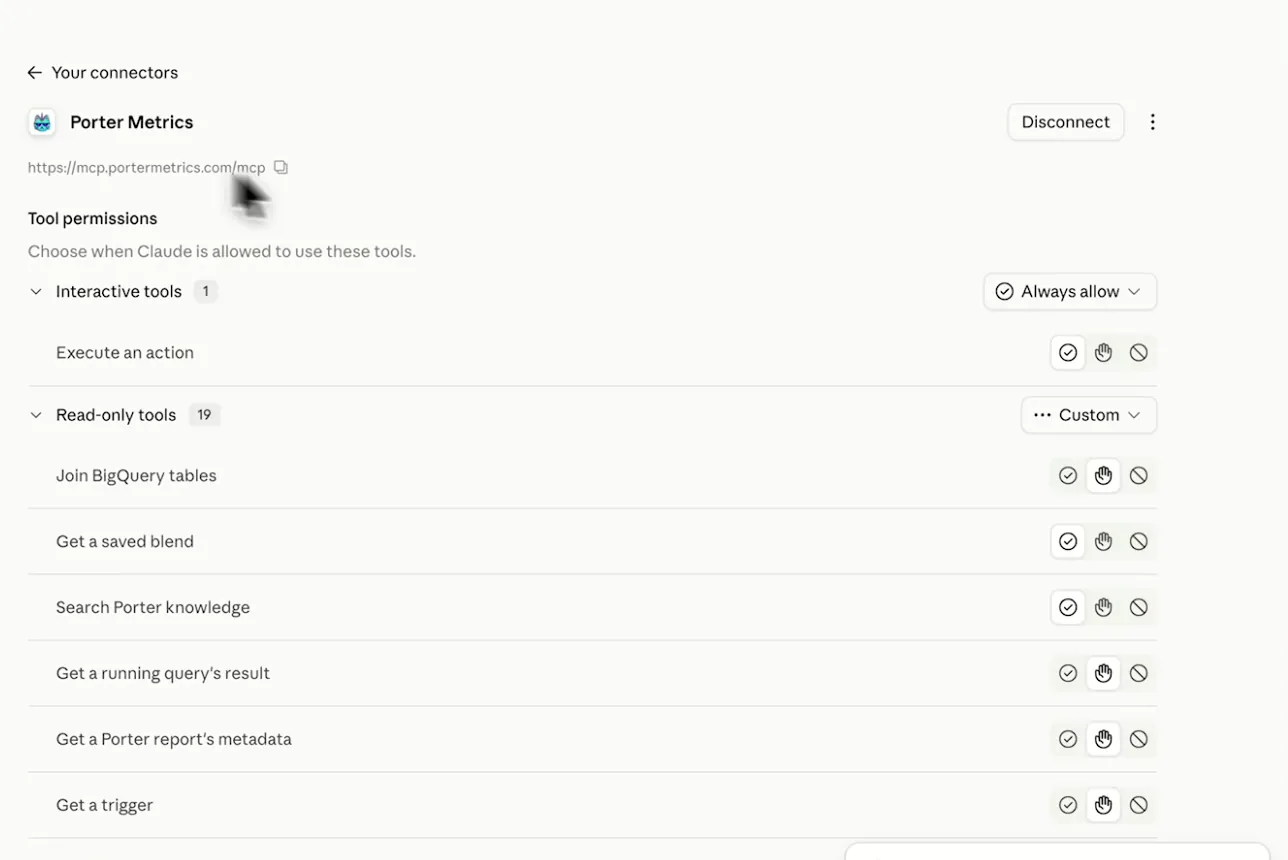
Porter Metrics connected in Claude.
Ask your first question
Open a new chat and try: “Which queries ranking between 4 and 15 got the most impressions in the last 14 days?”
 Claude
 Porter connected
 Porter · Google Search Console · trailgear.com✓ 5 rows
| Query | Position | Impressions | Clicks |
|---|---|---|---|
| hiking boots for wide feet | 7.4 | 18,200 | 201 |
| waterproof trail runners | 9.1 | 14,600 | 118 |
| lightweight hiking backpack | 11.8 | 12,900 | 64 |
| best camping stove 2026 | 5.6 | 9,800 | 231 |
| how to waterproof boots | 13.2 | 8,400 | 29 |
Prefer clicking through it? Open the interactive Search Console to Claude demo.
Claude Desktop, Cowork, Claude Code and Team plans
Add Porter once on claude.ai and it shows up in Claude Desktop and Cowork when you sign in with the same Claude account. The steps are the same on every model, from Opus to Haiku.
Claude Code
Claude Code runs in your terminal, so you add Porter with one command. --scope user makes it available in every project:
claude mcp add --transport http porter https://mcp.portermetrics.com/mcp --scope userThen type /mcp, pick porter and sign in in the browser tab that opens.
Claude Team and Enterprise plans
On Team and Enterprise, an owner adds Porter first in Organization settings, then Connectors, with the same URL. After that, each member opens Customize, then Connectors, clicks Connect next to Porter Metrics and signs in with their own Porter account.
Connect several Search Console properties
Agencies connect every client’s property once in Porter, then name the site in the question, for example “for trailgear.com, show clicks by page last month”. Domain and URL-prefix properties of the same site hold different numbers, so pick the one you report on.
Set up the open-source Search Console MCP
If you want to run a server yourself, mcp-gsc is the most used open-source option. It is free under the MIT license and runs on your own computer.
What you need
- A Google Cloud project with the Search Console API turned on
- An OAuth client of type Desktop app, or a service account added as a Full user on each property
- The
uvinstaller, or Python 3.11 or later - Claude Desktop or Claude Code. A server on your computer doesn’t reach the claude.ai website
Set it up in Claude Desktop
- Install uv, then add a server that runs
uvx mcp-search-consoleto your Claude Desktop config, with the full path to uvx. - Point it to your credentials file with an absolute path.
- Quit Claude Desktop completely, open it again and sign in with Google when the browser opens.
What it can do
It reads clicks, impressions, CTR and position, compares periods, inspects up to 10 URLs per call and lists sitemaps. It can also submit or delete sitemaps, and deleting a property needs a setting you turn on yourself. You keep the credentials and the updates on your side.
We tested it. On November 24, 2026 we installed mcp-search-console 0.4.2 and listed its tools. It has 21. Most read data, such as get_search_analytics, compare_search_periods and batch_url_inspection. Five can change your account: add_site, delete_site, submit_sitemap, delete_sitemap and manage_sitemaps, so read each request before you approve it.
What you can do once Search Console is connected
- Quick wins: queries ranking 4 to 15 with high impressions and a low CTR.
- Content decay: pages that lost clicks against the period before, and the queries they lost.
- Title and meta tests: CTR by page before and after you changed a title.
- Cannibalization: queries where two or more of your pages share the clicks.
- Index checks: whether a URL is indexed, its canonical and its crawl status.
- SEO next to paid and GA4: organic clicks beside Google Ads and GA4 sessions in one answer.
First prompts to run
Build a Search Console dashboard with AI
Ask Claude to turn your Search Console data into a live dashboard with its own link you can share. Porter keeps it synced, so you don’t rebuild it every week.
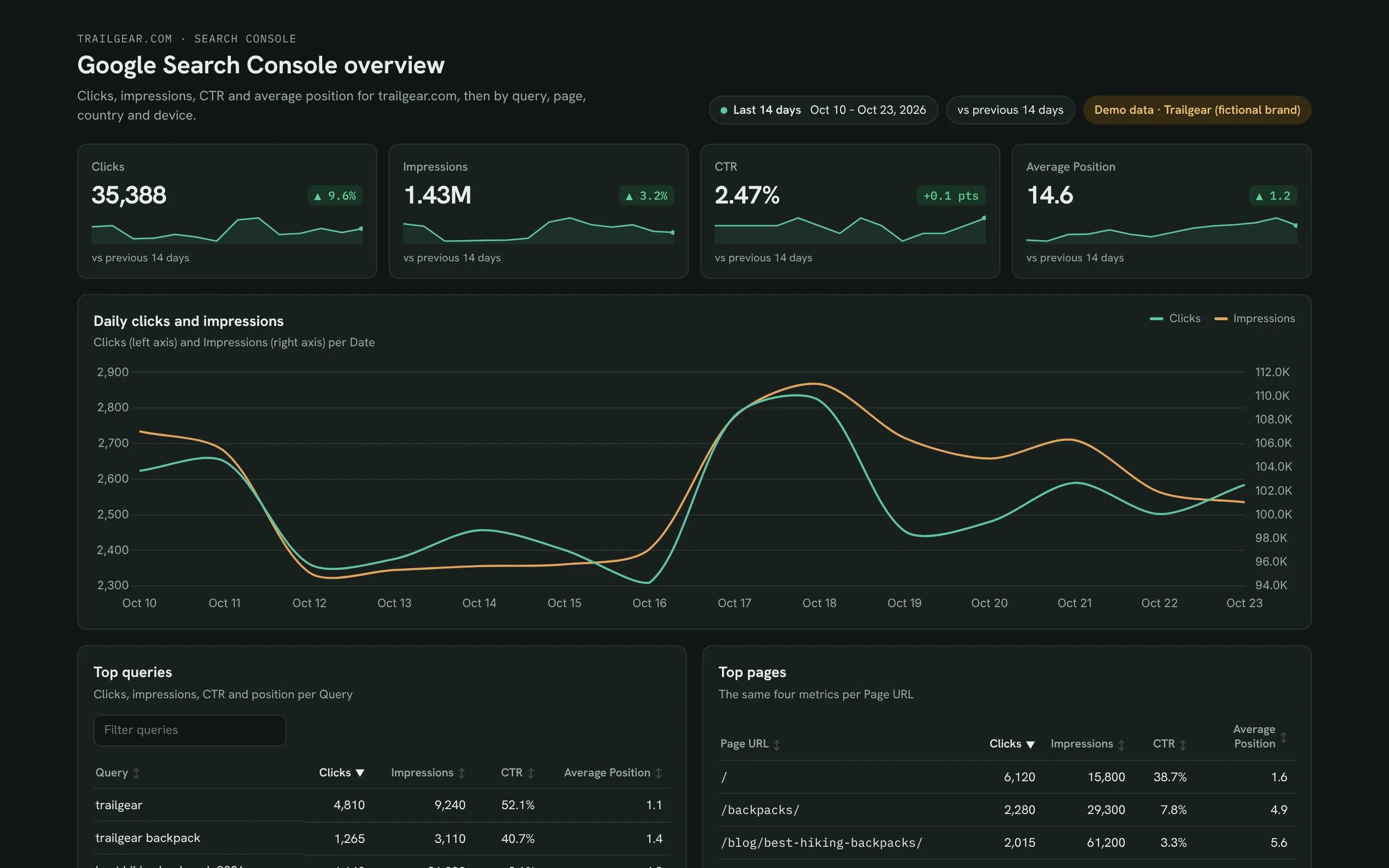
Google Search Console AI dashboard template, demo data.
See the Search Console dashboard template, or browse all dashboard templates.
Search Console metrics Claude can read
Through Porter, Claude reads these Search Console fields:
- Clicks, impressions, CTR and average position
- Query, page, country and device
- Date, week, month, quarter and year
- Search appearance and search type: web, image, video, news, Discover and Google News
- Aggregation by page or by property
- URL inspection: index status, canonical and crawl status
See every Google Search Console field in Porter
Troubleshooting
Porter doesn’t show in my chat.
Open the tools menu in the chat and turn Porter Metrics on, or start a new chat after adding it.
The last two or three days are empty.
That is normal. Search Console data arrives two to three days late, and Porter returns final days only. Ask for a range that ends three days ago.
Query clicks don’t add up to the total.
Google hides rare and personal queries, so query rows always add up to less than the site total. Use the total without a query breakdown for headline numbers.
My numbers differ from the Search Console app.
Google counts a day in California time, and totals by page are higher than totals by property. Use explicit dates and the same breakdown as the app.
Average position looks far too high.
Ask for Average Position, not Average Position (raw). The raw field adds up daily positions when days are combined.
My property isn’t listed.
In Porter, open Google Search Console, click Add a new Google account and sign in with the account that has access to the property.
Is the Google Search Console MCP safe?
Porter uses Google sign-in, so Claude never sees your password, and you can remove Porter from your Google Account’s third-party access at any time. Keep these rules:
- Give access only to the properties Claude needs.
- Approve any sitemap change before Claude makes it. Deleting a sitemap can’t be undone.
- Keep client properties in separate chats when you share them.
- Don’t paste credentials files from an open-source server into a chat.
Porter reads through Google’s official Search Console API, and Claude asks you before it changes anything.
Frequently asked questions
Is there an official Google Search Console MCP?
No. Google has not released one. You can run an open-source server such as mcp-gsc, which needs a Google Cloud project, or use Porter’s hosted connector, which needs none.
Is the Google Search Console MCP free?
Porter’s Free plan never expires and gives Claude the last 15 days of Search Console data. Open-source servers are free too, but you set up and maintain the Google Cloud project yourself.
Do I need a Google Cloud project?
Not with Porter. You sign in with Google once and Porter handles the API. Open-source servers need their own project, API and credentials.
Does it work with ChatGPT?
Yes. Add the same MCP URL as a connector in ChatGPT. See Search Console to ChatGPT.
How far back can Claude read?
Google keeps 16 months of Search Console data, and that is the most any MCP can read. On Porter’s Free plan, Claude reads the last 15 days.
Can Claude inspect URLs and submit sitemaps?
Yes. Claude can check a URL’s index status and canonical, list sitemaps and submit one after you approve. Google allows 2,000 URL inspections per property per day.