





To connect Google Sheets to Google BigQuery:
-
1
Log in with Google on portermetrics.com.
-
2
Select Google BigQuery as destination.
-
3
Select Google Sheets as data source and name your connection.
-
4
Authorize your Google account to access your Spreadsheets.
-
5
Authenticate BigQuery via Google login or Service Account.
-
6
Select Project ID, Dataset location, Dataset, and Table name (or create new).
-
7
Select metrics (e.g., Value) and dimensions (e.g., Category).
-
8
Optionally, prompt custom fields (e.g., Total, Count).
-
9
Set date range (e.g., this month to date).
-
10
Schedule refreshes in natural language (e.g., “daily at 8am”).
-
11
Set write mode (overwrite, append, or update).
-
12
Send and monitor execution logs.
Four free and paid ways to connect Google Sheets to Google BigQuery
1. No-code marketing ETL powered by AI (Porter Metrics)
AI-native connector for marketers. Build queries with all fields—spreadsheet data, already structured and ready to query—already joined. Create custom fields, calculated metrics, and dimension segmentations in natural language. Data arrives in BigQuery marketing-ready: connect directly to Data Studio without transformation.
2. General ETL/ELT tools
Data integration platforms for data engineers. Examples: Fivetran, Stitch, Airbyte.
Export raw tables that mirror the source schema: one table per sheet tab, preserving your original column structure. Each table contains all fields. The data engineer writes SQL JOINs to relate tables, selects fields, transforms data, and uses dbt or Python for preprocessing before visualization.
3. Google BigQuery Data Transfer Service
Free native Google integration for data engineers.
Setup requirements:
- Enable Google Sheets API in Google Cloud Console.
- Set up OAuth 2.0 credentials or Service Account.
- Share the spreadsheet with your service account email.
- Rate limits: 300 requests/minute per project.
- Use BigQuery external tables or scheduled queries to import.
What you get:
- Direct access to spreadsheet data.
- Can query Sheets as external BigQuery tables.
- Scheduled refresh available via Cloud Functions.
Limitations:
- Not true ETL: external tables query live data (slower).
- Schema changes break queries: column changes cause errors.
- Size limits: Sheets has 10M cell limit.
- Performance: large sheets slow to query from BigQuery.
4. Manual CSV export
Download from Google Sheets manually. No automation.
How it works:
- In Google Sheets: open your spreadsheet, click File → Download → Comma-separated values (.csv, current sheet).
- Upload CSV to BigQuery manually or via Cloud Storage.
- Alternative: use Porter to connect Google Sheets directly to BigQuery.
Limitations:
- No automation: repeat manually for each update.
- No row limit beyond the spreadsheet’s cell capacity (10 million cells).
- No scheduled refreshes.
- Manual upload to BigQuery required.
How to Connect Google Sheets to Google BigQuery for Marketers (No Code)
Porter is an AI-native connector. Configure everything with natural language, not SQL or forms. Custom fields, filters, scheduling—all prompted in plain English. No coding, no data engineering required.
- Data preview is always live. As you select metrics, dimensions, filters, and date ranges, Porter shows your data in real-time. Verify everything before sending to BigQuery.
- Data arrives transformed, blended, and ready to visualize. No SQL transformations needed after.
In this tutorial, we’ll show you how to send your Google Sheets data to Google BigQuery with Porter. We’ll send custom spreadsheet data with any fields you define, and custom calculations like totals, ratios, and custom segmentations.
Set a connection
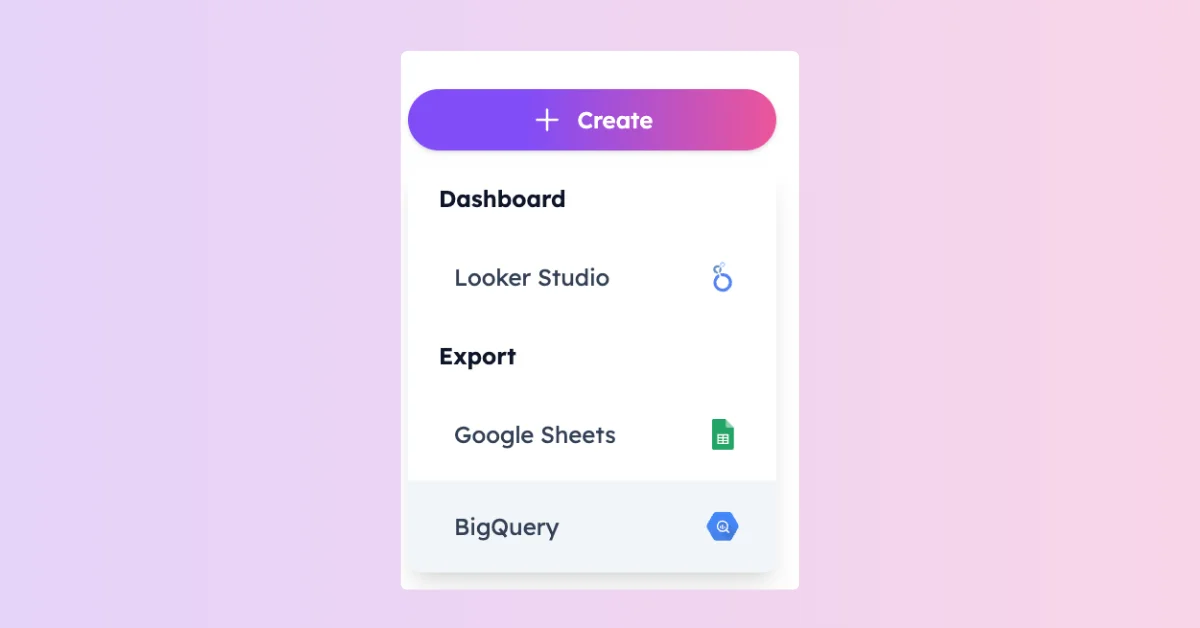
Log in to portermetrics.com with Google. Click “Create” and select “Google BigQuery” as destination. Name your connection (e.g., “Google Sheets Campaign Performance”). Select Google Sheets as data source.
- Data blending: optionally, add Google Ads, Meta Ads, HubSpot in the same connection for cross-channel reports.
Connect your Google Sheets accounts
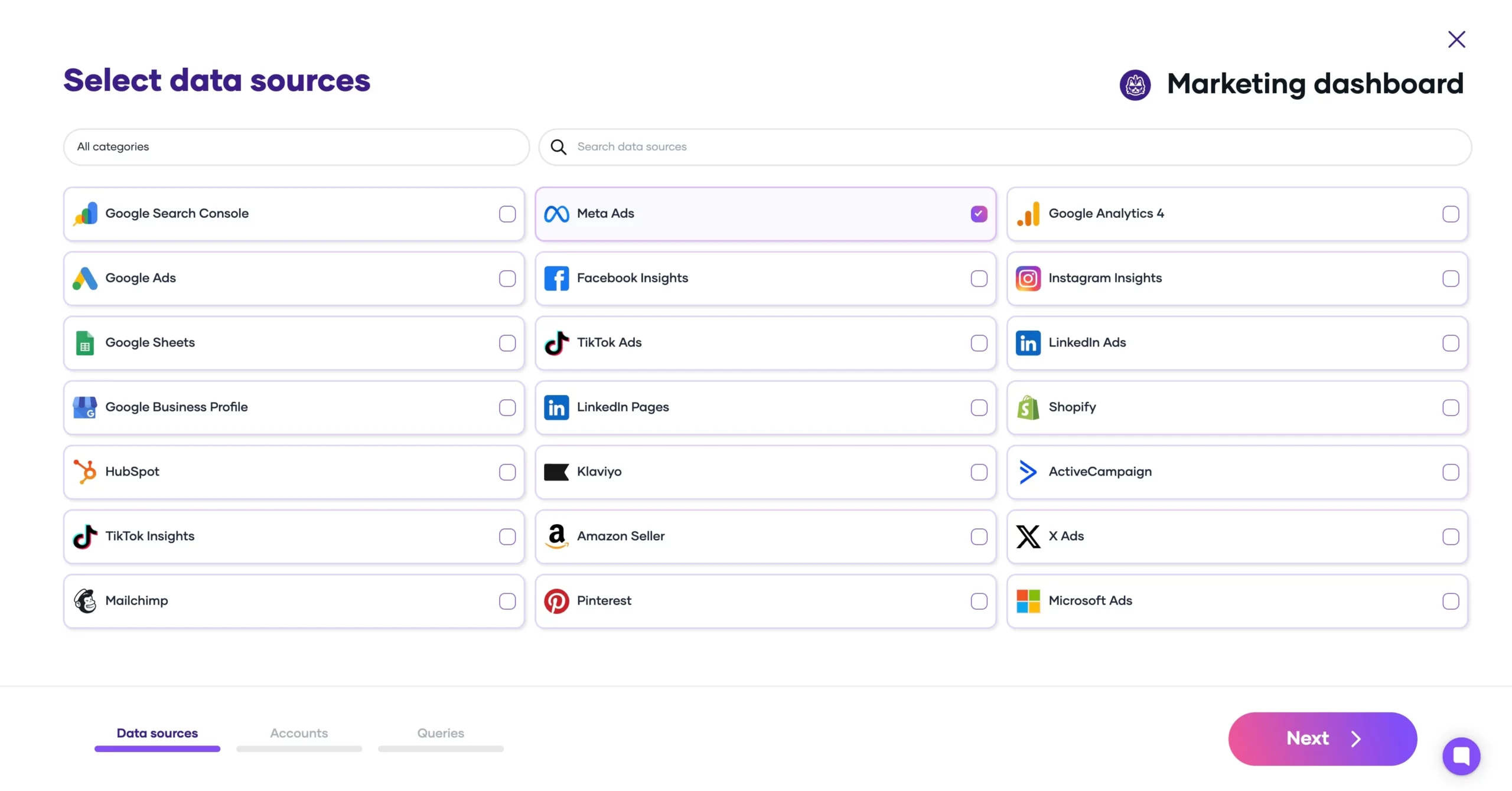
Connect your Google account and grant access to your Spreadsheets. Select the specific sheets you want to import. Select the Sheets you want to connect.
Multi-account
Consolidate dozens or hundreds of spreadsheets in a single report.
Required permissions
Viewer or above on the Google Sheet.
Tokens never expire
Your Google connection stays active unless you revoke access from your Google Account settings.
Connect your BigQuery destination
Authenticate with Google login or Service Account. Select Project ID, Dataset location, Dataset, and Table name.
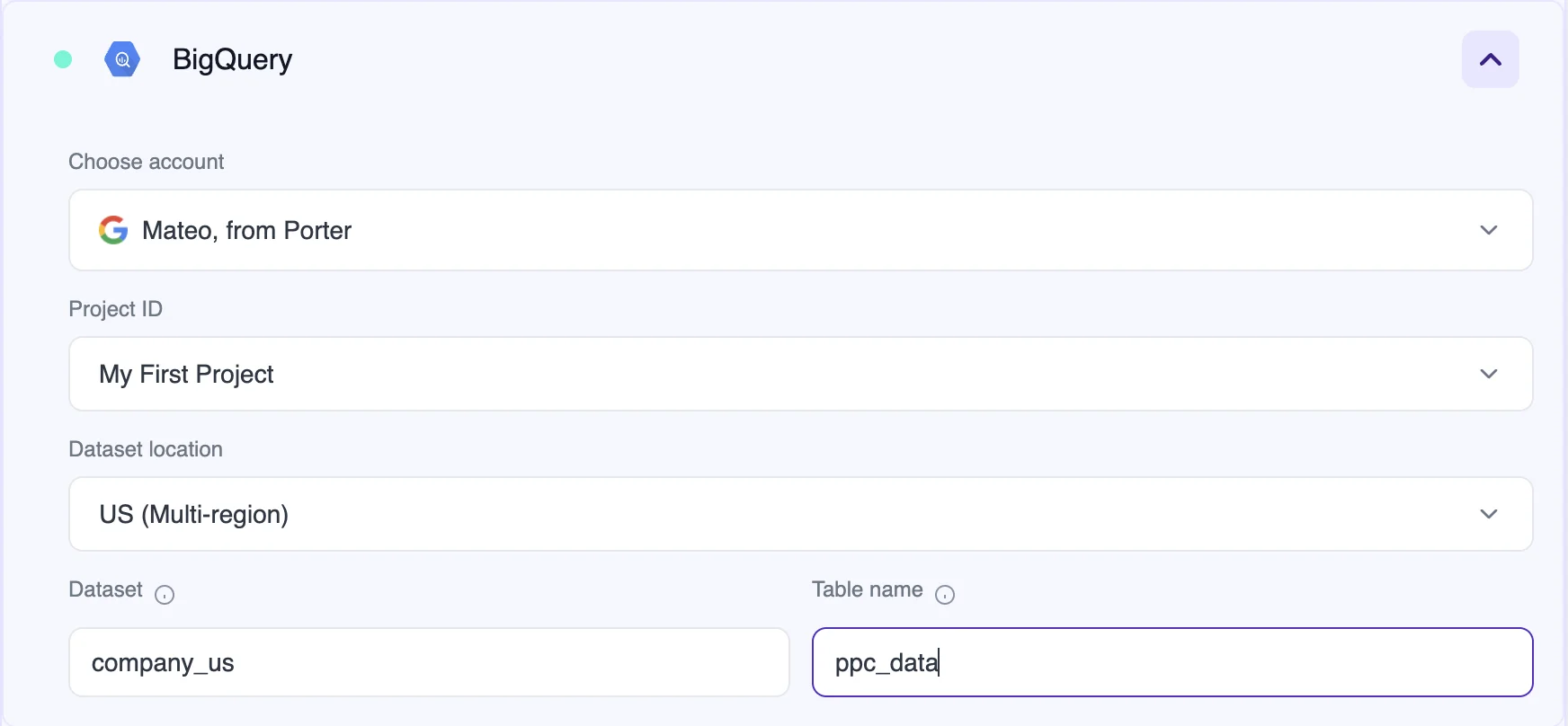
- Google login (recommended): Porter lists your projects in a dropdown. Easiest option.
- Service Account JSON: for companies with strict permissions management on Google Workspace. Copy a JSON text from your project details to connect.
- Dataset location: US, EU, or your preferred region.
- Auto-update schema: if you change your query later, Porter updates the schema automatically and rewrites it in your BigQuery table, unlike other tools.
New to BigQuery? Create your first project:
Go to console.cloud.google.com. In the Navigation Menu (top left), select BigQuery → Studio. On the left panel, you’ll see your projects.
- Create a Project: select or create a new project (e.g., “Marketing Data”). Choose a name, type, and organization. BigQuery creates a folder for it.
- Create a Dataset: expand your project folder, click the ellipsis, and select “Create Dataset.” Name it (e.g., “sheets_data”) and select a location (US or EU).
- Create a Table: inside your dataset, you can create a table (e.g., “google_sheets”). Or let Porter create it automatically when you send your first query.
The Project ID, Dataset name, and Table name you set here are the same values you’ll enter in Porter’s BigQuery configuration.
Verify your data in BigQuery:
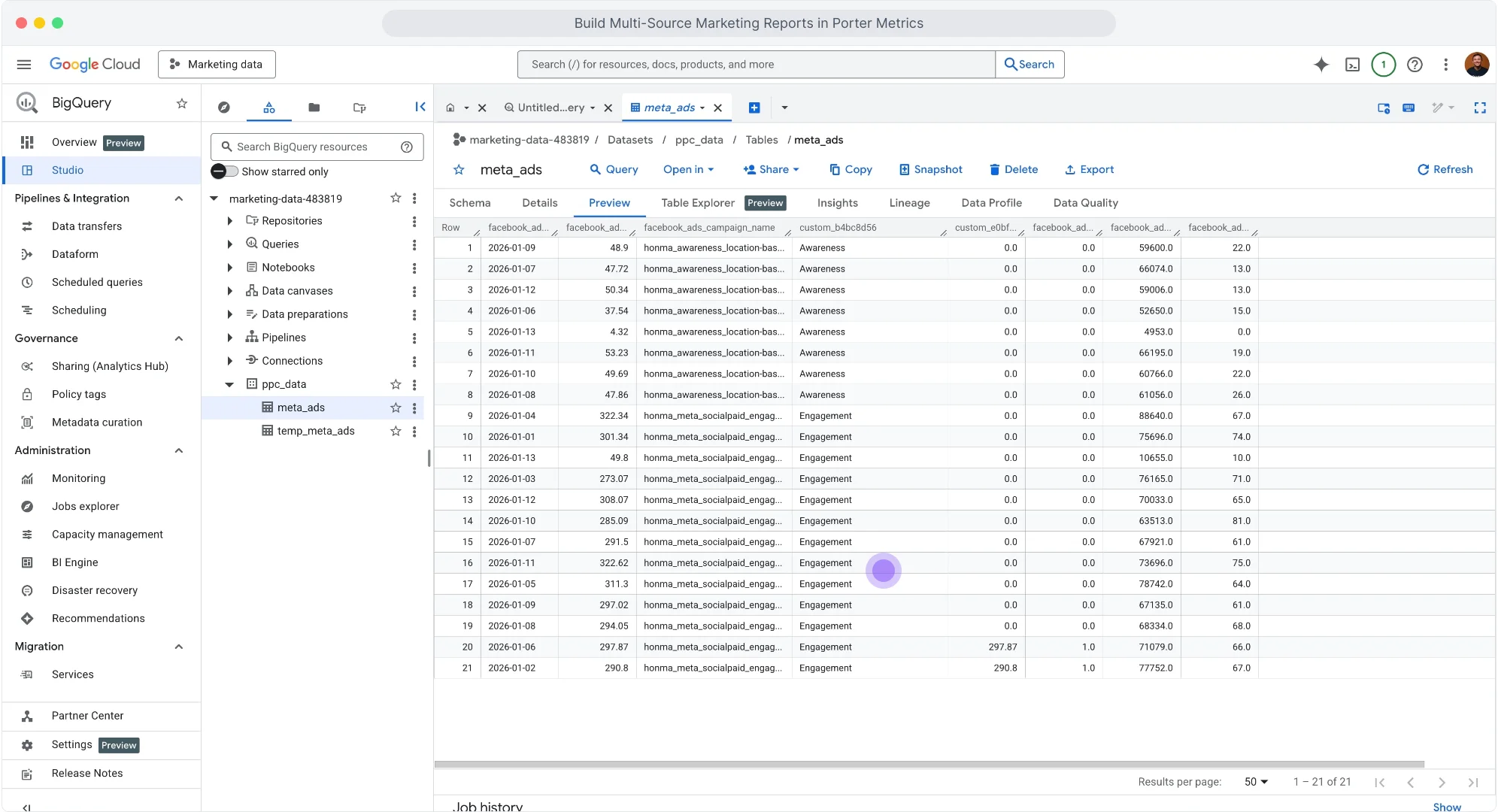
When you select a table, BigQuery shows the Schema view first. This is the metadata: field names, field types, and modes. To see your exported data, go to the Preview tab. Once your query executes, you’ll see the complete table with your data.
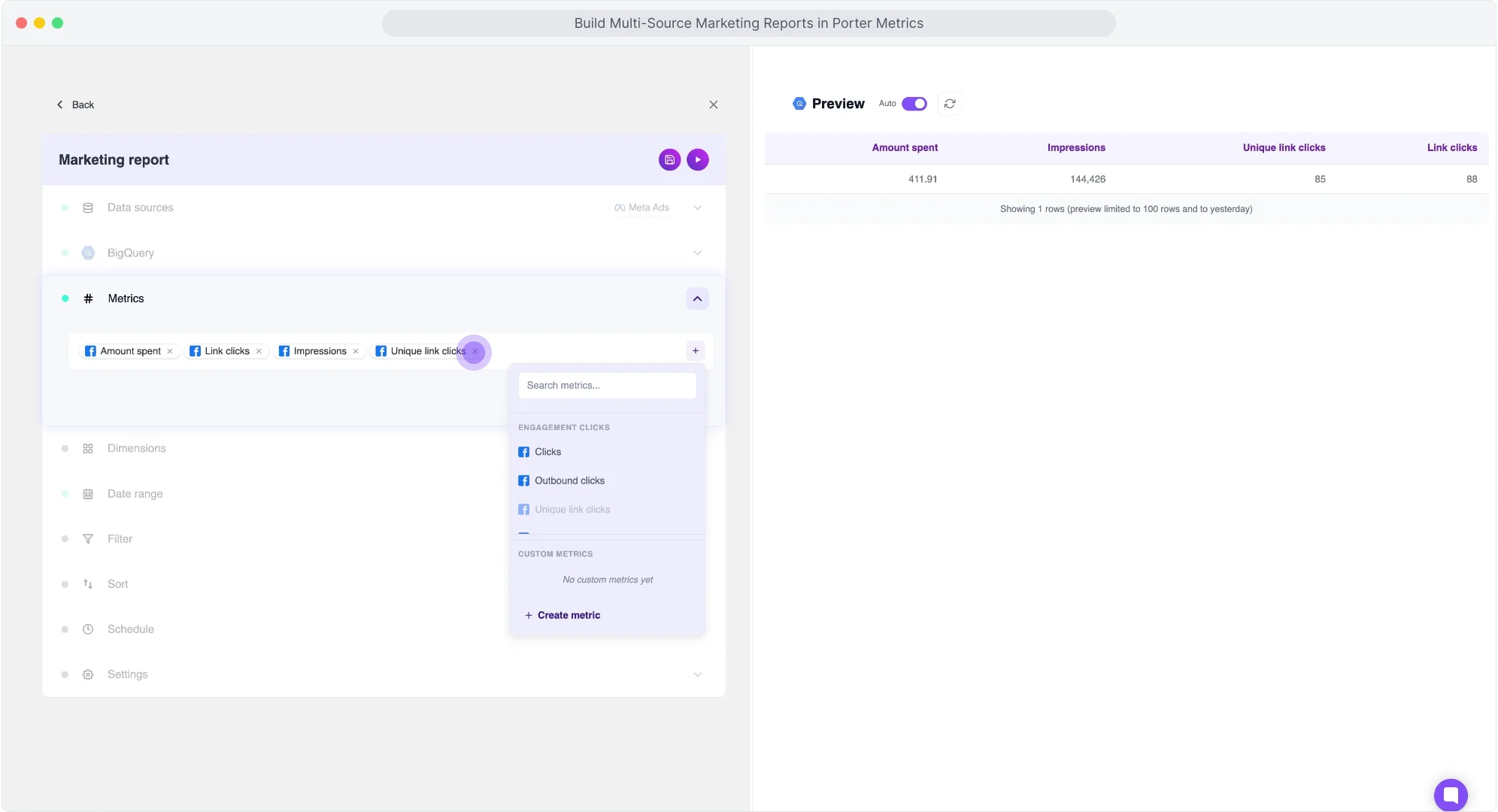
Choose metrics
In the metrics dropdown, search and select: e.g., Revenue, Units Sold, Leads, Conversions.
Choose dimensions
To segment your data, in the dimensions dropdown, search and select: e.g., Category, Date.
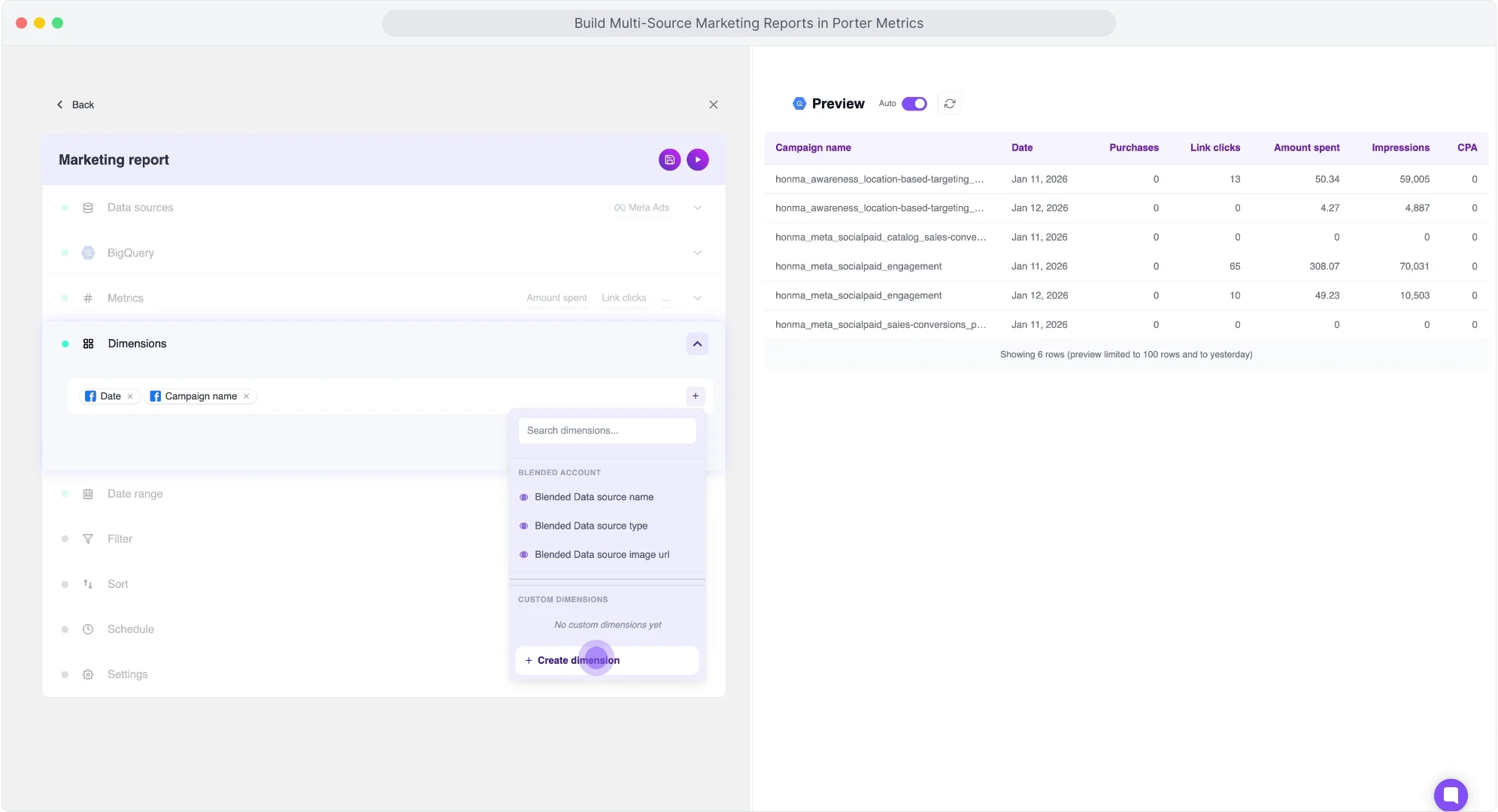
- Other dimensions: Campaign, Date.
- Time dimensions: Date, Week, Month, Quarter, Year available for trending analysis.
- Full field list: Check the Porter documentation for all available fields and dimensions.
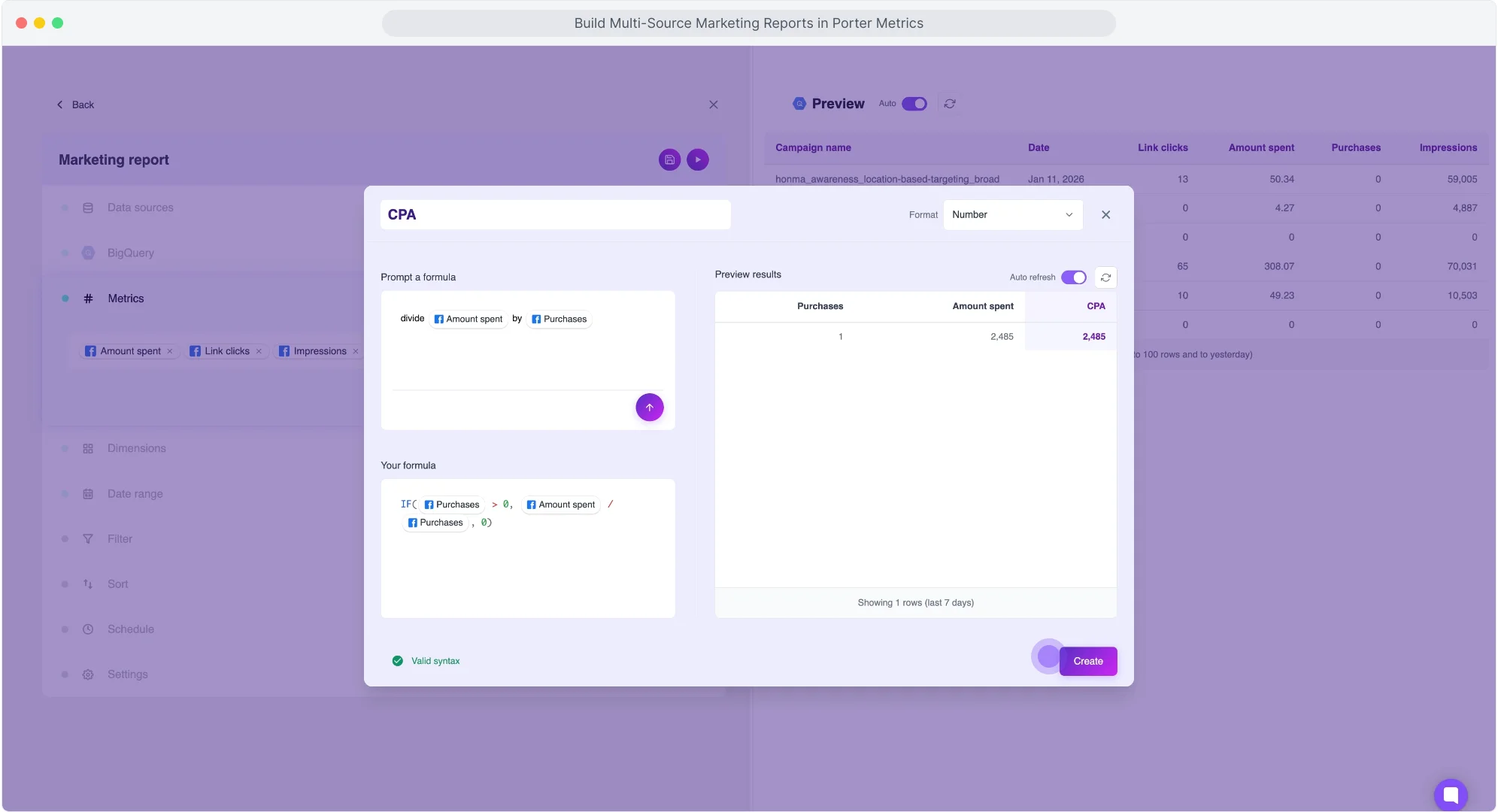
Create custom fields
For custom metrics, add a new metric, prompt your formula in natural language, and check the formula generated and a preview of the query. Choose the format of your metric (number, currency, percentage). For this example: Custom = “column_a / column_b”.
For custom dimensions, prompt your formula to segment data based on naming conventions. If your naming conventions include objective, funnel stage, or products, prompt a formula like: “If category contains ‘Product A’, tag as ‘Product A’. If contains ‘Product B’, tag as ‘Product B’. Else ‘Other’.” In the preview, see how Porter transforms conditionals into regex for custom segmentations.
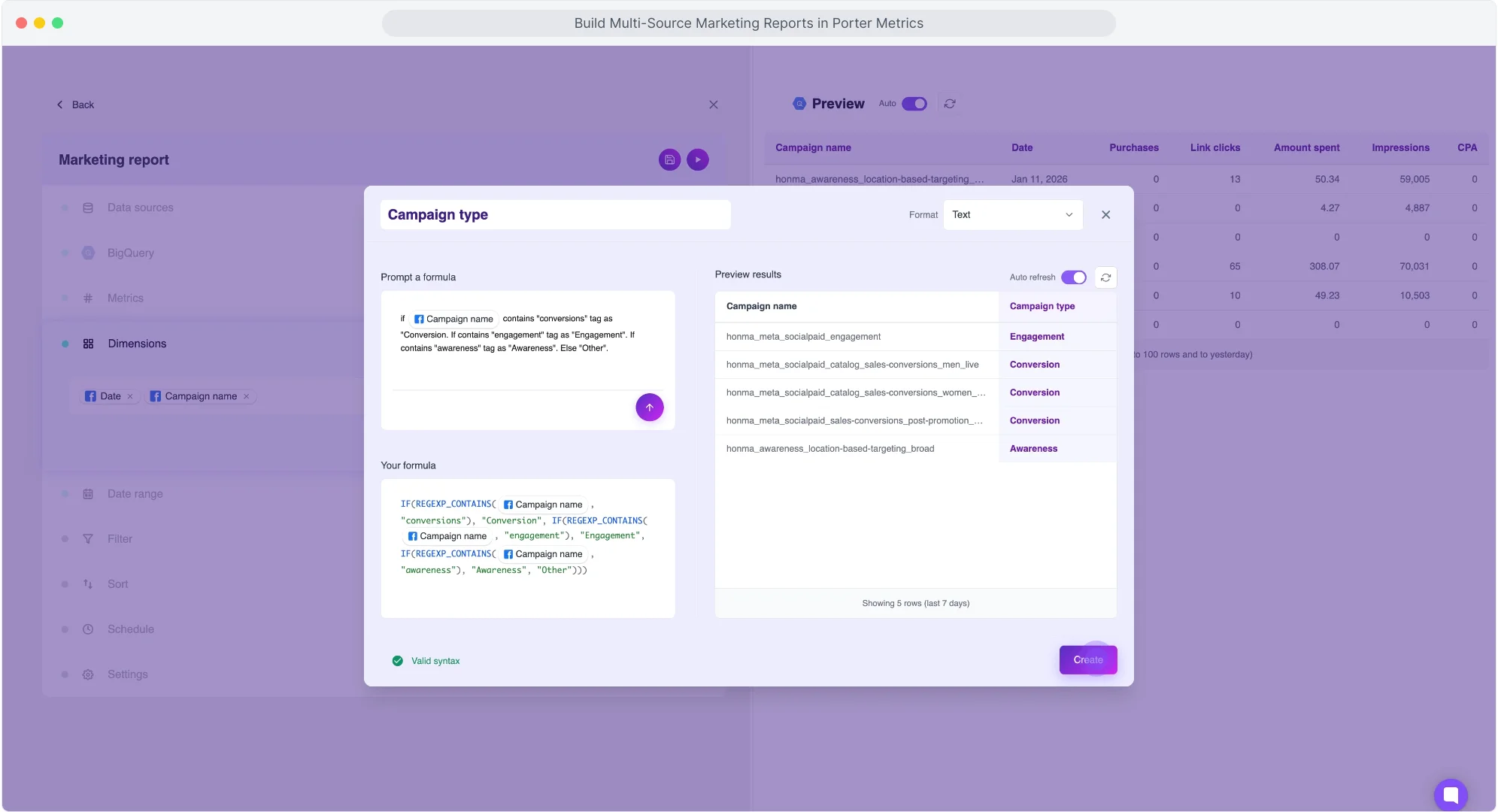
Create your own metrics or dimensions so no SQL or transformation is needed in BigQuery. Your data is ready to be connected to Data Studio. Supported operations: math (sum, subtract, divide, multiply), conditionals (if/then/else), regex (pattern matching). Same capabilities as Data Studio calculated fields.
Set date range
Select a date range from the dropdown. For this example: last 30 days.
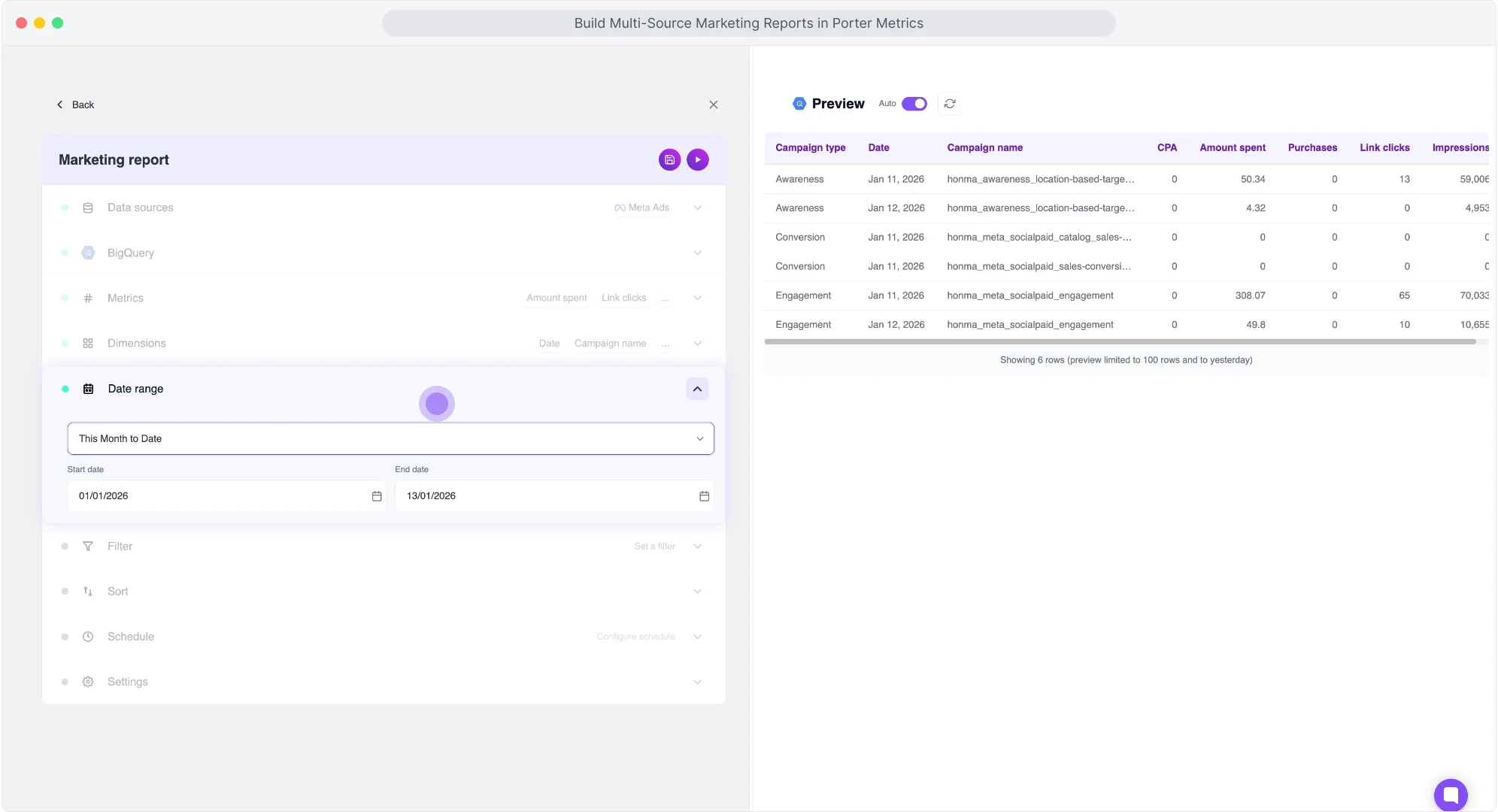
- Dynamic ranges: today, yesterday, last 7/14/28/30/90 days, this week/month/quarter/year to date, last week/month/quarter/year.
- Fixed ranges: specific start and end dates.
- Auto-update: data refreshes automatically based on dynamic range.
Add filters
We’ll apply a filter to focus on the rows relevant to your analysis.
For this example:
- Condition: Exclude
- Field: Amount Spent
- Operator: equals
- Value: 0
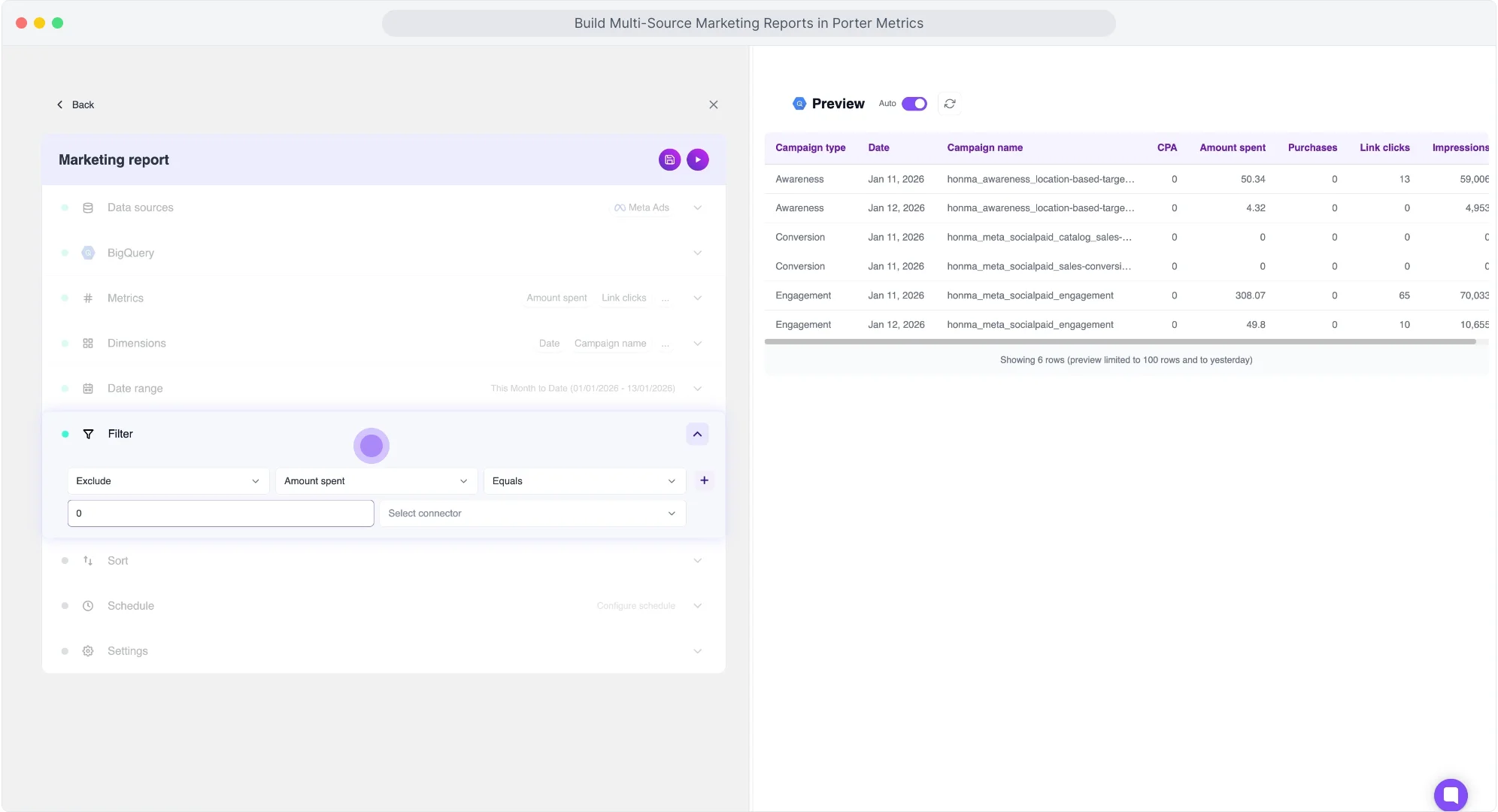
This excludes all rows without activity, so your query only returns rows with data.
- Available operators: equals, contains, not contains, greater than, less than, starts with, ends with.
- Value detection: Porter detects if the field is a number or text automatically.
- Combine filters: add AND/OR logic within the same condition or create multiple filters in one query.
Schedule refresh
Prompt your schedule in natural language. For this example: “every day at 8am”.
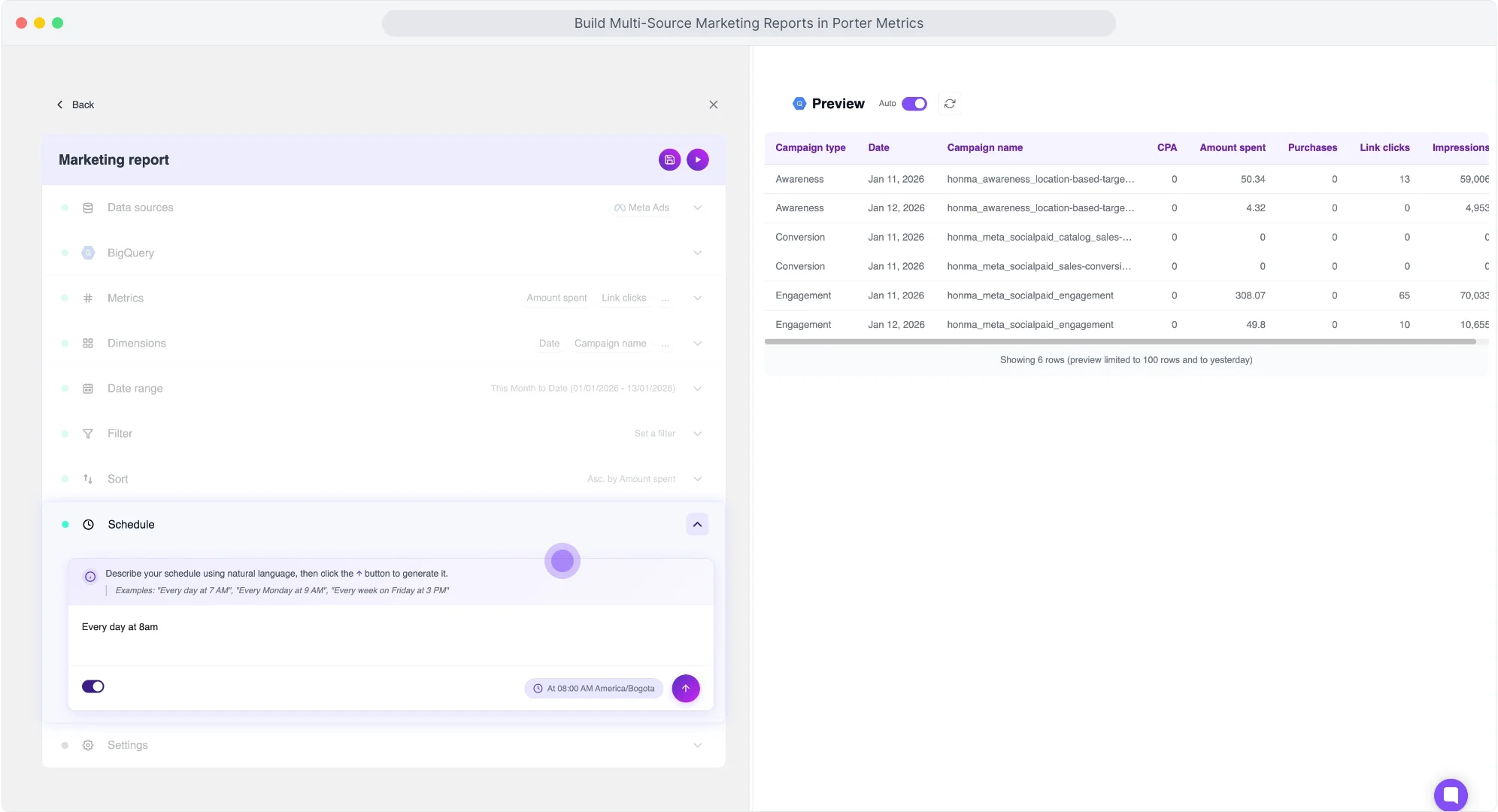
- Examples: “Every Monday at 5am”, “Weekdays at 7pm”, “Every hour”, “Every Tuesday and Friday at 9am”.
- Auto-convert: Porter converts prompts into cron expressions.
- Timezone: detected automatically from your browser.
- Minimum frequency: every minute. No extra cost for frequent refreshes.
Choose write mode
Select how Porter writes data to BigQuery. For this example: Overwrite.
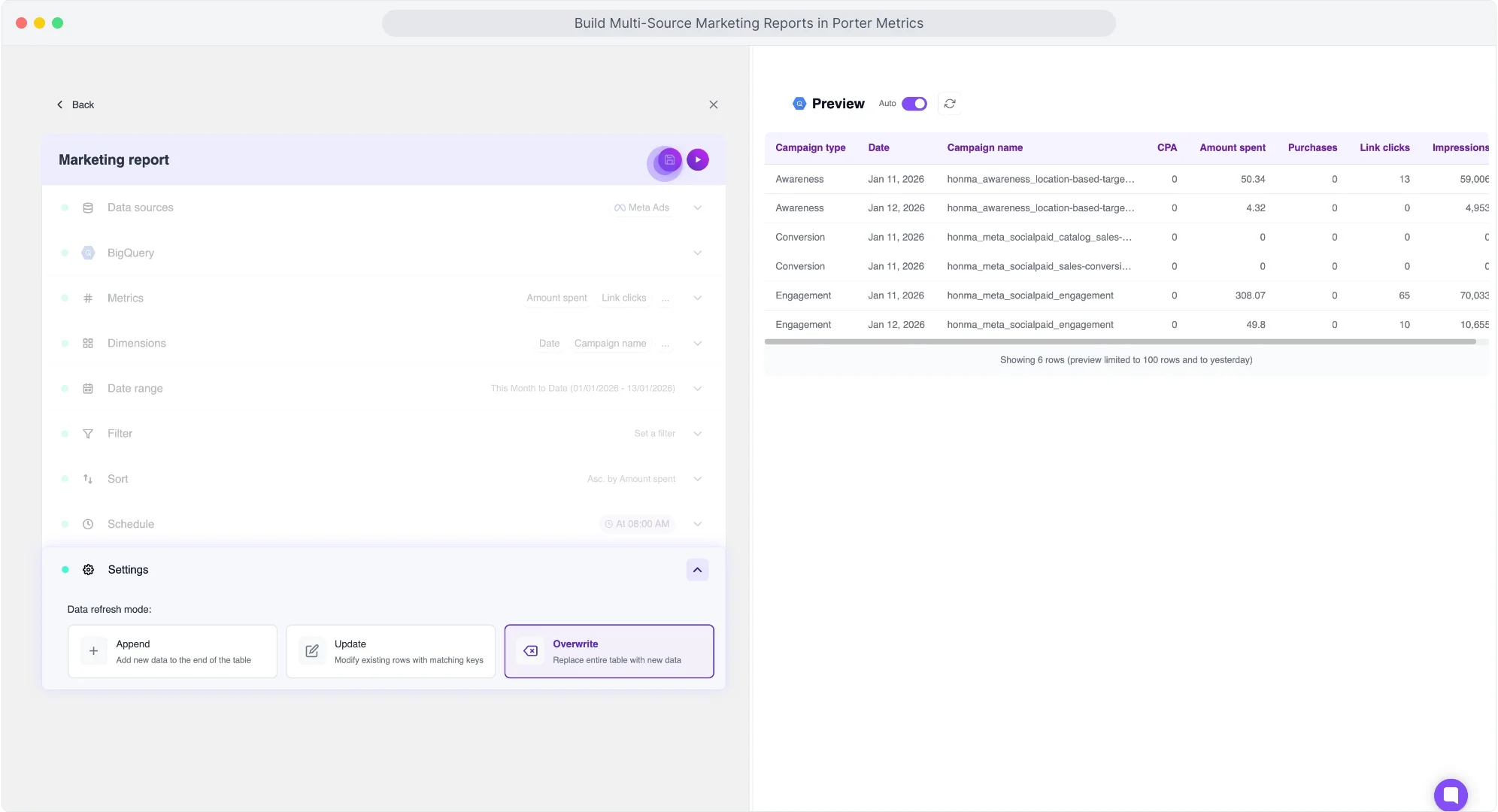
- Overwrite (recommended): deletes existing table and writes fresh data. No duplicates.
- Append: adds new rows below existing data. Risk of duplicates if same date range runs twice.
- Update: matches rows by dimension and updates values. For data with changing values.
Send, monitor, and organize
Click “Save” to save your query and click “Send” to deliver the data to Google BigQuery. The transfer takes a few seconds depending on the volume of data. Once finished, you can refresh it or create more queries.
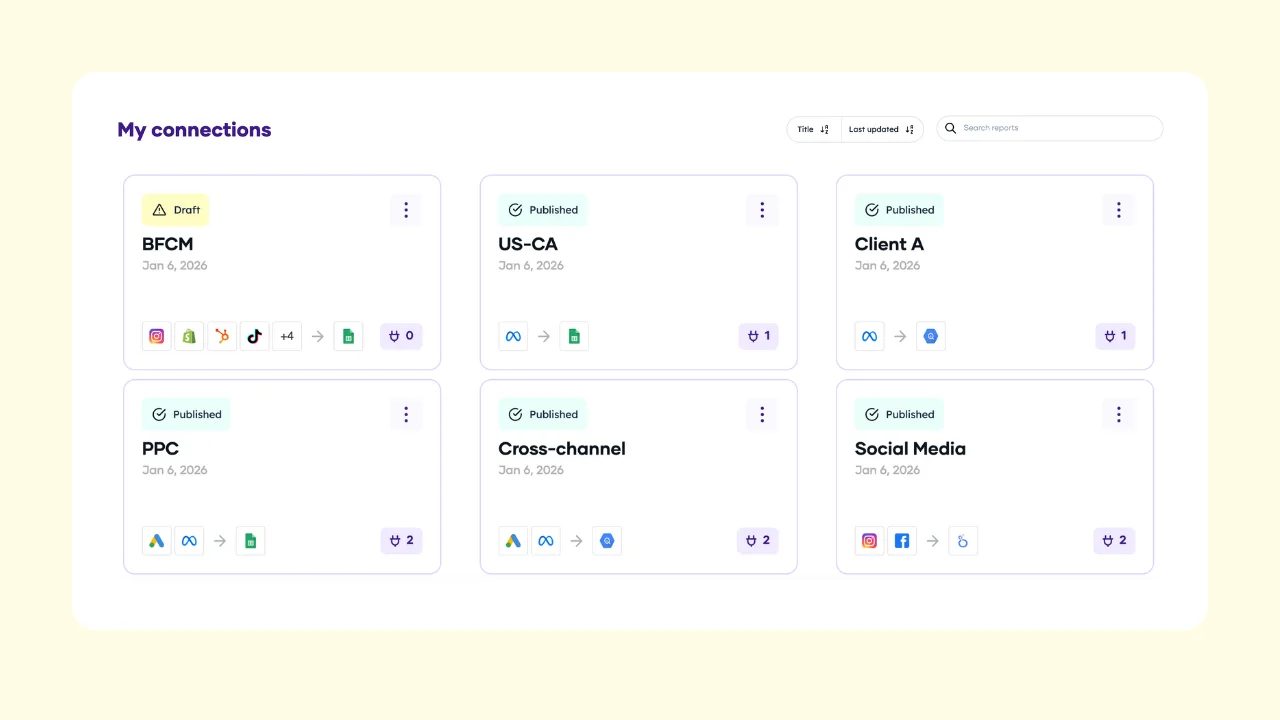
To create more queries: go back to the query manager inside your connection, or go to Porter Metrics → Account → Reports → Connections. In the Queries tab, you’ll see all queries running from your account with their associated connection, name, data sources, last run time, latest status, and option to run manually.
To monitor executions: click the ellipses icon and select “History.” You’ll see logs with exact date and time, execution type (manual or scheduled), and status. If an error occurs, you’ll see the specific error message.
To organize your data: manage connections and queries within them. Name connections by campaign (e.g., “Black Friday”), by client, or by data source. Within each connection, create as many queries or tables as needed and rename them. You can enable/disable queries or connections, and update any query anytime—Porter refreshes and updates the schema on BigQuery automatically.
How to Connect Your BigQuery Table to Google Data Studio
First, verify your data in BigQuery:
Go to console.cloud.google.com/bigquery. In the left menu, under Products, find BigQuery → Studio. This is where you manage your tables.
BigQuery hierarchy:
- Project (e.g., “Marketing Data”): your top-level container.
- Dataset (e.g., “Sheets_Data”): a collection of tables within a project.
- Table (e.g., “Google Sheets”): your actual data.
In BigQuery Studio, go to “Classic Explorer” and select your project. Click the ellipsis to create a new dataset if needed (set a name and location, e.g., US or Europe). Navigate to your dataset and table. In “Schema,” see the list of fields and their types. In “Preview,” see your actual data. To refresh data, go back to Porter and resend—Porter overwrites the table.
Connect BigQuery to Data Studio:
Go to Data Studio. Click “Create” and select “Report” to start a blank report. Data Studio will prompt you to add a data source. Search for “BigQuery” and connect your Google account.
You’ll see options: Recent Projects, My Projects, Shared Projects, Custom Query, Public Datasets.
Select “My Projects” and navigate to your project, dataset, and table. In this example: Project “Marketing Data” → Dataset “Sheets_Data” → Table “Google Sheets”. Click “Add” to connect.
Once connected, Data Studio loads the fields from your table. Create a chart, add your dimensions (e.g., date) and metrics (e.g., Value). Make sure to set a date range that matches your query in Porter.
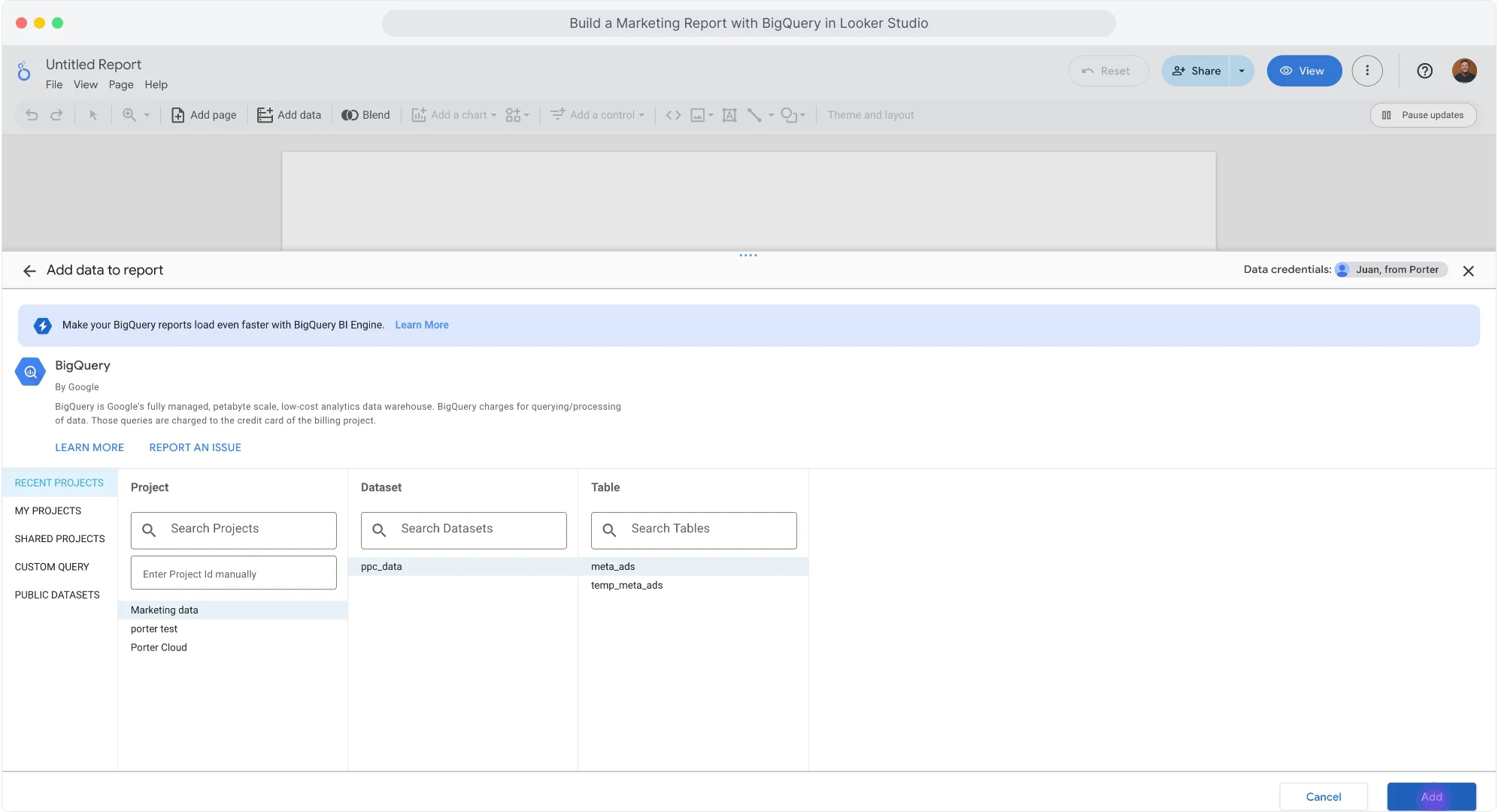
Your BigQuery data is now connected to Data Studio.
Why Marketers Move Google Sheets Data to BigQuery
- Connect any reporting tool: BigQuery connects to Data Studio, Power BI, Tableau, or any BI tool. One warehouse, every destination.
- Multi-touch attribution: Join Google Sheets with raw GA4 event data. Trace the full user path from ad click to conversion.
- Source of truth: Define what “conversion” means for your company. Compare Meta vs. GA4 vs. HubSpot. Pick one source for CAC, ROAS, and CPA. End the “which number is right” debate.
- Company-wide access without platform permissions: Managing permissions across platforms is a pain. With BigQuery, anyone can access marketing data without accounts or roles in each platform. One permission model, all data.
- Make data available for AI: AI needs clean, structured data with context. Every AI tool feels siloed. Integrating sources is complicated. With BigQuery as your universal warehouse, any AI tool can access your marketing data. No custom integrations. No complicated setup.
- Data blending: Combine Google Sheets with CRM, GA4, Shopify, Google Ads in one warehouse. Measure real profit, not platform ROAS. Calculate blended CAC across all channels.
What’s Next
Now that your Google Sheets data is in BigQuery:
- Connect to BigQuery: learn Google BigQuery for marketers and read tutorials to connect other data sources.
- Connect to Data Studio: Build dashboards that load in seconds. Use Porter templates or create your own.
- Connect to Google Sheets: Export BigQuery data to Sheets for quick analysis, sharing with clients, or custom calculations.
- Blend data from multiple sources: Add Google Ads, GA4, Shopify, CRM to the same connection. Porter auto-maps equivalent fields. Create cross-channel reports without SQL joins.
- Create AI workflows: Automate alerts and reports with natural language. Example: “Every Monday at 9am, get Google Sheets data for last 7 days, analyze performance with AI, send summary to Slack.”
- Use templates: Start with pre-built Data Studio templates. Campaign performance, creative analysis, audience breakdowns—ready to connect.
- Explore other destinations: Send Google Sheets data to PostgreSQL, or other warehouses. Same setup process.
Browse all Google Sheets templates
Ready to connect Google Sheets to BigQuery?
Start your free trial and get your marketing data flowing in minutes.
Book a call →