Google Search Console connector for ChatGPT

Use Porter’s Google Search Console connector for ChatGPT to find striking-distance queries, decaying pages and low-CTR titles, then check indexing and resubmit the sitemaps you confirm on Business, Enterprise or Edu.

  • Find queries that sit just off page one
  • Rank pages losing clicks and the queries behind it
  • Draft new titles for pages with low CTR
  • Match Search Console clicks with GA4 sessions and key events
G2★★★★★Rated 4.6/5 from 288 G2 reviews (October 2026)

By Porter Metrics team · Last updated October 20, 2026

ChatGPTPorter connected
Show Clicks, Impressions, CTR and Average Position by week for the last 4 full weeks, ending 3 days ago.
Porter / Google Search Console / Trailgear Demo✓ 4 rows
Impressions rose 18% over 4 weeks while CTR fell from 2.9% to 2.4%, so clicks stayed flat.
WeekClicksImpressionsCTR
Sep 143,410117K2.9%
Sep 213,380124K2.7%
Sep 283,450131K2.6%
Oct 53,320138K2.4%
Demo data, Trailgear Demo account
27 Search Console fields
01Setup

How to connect Google Search Console to ChatGPT

Setting up Porter’s Google Search Console connector for ChatGPT takes 3 steps, with no code since Porter hosts the server. Sign in with Google in Porter and pick your properties, add Porter’s MCP URL to ChatGPT as a custom MCP server, then ask. Porter’s Search Console to ChatGPT tutorial also has screenshots.

What you need

  • You need a Google account with access to the property, as well as a free Porter account and a ChatGPT plan that supports custom MCP servers. Domain and URL-prefix versions of a site are separate properties (Google’s guide to Search Console property types), so connect the one your team uses.
  • Custom MCP servers are in beta in ChatGPT on the web, so set up Porter and ask your questions from a browser. On Business, Enterprise or Edu, an admin or owner turns on developer mode, and then ChatGPT can also make the changes you confirm. On Pro, you turn on developer mode yourself, and ChatGPT reads and recommends (OpenAI’s guide to custom MCP apps).
  • Works in ChatGPT on the web (chatgpt.com, custom MCP servers in beta) and in Codex, with the same Porter MCP URL.
  1. Step 1: Connect Search Console in Porter

    Sign up free at Porter, then pick Google Search Console as the source and sign in with Google. Select the properties ChatGPT should read, then pick ChatGPT as the destination.

  2. Step 2: Add the Search Console connector to ChatGPT

    In ChatGPT, open Customize › Plugins, click Add and choose Add custom MCP server. On Business, an admin does this from Workspace settings › Apps › Create. Name it Porter Metrics, paste this URL as the Server URL and keep OAuth as the authentication:

    MCP URL
    https://mcp.portermetrics.com/mcp

    Tick “I understand and want to continue”, then select Create as a plugin.

  3. Step 3: Ask ChatGPT about Search Console

    Next, select Continue to Porter Metrics, sign in to Porter and click Allow Access. Then select Try in chat and paste this prompt:

    Prompt
    For my Search Console property, show Clicks, Impressions, CTR and Average Position by Week for the last 4 full weeks, ending 3 days ago.

Guides and videos

app.portermetrics.com / create

Create: Google Search Console to ChatGPT

Sign in: Google Search Console

Select the accounts ChatGPT can use.

ChatGPT / Customize / Plugins / Add / Add custom MCP server

Remote MCP server URL

https://mcp.portermetrics.com/mcp

ChatGPT

Using Porter / Google Search Console …

Demo data
02Use cases and prompts

What you can ask ChatGPT

Each use case comes with a prompt to copy, the fields it uses from the fields list and who it’s for. Prompts end 3 days ago, so every day in the answer is final. On Business, Enterprise or Edu, ChatGPT can also make the changes you confirm; on Pro it reads and recommends.

Can ChatGPT find queries that are just off page one?

The problemPlenty of queries sit just past page one, but finding them means sorting a Performance export by position and filtering it by hand.

What ChatGPT doesChatGPT lists striking-distance queries: both an average position between 8 and 20 and enough impressions to matter. You get the page that ranks for each, its CTR and its clicks, as well as one suggested change per page to move it up. The list covers every query Search Console names, since Google hides rare ones.

What you getYour next round of on-page edits starts with queries that already rank instead of a guess from a keyword tool.

Prompt
For the last 90 days ending 3 days ago, list Query and Page URL pairs with Average Position between 8 and 20 and at least 500 Impressions. Show Clicks, Impressions, CTR and Average Position, sort by Impressions, and for the top 10 suggest one change to the page's title, headings or content.

For: in-house SEO specialists · SEO agencies · content strategists

Fields used: QueryPage URLImpressionsClicksCTRAverage Position

Can ChatGPT find pages losing clicks, and on which queries?

The problemClicks to an old guide slip a little every month, and nobody notices until the traffic line has already bent.

What ChatGPT doesChatGPT compares each page’s clicks, impressions and average position over the last 3 full months with the 3 months before. Then it lists the queries each page lost. Paid Porter plans read the full 6 months, while the free plan reads the last 15 days in ChatGPT (30 days in Data Studio and Sheets).

What you getYou refresh the pages that lost the most, in order, instead of rewriting whatever looks old.

Prompt
Compare Clicks, Impressions and Average Position by Page URL for the last 3 full months vs the 3 months before. Rank the 15 pages with the largest click loss, and for the top 5 show the Query rows that lost the most Clicks.

For: content strategists · in-house SEO specialists · SEO agencies

Fields used: Page URLQueryYear-MonthClicksImpressionsAverage Position

Can ChatGPT find pages that rank well but have low CTR?

The problemA page holds its ranking while CTR keeps dropping, and the Performance report won’t say whether the title or the results page changed.

What ChatGPT doesChatGPT finds query and page pairs in the top 5 whose CTR is lower than other pairs at the same position. Then it drafts a new title tag and meta description for each. Keep in mind that an AI Overview or a video result can also pull CTR down when the snippet is fine.

What you getTitle rewrites then go to the pages where a better snippet can win clicks, with drafts ready to test.

Prompt
For the last 28 days ending 3 days ago, find Query and Page URL pairs with Average Position of 5 or better and at least 1,000 Impressions. Compare each CTR with the median CTR of pairs at the same rounded position. For the 10 biggest gaps, draft a new title (max 60 characters) and meta description (max 155).

For: in-house SEO specialists · content strategists · founders and marketing leads

Fields used: QueryPage URLImpressionsClicksCTRAverage Position

Are two pages fighting over one query?

The problemTwo of your posts keep trading places for the same query, but neither one holds the position.

What ChatGPT doesChatGPT spots queries where at least two of your pages each get impressions. It shows clicks, impressions and average position per page, then tells you which page should own the query. Page totals run higher than site totals here, because Google counts every URL it shows.

What you getYou decide what to merge, redirect or relink from one table instead of checking each query in the app.

Prompt
For the last 90 days ending 3 days ago, find Query values where 2 or more Page URL values each have at least 100 Impressions. For each, show Clicks, Impressions and Average Position per Page URL and recommend which page should own the query.

For: in-house SEO specialists · SEO agencies · content strategists

Fields used: QueryPage URLImpressionsClicksAverage Position

Can ChatGPT show how much of my traffic is branded?

The problemTotal clicks look healthy, but you can’t tell how much of that is people who typed your brand name anyway.

What ChatGPT doesChatGPT splits weekly clicks, impressions and CTR into queries with and without your brand terms, so you can see whether non-branded search grows. List your brand spellings in the prompt, and ChatGPT matches each query against them.

What you getNon-branded clicks then show what your SEO work earned, apart from people who already knew the name.

Prompt
Treat any Query containing 'acme', 'acme app' or 'acmeapp' as branded. For the last 12 full weeks ending 3 days ago, show Clicks, Impressions and CTR by Week for branded and non-branded queries, and the non-branded share of Clicks.

For: founders and marketing leads · SEO agencies · in-house SEO specialists

Fields used: QueryWeekClicksImpressionsCTR

Can ChatGPT write my weekly SEO report?

The problemEvery Monday you set the date comparison and screenshot the Performance chart, then retype the top queries into a client update.

What ChatGPT doesChatGPT compares last full week with the week before for clicks, impressions, CTR and average position, plus top queries, pages, devices and countries. It then ends with three takeaways for an email or client update. Search Console days follow Pacific time, so weekly totals can differ slightly from the app.

What you getOne prompt replaces the Monday screenshots, while the follow-up runs it for every client property.

Prompt
Build my weekly Search Console report for the last full week vs the week before: Clicks, Impressions, CTR and Average Position with % change; top 10 Query and top 10 Page URL by Clicks; Clicks by Device; top 5 Country by Clicks. Finish with 3 bullets: what grew, what dropped, what to work on next week.
Then ask
Prompt
Do the same for every property I've connected and put them in one table.

For: SEO agencies (one report per client property) · in-house SEO specialists · marketing leads

Fields used: WeekClicksImpressionsCTRAverage PositionQueryPage URLDeviceCountry

Can ChatGPT show which pages bring sessions and key events?

The problemA page wins more organic clicks every month, and nobody can say whether those visitors sign up or buy.

What ChatGPT doesBefore you ask, connect GA4 in Porter too, next to your Search Console properties. ChatGPT then adds GA4 organic sessions, engaged sessions and key events next to each page’s clicks, impressions and average position. Clicks and sessions come from different tools, so compare trends, not exact numbers.

What you getYou can set content priorities by the rankings that bring key events rather than by traffic alone.

Prompt
For last month, list my top 20 Page URL values by Clicks with Impressions and Average Position. Next to each, show GA4 Sessions, Engaged sessions and Key events for the same landing page where Session source / medium is google / organic. Flag pages with many clicks but few key events.

For: e-commerce and growth marketers · SEO agencies · marketing leads

Fields used: Page URLClicksImpressionsAverage PositionLanding page + query stringSession source / mediumSessionsEngaged sessionsKey events

Can ChatGPT check indexing and resubmit my sitemap?

The problemA new section went live weeks ago, and you’re still pasting URLs into URL Inspection one at a time to see what Google indexed.

What ChatGPT doesChatGPT inspects URLs for index status, Google-selected canonical, last crawl and rich results. It also lists your submitted sitemaps with their status, then, on Business, Enterprise or Edu, resubmits or removes the sitemap you confirm. Google allows 2,000 URL inspections per property a day (Search Console API usage limits), so spread big sections over several days.

What you getChecking a whole section’s indexing takes one prompt, then you fix the sitemap in the same chat.

Prompt
Inspect these 10 URLs in my Search Console property and show index status, Google-selected canonical and last crawl date for each. Then list my submitted sitemaps with their status.
Then ask
Prompt
Resubmit https://example.com/sitemap.xml. Show me the sitemap URL before you submit it.

For: technical SEOs · SEO agencies · in-house SEO specialists

Actions: site_list · urlinspection_inspect · sitemap_list · sitemap_submit · sitemap_delete
03Why Porter

Why Porter for Google Search Console in ChatGPT

Google offers an MCP server for Analytics (Google’s Analytics MCP server page) but none for Search Console (Search Console API documentation), so your data reaches ChatGPT through Porter, a community server, your own API code or a CSV export. If you’re comfortable in Google Cloud and want to change the code yourself, a community server such as AminForou/mcp-gsc on GitHub is free and capable. You can run both.

✓

One URL, nothing to host

Sign in with Google in Porter and add one MCP URL to ChatGPT on the web. One sign-in replaces the Cloud project, API keys and config file a community server needs.

⊞

Google's full 16 months

Search Console keeps 16 months of performance data. On paid plans Porter reads that full window live from Google, so ChatGPT compares this month with the same month last year, by query, page, country or device.

⚙

Past the 1,000-row limit

ChatGPT asks Google’s API for up to 25,000 rows per request, so long-tail queries and pages fit in one answer instead of a capped export.

Aa

Read and change sitemaps

ChatGPT inspects URLs and lists sitemaps on any plan. On Business, Enterprise or Edu, it also submits or deletes the sitemaps you confirm, and shows you the sitemap URL first. On Pro it reads and recommends.

↻

Search Console next to GA4 and Google Ads

Rankings, sessions and key events sit in one chat with all ChatGPT connectors, so you see which pages that win clicks also bring sign-ups.

✓

One connection, every destination

Properties connected through Porter’s Search Console connector also feed Claude, Data Studio and the Search Console to BigQuery connector at no extra cost.

⊞

Live dashboards, not only chat answers

Ask ChatGPT for a dashboard and Porter’s AI dashboards publish it at its own link, synced automatically and ready to share. Official MCP servers answer inside the chat and stop there.

04Dashboard

Dashboard template

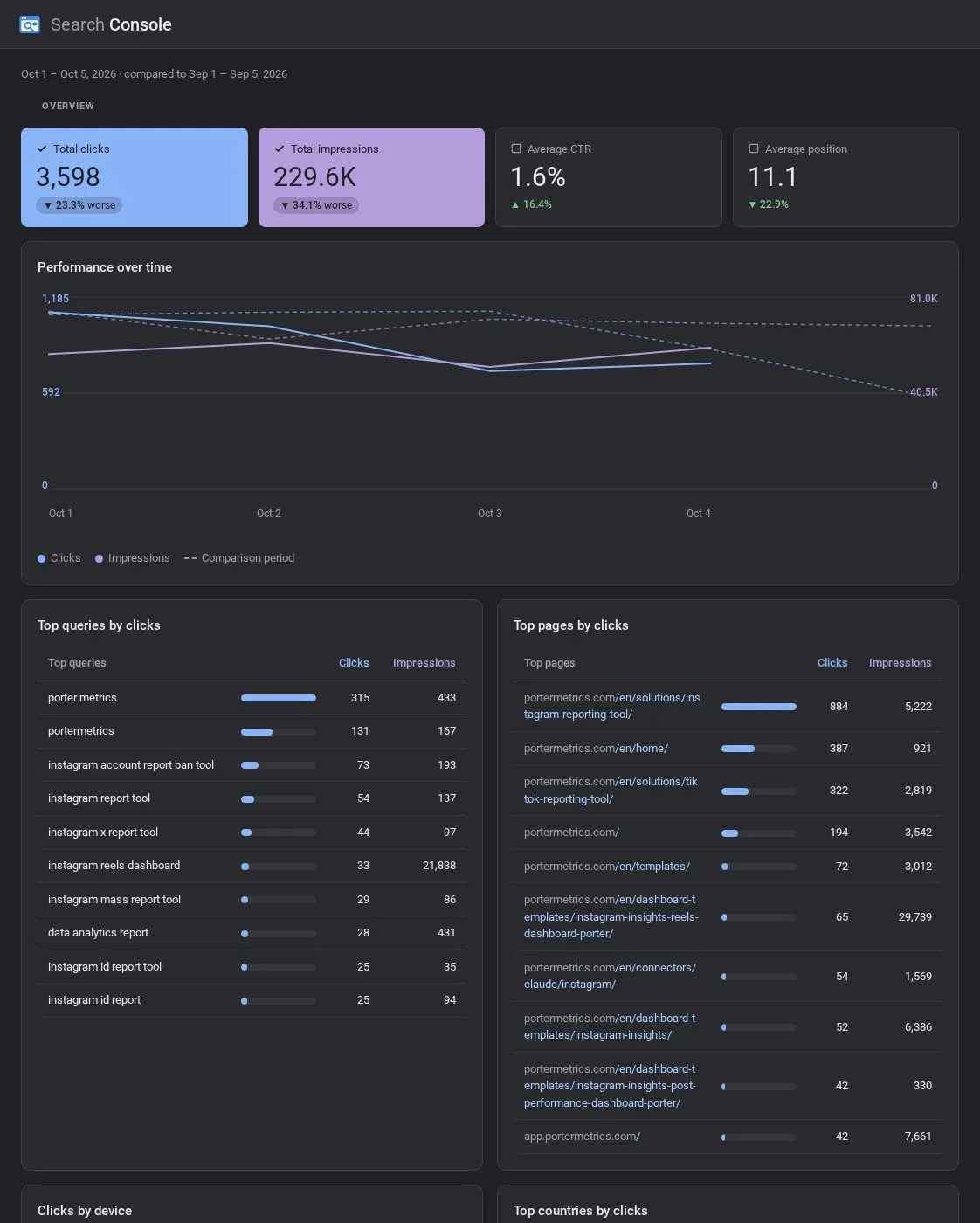
Want a shared view instead of a ChatGPT chat? Porter’s free SEO dashboard template shows clicks, impressions, CTR, average position as well as top queries and top pages in one report.

AI dashboards

Build a live Google Search Console dashboard from the chat

Describe the dashboard in one sentence and Porter builds it. A client-ready dashboard in minutes, with no chart dragging and no BI tool to learn. Ask ChatGPT:

Prompt
Build a live Google Search Console dashboard for my account with the last 30 days, the main KPIs and a weekly trend.
Live URLEach dashboard at its own link: no login, no app, no download
Auto-syncFresh Google Search Console data, nobody re-exports each period
Scheduled deliveryEmail or PDF sends on a set day
White labelYour logo and branding for clients
Sharing permissionsView or edit access per person
05Pricing

Pricing

You can start free, since Porter’s Google Search Console connector for ChatGPT comes with every plan. Use the calculator for your number of accounts, or see Porter pricing for every plan.

What you get

  • Free plan: never expires, with unlimited connected accounts and the last 15 days of data in ChatGPT (30 days in Data Studio and Sheets)
  • Reporting: from $12.50 per account a month billed annually, or $15 month to month for one account
  • Billing: each Search Console property (Domain or URL-prefix) counts as one account, with volume discounts and no per-seat fee
  • Changes: 1 AI credit per completed change you confirm on Business, Enterprise or Edu; failed tasks are free, and the Free plan includes 100 credits a month
  • Trial: 14 days of full access, no card

Price calculator

$33.33/mo$6.67 per account

An account is one ad account, Stripe account, store, page or GA4 property. The Free plan never expires and has unlimited accounts, with the last 15 days of data in AI chats.

06Data and actions

Google Search Console data and actions in ChatGPT

The Google Search Console connector gives ChatGPT every Performance field, including clicks, impressions, CTR and average position. Each one then breaks down by query, page, country, device, search appearance, search type and date. It also gets actions to list properties, inspect URLs and manage sitemaps. The full fields list shows every label and ID.

The 12 Search Console fields ChatGPT uses most

FieldWhat it's for
ClicksclicksClicks from Google Search results
ImpressionsimpressionsTimes your pages appeared in results
CTRctrClicks divided by impressions, returned as a fraction
Average PositionpositionRanking weighted by impressions; use it instead of Average Position (raw)
QueryqueryWhat people searched; rare queries are hidden
Page URLpageThe URL shown in results
CountrycountryThree-letter country codes, such as usa
DevicedeviceDesktop, mobile or tablet
Search Appearancesearch_appearanceRich-result types; ask for it alone or by Page URL
Search Type: Web · Image · Video · News · Discover · Google Newssearch_type_web · search_type_image · search_type_video · search_type_news · search_type_discover · search_type_googlenewsWhich Google surface the numbers come from, one per question
Aggregation Type: By Page · By Propertyaggregation_type_bypage · aggregation_type_bypropertyEach URL counted, or the site counted once per result
Week · Month · Year-Monthweek · month · year_monthTrends by period

Can ChatGPT inspect URLs and submit Search Console sitemaps?

ChatGPT lists every property your Google account can open, inspects URLs for index status, canonical, crawl and rich results, and lists sitemaps. On Business, Enterprise and Edu plans, it also submits or deletes sitemaps after you confirm; on Pro it lists the sitemap changes for you to make in Search Console. Indexing requests, property verification, users and settings stay in Search Console, where you handle them as usual.

How far back and how fresh is the data?

Google keeps 16 months of Search Performance data (Google's 16-month data announcement). Porter reads it live, so ChatGPT sees the same window. Recent days show up when Google marks them final, dated in Pacific time (Search Analytics query reference). The free plan reads the last 15 days in ChatGPT (30 days in Data Studio and Sheets).

Can ChatGPT see past the Search Console 1,000-row limit?

Yes. Search Console's tables stop at 1,000 rows (Google's 1,000-row table limit), but Google's API lets Porter request up to 25,000 at a time. Google keeps up to 50,000 rows a day per search type, sorted by clicks (Google's 50,000-row daily limit). Rare queries remain hidden either way, though.

Product stats

WhatGoogle Search Console connector
FieldsEvery Performance field: clicks, impressions, CTR and average position by query, page, country, device, search appearance, search type and date
Actions5: list properties, inspect URLs, and list, submit or delete sitemaps (changes you confirm on Business, Enterprise or Edu)
ChatGPT plansReads on Pro; reads and changes you confirm on Business, Enterprise and Edu (web, beta)
FreshnessLive from Google; days appear once Google marks them final, dated in Pacific time
History16 months, Google's full window, on paid plans; the last 15 days in ChatGPT on the Free plan (30 days in Data Studio and Sheets)
RowsUp to 25,000 per request; Google keeps up to 50,000 a day per search type
URL inspectionUp to 2,000 URLs a day per property
AccessGoogle sign-in; webmasters.readonly for reports, webmasters for sitemap changes

See all Google Search Console fields

07Security

Is it safe?

Yes. Reading data through Porter's Google Search Console connector for ChatGPT never changes your property, because reports only read data. ChatGPT's changes are sitemap submissions and deletions on Business, Enterprise or Edu, and only the ones you confirm. In addition, Porter only sees the properties your chosen Google account can open.

How changes are approved

ChatGPT asks you to confirm changes based on the app's permissions and holds back some high-risk actions for extra care. Deleting a sitemap is permanent, so resubmit the URL if you need it back. Each completed change also uses one AI credit, while URL inspection and reports never change anything.

What the Search Console connector needs

Porter needs a Google sign-in from an account with access to the property, as Search Console users and permissions describes for owners and users. Reports use the webmasters.readonly scope, while sitemap changes use webmasters (Search Console API authorization scopes).

Each Domain (sc-domain:) or URL-prefix property connects as its own account, so it has its own numbers. If you reconnect, Porter adds a second row for the same property, but both rows read the same data.

08FAQ

FAQ

Before connecting, SEOs usually ask about verified properties, several sites, Claude, Data Studio (formerly Looker Studio), Discover, AI Overviews and ChatGPT search. The last three answers help when numbers differ, a property is missing or days come back empty.

Do I need a verified Search Console property first?

Yes. ChatGPT only reads properties your Google account can already open, so Porter needs a verified property first. Follow Google's guide to adding a Search Console property to add and verify a Domain or URL-prefix property, then pick it in Porter.

Can I connect several properties, say as an agency?

Yes. Each property connects to Porter as one account, then ChatGPT can query or compare them together, with the property as a column. Agencies, for example, connect every client property once and run one prompt across all of them. Each property is billed as one data source account.

Can I use Porter in Claude too?

Yes. Porter's MCP URL, the same one behind the Google Search Console connector for ChatGPT, also works in Claude as a custom connector, with the same Porter account and properties. See Porter's Google Search Console connector for Claude for the Claude setup and what it covers.

I already use Porter with Looker Studio. Do I need to reconnect?

No. A property connected in Porter feeds every Porter destination, including ChatGPT and the Search Console connector for Data Studio, at no extra cost. Just add Porter's MCP URL to ChatGPT, then ask. If you want to keep data past Google's window, send Search Console to BigQuery from the same connection.

Can ChatGPT analyze Discover, News, image and video traffic?

Yes, one search type per question. ChatGPT reads web, image, video and news data through Porter, as well as Discover and Google News. Ask for Discover, then web, and ChatGPT puts the answers side by side. The Search Analytics query reference notes that Discover and Google News can't be grouped by property.

Can ChatGPT see AI Overviews and AI Mode traffic?

ChatGPT sees AI Overviews and AI Mode clicks and impressions inside your web totals. Search Console shows them as a separate report in its app, since Google's Search Analytics API doesn't return that split. Open the report in Search Console when you need it.

Is this the same as ChatGPT search?

No. ChatGPT search reads public pages, while Porter gives ChatGPT your private Search Console data for the properties you connect. You can use both in one chat: have ChatGPT read a competitor's live page, then compare it with the queries your own page ranks for.

Troubleshooting

Why don't the numbers match Search Console?

ChatGPT's numbers through Porter differ from the Search Console app for five reasons. Search Console days follow Pacific time while Porter's presets use UTC, and recent days stay empty until final. With Page URL in the question, Google counts each URL shown, so page totals run higher. Finally, hidden queries and Domain vs URL-prefix properties explain the rest.

Why do I see no data or the wrong property?

ChatGPT shows no Search Console data, or the wrong property, for three usual reasons. Your Google account can't open that property, you connected the URL-prefix version instead of the Domain property, or the Google sign-in expired. Check your access in Search Console, then reconnect the right property in Porter and ask again.

Why are some days or fields empty?

Empty days are usually the newest ones, which Google hasn't marked final yet. Search Appearance comes back blank when combined with Query, so ask for it alone or by Page URL. Dates older than Google's history window return nothing.


09Next

More ChatGPT connectors

Porter also connects ChatGPT to your ad and analytics sources, each with its own prompts, fields and limits. Browse all ChatGPT connectors or open a related page below.

Not only ChatGPT. Send Google Search Console data anywhere

The same Porter account and connection also send Google Search Console data to these destinations, at no extra cost.

Try the connector in ChatGPT

When the Google Search Console connector is in ChatGPT, the weekly check becomes a conversation. Ask which queries sit just off page one, which pages lost clicks and whether Google indexed last week's posts. Then act on the answer in the same chat.

Free plan · 14-day trial · No card needed

In-house SEO specialists: striking-distance queries and decaying pages as well as indexing checks in one chat.

SEO agencies: every client property answers the same weekly report prompt.

Content marketers: a refresh list ranked by lost clicks, with new titles drafted.