






To connect Meta Ads to Claude:
- Sign up free at portermetrics.com and connect your Meta ad account with your Facebook profile.
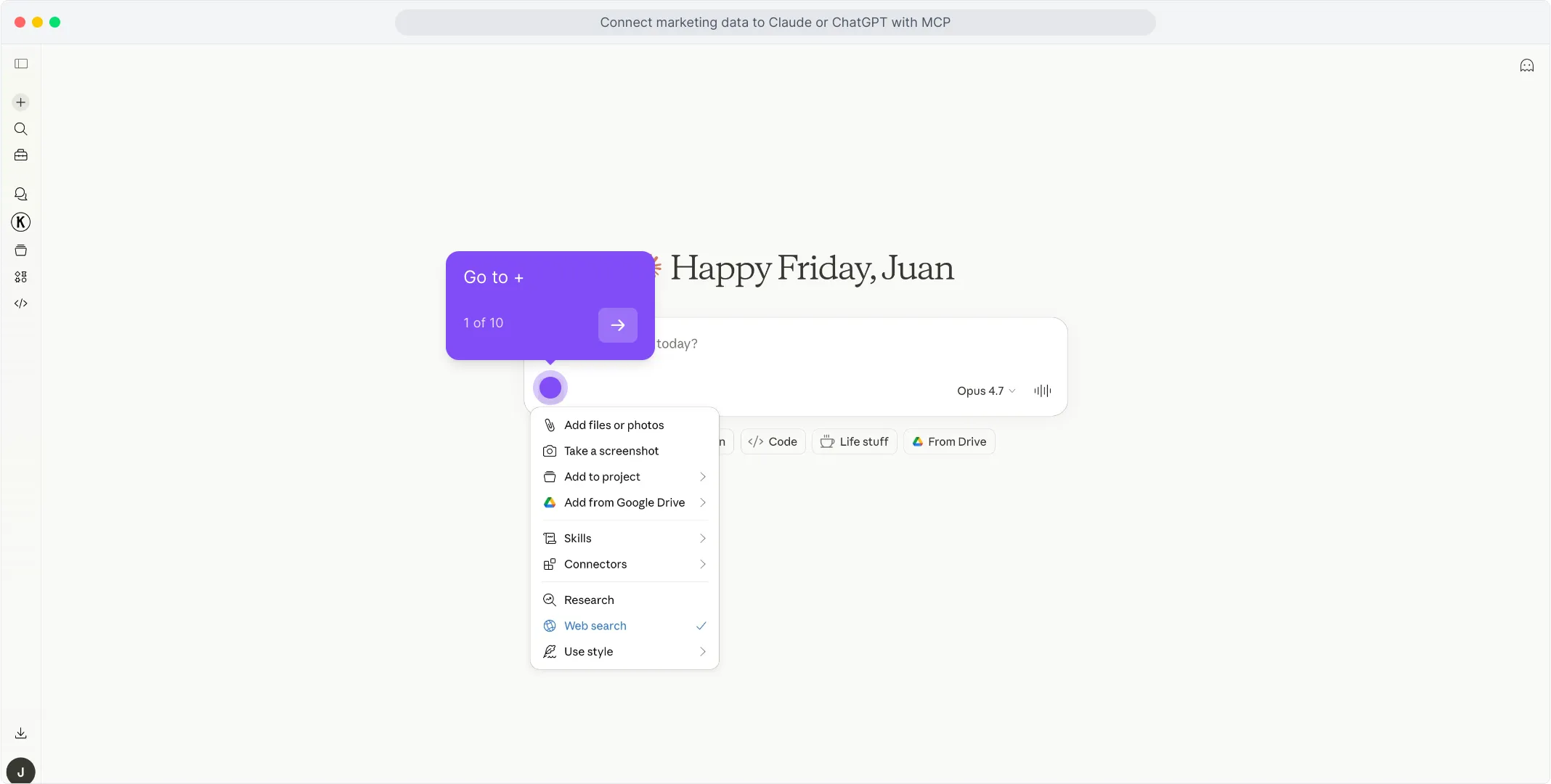
- In Claude, click + → Connectors → Manage Connectors → Add custom connector, name it Porter, paste
https://mcp.portermetrics.com/mcp, then click Add and authenticate with Google.
That’s it, you’re connected. Porter’s free plan covers unlimited Meta ad accounts with no usage limits on Claude’s free plan. No credit card required.
What makes Porter different:
- Read + write, safely. Porter’s MCP lets you adjust budgets, manage campaigns and upload creatives (including videos and carousels) from inside Claude, through deterministic code components. Nothing hallucinates, and built-in rate limiting keeps your ad account safe from bans.
- 200+ Meta Ads metrics and dimensions, and the only MCP that includes attribution coverage in the same connection.
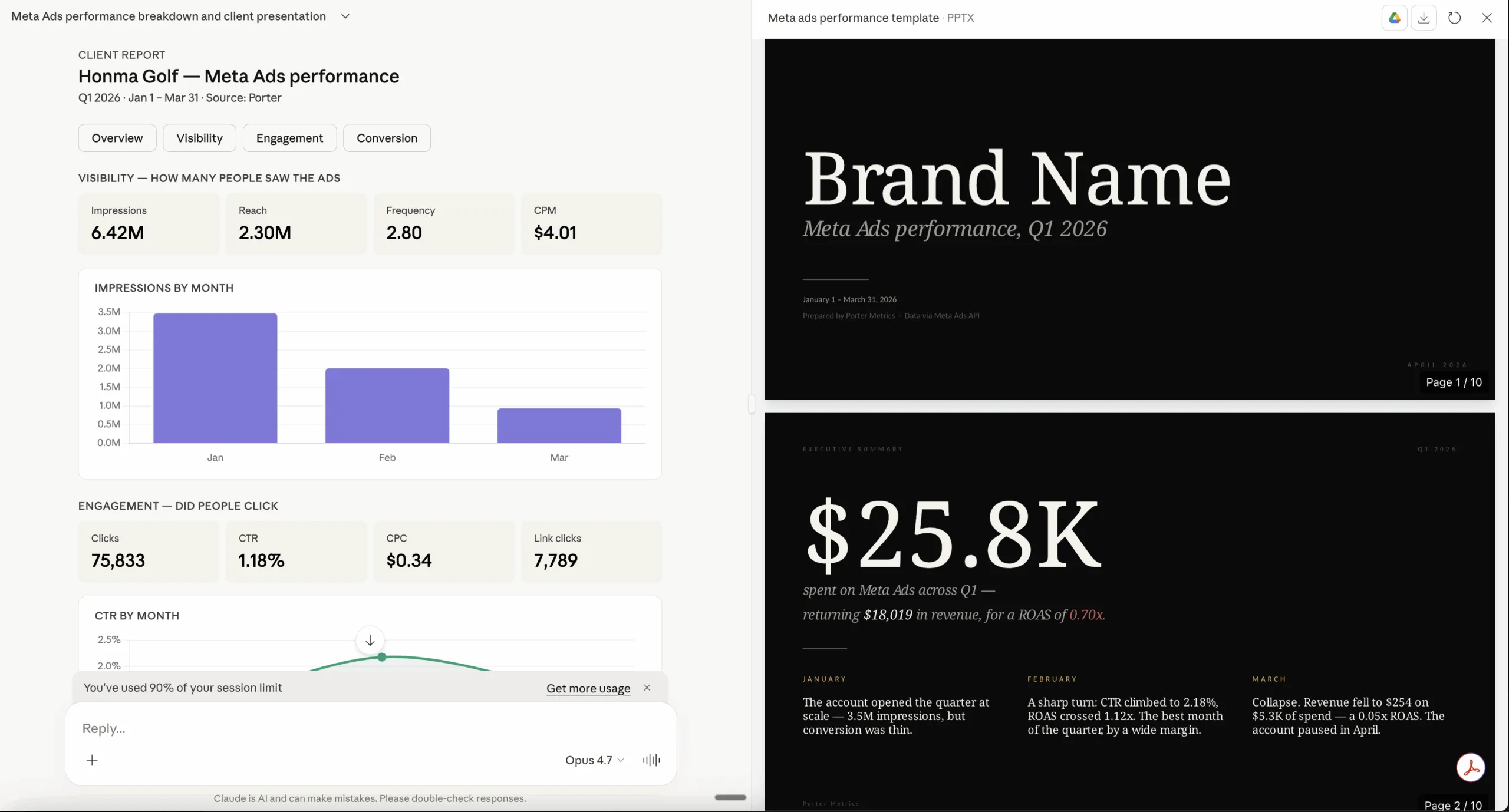
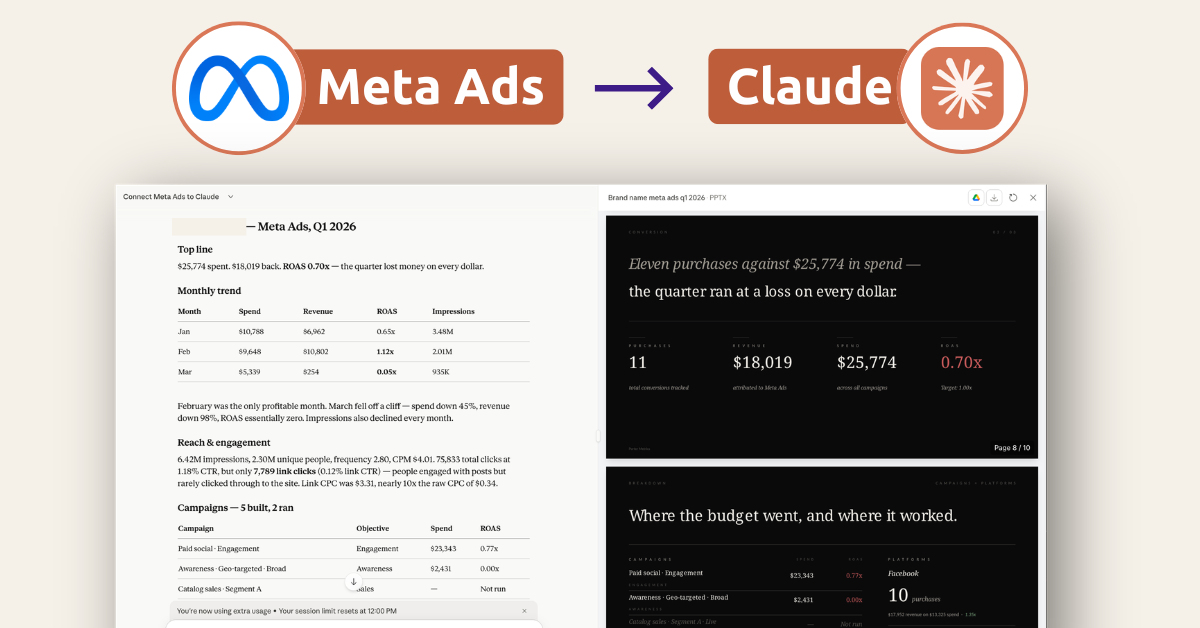
- Universal Meta Ads MCP. Build hosted, white label dashboards and client portals for your clients, track competitor ads with creative analysis that shows you the hooks, angles and formats winning in your niche, and validate ideas with Google Trends and keyword data. Your whole Meta Ads operation runs from one chat.
Prerequisites
- A Porter Metrics account with your Meta Ads account connected (free tier is enough to try it end-to-end)
- A Claude account — the free plan works for Claude Web; a Pro subscription is needed for Claude Code and Desktop MCP features
- Admin or standard access to the Meta Ads account(s) you want to connect
Connect Meta Ads to Claude with the Porter Metrics MCP
For this tutorial we’re going with the MCP method. Here’s a quick explainer of what MCP is and why it’s the best path for Meta Ads.
MCP (Model Context Protocol) is the open standard that lets AI tools like Claude, ChatGPT, Claude Code and others access and use external APIs — the things that make tools like Meta Ads work under the hood. Instead of building a custom integration for every AI tool you use, you install one MCP and every compatible AI gets access to the same data.
Four reasons MCP wins for Meta Ads:
The full setup takes under 5 minutes and breaks into three moves: connect Meta Ads to Porter, point Claude at the Porter MCP, and ask your first question.
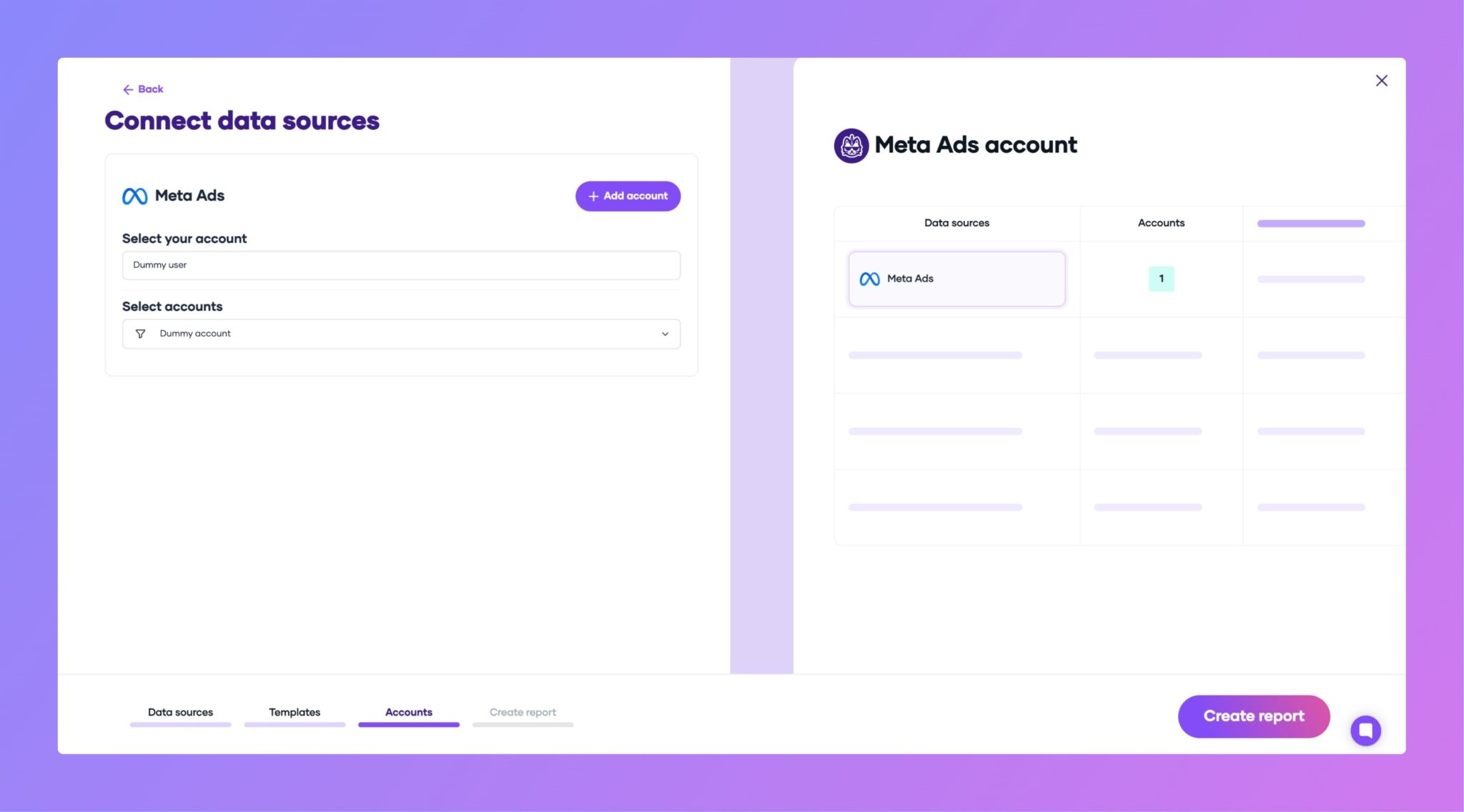
1. Connect your Meta Ads data to Porter
Porter sits between Meta’s Marketing API and Claude. It handles OAuth, rate limiting, pagination and all the plumbing so Claude only ever sees clean, structured data.

2. Connect the MCP to Claude
Porter’s MCP URL is what you paste into Claude: https://mcp.portermetrics.com/mcp. Once added, Claude can query Meta Ads data on demand in any conversation.
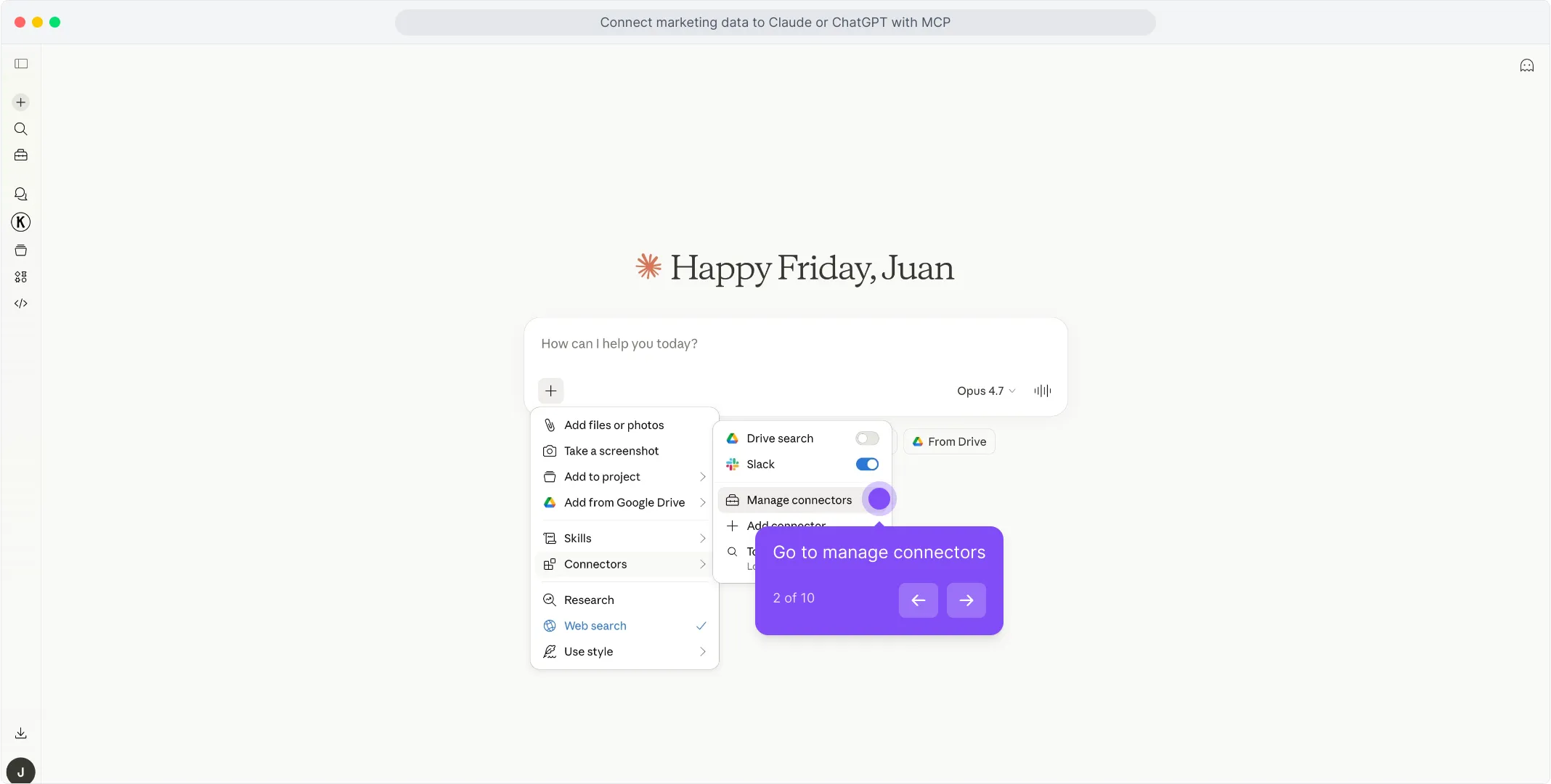
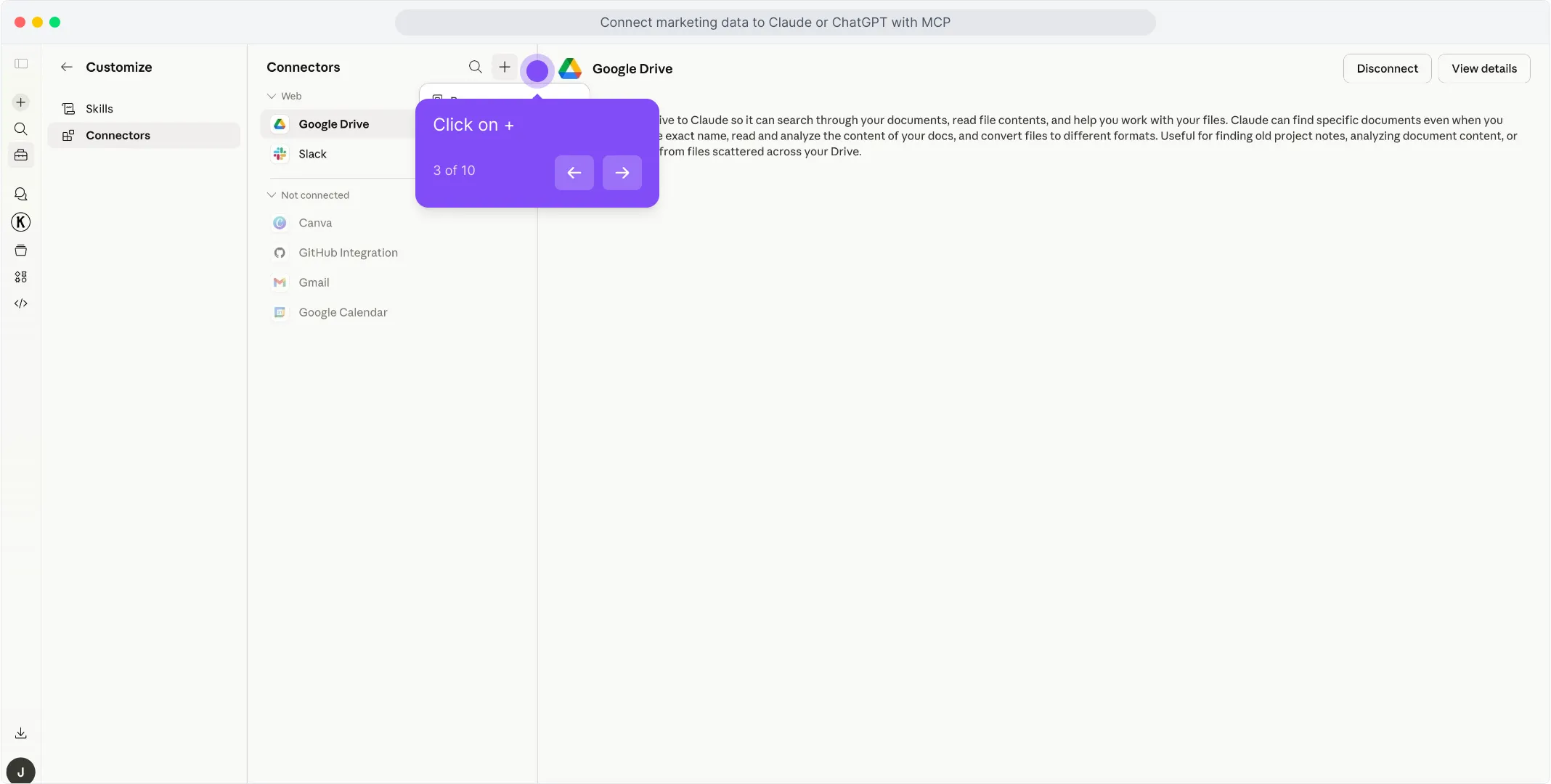
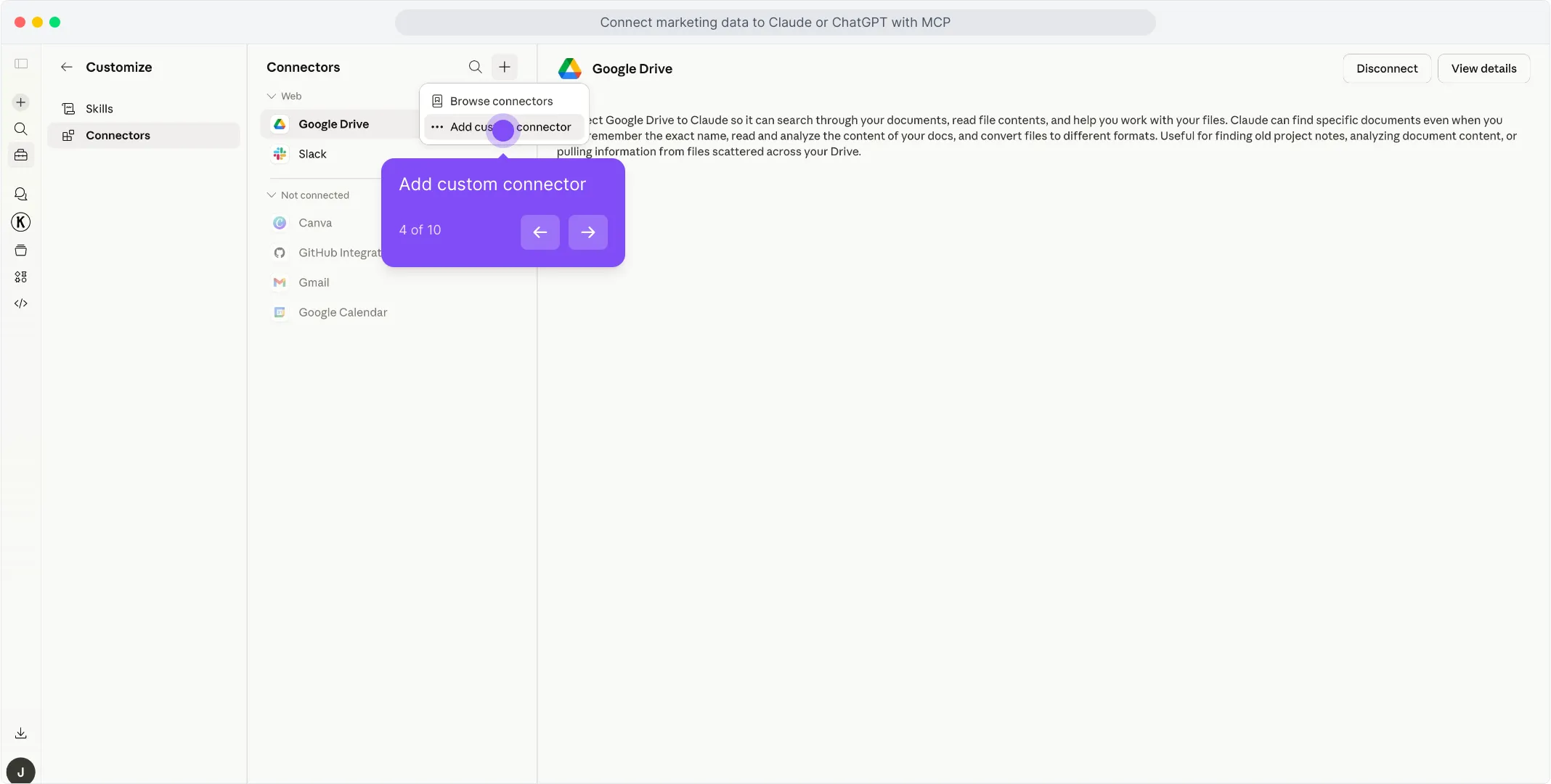
Porter in the first field to name the connector.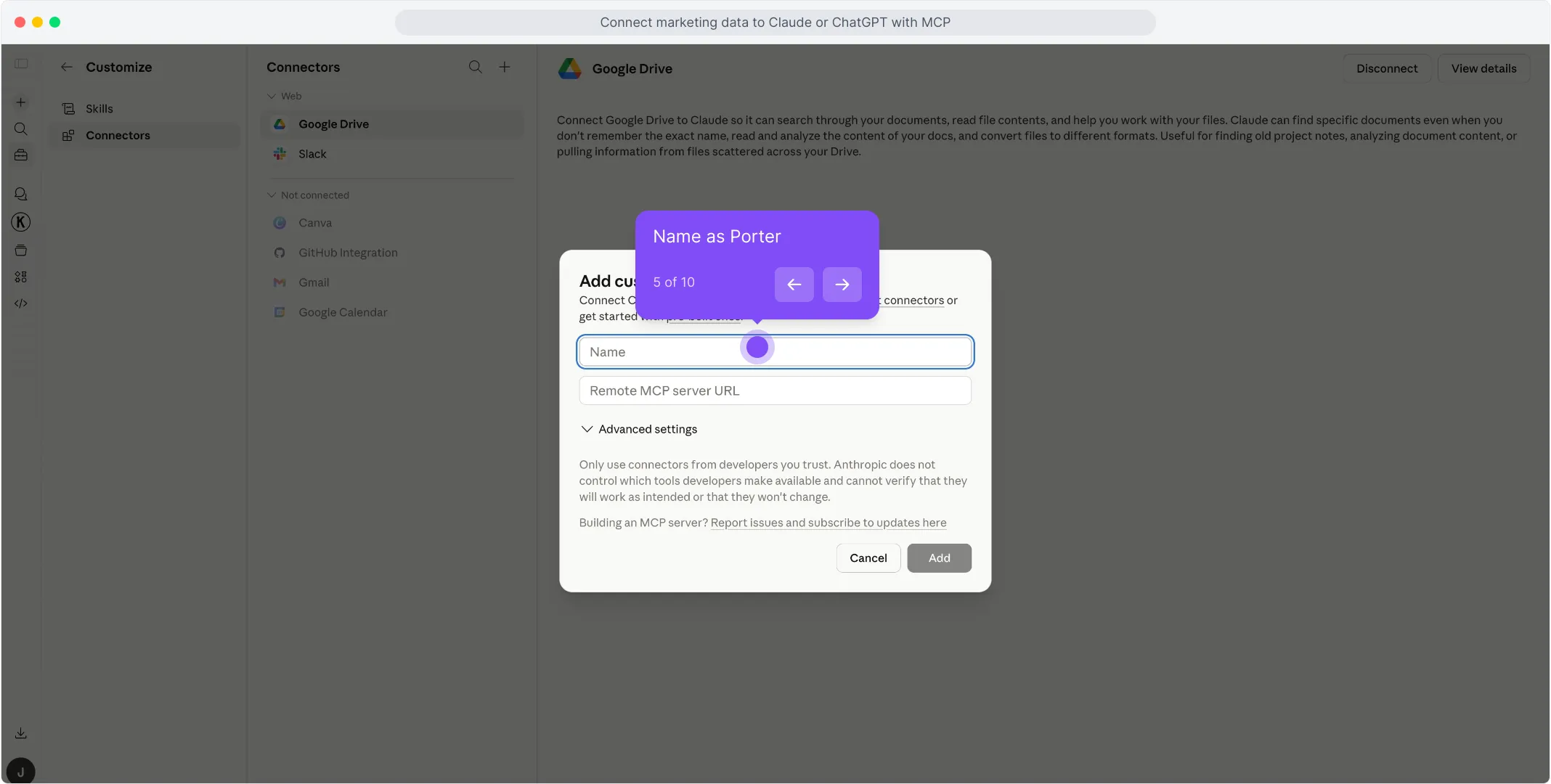
https://mcp.portermetrics.com/mcp. Leave the advanced settings alone.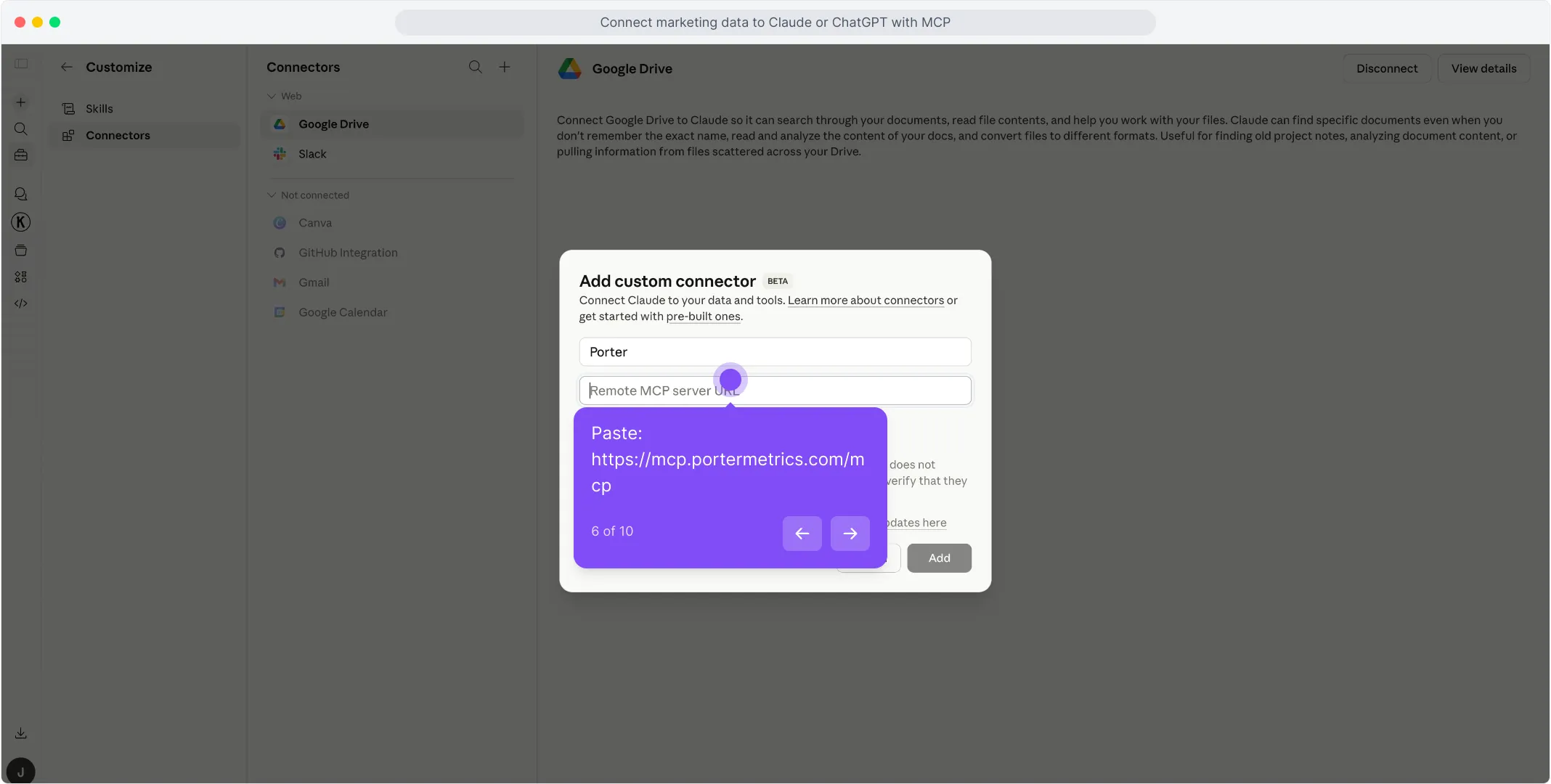
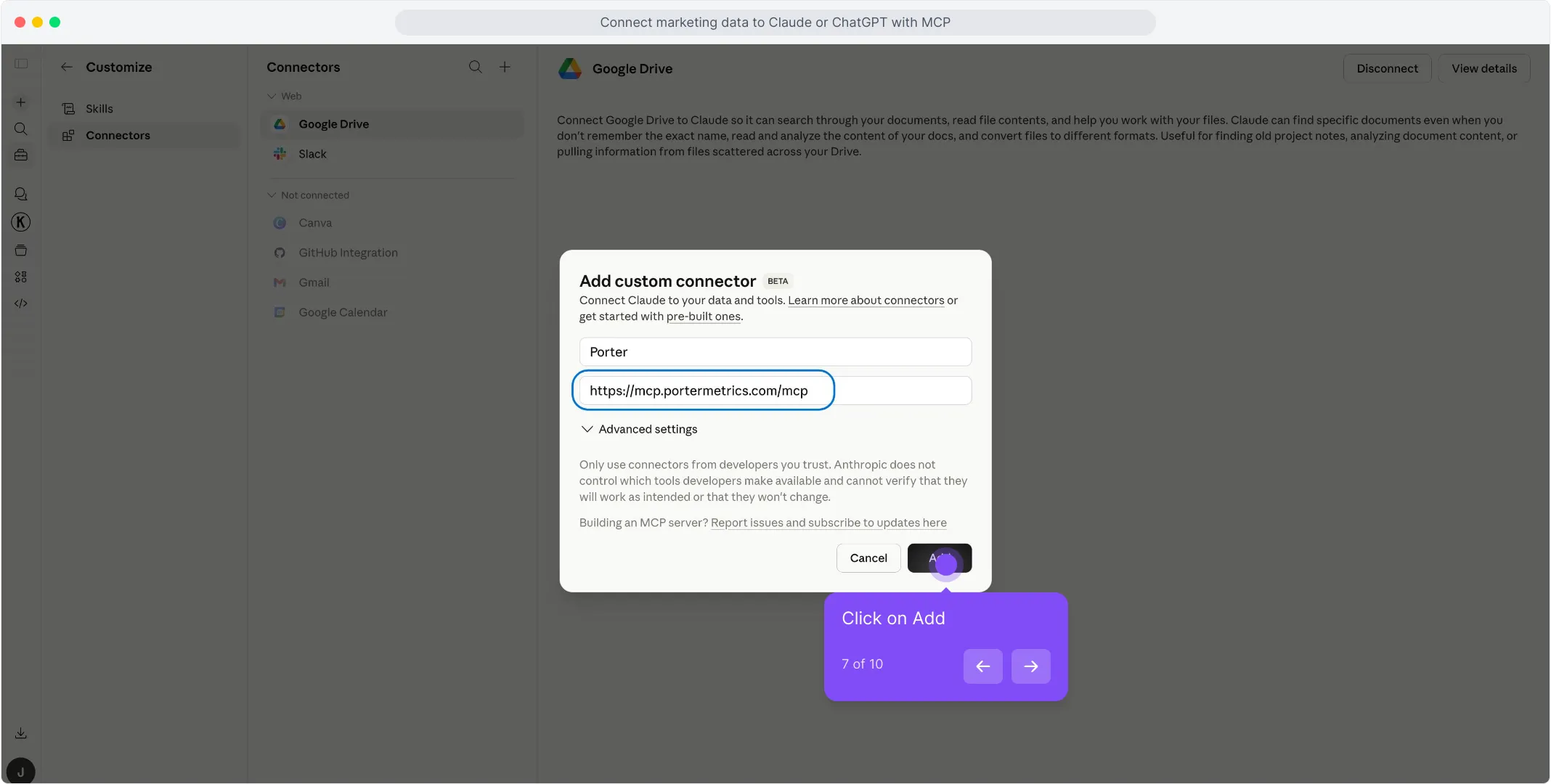
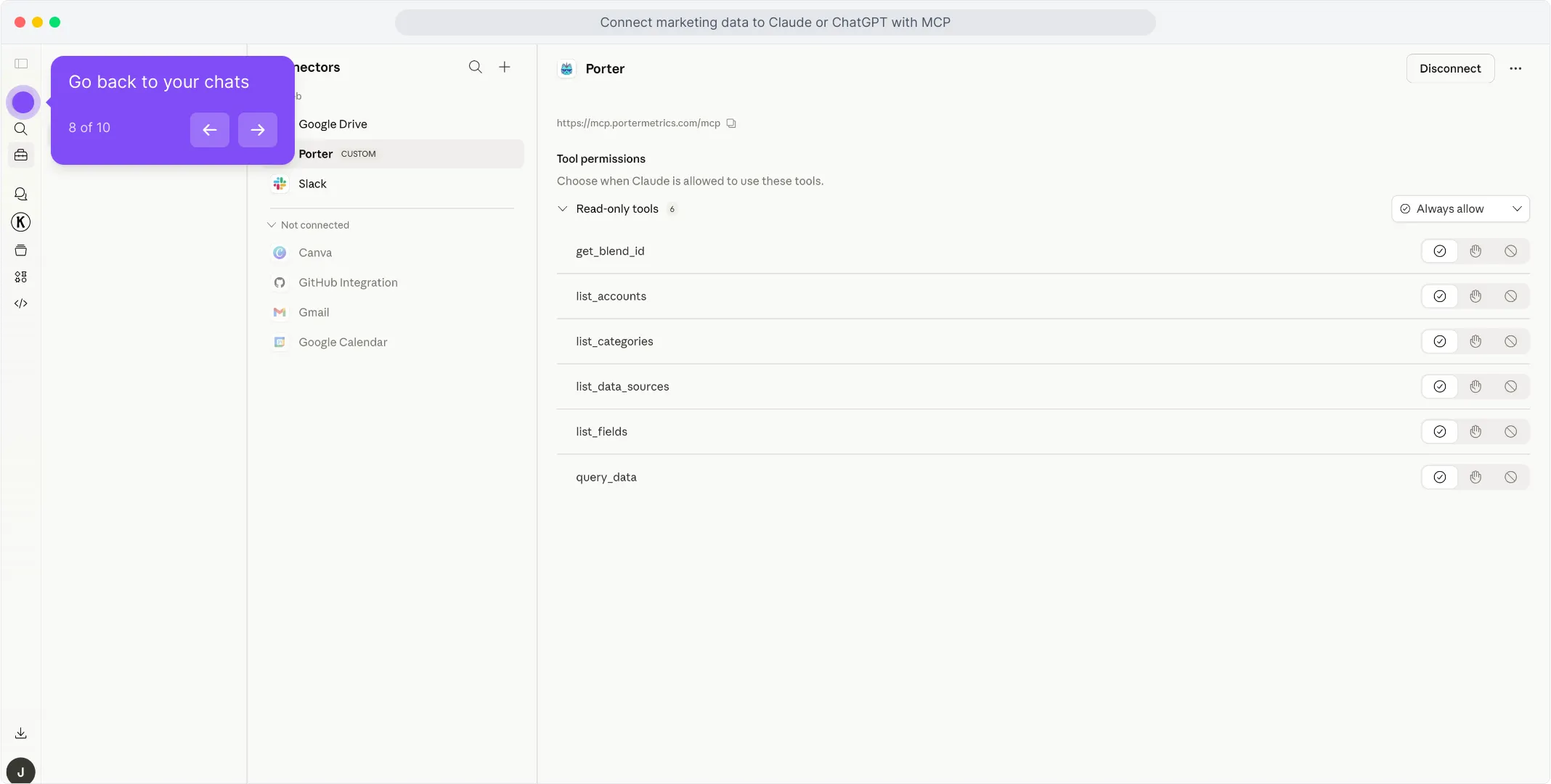
For a fuller walkthrough with screenshots at every step, see the Porter MCP tutorial.
3. Start asking questions, building dashboards, and automating ad management
With Porter connected, open a new Claude chat and ask anything about your Meta Ads in plain English. Claude calls Porter behind the scenes, pulls live data from Meta, and answers with tables, charts, or summaries.
Try one of these to verify the setup is working:
For a full catalogue of copy-paste prompts organized by job (campaign management, budgets, creative uploads, UTMs, performance, reporting, agencies, e-commerce, cross-channel), jump to the prompts section below.
Alternative ways to connect Meta Ads to Claude
Porter MCP is the path we just walked through and the one we recommend for most marketers. It is not the only way to get Meta Ads data in front of Claude, though. The most common alternatives are Meta’s official Ads MCP, a live Google Sheets bridge or CSV upload, BigQuery for scale, and Meta’s own agentic stack through Manus AI. Each has trade-offs, so pick the one that fits how your team already works.
Via Meta’s official Ads MCP
Meta launched its own MCP in open beta in April 2026, and it is quickly becoming the most common way to connect Meta Ads to an AI assistant. Add https://mcp.facebook.com/ads as a custom connector in Claude, sign in with your Meta account, and you get 29 official tools for campaign management, product catalogs, and performance insights. Authentication runs directly between you and Meta, it is free during the beta, and any campaign it creates starts paused by default.
The nuances: not every account has access yet, since Meta is rolling the beta out gradually, and pricing after the beta is not announced. It covers Meta data only, with no blending with Google Ads, GA4, Shopify, Sheets, or BigQuery, and no hosted dashboards or client portals. There is also no multi-account setup: agencies managing several clients work one account at a time.
Keep in mind that an MCP wrapped directly around the API is sometimes not enough. It cannot see your creatives: the tools read text fields only, no images or video, so it cannot tell you which hooks or visuals are winning. Uploading videos and carousels often fails because those steps need extra infrastructure. Access tokens expire after about 60 days and do not refresh on their own, so tools quietly stop returning data until you reconnect. And budgets deserve a double check when the account currency is different from yours, since a dollars to pesos mix up can set spend very wrong.
Some metrics are also missing or inconsistent: users report cost per add to cart and custom conversions absent, and attribution window settings ignored in places. A Meta Ads expert friend summed it up for us: it is useful, but you need to know the platform well to spot what is off, and you end up writing your own instructions file so the AI does not guess. Porter MCP covers this out of the box: creative analysis included, uploads handled, tokens that do not expire, multi account and dashboards built in, on top of the same Meta data.
Via Google Sheets (live Sheet or manual CSV)
If your team already works in Google Sheets, or you want to double check the data before giving it to AI, feed Meta Ads into a Sheet and let Claude read the Sheet. You can automate the Meta Ads to Sheets pipeline with Porter so it refreshes daily, or export a CSV from Ads Manager for one-off analysis.
A Sheet also gives you something the API path does not: you can edit the data and blend it with your own numbers, like goals and budgets. It works in the other direction too: connect that Sheet to Porter MCP and it blends your Sheet with live Meta Ads data automatically, so you can track budget versus actual spend, monitor pacing, or compare your naming conventions against what is actually implemented in the account.
The trade-off to know. A Sheet does not make Claude hallucinate more or less, the data is the same either way. The difference is how the math gets done. Porter MCP runs deterministic queries, so totals and averages arrive already calculated and exact. With a Sheet, Claude does the aggregation itself, so double check the math on very large exports. The upside of Sheets is speed: for big date ranges or historical analysis, a pre-built Sheet is faster than live API calls. One more limit to know: the Sheets path is for analysis only. Claude can read the data, but it cannot pause campaigns, change budgets, or automate tasks from a Sheet.
Via Google BigQuery (for scale)
Most people overlook this path, but it is the one that saves you when your Meta Ads account gets serious. A single large advertiser, or an agency managing 10+ accounts, will hit Meta’s API rate limits and latency problems on big pulls. Claude will tell you the query is taking too long or timing out.
BigQuery fixes that. Porter loads your Meta Ads data into BigQuery on a schedule, included in the free plan, and you connect BigQuery to Claude through a BigQuery MCP or Claude Code. BigQuery aggregates the raw data into small summary tables and Claude only queries those, so answers stay fast no matter how big the account gets.
BigQuery is also the best place to blend beyond marketing: combine Meta Ads with product analytics, internal usage data, or web traffic in the same warehouse. Porter MCP reads and writes BigQuery tables, so Claude can create the tables and blend the data for you, ready to query. Like Sheets, this path is for analysis and reporting only: managing campaigns and automating tasks still happens through an MCP with write access.
Via Manus AI (still works, but in retreat)
Manus AI became part of Meta in December 2025, when Meta acquired the Singapore-based agentic AI startup for more than $2 billion. The deal did not survive: in April 2026 China’s regulator ordered the acquisition unwound, and in June 2026 Meta cut Manus off from its internal systems and began sunsetting it. Manus still works inside Meta Ads Manager today as an AI work partner that analyzes campaigns, generates reports, and runs competitor research, but its future inside Meta is uncertain.
Two things to understand. First, Manus is not a direct Claude connection: you are using Meta’s chosen models, not chatting with Claude. Second, with the acquisition reversed, the likely path is Manus moving back to open standards like MCP for these same use cases, which means anything you build on the native integration may need to move later.
Connecting Meta Ads to Claude Code
Most marketers lump Claude and Claude Code together and miss the biggest advantage of the entire MCP ecosystem. They’re not the same tool — and the difference matters enormously once you start working with Meta Ads data seriously.
Claude is a chat interface. You ask a question, Claude pulls live data through the MCP, answers, maybe builds a quick dashboard inside the conversation. Great for one-off analysis. The problem: everything is ephemeral. Want to refresh the dashboard tomorrow? You regenerate it from scratch. Want the same report every Monday? You re-ask the question every Monday.
Claude Code is Claude running inside your computer’s terminal. Because it has access to your filesystem, runtime, and other developer tools, it doesn’t just answer questions — it can build real software. Persistent scripts, scheduled routines, HTML apps, internal dashboards, integrations that run 24/7 without your input. Once it’s connected to Porter’s MCP for Meta Ads, a whole category of work becomes possible.
What Claude Code unlocks that Claude alone cannot
This is where the MCP ecosystem pays off most. Because Claude Code can combine Porter’s MCP with other MCPs — Firecrawl for web scraping, Airtable for structured data, Notion for wikis, Vercel for deployment, Slack and Gmail for delivery — you’re no longer querying data. You’re building tools.
The common thread: Claude gives you answers. Claude Code gives you systems. For one-off questions Claude is faster. For anything you want to run more than once, or for anything that needs to persist beyond a chat session, Claude Code is the better tool.
And because the MCP spec is open, everything you build in Claude Code today will still work in Cursor, Antigravity, Lovable, Vercel v0, or whatever AI tool you adopt next year. That portability is the real value of picking the MCP path.
Use cases: what you can actually do once Meta Ads is connected to Claude
Getting the connection right is half the battle. The real value shows up in what you do next. These are the use cases Porter users build around their Meta Ads accounts, from full campaign management to client facing reporting.
1. Manage campaigns from the chat
The biggest shift from a dashboard: Claude does not just read your account, it operates it. Create campaigns, pause and activate ad sets, and adjust targeting through Porter’s deterministic components, with built in rate limiting so your account stays safe. One habit to keep for every prompt that changes the account: ask Claude to show the change and wait for your confirmation.
2. Automate UTMs and naming conventions
Dynamic UTM parameters in Meta look convenient, but they can break attribution: when an ad uses a dynamic value like placement, GA4 and attribution tools often record the literal text instead of the actual placement. The reliable fix is writing real UTMs into each ad, which nobody does manually at scale. With the MCP it is automated: Claude writes the actual UTMs into every ad and validates them against your naming convention sheet, so your Meta, GA4, and attribution numbers finally match.
3. Manage budgets and pacing
Budget management is where chat beats dashboards: you spot the problem and fix it in the same conversation. Keep your budget targets in a Google Sheet and let Claude compare plan versus actual spend. One caution from earlier in this article: double check amounts when the account currency is different from yours.
4. Upload creatives, videos and carousels
Uploads are the step where raw API connections usually fail, because videos and carousels need extra infrastructure. Porter handles that part, so Claude can take files from your computer or Google Drive and turn them into ads that follow your naming conventions.
5. Reporting: questions, dashboards, alerts and client decks
Everything analysis related lives here, and it is still the daily bread. Ask questions in plain English, blend Meta Ads with revenue sources like Stripe, HubSpot, or Shopify for real attribution, schedule alerts that ping you on Slack or Gmail only when something needs attention, and turn live data into hosted dashboards or client decks.
Meta Ads fields and metrics you can query with Claude
Before you start writing prompts, it helps to know what data is actually available. Porter MCP gives Claude access to 200+ Meta Ads metrics across every reporting level, plus breakdowns by audience, placement, device, and geography. And the same MCP URL also unlocks 25+ other sources — so Claude can blend Meta Ads with Google Ads, GA4, Shopify, HubSpot and more in a single prompt.
 Mobile app achievements unlockedLanding page viewsLanding page views (1 day click)Landing page views (1d_click + 1d_view)Landing page views (28 days click)Landing page views (7 days click)Page engagementPage engagement (1 day click)Actions (All)Actions (All) (1d_click + 1d_view)Actions (Without customs)Actions (Without customs) (1d_click + 1d_view)Attribution settingAuction BidAuction competitivenessCanvas avg view percentCost per three-second video viewCost per any action (CPA)Cost per check-inCost per credit spend actionCost per desktop app engagementCost per desktop app story engagementCost per desktop app useCost per estimated ad recall lift (people)Actions (All) (1 day click)Actions (All) (28 days click)Actions (All) (7 days click)Actions (Without customs) (1 day click)Actions (Without customs) (28 days click)Actions (Without customs) (7 days click)App custom event (1 day click)App custom event (28 days click)Carousel card nameAd bid infoCall to action typeAd configured statusAd creative IDAd creative nameAd preview URL: desktop feedDestination URLAd format assetAgeAd text IDAd textCall to action asset IDCall to action asset nameCountry codeCountry iconAdset edit linkAdset IDAdset nameAdset statusAdset budget remainingAdset configured statusAdset daily budgetAdset end dateApp custom eventApp custom event (1d_click + 1d_view)Mobile app adds of payment infoMobile app adds of payment info (1d_click + 1d_view)Mobile app add to wishlistMobile app content viewsMobile app levels completedMobile app rating submittedAccount currencyAccount edit linkAccount IDAccount nameAccount statusAccount amount spentAccount balanceBusiness cityCampaign budget remainingCampaign configured statusCampaign daily budgetCampaign edit linkCampaign end date & timeCampaign IDIs Campaign using SKAdNetworkCampaign lifetime budgetDateDay of week (Mon – Sun)MonthQuarterWeekWeek (Mon-Sun)YearMonth and yearAction typeAction type (with custom conv. IDs)Age targetingBuying typeConversion rate rankingCreated timeEngagement rate rankingGender targetingFrequencyFull view impressionsFull view reachImpressionsReachEngagement Rate RankingConversion Rate RankingQuality rankingMobile apps content view (shared item)Omni content view (shared item)Reach estimate: users lower boundReach estimate: users upper boundEnd dateReal timeStart datePlatform position
Prompts you can copy-paste today
Once your Meta Ads account is connected, these are the prompts Porter users run most often, organized by job: manage the account, control budgets, keep tracking clean, analyze performance, and report. Copy, paste, run. Every prompt that changes the account has the safety habit built in: review first, then apply.
Campaign management
Budgets and pacing
Creative uploads
UTM and naming hygiene
Performance checks
Creative fatigue
Client reporting
Prompts for agencies managing multiple clients
If you run Meta Ads for 5+ brands, these prompts replace most of your weekly data wrangling:
Prompts for e-commerce teams
When you combine Meta Ads data with Shopify revenue in one prompt, Claude answers questions that used to require a full BI stack:
Cross-channel prompts (Meta + Google + GA4 + Shopify)
Meta Ads alone only tells part of the story. Because the same Porter MCP URL connects to Google Ads, GA4, Shopify, HubSpot and 20+ more sources, Claude can run true cross-channel analysis in a single prompt, including B2B pipeline questions against your CRM.
How to use Claude Code for Meta Ads without getting banned
In early 2026, a marketer posted in r/FacebookAds that Claude Code got their account permanently banned. The post hit 70+ comments and is still the #1 organic result on Google for “claude code meta ads”. In their own words: “If you use Claude Code to day-trade Meta ads, you’ll get banned.”
We’ve seen it happen to our own clients. Agencies with six-figure monthly spend have had ad accounts permanently disabled over a single weekend of automated experimentation. The cost isn’t a Claude subscription — it’s the ad account, the pixel history, the learning phase, and sometimes hundreds of thousands of dollars in frozen spend. This section is the most important one in the article.
The two behaviors that actually get accounts banned
After reviewing Meta’s official enforcement documentation and the 17 SaaS platforms that publish ads through the Marketing API (Smartly.io, Madgicx, Birch/Revealbot, Skai, Sprinklr and others), two patterns come up again and again.
1. Programmatic write access at scale. Read API access is universally safe — every BI tool (Supermetrics, Funnel.io, Fivetran) operates this way, and so do Porter MCP’s read tools. Porter MCP’s write actions use the same safety logic: deterministic code components, not AI-generated calls. The risk appears the moment unguarded write permissions (ads_management, pages_manage_ads) with automation that runs faster than a human would. Budget changes every 5 minutes, campaign duplication loops, bulk ad uploads with no delay — Meta’s systems flag those as bot behavior even if your ad content is perfectly compliant. Meta’s Platform Terms and Marketing API Rate Limiting docs spell out the caps explicitly — and going past them is the fastest way to lose an ad account.
2. Browser automation on Ads Manager. Tools that drive the Meta Ads Manager UI with an AI agent — Claude Code in browser-automation mode, headless browsers, RPA scripts — are even riskier than write APIs. Meta treats them as “unauthorized automated access” because you’re bypassing the API entirely and impersonating a human user inside the interface. The Meta Platform Policies, specifically the section on circumventing systems, prohibit this. Unlike rate-limited API calls, there’s no published “safe threshold” for UI automation. Any significant volume of automated clicks inside Ads Manager can result in a ban.
Both behaviors — write-at-scale via the API, and browser automation on the UI — trigger the same automated enforcement. If you want to use Claude for Meta Ads safely, stay on the read side for analysis, and only cross into write through a reviewed, rate-aware, gradual setup like the protocol below.
The 5-rule safety protocol
Based on Meta’s documented rate limits and the behaviors that have actually gotten accounts banned — not guesswork:
- Do not “day-trade” your ads. Meta’s official limit is 4 budget changes per ad set per hour, and 10 spend-cap changes per account per day. Blowing past those triggers automated enforcement even when your content is compliant.
- Review before you apply. Run scripts in read mode first, then enable write actions once you’ve verified the analysis. Porter MCP requires explicit confirmation for every write action — no campaign change runs until you approve it.
- Never automate the Ads Manager UI. No Claude Code browser automation, no headless Chrome, no RPA on meta.com. Use the Marketing API instead — that’s the only path Meta considers legitimate.
- Be gradual. Don’t scale a budget more than 20% in a single move. Meta’s 2026 systems flag abrupt spend spikes as suspicious behavior, separately from content review.
- One account at a time. If you’re automating ten accounts, run them sequentially with 15+ minute delays, not in parallel. Parallel burst API calls are the #1 trigger community members cite when their MCP setups got them banned.
What Porter MCP does differently: it enforces these rules at the platform level. Deterministic code components for every action — no AI-generated API calls. Explicit confirmation for any write. Built-in rate limiting with exponential backoff. Per-account call batching. No browser automation ever. That’s the behavior Meta’s automated systems reward.
Frequently asked questions
Ready to chat with your Meta Ads?
Open Claude, add the Porter connector, and ask your first question. If you don’t have Porter yet, create your free account and connect your Meta Ads account. You’ll be chatting with your campaigns in under five minutes.
rocket_launchUse Porter for freeopen_in_newOpen Claude