





Connecting an MCP does not get you banned. Four specific behaviours do.
First, the one that is not on the list because it is not a risk, it is a guarantee: letting an AI drive your browser and click inside Ads Manager. Meta does not allow software to impersonate a person in its interface, so that route is a policy breach before anything else happens. Everything below assumes you are talking to the Marketing API.
- An app that never passed App Review — a cloned repo with a personal token. The official server retires this one.
- Writes fired faster than a human could. Fires on the official server too.
- AI creative pushed without the label — a separate enforcement system.
- The retry loop after the first error — the error rate itself becomes the signal.
Read-only access cannot trigger three of the four. If your agent only reads, the surface Meta enforces against is mostly unavailable to it — and that decision costs nothing.
Seeing is_ads_mcp_enabled: false? That is a rollout gate, not a ban. A ban has a message, a gate has a flag, an expired token has silence.
The short answer
No. Using an MCP does not disable an ad account. Meta’s Marketing API is the sanctioned route for programmatic access, and an MCP server is a client on it. Using a sanctioned route is not a violation.
What gets accounts disabled is the call pattern an unsupervised agent makes through it: write access with no human in the loop, no pacing, and an immediate retry on every error. Meta’s enforcement is behaviour-based, not tool-based — it does not know or care that Claude was on the other end.
One correction to the thing most articles imply: Meta’s official server does not end the risk. It retires exactly one of the four triggers below. The other three fire the same on the first-party path as on any other.
What Meta actually says about bans
This question has a first-party answer, and it is easy to miss because it sits in the Business Help Center rather than in anyone’s blog post. Meta’s own words:
Worth taking at face value: this is the platform that does the enforcing. It is also worth reading precisely. Meta says a ban is unlikely for connecting. It does not say every workflow you build on top is safe, and it does not exempt anyone from standard Marketing API rate limits or abuse controls.
When an account does get disabled, the notice cites Meta’s Advertising Standards on Account Integrity, and the wording is near-identical across reported cases:
So if connecting is safe, how did the most-linked case on this topic end in a permanent disable?
The case everyone links to — and what actually happened
Search this topic and the first result is a Reddit thread titled “Claude Code got my Meta ads account permanently banned”, with 130+ comments. It is the origin story of the entire panic, and almost every article on this subject is downstream of it.
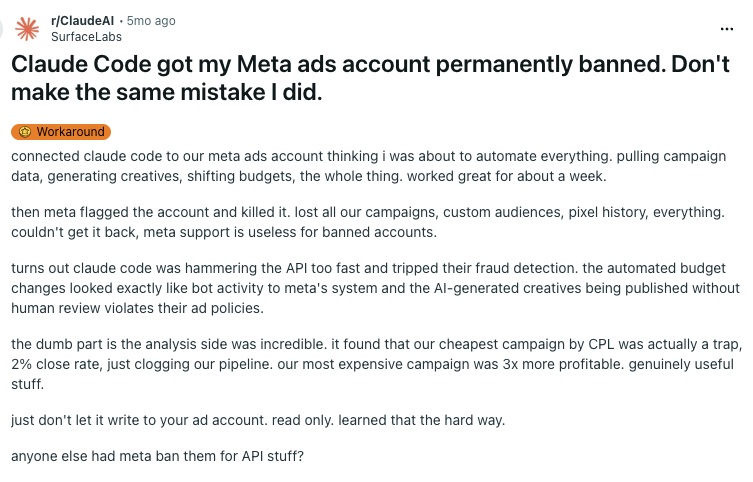
The thread’s own top comment is the most accurate diagnosis published anywhere on this topic: the account gave an LLM ungated write access to a production API. Not a protocol problem. A permissions problem.
Two things are true at once, and no other page on this query says both: Meta is right that connecting is safe, and the person in that thread really did lose their account. The gap between those two facts is the four triggers below.
The four things that actually disable an account
These are independent. An account can be clean on three and disabled by the fourth. Only the first is retired by moving to Meta’s official server.
1. An app that never passed App Review
A cloned GitHub repo calling the Marketing API with a personal access token — no registered app, no OAuth, no rate limiting. This is the most-cited cause in the field, and it is the one the official server removes outright.
There is a second-order version worth knowing: several third-party MCPs routed every customer’s calls through one shared developer app. When that app got flagged, every account behind it went with it.
2. Writes fired faster than a human could
Launching a hundred campaigns in two minutes. Budget changes at a cadence no person could produce. Meta’s systems see a burst of API calls that no human could generate manually and flag it as abnormal.
This one fires on the official server too. Meta’s May 2026 rate-limit update set explicit ceilings — four ad-set budget changes per hour, ten spending-limit changes per day — and they apply whatever client you connect with.
3. AI creative pushed without the label
The trigger with nothing to do with MCP and everything to do with what your agent generates. Meta requires advertisers to disclose AI-generated or AI-modified creative, and undisclosed AI content is a meaningful share of ad rejections.
The line that matters: if AI generated the subject of the image, it needs the label. If AI only assisted in editing a real subject — colour, crop, light — it does not. Apply the label at the generation step, not at the push step, so nothing reaches the API unlabelled.
The mechanism is a ladder, not a switch. An ad that violates a policy earns a strike — one is nothing. The damage comes from publishing at scale with nobody reviewing what the agent created: strikes accumulate, the account gets restricted, and restriction is what precedes a ban. It is not the automated creation that costs you the account. It is that you gave the agent free rein and never checked what it was putting live.
4. The retry loop after the first error
The compounding one. The agent hits a cap, gets an error, retries immediately, gets the error again — and the error rate itself becomes the signal. As the thread put it, Claude Code was hammering the API too fast and tripped fraud detection.
Meta’s own qualification threshold gives you the shape of what it considers healthy: 500+ Marketing API calls over 15 days with an error rate under 15%. And when Meta does block you, the refusal itself tells you how long the block lasts. Waiting that out is the whole difference between a throttle and a flag.
This is the trigger a well-built MCP is designed to absorb. Pointed straight at the Marketing API, an agent does not know the correct sequence for each operation, so it guesses, fails, and guesses again — each attempt adding to the error rate. An MCP ships a defined tool per action, so there is far less to guess at, and when it approaches a limit it waits and retries with judgment instead of hammering the door.
The limits that keep you inside them
Triggers 2 and 4 are both defined by numbers. Here they are in one place, because they are currently scattered across four different articles that each hold a subset.
The way Meta counts is simple: every request costs points. Reading a report costs one; changing something costs three. You get a budget of points per hour, and on top of that a few hard caps on specific changes that no amount of budget buys you past.
error 613 is how you find out — that is Meta’s code for “you have changed this budget too many times this hour”.X-Business-Use-Case-Usage for the quota gauge and estimated_time_to_regain_access for the block duration, both in Meta’s Marketing API documentation. Using a managed MCP? None of this is yours to handle — but it is worth asking your provider whether they pace against the gauge and back off on errors, because not all of them do.A setup that cannot trigger any of them
Each item here exists to retire a specific trigger. That mapping is the point — a checklist without it is just advice.
Porter’s MCP is the managed version of this list, and three of its defaults map directly onto the triggers above:
PAUSED status. Creating something already live is not a supported path — activation is a separate, explicit step, in reverse order, after a human has reviewed. Retires trigger 3.code 10 / subcode 2859015). Porter queues them one at a time per account, so the burst pattern never forms. Retires trigger 2.The agent also works from a defined tool per operation rather than guessing at the API — a schema per action, a legal-combination check for objective, optimization goal and billing event, and an allowlist for call-to-action values. That is what keeps the error rate down, and the error rate is what trigger 4 is made of.
And the line worth keeping whichever route you pick: read-only reaches all of them. An agent that cannot write cannot hit a change cap, cannot push unlabelled creative, and cannot loop on failed writes — no matter which server it is talking to.
Two practical differences against Meta’s own server. Creative upload works from your own machine — with the official connector you have to host each asset somewhere public and pass a URL first; with Porter you point at the file (up to 30 MB; above that a public URL is still the only path). And Porter reaches Google Ads, GA4, Klaviyo, Shopify and 20+ other sources in the same connection, so cross-channel questions do not need a second setup. One URL: https://mcp.portermetrics.com/mcp.
“Not enabled” is not a ban — and two other false alarms
The most common scare on this topic is not a ban at all. Three things look like enforcement and are not:
is_ads_mcp_enabled: false — your ad account has not been included in Meta’s gradual rollout yet. It is a server-side gate, not a ban and not something you can configure your way out of. Meta has been enabling US-based and higher-spend accounts first, and accounts with prior policy flags may be delayed.redirect_uris are not registered for this client — the official server failing OAuth in Claude Code, before it ever returns an authorization URL. A client-registration bug with open issues against Claude Code. Connect from Claude web or desktop meanwhile.If your account is already disabled
Most people reading this arrived before the ban. If you arrived after, here is what is actually known — and what isn’t.
- Stop the automation before you appeal. An appeal filed while the pattern is still running re-triggers the signal that caused it.
- The appeal is an automated review in Account Quality. Reported outcomes describe near-identical denials with no obvious escalation path.
- Some things do not come back. Pixel history and custom audiences may be wiped permanently, even where the account is restored. Plan around that rather than waiting on it.
- What helps is a human with an escalation channel — an agency rep or Meta account manager. Reported reinstatements tend to go through one.
- What does not help: repeat appeals through the automated flow, or opening a new Business Manager on the same payment instrument.
Questions people ask before they connect
https://mcp.facebook.com/ads, launched April 29, 2026 as part of Meta ads AI connectors, alongside the Meta Ads CLI. It is free during the open beta.ads_mcp_management permission — if you manage data on behalf of other businesses, which includes most agencies.is_ads_mcp_enabled: false?Connect Meta Ads to AI without the risk
The safest version of everything on this page is a connection that reads by default, asks before it writes, and paces itself. That is what Porter’s MCP does — and it brings Google Ads, GA4, Klaviyo and Shopify along in the same connection.