







To connect Instagram Public Data to Claude via MCP: copy mcp.portermetrics.com/mcp, go to claude.ai, open Connectors → Manage connectors → Add custom connector, paste the URL, and sign in. From there, ask Claude anything about your Instagram Public Data public profiles and posts in plain English.
Once connected, you can automate your Instagram Public Data reporting and analysis — ask questions about your data, build dashboards, trigger alerts, or ship client-ready reports like the one below.
Prerequisites
- A Porter Metrics account with your Instagram Public Data account connected (free tier is enough to try it end-to-end)
- A Claude account — the free plan works for Claude Web; a Pro subscription is needed for Claude Code and Desktop MCP features
- Admin or standard access to the Instagram Public Data profiles you want to connect
Connect Instagram Public Data to Claude with MCP
For this tutorial we’re going with the MCP method. Here’s a quick explainer of what MCP is and why it’s the best path for Instagram Public Data.
MCP (Model Context Protocol) is the open standard that lets AI tools like Claude, ChatGPT, Claude Code and others access and use external APIs — the things that make tools like Instagram Public Data work under the hood. Instead of building a custom integration for every AI tool you use, you install one MCP and every compatible AI gets access to the same data.
Four reasons MCP wins for Instagram Public Data:
The full setup takes under 5 minutes and breaks into three moves: connect Instagram Public Data to Porter, point Claude at the Porter MCP, and ask your first question.
1. Connect your Instagram Public Data data to Porter
Porter sits between Meta’s Instagram Graph API and Claude. It handles OAuth, rate limiting, pagination and all the plumbing so Claude only ever sees clean, structured data.
Sign up for Porter. Create a free account at portermetrics.com. The free tier is enough to run this full workflow end-to-end.
Connect your Meta. In Porter, click Create → pick Claude as the destination → select Instagram Public Data as the source → sign in with Meta to grant access to your profiles.
Select your profiles. Choose the Instagram Public Data profiles you want Claude to query. When you select multiple profiles under a single connection, Porter automatically blends their data together so you can query them as one.
Optional: enable automatic BigQuery storage if you’re connecting multiple profiles with large data volumes. This keeps Claude’s responses fast even at scale.
2. Connect the MCP to Claude
Porter’s MCP URL is what you paste into Claude. Once added, Claude can query Instagram Public Data data on demand in any conversation.
Go to claude.ai and click the + icon in the chat input to open the tools menu.
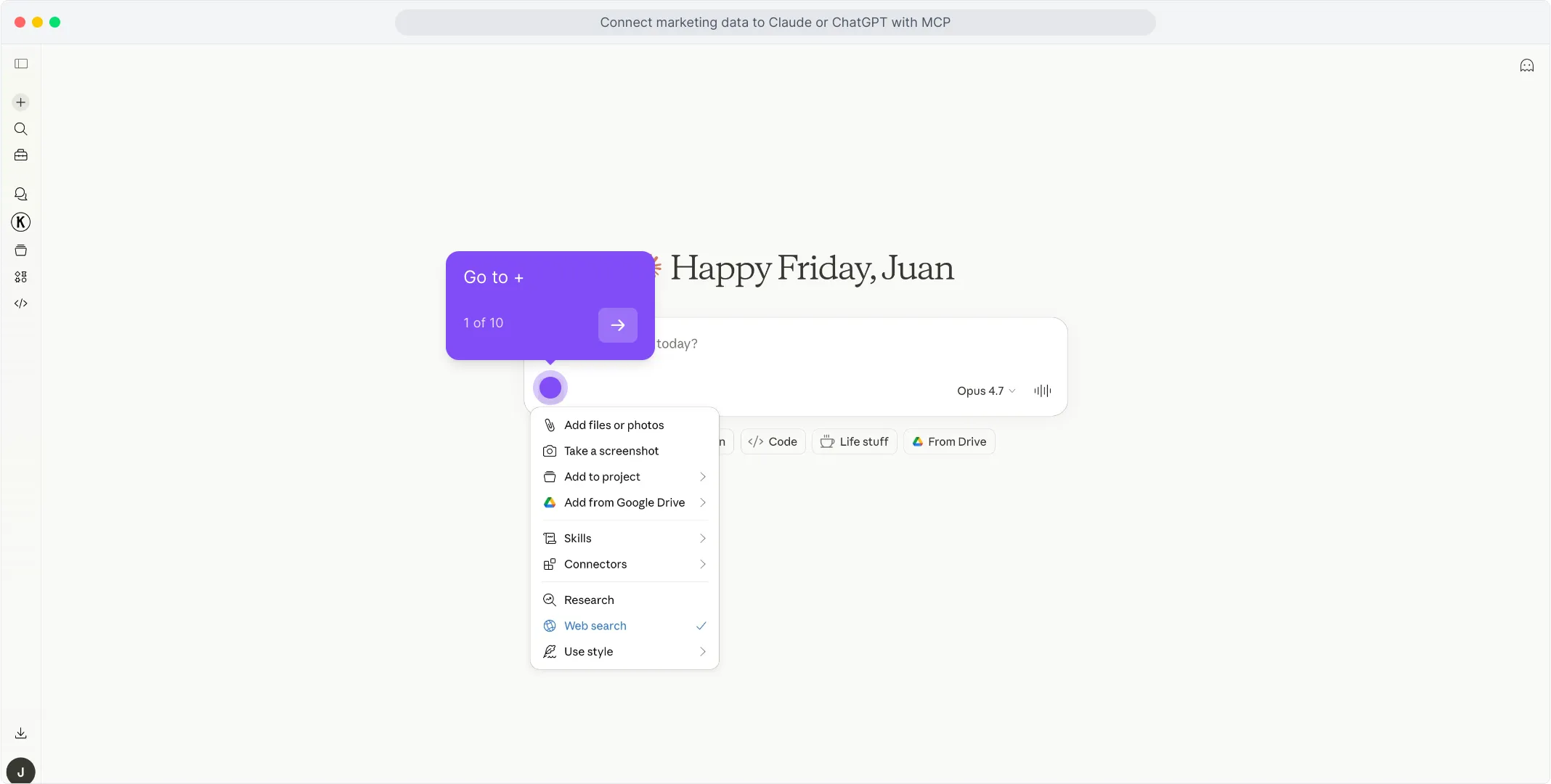
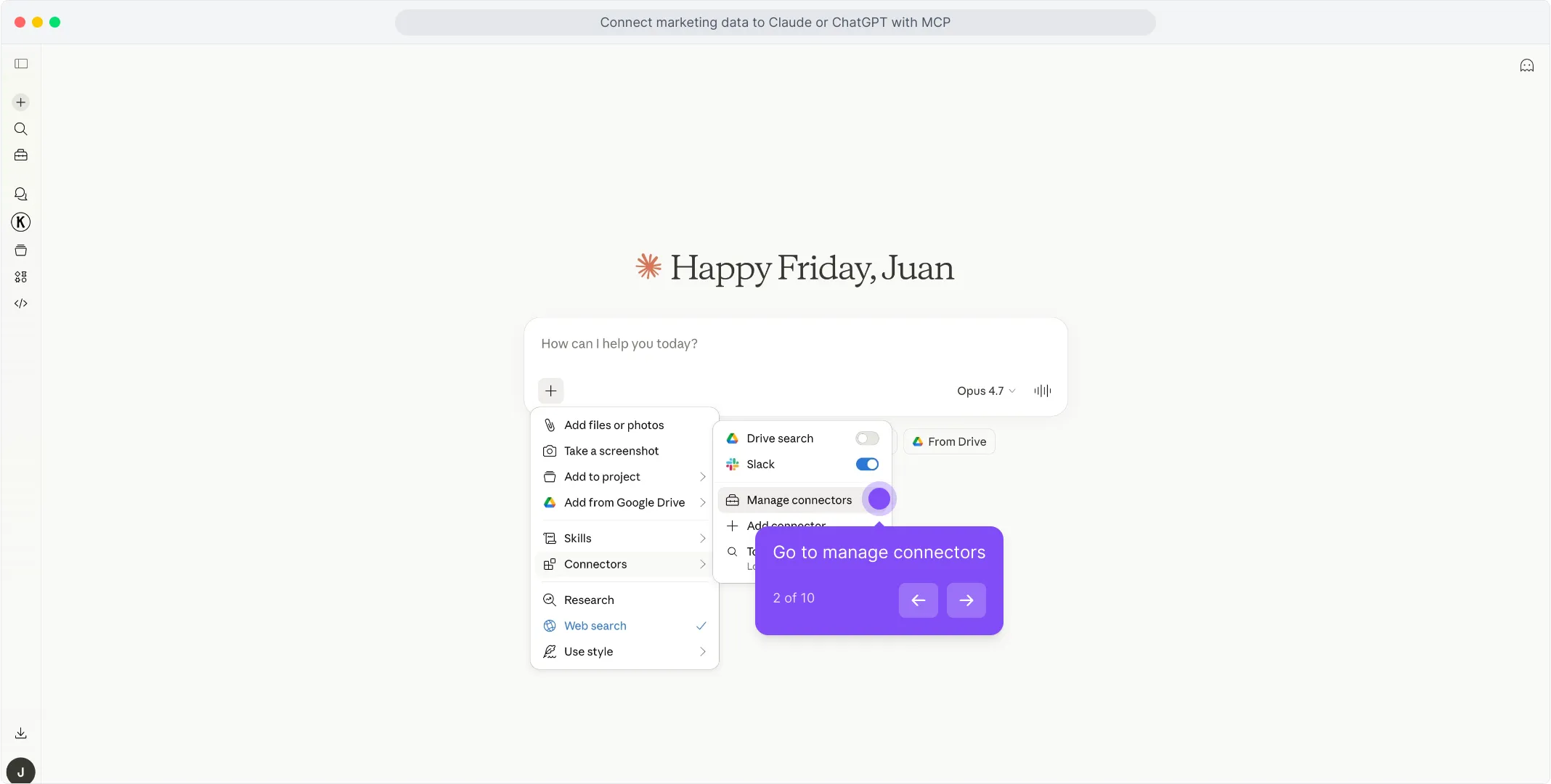
In the menu that opens, hover over Connectors and click Manage connectors.
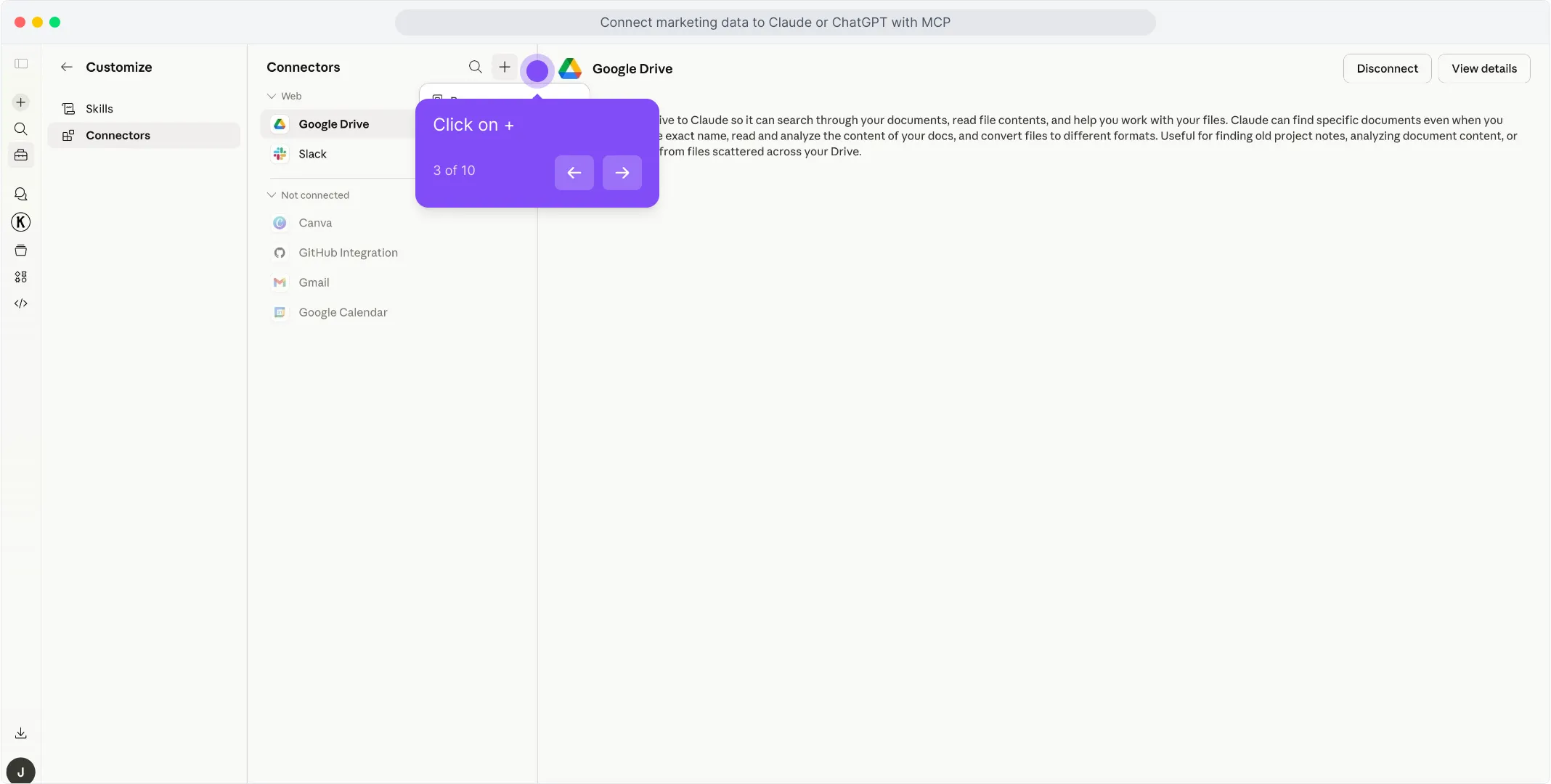
In the Connectors panel, click the + button at the top of the list to start adding a new connector.
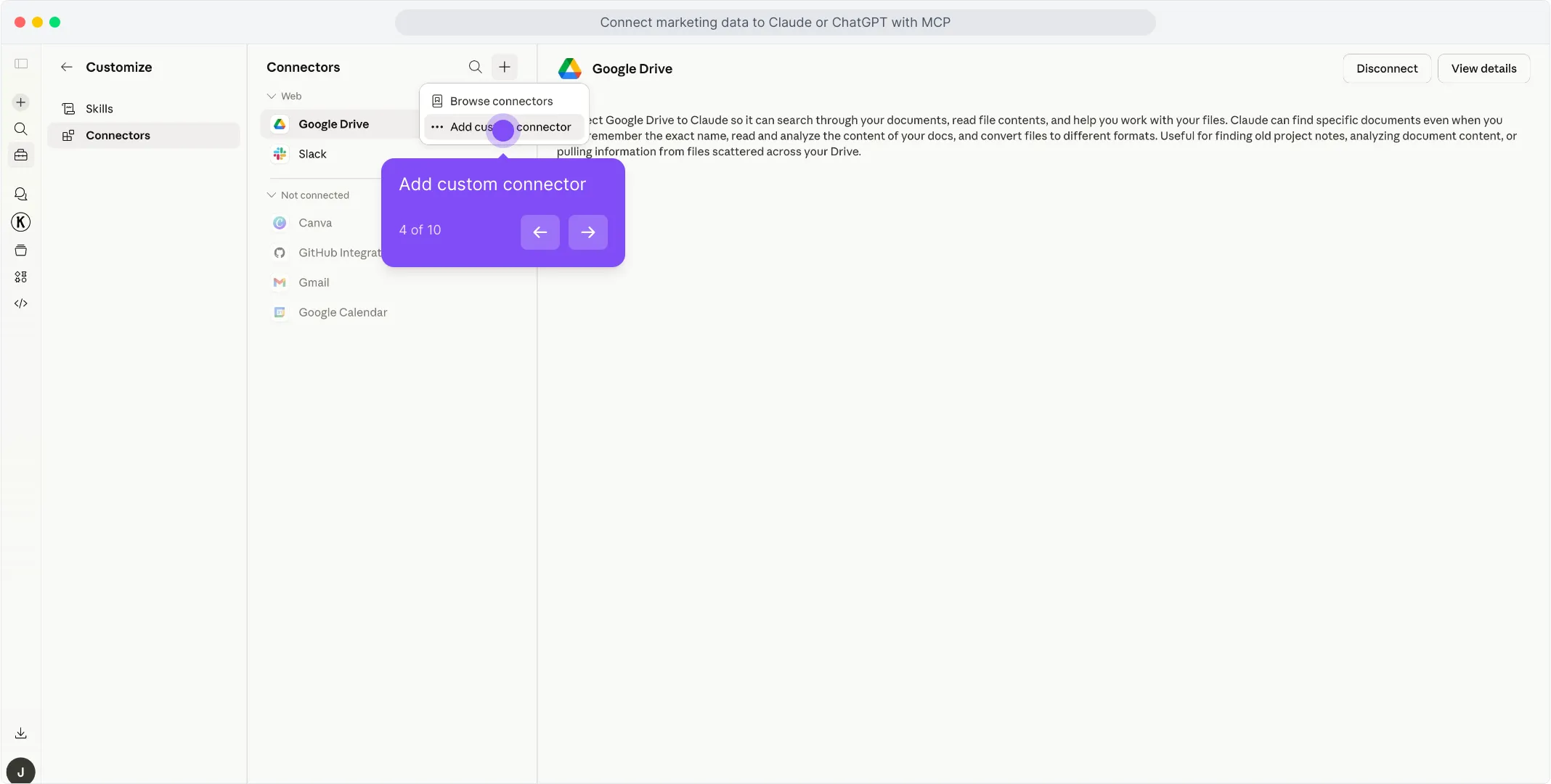
Pick Add custom connector from the dropdown that appears.
A dialog opens with the name and URL fields. Type Porter in the first field to name the connector.
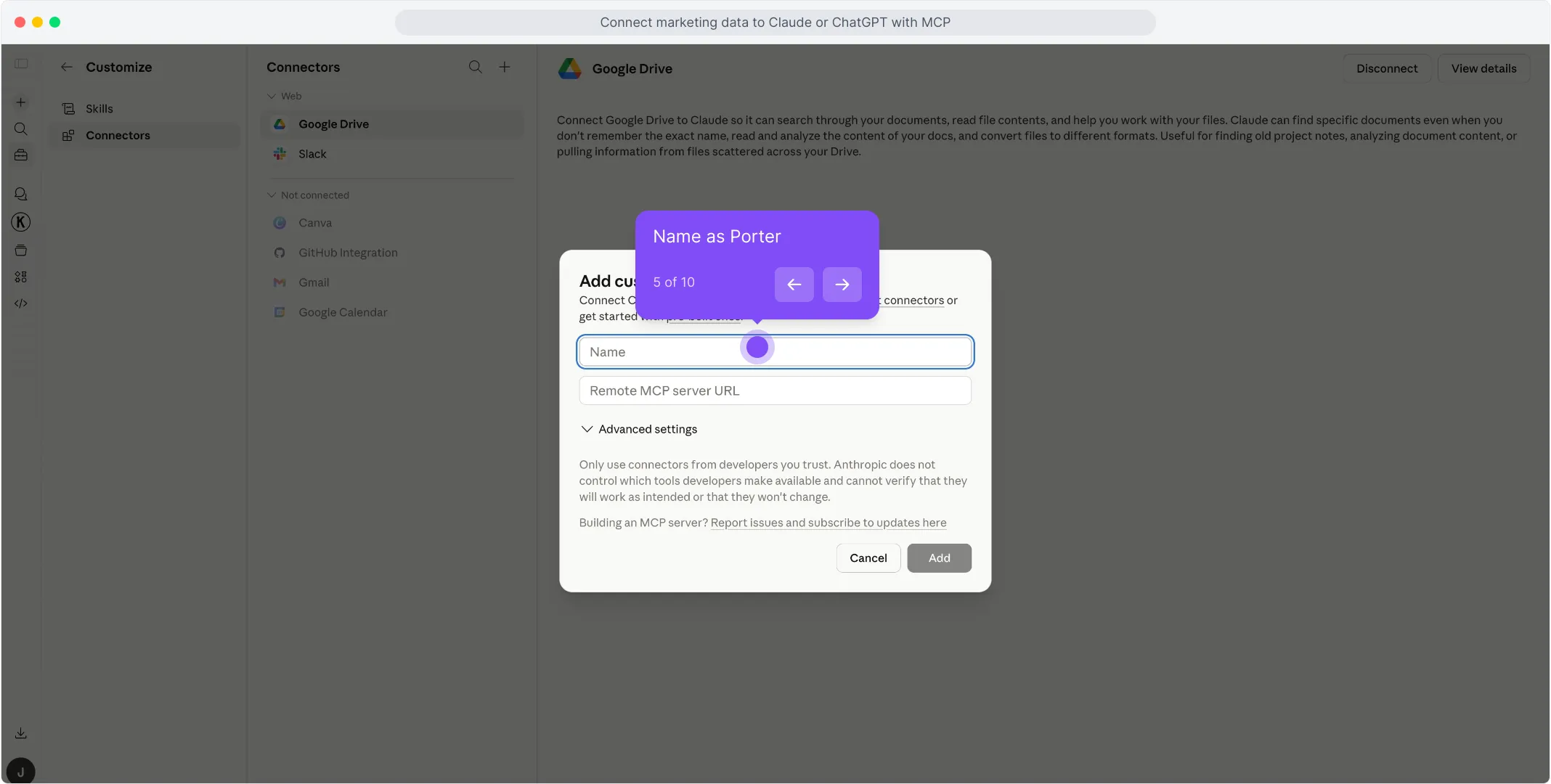
In the second field, paste https://mcp.portermetrics.com/mcp. Leave the advanced settings alone.
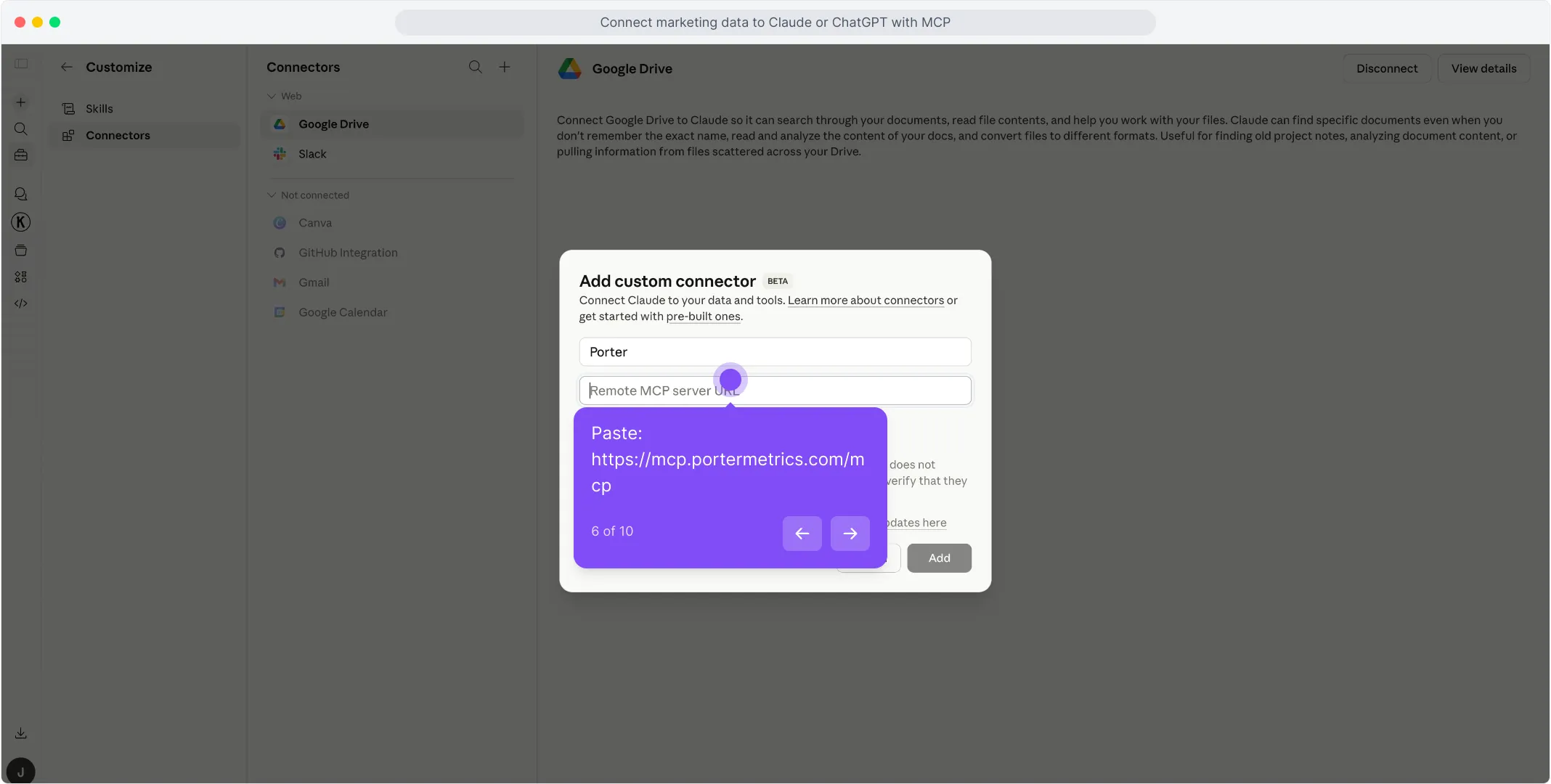
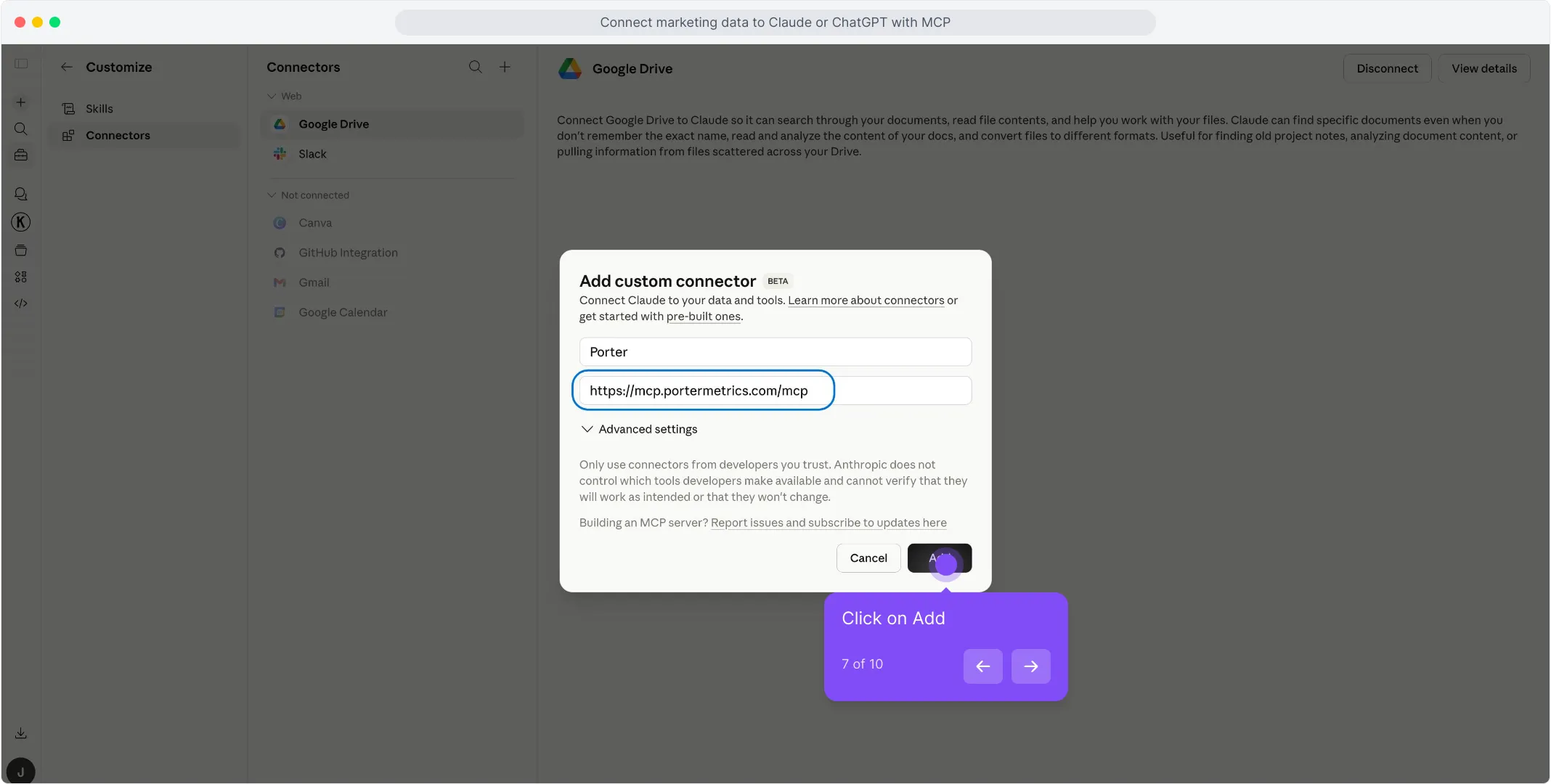
Click Add at the bottom right of the dialog. Claude opens a sign-in window — use the same Google account linked to your Porter workspace and approve access.
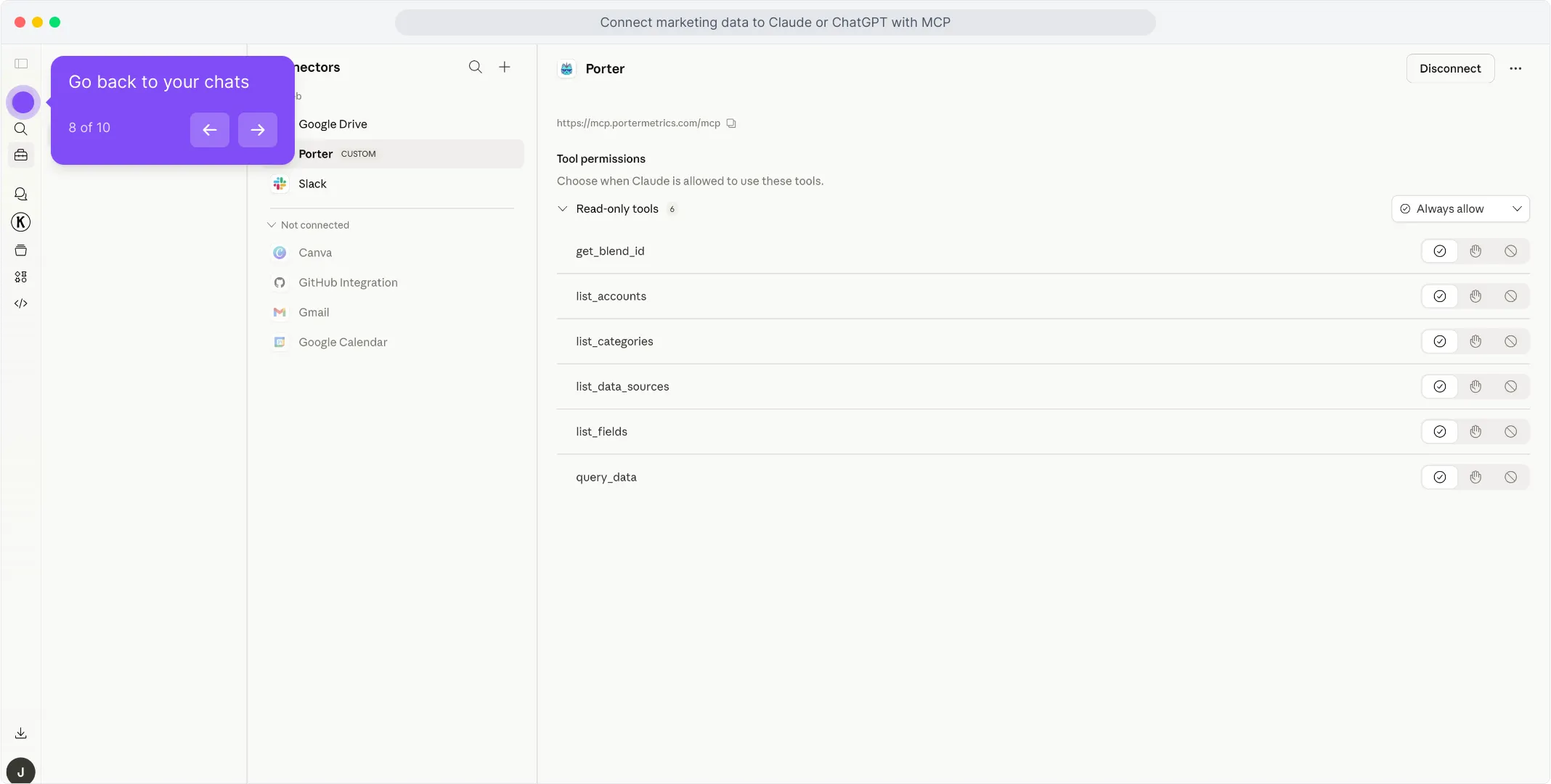
Once the authorization finishes, you’ll see Porter’s read-only tools appear in the connectors panel. You’re ready to start asking questions.
For a fuller walkthrough with screenshots at every step, see the Porter MCP tutorial.
3. Start building questions and dashboards
With Porter connected, open a new Claude chat and ask anything about your Instagram Public Data in plain English. Claude calls Porter behind the scenes, pulls live data from Meta, and answers with tables, charts, or summaries.
Try one of these to verify the setup is working:
For a full catalogue of copy-paste prompts organized by use case (performance, fatigue, budget, agency, B2B, e-commerce, cross-channel), jump to the prompts section below.
Alternative ways to connect Instagram Public Data to Claude
MCP is the path we just walked through — and the one we recommend for most marketers. But it’s not the only way to get Instagram Public Data data in front of Claude. The most common alternatives are Instagram Public Data’s direct API (or its official MCP if it has one), a live Google Sheets bridge, and BigQuery for scale. Each has its trade-offs — pick the one that fits how your team already works.
- 🔌 Instagram Public Data’s direct API (or official MCP) — Talk to Meta’s Instagram Graph API yourself, or install Instagram Public Data’s native MCP if one exists. Maximum control, but you handle auth, rate limits and pagination — and you only get one source.
- 📊 Google Sheets — Live Sheet or one-off CSV upload. Auditable, familiar, faster for big exports — but aggregation happens in the Sheet, not the API.
- 🗄️ Google BigQuery — For large profiles or agencies running multi-profile analysis. BigQuery aggregates; Claude only queries pre-built summaries.
Via Instagram Public Data’s direct API (or official MCP)
If you’re building a product around Instagram Public Data — or you’re a developer who’d rather own every layer of the integration — the most direct path is talking to Meta’s Instagram Graph API yourself, or installing the official Instagram Public Data MCP (if one exists). Meta doesn’t ship an official Instagram Public Data MCP yet, so this means writing API calls directly in Claude Code or in your own scripts. You’ll need to follow Meta’s rate limits & quotas and request a Developer Token / API access where applicable. Either way, you skip Porter entirely and call Meta from your own code or from Claude Code with raw HTTP requests.
Via Google Sheets (live Sheet or manual CSV)
If your team already lives in Google Sheets — or you want a paper trail before Claude touches anything — feed Instagram Public Data into a Sheet, then let Claude read the Sheet. You can automate the Instagram Public Data → Sheets pipeline with Porter so it refreshes daily, or do one-off CSV exports from Instagram Public Data’s native UI for static analysis.
Read the full Sheets tutorial →
Via Google BigQuery (for scale)
This is the path most people overlook — and it’s the one that saves you when your Instagram Public Data profile gets serious. A single large profile or an agency managing 10+ profiles will hit API rate limits and latency problems querying Claude directly. Claude will literally tell you it’s taking too long or timing out on big pulls.
BigQuery fixes that. You load Instagram Public Data data into BigQuery tables on a schedule, then connect BigQuery to Claude — either through a BigQuery MCP or via Claude Code with SQL queries. Instead of asking Claude to pull raw Instagram Public Data data, you let BigQuery aggregate into small, optimized tables, and Claude only queries the summarized output. Scale problem solved.
Read the full BigQuery tutorial →
Connecting Instagram Public Data to Claude Code
Most marketers lump Claude and Claude Code together and miss the biggest advantage of the entire MCP ecosystem. They’re not the same tool — and the difference matters enormously once you start working with Instagram Public Data data seriously.
Claude is a chat interface. You ask a question, Claude pulls live data through the MCP, answers, maybe builds a quick dashboard inside the conversation. Great for one-off analysis. The problem: everything is ephemeral. Want to refresh the dashboard tomorrow? You regenerate it from scratch. Want the same report every Monday? You re-ask the question every Monday.
Claude Code is Claude running inside your computer’s terminal. Because it has access to your filesystem, runtime, and other developer tools, it doesn’t just answer questions — it can build real software. Persistent scripts, scheduled routines, HTML apps, internal dashboards, integrations that run 24/7 without your input. Once it’s connected to Porter’s MCP for Instagram Public Data, a whole category of work becomes possible.
What Claude Code unlocks that Claude alone cannot
Use cases — what you can actually do once Instagram Public Data is connected to Claude
Getting the connection right is half the battle. The real value shows up in what you do next. Here are the use cases Porter users build around their Instagram Public Data data — from simple Q&A to full client-facing workflows.
1. Chat and ask questions directly
The simplest use case — and still the one 80% of marketers start with. Open Claude, ask a question, get an answer grounded in live data.
It’s the fastest way to replace a daily Instagram app check-in. But chat is table stakes — the interesting use cases come next.
2. Blend Instagram Public Data with your marketing data (Meta Ads, Shopify, HubSpot)
This is where a 360° view gets real. When you connect Instagram Public Data and your partner source (Meta Ads for paid amplification, Shopify for e-commerce correlation, HubSpot for CRM tracking), Claude can map posts and profiles to actual sales or engagement spikes — using timestamps, media permalinks, and campaign names — and give you correlation that no platform-side number can.
Claude handles the timestamps, media permalinks, and campaign names mapping and joins. You get a client-ready correlation report that no single platform can generate on its own.
3. Automated alerts and notifications on Slack or Gmail
With Claude Code you can turn Instagram Public Data monitoring into a routine that runs on its own. Hook Porter’s MCP (for the data) together with a Slack or Gmail MCP (for delivery), then write a Claude Code scheduled task that pulls performance every morning and pings you only when something actually needs attention.
No dashboards, no daily check-ins. The report comes to you — and only when it matters.
4. Client-ready presentations with live data (Gamma, HTML, PDF)
A common agency pain: you send clients a Data Studio link, Looker breaks, the client panics — and you spend an hour explaining a broken dashboard. With Claude you can build the presentation itself — as a Gamma deck, a custom HTML page, or a PDF — populated with live numbers each time.
The presentation becomes a delivery artifact you send to the client, not a dashboard that depends on another tool staying up. No broken iframe, no login prompts, just the content.
Instagram Public Data templates
Instagram Public Data fields and metrics you can query with Claude
Before you start writing prompts, it helps to know what data is actually available. Porter MCP gives Claude access to 30 Instagram Public Data fields and metrics across every reporting level, plus breakdowns by date, media type, day of week, and hour of day. And the same MCP URL also unlocks 25+ other sources — so Claude can blend Instagram Public Data with Google Ads, GA4, Shopify, HubSpot and more in a single prompt.
Prompts you can copy-paste today
1. For agencies
For agencies running multi-client competitor benchmarking and client reporting.
2. For brand teams
For brand teams optimizing content calendars and hashtag performance.
3. For creators & DTC
For creators and DTC founders optimizing posting schedules and follower growth.
4. Cross-channel
For analysts blending Instagram Public Data with the rest of the marketing stack.
How to use Claude Code for Instagram Public Data without getting banned
This is the nightmare scenario for any marketer running Instagram integrations through a Meta Developer account. Unlike a consumer Instagram ban, a developer account suspension is irreversible and cascades to every app, Business Manager, and client asset tied to that identity. The cost isn’t just downtime — it’s lost client trust, broken automations, and weeks of rebuilding infrastructure. For agencies and social media analysts using Instagram Public Data at scale, the real risk isn’t a temporary rate-limit error; it’s a permanent platform exile triggered by behavior Meta’s automated systems flag as suspicious.
Meta’s enforcement is behavior-based and quota-based, not tool-based. Meta doesn’t ban accounts because you used Claude, an MCP server, or Porter Metrics. It throttles or suspends because of how the API was used: excessive request velocity, missing or expired permissions scopes, scraping private data boundaries, or triggering automated-write patterns from apps not in Live mode. Instagram Graph API applies rate limits per user and per app , and exceeding them returns HTTP 429 errors with exponential backoff. Read-only access to public profiles and posts is generally safe if rate limits are respected. Bursty parallel requests, repeated token failures, or attempts to access non-public data (stories, DMs, private accounts) are not. Meta’s automated review also flags apps with abnormal traffic patterns — for example, a sudden spike from a single IP or app making thousands of profile lookups in minutes — which can trigger a Business Manager or app review suspension without human warning.
The two behaviors that actually get accounts banned
After reviewing official docs and community threads, two patterns come up again and again.
1. Running unapproved apps in Development mode against live public data at scale. Instagram Graph API apps must pass App Review and be switched to Live mode before they can access data from users who are not app admins or testers. Running a custom MCP or scraper in Development mode and pointing it at hundreds of public profiles looks, to Meta’s systems, like an unauthorized scraping bot. This is one of the most common triggers for app suspension cited in developer forums. Instead: use a reviewed, Live-mode app — or rely on a managed platform like Porter that handles app review and token lifecycle for you.
2. Ignoring rate-limit headers and retrying aggressively on HTTP 429. Instagram Graph API returns x-app-usage and x-ad-account-usage headers that show how close an app is to its limit. Developers who ignore these and retry immediately — or worse, spin up parallel connections — burn through their quota and flag the app as abusive. InsightfulPipe and GitHub ig-mcp both document “strict rate limits” as a primary pain point. Instead: implement exponential backoff (wait at least the Retry-After seconds specified in the 429 response) and batch requests rather than firing them individually.
3. Blurring the line between “public data” and “private data.” Instagram Public Data means public profiles, public posts, and public engagement metrics (likes, comments on public posts). It does not include stories, DMs, private account content, or follower lists of private users. Attempting to access these via any API path — even accidentally through a misconfigured scope — violates Meta’s Platform Terms and can trigger both API block and legal exposure. Apify’s honest framing is the benchmark here: “Scraping publicly available data from Instagram is legal, but you must comply with Instagram’s Terms of Service and respect rate limits.” — Apify documentation. Instead: explicitly scope every integration to public-only endpoints and audit your connector’s field list regularly.
Both behaviors trigger permanent platform exile. If you want to use Claude for Instagram Public Data safely, follow the 5-rule protocol below.
The 5-rule safety protocol
Based on Instagram Public Data’s documented rate limits and the behaviors that have actually caused irreversible suspensions — not guesswork:
-
Stay in read-only mode. Instagram Public Data connectors should never attempt to publish, comment, DM, or modify account settings. Porter’s Instagram Public Data connector is read-only by design — zero risk of accidental publishing or TOS-violating write operations. This is the safest posture because Meta’s automated enforcement weights write abuse far more heavily than read abuse.
-
Respect rate-limit headers and back off on 429. . Meta’s rate-limiting documentation states that exceeding limits triggers throttling and can escalate to app suspension. Porter enforces this automatically by batching requests and applying platform-level backoff when
x-app-usageapproaches the threshold. If you’re building a custom MCP, implement at least a 2-second delay between profile lookups and never retry a 429 before theRetry-Afterheader value. -
Use a reviewed, Live-mode app — or a managed platform. Apps in Instagram Graph API Development mode can only access data from app admins and testers. Attempting to scale public-data collection from Development mode is a documented suspension trigger. Porter operates through reviewed, Live-mode infrastructure so you never risk a personal developer account. If you self-build, submit your app for App Review and switch to Live mode before any production use.
-
Never store or expose PII scraped from public profiles. Public Instagram data still contains personal information: usernames, bios, profile photos, locations. GDPR and CCPA apply to how you process and retain this data, even if it was publicly visible. Porter does not persist raw profile data beyond the session window needed for analysis. If you export to Sheets or databases, anonymize identifiers and set a retention policy of .
-
Label data freshness honestly — never claim “real-time.” Instagram Public Data has a lag of minutes to hours, not seconds. InsightfulPipe documents this explicitly: “API data can lag by minutes, not seconds.” — InsightfulPipe, Jan 2026. Porter surfaces the last-sync timestamp on every dataset so you and your stakeholders know exactly how fresh the data is. Presenting stale data as real-time damages trust and can lead to flawed campaign decisions.
What Porter MCP does differently: it enforces these safeguards at the platform level so you don’t have to manage them manually. Porter’s Instagram Public Data connector is read-only by default — there is no code path that can publish, comment, and modify an account. Rate limiting is handled with automatic backoff and request batching, so you never hit a 429 or trigger Meta’s velocity alerts. The connector operates through reviewed, Live-mode app infrastructure — your personal Meta Developer account is never exposed to suspension risk. Every dataset carries a freshness timestamp, and Porter’s field reference explicitly scopes to public-only data (no DMs, no stories, no private accounts). That’s the behavior Meta’s automated systems reward: predictable, low-velocity, read-only, public-data access that stays within platform boundaries.
Frequently asked questions
An Instagram Public Data MCP is an open standard that lets AI tools like Claude connect to your public profiles, posts, and engagement metrics through one URL. Porter’s server requires no tokens, scripts, or developer setup.
Claude is the conversational product for web and mobile. Claude Code is a terminal-based developer tool that writes scripts and automates workflows. Both connect to Instagram Public Data via MCP.
No. Meta’s API data typically lags by minutes to hours, not seconds. Porter MCP pulls the latest available snapshot, so your data is always within that window.
Yes. Meta enforces dynamic, app-specific rate limits on Instagram Graph API requests. Porter MCP batches requests and applies automatic backoff so you rarely hit them.
Two common reasons: (1) Data lag — API data refreshes on a delay of minutes to hours, while the native UI shows live counts. (2) Public data scope — the API only returns public profiles and posts, so private or personalized metrics may differ. The fix: compare the same public profile at the same timestamp to isolate lag.
Only if you abuse it. Meta bans based on behavior, not tools: running unapproved apps in Development mode at scale, or ignoring rate-limit headers and retrying aggressively, are the top triggers. Following the safety protocol keeps your risk comparable to other live-mode SaaS platforms.
Ready to chat with your Instagram Public Data?
Open Claude, add the Porter connector, and ask your first question. If you don’t have Porter yet, start a free trial and connect your Instagram Public Data account — you’ll be chatting with your public profiles and posts in under five minutes.
rocket_launchStart free Porter trialopen_in_newOpen Claude