






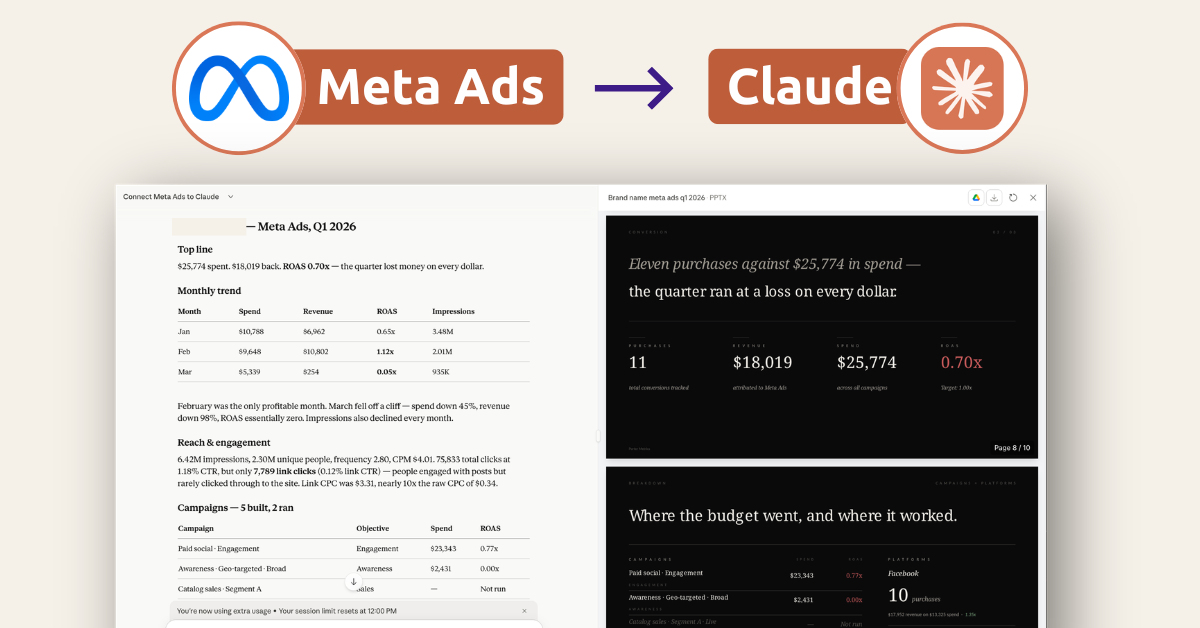
Para conectar Meta Ads a Claude vía MCP: copia mcp.portermetrics.com/mcp, ve a Claude.ai, abre Conectores → Gestionar conectores → Añadir conector personalizado, pega la URL e inicia sesión. A partir de ahí, pregúntale a Claude lo que quieras sobre tus campañas de Meta Ads en inglés sencillo.
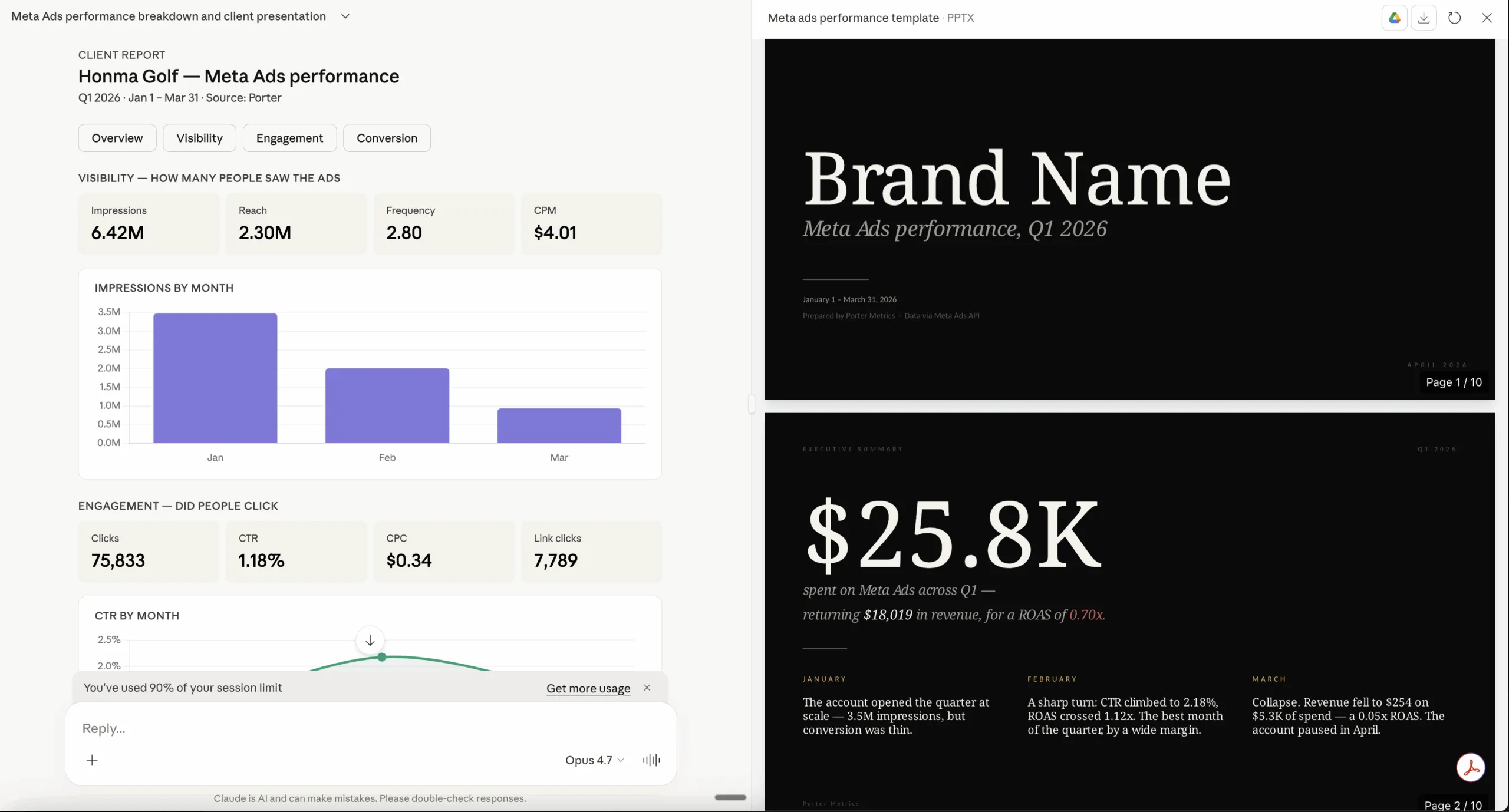
Una vez conectado, puedes automatizar tus informes y análisis de Meta Ads: haz preguntas sobre tus datos, crea dashboards, activa alertas o envía informes listos para el cliente como el de abajo.
Requisitos previos
- Una cuenta de Porter Metrics con tu cuenta de Meta Ads conectada (el plan gratuito es suficiente para probarlo de principio a fin)
- Una cuenta de Claude — el plan gratuito funciona para Claude Web; se necesita una suscripción Pro para Claude Code y las funciones MCP de escritorio
- Acceso de administrador o estándar a la(s) cuenta(s) de Meta Ads que quieres conectar
Conecta Meta Ads a Claude con MCP
Para este tutorial vamos a usar el método MCP. Aquí tienes una explicación rápida de qué es MCP y por qué es la mejor opción para Meta Ads.
MCP (Model Context Protocol) es el estándar abierto que permite a herramientas de IA como Claude, ChatGPT, Claude Code y otras acceder y usar APIs externas — las cosas que hacen funcionar herramientas como Meta Ads bajo el capó. En lugar de construir una integración personalizada para cada herramienta de IA que uses, instalas un MCP y cada IA compatible accede a los mismos datos.
Cuatro razones por las que MCP gana para Meta Ads:
La configuración completa toma menos de 5 minutos y se divide en tres pasos: conecta Meta Ads a Porter, apunta Claude al MCP de Porter, y haz tu primera pregunta.
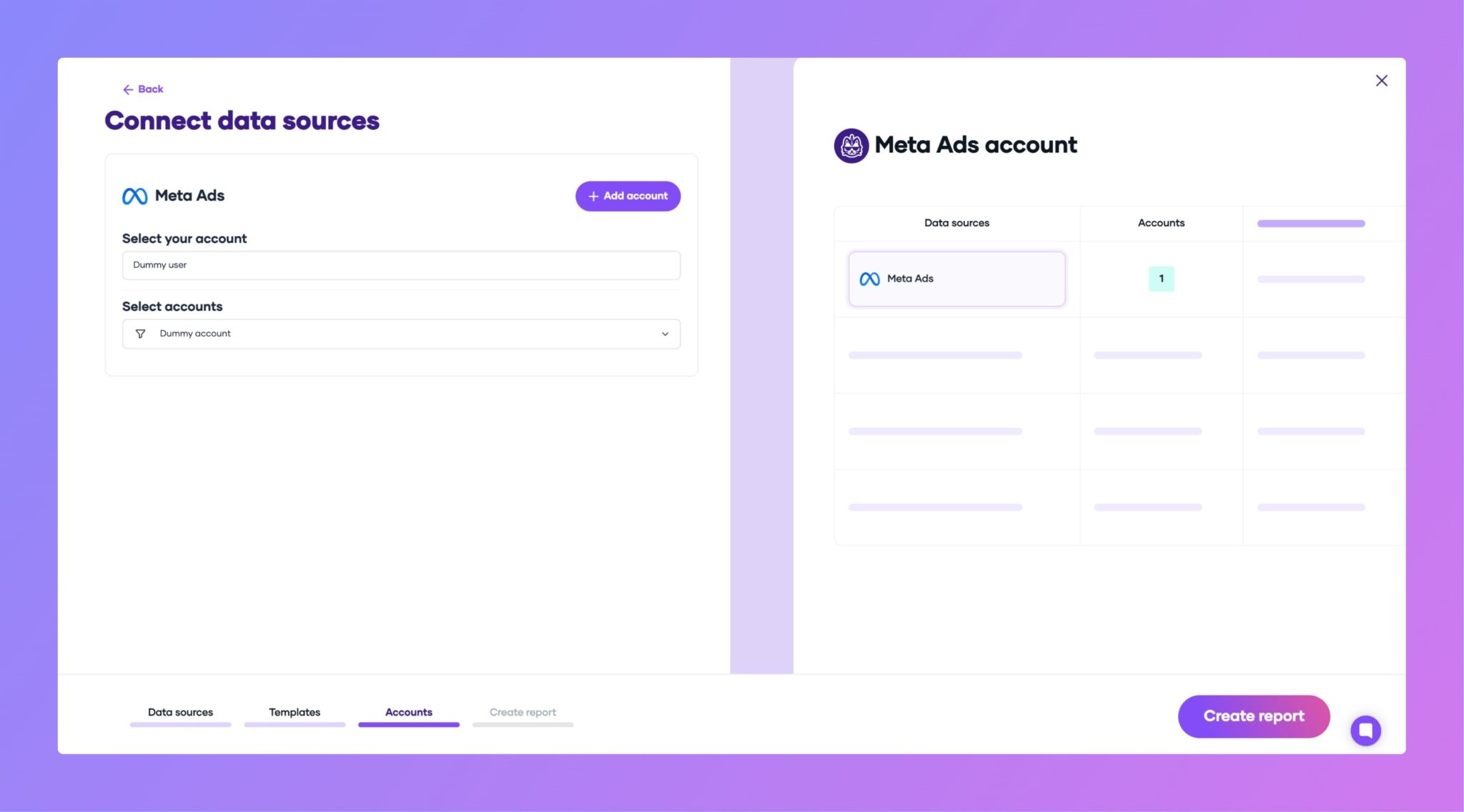
1. Conecta tus datos de Meta Ads a Porter
Porter se sitúa entre la Marketing API de Meta y Claude. Se encarga del OAuth, el rate limiting, la paginación y toda la infraestructura para que Claude solo vea datos limpios y estructurados.

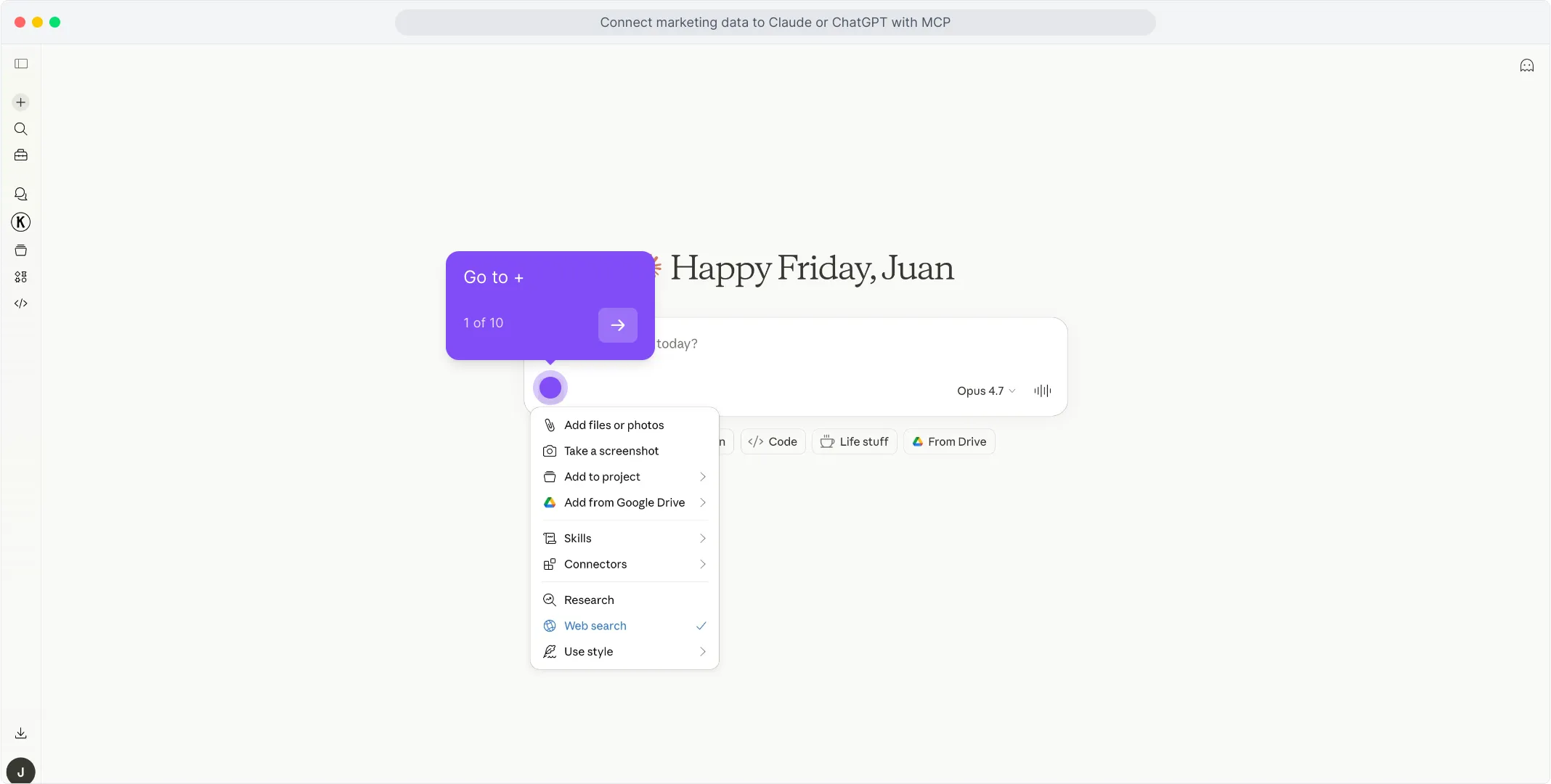
2. Conecta el MCP a Claude
La URL del MCP de Porter es lo que pegas en Claude. Una vez añadida, Claude puede consultar datos de Meta Ads bajo demanda en cualquier conversación.
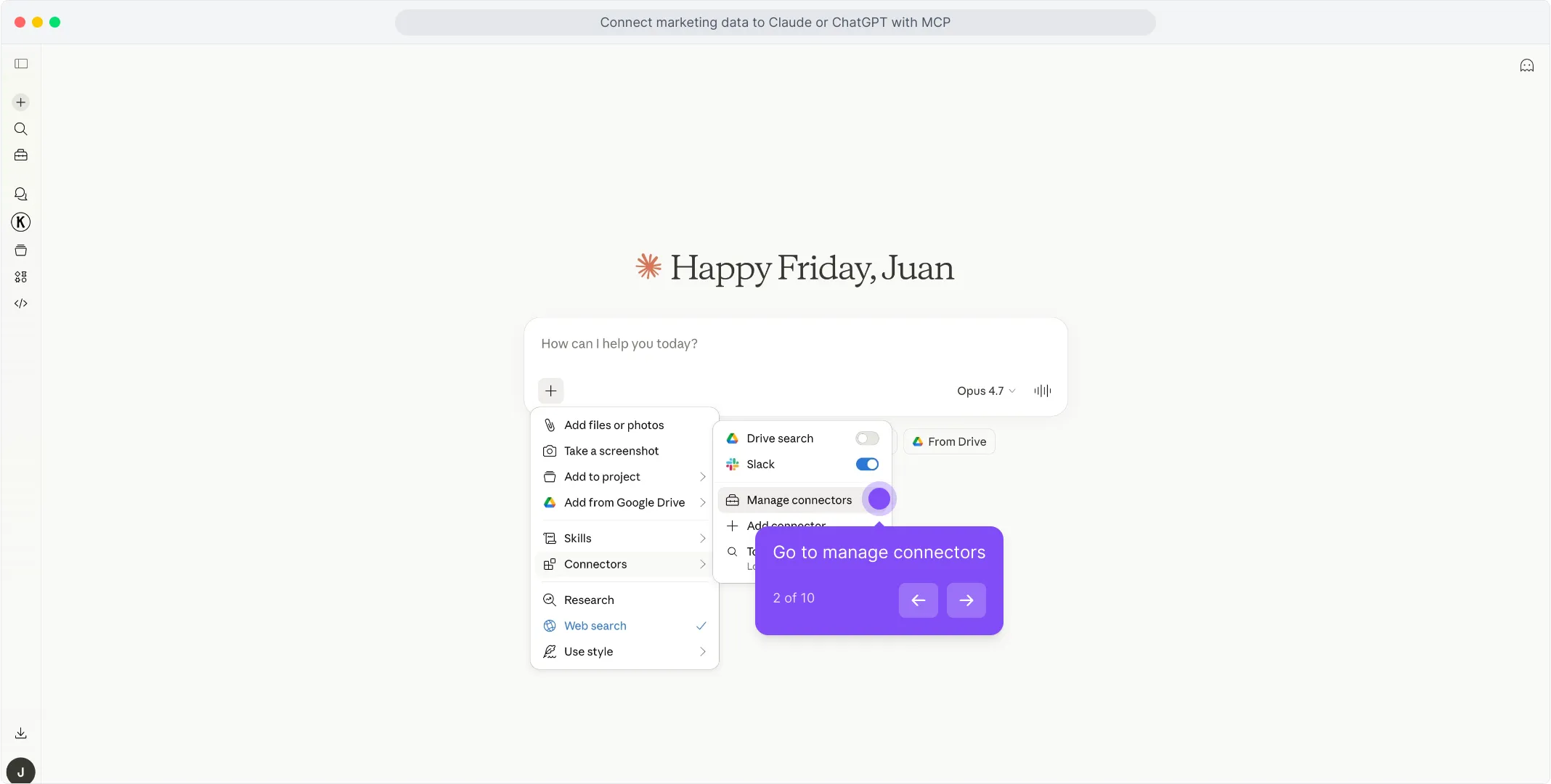
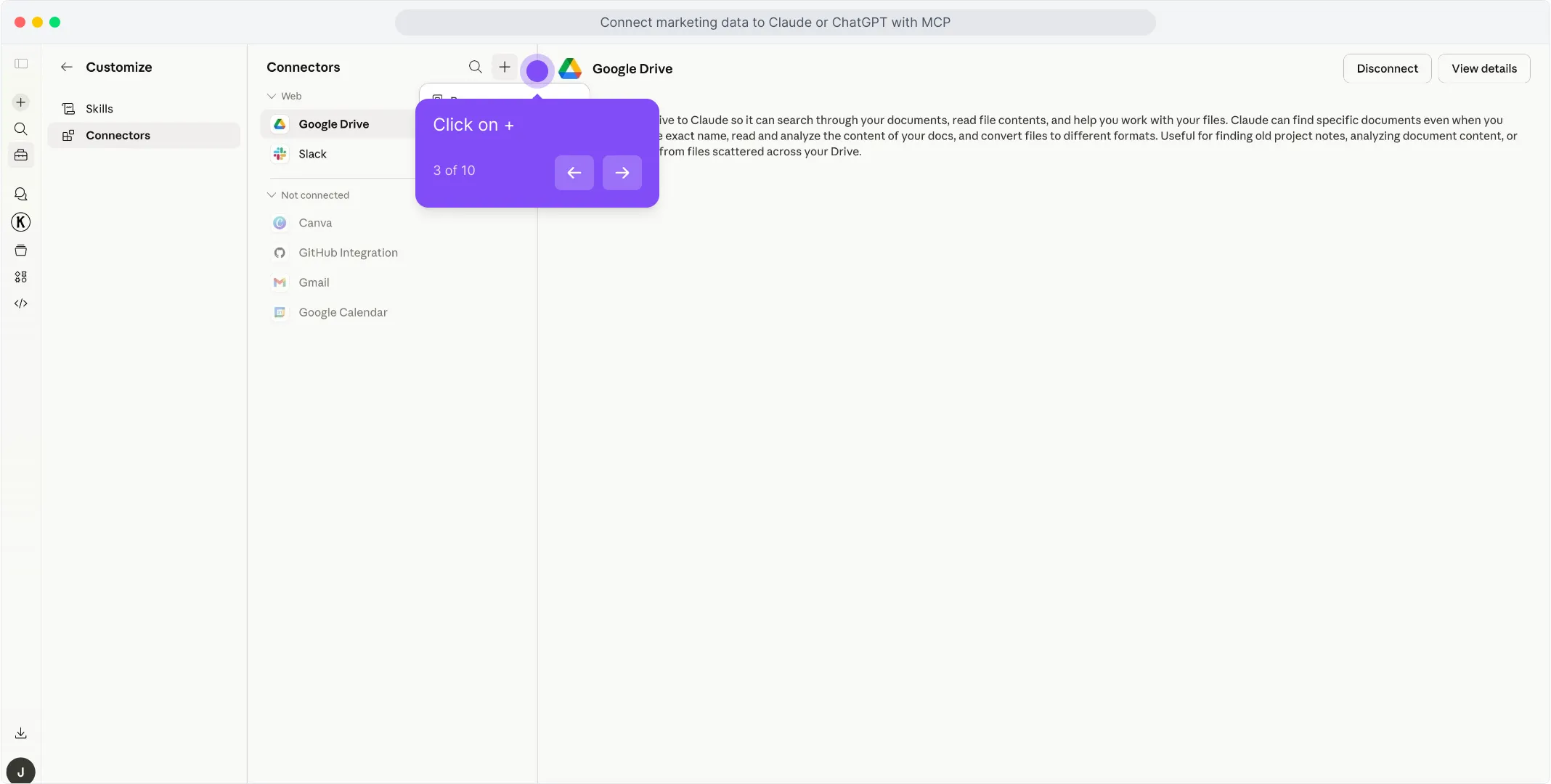
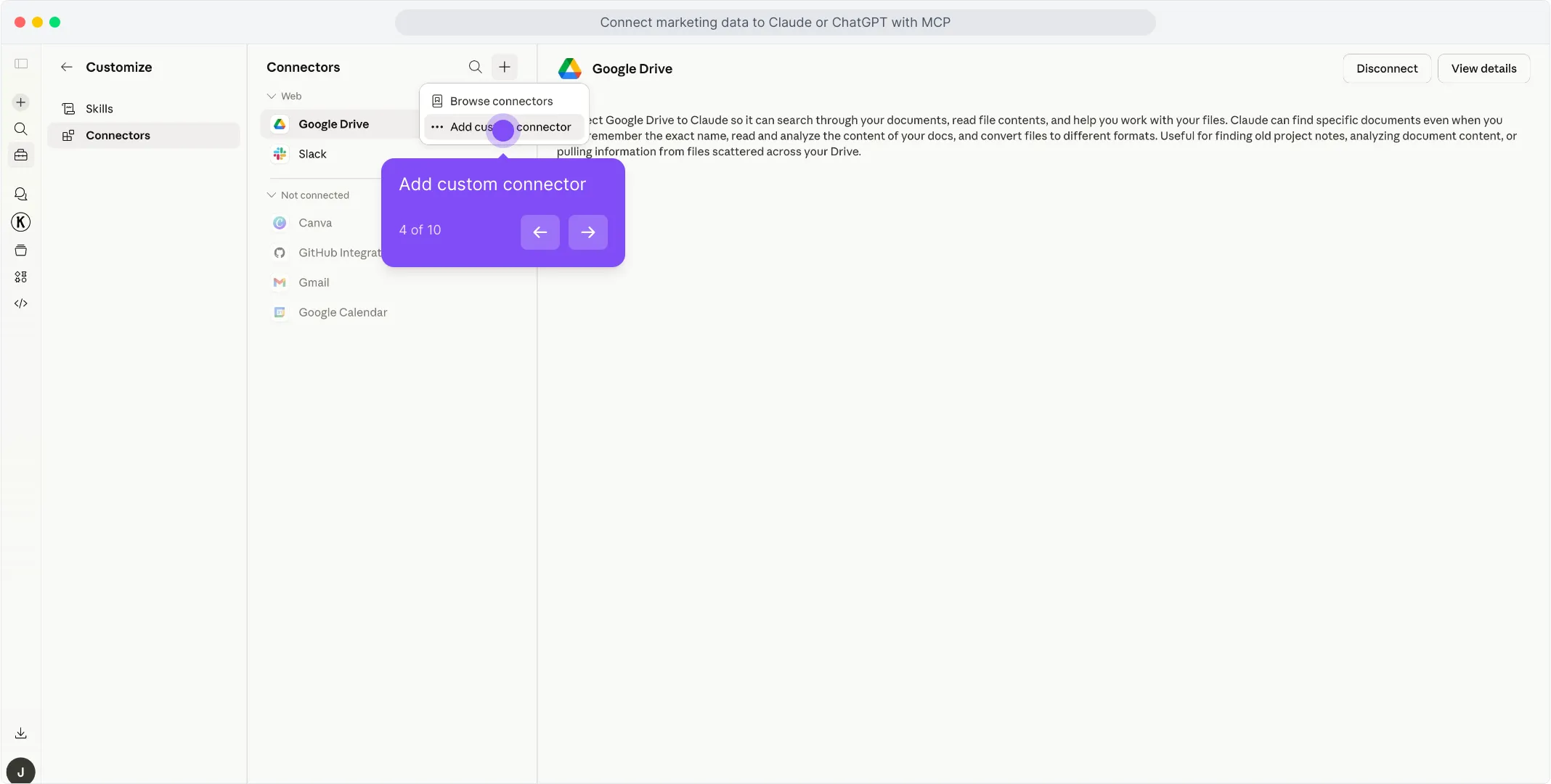
Porter en el primer campo para nombrar el conector.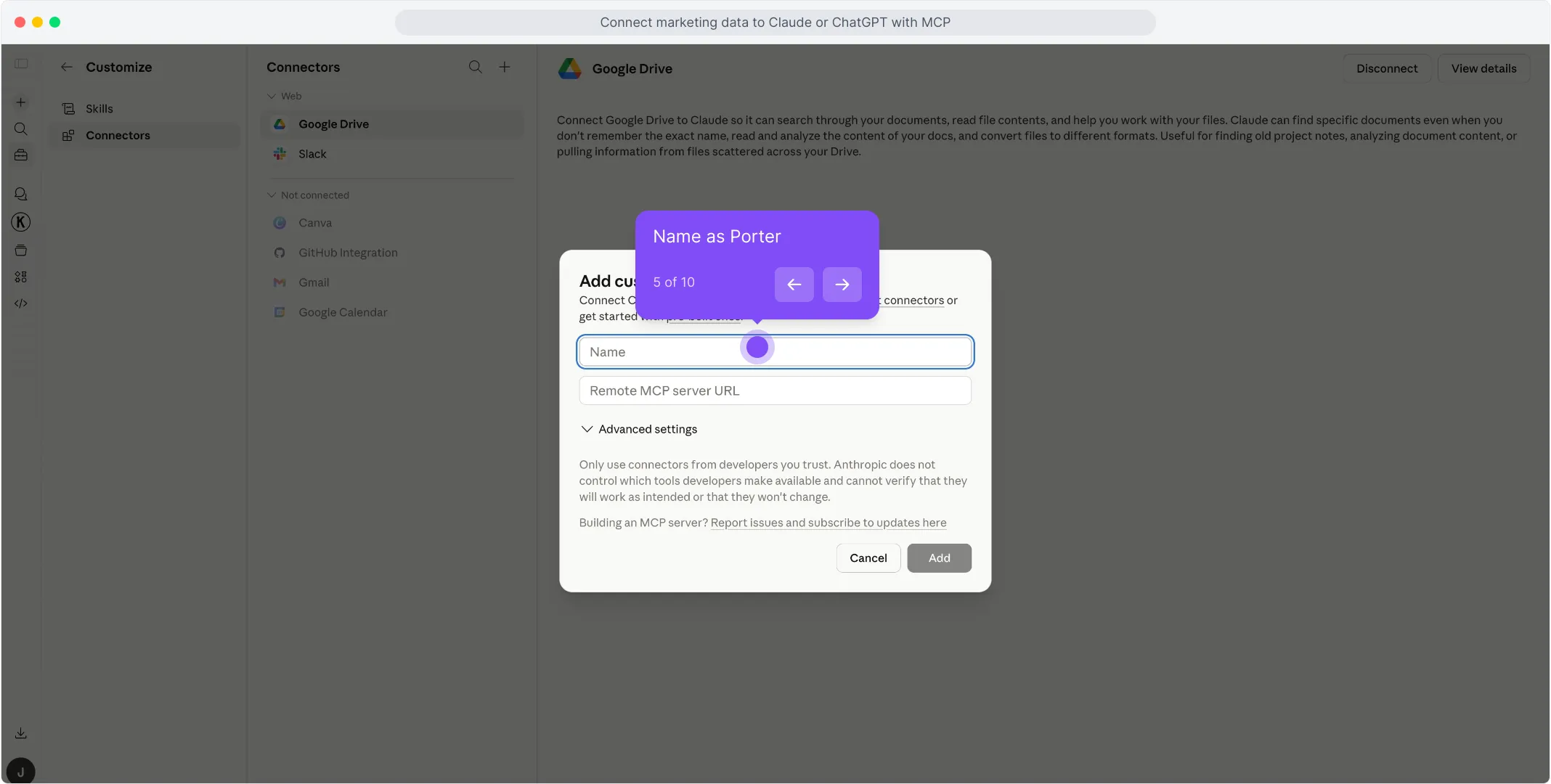
https://mcp.portermetrics.com/mcp. Deja la configuración avanzada tal cual.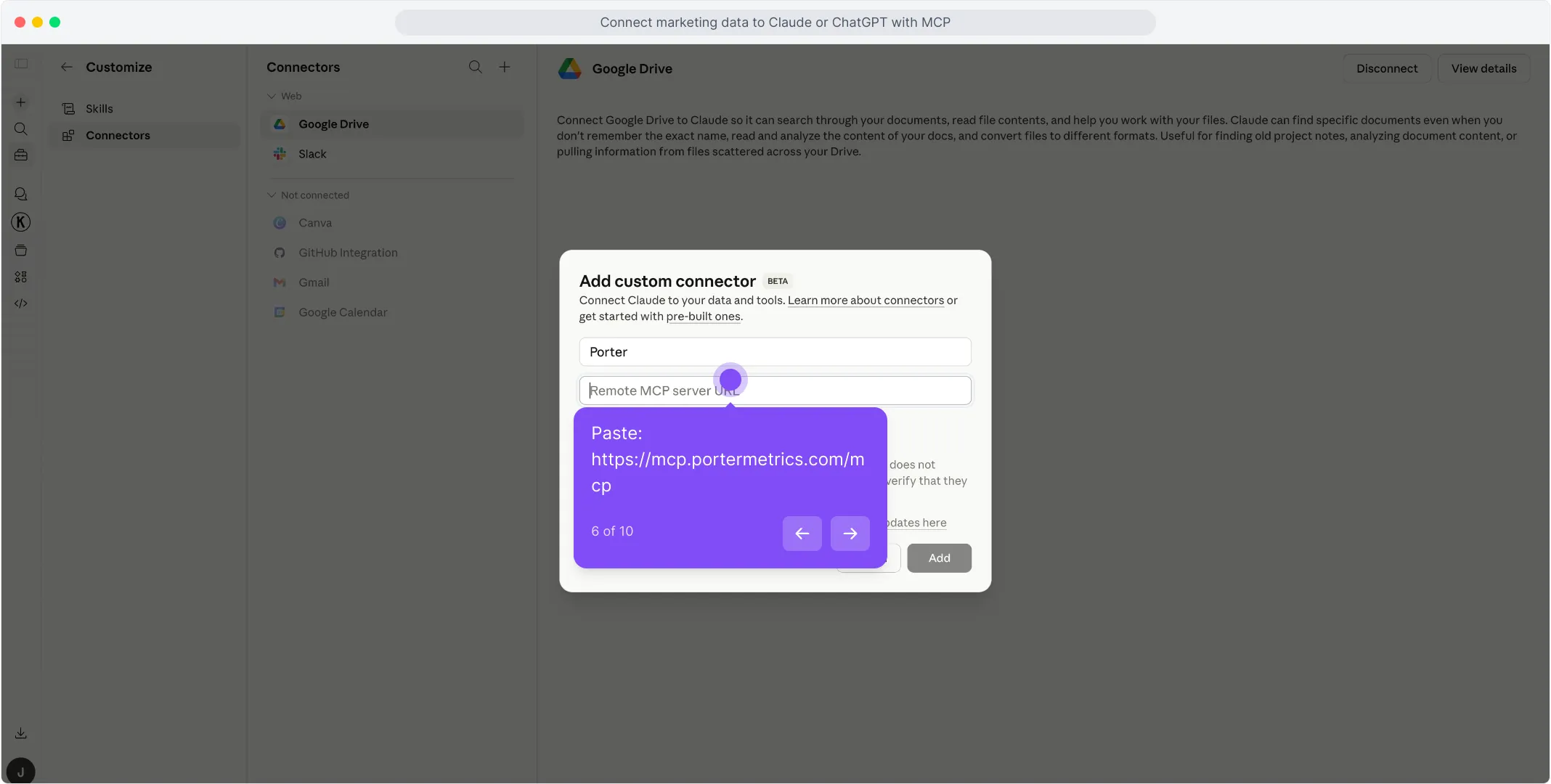
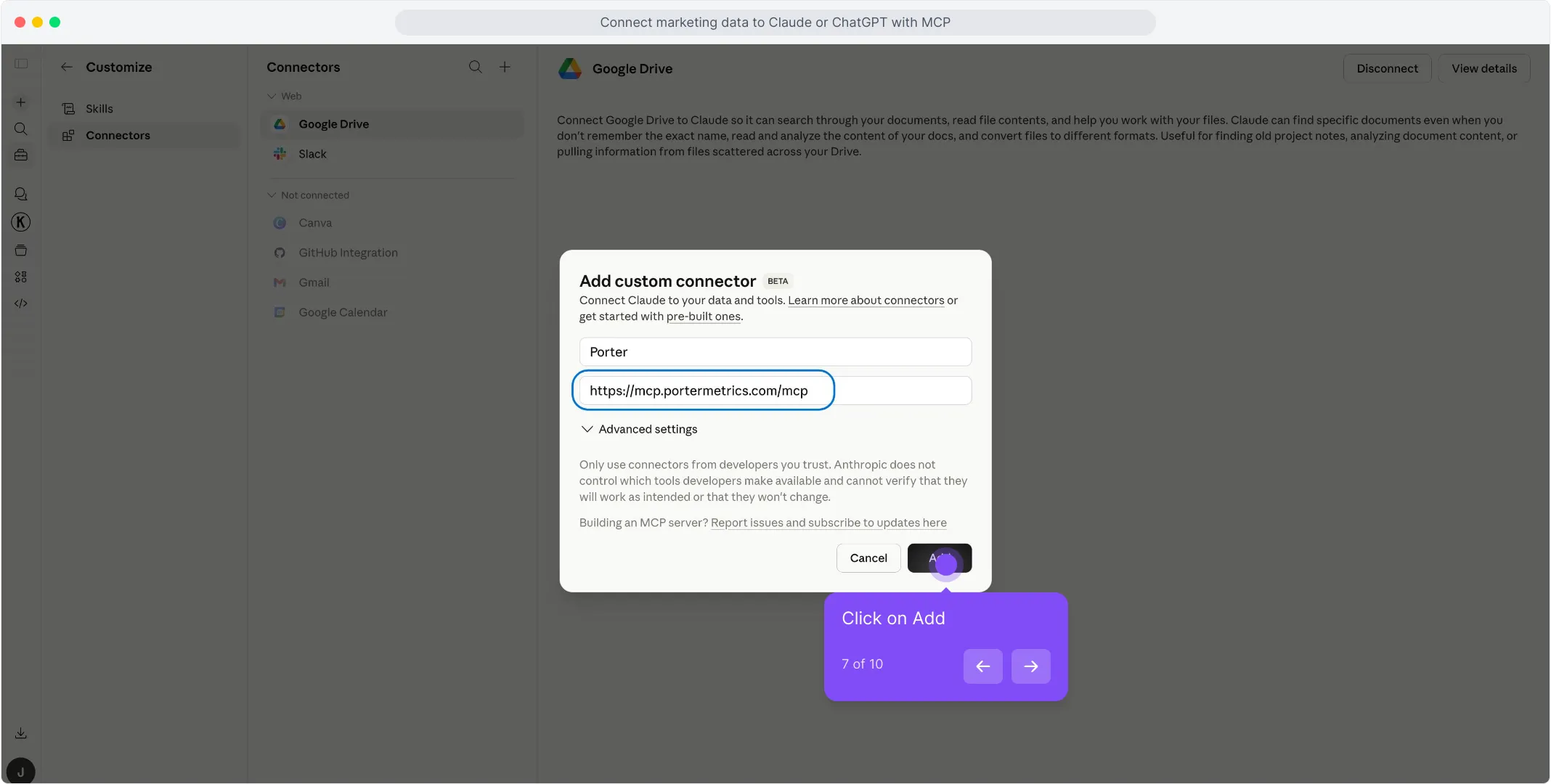
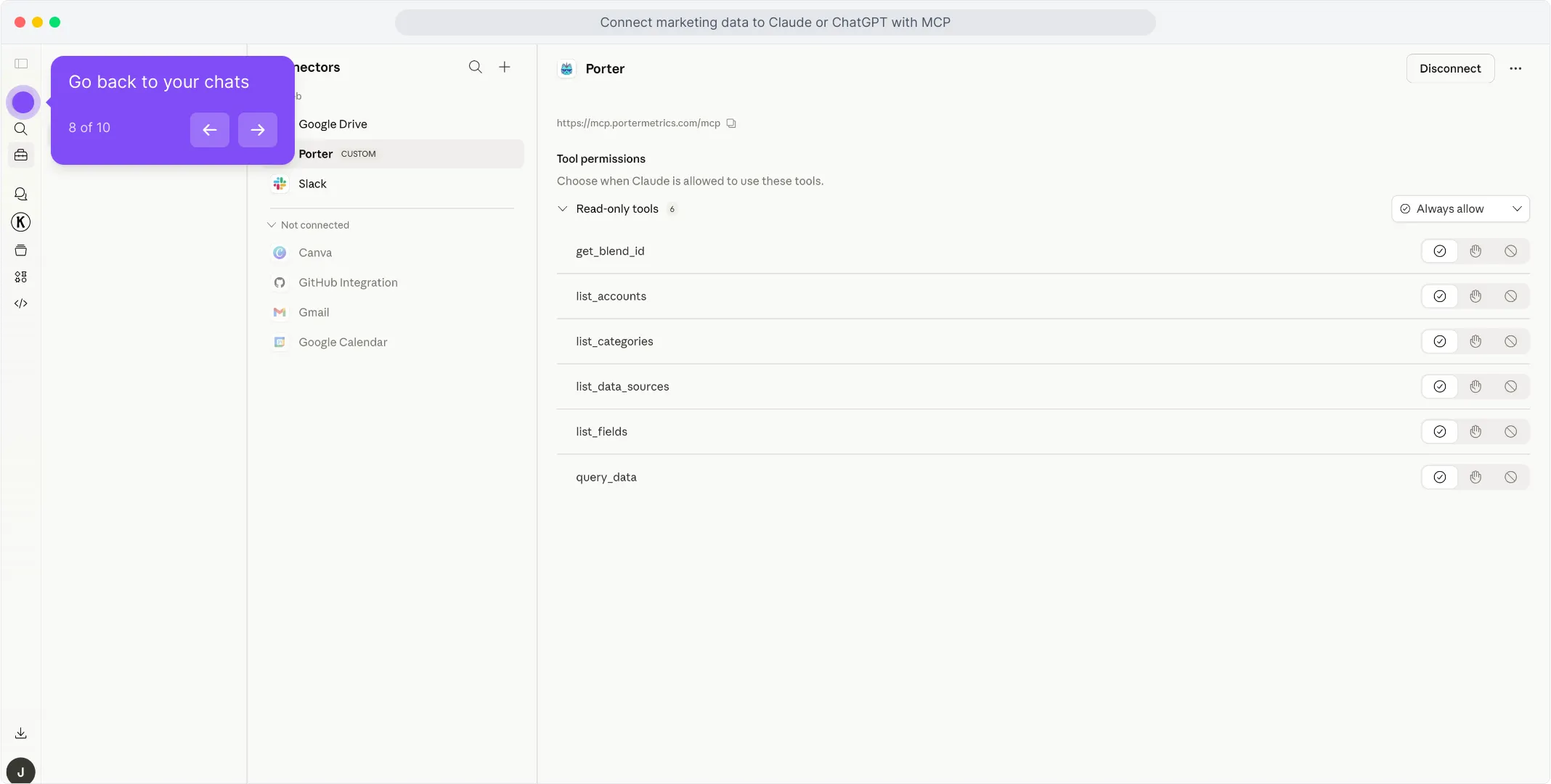
Para un tutorial más completo con capturas de pantalla en cada paso, consulta el tutorial de Porter MCP.
3. Empieza a crear preguntas y dashboards
Con Porter conectado, abre un nuevo chat de Claude y pregunta lo que quieras sobre tus Meta Ads en inglés sencillo. Claude llama a Porter en segundo plano, extrae datos en vivo de Meta, y responde con tablas, gráficos o resúmenes.
Prueba una de estas para verificar que la configuración funciona:
Para un catálogo completo de prompts de copiar y pegar organizados por caso de uso (rendimiento, fatiga, presupuesto, agencia, B2B, e-commerce, multicanal), salta a la sección de prompts más abajo.
Otras formas de conectar Meta Ads a Claude
MCP es el camino que acabamos de recorrer — y el que recomendamos para la mayoría de los marketers. Pero no es la única forma de poner datos de Meta Ads frente a Claude. Las alternativas más comunes son un puente de Google Sheets en vivo, una carga manual de CSV, BigQuery para escala, o el stack agentico propio de Meta a través de Manus AI. Cada una tiene sus pros y contras — elige la que se adapte a cómo ya trabaja tu equipo.
Vía Google Sheets (Hoja en vivo o CSV manual)
Si tu equipo ya vive en Google Sheets — o quieres un rastro de auditoría antes de que Claude toque nada — introduce Meta Ads en una Hoja, y luego deja que Claude lea la Hoja. Puedes automatizar la canalización Meta → Sheets con Porter para que se actualice diariamente, o hacer exportaciones CSV puntuales desde Ads Manager para análisis estático.
La contrapartida que debes conocer. Con la ruta MCP, Claude llama directamente a la API de Meta y Meta hace el filtrado y la agregación por su lado — limpio y determinista. Con la ruta Sheets, Claude agrega dentro de la Hoja misma, lo que puede introducir alucinaciones en totales, promedios y uniones cuando tienes miles de filas. La ventaja es la velocidad: para rangos de fechas muy grandes o análisis histórico, una Hoja preconstruida es dramáticamente más rápida que llamadas a la API en vivo.
Vía Google BigQuery (para escala)
Este es el camino que la mayoría pasa por alto — y es el que te salva cuando tu cuenta de Meta Ads se pone seria. Un solo anunciante grande o una agencia gestionando 10+ cuentas alcanzará los límites de rate de la API y problemas de latencia consultando Claude directamente. Claude literalmente te dirá que está tardando demasiado o que se agota el tiempo en grandes extracciones.
BigQuery lo soluciona. Cargas datos de Meta Ads en tablas de BigQuery de forma programada, luego conectas BigQuery a Claude — ya sea a través de un MCP de BigQuery o vía Claude Code con consultas SQL. En lugar de pedirle a Claude que extraiga datos brutos de Meta, dejas que BigQuery agregue en tablas pequeñas y optimizadas, y Claude solo consulta el resultado resumido. Problema de escala resuelto.
Vía Manus AI (la ruta agentica nativa de Meta)
Manus AI pasó a formar parte de Meta en diciembre de 2025, cuando Meta adquirió la startup agentica de IA con sede en Singapur por más de 2 mil millones de dólares — la tercera adquisición más grande de Meta, solo por detrás de WhatsApp y Scale AI. A partir del 17 de febrero de 2026, Manus vive de forma nativa dentro de Meta Ads Manager como un socio de trabajo de IA que puede analizar campañas, generar informes, investigar audiencias y ejecutar investigación de competidores a través de la Biblioteca de Anuncios de Meta — todo sin salir de la interfaz de Ads Manager.
Importante entender: Manus no es una conexión directa con Claude. Dado que Meta ahora lo posee, Manus funciona en la infraestructura de Meta y con los modelos elegidos por Meta. Estás usando un agente que completa tareas para ti — pero no estás chateando con Claude al otro lado. Para los marketers que quieren un stack nativo de Meta sin configuración, eso es una ventaja. Para los marketers que específicamente quieren el razonamiento de Claude o la flexibilidad del ecosistema MCP, eso es una limitación.
Conectando Meta Ads a Claude Code
La mayoría de los marketers agrupan a Claude y Claude Code juntos y pasan por alto la mayor ventaja de todo el ecosistema MCP. No son la misma herramienta — y la diferencia importa enormemente una vez que empiezas a trabajar con datos de Meta Ads en serio.
Claude es una interfaz de chat. Haces una pregunta, Claude extrae datos en vivo a través del MCP, responde, tal vez construye un dashboard rápido dentro de la conversación. Ideal para análisis puntuales. El problema: todo es efímero. ¿Quieres actualizar el dashboard mañana? Lo regeneras desde cero. ¿Quieres el mismo informe cada lunes? Vuelves a hacer la pregunta cada lunes.
Claude Code es Claude ejecutándose dentro del terminal de tu computadora. Como tiene acceso a tu sistema de archivos, runtime y otras herramientas de desarrollo, no solo responde preguntas — puede construir software real. Scripts persistentes, rutinas programadas, apps HTML, dashboards internos, integraciones que funcionan 24/7 sin tu intervención. Una vez conectado al MCP de Porter para Meta Ads, toda una categoría de trabajo se vuelve posible.
Lo que Claude Code desbloquea que Claude solo no puede
Aquí es donde el ecosistema MCP rinde más. Porque Claude Code puede combinar el MCP de Porter con otros MCPs — Firecrawl para web scraping, Airtable para datos estructurados, Notion para wikis, Vercel para despliegue, Slack y Gmail para entrega — ya no estás consultando datos. Estás construyendo herramientas.
El hilo común: Claude te da respuestas. Claude Code te da sistemas. Para preguntas puntuales Claude es más rápido. Para cualquier cosa que quieras ejecutar más de una vez, o para cualquier cosa que necesite persistir más allá de una sesión de chat, Claude Code es la mejor herramienta.
Y porque la especificación MCP es abierta, todo lo que construyas en Claude Code hoy seguirá funcionando en Cursor, Antigravity, Lovable, Vercel v0, o cualquier herramienta de IA que adoptes el año que viene. Esa portabilidad es el verdadero valor de elegir la ruta MCP.
Casos de uso: qué puedes hacer realmente una vez que Meta Ads está conectado a Claude
Conseguir la conexión correcta es la mitad de la batalla. El verdadero valor aparece en lo que haces después. Aquí están los casos de uso que los usuarios de Porter construyen alrededor de sus datos de Meta Ads — desde preguntas simples hasta flujos de trabajo completos orientados al cliente.
1. Chatea y haz preguntas directamente
El caso de uso más simple — y aún el que el 80% de los marketers empiezan. Abre Claude, haz una pregunta, obtén una respuesta basada en datos en vivo.
Es la forma más rápida de reemplazar el check-in diario de Ads Manager. Pero el chat es lo básico — los casos de uso interesantes vienen a continuación.
2. Combina Meta Ads con tus datos de ventas (Stripe, HubSpot, Shopify)
Aquí es donde una visión 360° se vuelve real. Cuando conectas Meta Ads y tu fuente de ingresos (Stripe para SaaS, HubSpot CRM para B2B, Shopify para e-commerce), Claude puede mapear campañas publicitarias a acuerdos cerrados reales o compras — usando UTMs, nombres de campaña y marcas de tiempo — y darte una atribución que ningún número de plataforma puede ofrecer.
Claude se encarga del mapeo de UTMs y las uniones. Obtienes un informe de atribución listo para el cliente que ninguna plataforma individual puede generar por sí sola.
3. Alertas y notificaciones automatizadas en Slack o Gmail
Con Claude Code puedes convertir el monitoreo de Meta Ads en una rutina que se ejecuta sola. Conecta el MCP de Porter (para los datos) junto con un MCP de Slack o Gmail (para la entrega), luego escribe una tarea programada de Claude Code que extrae el rendimiento cada mañana y te avisa solo cuando algo realmente necesita atención.
Sin dashboards, sin check-ins diarios. El informe viene a ti — y solo cuando importa.
4. Presentaciones listas para el cliente con datos en vivo (Gamma, HTML, PDF)
Un dolor común de las agencias: envías a los clientes un enlace de Data Studio, Looker se rompe, el cliente entra en pánico, pasas una hora explicando un dashboard roto. Con Claude puedes construir la presentación misma — como un deck de Gamma, una página HTML personalizada, o un PDF — poblada con números en vivo cada vez.
La presentación se convierte en un artefacto de entrega que envías al cliente, no un dashboard que depende de que otra herramienta siga funcionando. Sin iframe roto, sin solicitudes de inicio de sesión, solo el contenido.
Campos y métricas de Meta Ads que puedes consultar con Claude
Antes de empezar a escribir prompts, ayuda saber qué datos están realmente disponibles. El MCP de Porter le da a Claude acceso a 200+ métricas de Meta Ads en todos los niveles de informe, más desgloses por audiencia, ubicación, dispositivo y geografía. Y la misma URL de MCP también desbloquea 25+ fuentes más — así que Claude puede combinar Meta Ads con Google Ads, GA4, Shopify, HubSpot y más en un solo prompt.
 Logros desbloqueados de app móvilVistas de página de destinoVistas de página de destino (1 día clic)Vistas de página de destino (1d_click + 1d_view)Vistas de página de destino (28 días clic)Vistas de página de destino (7 días clic)Interacción con la páginaInteracción con la página (1 día clic)Acciones (Todas)Acciones (Todas) (1d_click + 1d_view)Acciones (Sin personalizadas)Acciones (Sin personalizadas) (1d_click + 1d_view)Configuración de atribuciónPuja de subastaCompetitividad de subastaPorcentaje medio de visualización de CanvasCoste por visualización de video de tres segundosCoste por cualquier acción (CPA)Coste por check-inCoste por acción de gasto de créditoCoste por interacción de app de escritorioCoste por interacción de historia de app de escritorioCoste por uso de app de escritorioCoste por estimación de mejora de recuerdo de anuncio (personas)Acciones (Todas) (1 día clic)Acciones (Todas) (28 días clic)Acciones (Todas) (7 días clic)Acciones (Sin personalizadas) (1 día clic)Acciones (Sin personalizadas) (28 días clic)Acciones (Sin personalizadas) (7 días clic)Evento personalizado de app (1 día clic)Evento personalizado de app (28 días clic)Nombre de tarjeta de carruselInformación de puja de anuncioTipo de llamada a la acciónEstado configurado del anuncioID de creativo de anuncioNombre de creativo de anuncioURL de vista previa de anuncio: feed de escritorioURL de destinoRecurso de formato de anuncioEdadID de texto de anuncioTexto de anuncioID de recurso de llamada a la acciónNombre de recurso de llamada a la acciónCódigo de paísIcono de paísEnlace de edición de conjunto de anunciosID de conjunto de anunciosNombre de conjunto de anunciosEstado de conjunto de anunciosPresupuesto restante de conjunto de anunciosEstado configurado de conjunto de anunciosPresupuesto diario de conjunto de anunciosFecha de fin de conjunto de anunciosEvento personalizado de appEvento personalizado de app (1d_click + 1d_view)Añadidos de información de pago de app móvilAñadidos de información de pago de app móvil (1d_click + 1d_view)Añadir a lista de deseos de app móvilVistas de contenido de app móvilNiveles completados de app móvilValoración enviada de app móvilMoneda de cuentaEnlace de edición de cuentaID de cuentaNombre de cuentaEstado de cuentaGasto de cuentaSaldo de cuentaCiudad de negocioPresupuesto restante de campañaEstado configurado de campañaPresupuesto diario de campañaEnlace de edición de campañaFecha y hora de fin de campañaID de campaña¿La campaña usa SKAdNetwork?Presupuesto de vida de campañaFechaDía de la semana (Lun – Dom)MesTrimestreSemanaSemana (Lun-Dom)AñoMes y añoTipo de acciónTipo de acción (con IDs de conversión personalizados)Segmentación por edadTipo de compraClasificación de tasa de conversiónHora de creaciónClasificación de tasa de interacciónSegmentación por géneroFrecuenciaImpresiones de vista completaAlcance de vista completaImpresionesAlcanceClasificación de tasa de interacciónClasificación de tasa de conversiónClasificación de calidadVista de contenido de apps móviles (elemento compartido)Vista de contenido omnicanal (elemento compartido)Estimación de alcance: límite inferior de usuariosEstimación de alcance: límite superior de usuariosFecha de finTiempo realFecha de inicioPosición de plataforma
Prompts que puedes copiar y pegar hoy
Una vez que tu cuenta de Meta Ads está conectada, estos son los prompts que los usuarios de Porter ejecutan con más frecuencia. Doce prompts principales para el trabajo diario de rendimiento, más tres verticales — agencias, B2B y e-commerce — con prompts especializados para cada uno. Copia, pega, ejecuta.
Comprobaciones de rendimiento
Fatiga creativa
Presupuesto y desperdicio
Informes para clientes
Prompts para agencias que gestionan múltiples clientes
Si ejecutas Meta Ads para 5+ marcas, estos cuatro prompts reemplazan la mayor parte de tu manipulación semanal de datos:
Prompts para marketers B2B
Meta Ads en B2B significa conectar datos de Meta con datos de pipeline del CRM. El MCP de Porter une ambos para que puedas preguntar:
Prompts para equipos de e-commerce
Cuando combinas datos de Meta Ads con ingresos de Shopify en un solo prompt, Claude responde preguntas que antes requerían un stack completo de BI:
Prompts multicanal (Meta + Google + GA4 + Shopify)
Meta Ads solo cuenta parte de la historia. Como la misma URL de MCP de Porter se conecta a Google Ads, GA4, Shopify, HubSpot y 20+ fuentes más, Claude puede ejecutar análisis multicanal real en un solo prompt.
Cómo usar Claude Code para Meta Ads sin que te baneen
A principios de 2026, un marketer publicó en r/FacebookAds que Claude Code le había baneado permanentemente la cuenta. El post alcanzó 70+ comentarios y sigue siendo el resultado orgánico #1 en Google para claude code meta ads. En sus propias palabras: Si usas Claude Code para hacer day-trading de anuncios de Meta, te banearán.
Nosotros lo hemos visto pasar con nuestros propios clientes. Agencias con gasto mensual de seis cifras han tenido cuentas publicitarias deshabilitadas permanentemente durante un solo fin de semana de experimentación automatizada. El coste no es una suscripción de Claude — es la cuenta publicitaria, el historial del píxel, la fase de aprendizaje, y a veces cientos de miles de dólares en gasto congelado. Esta sección es la más importante del artículo.
Los dos comportamientos que realmente banean cuentas
Después de revisar la documentación oficial de aplicación de Meta y las 17 plataformas SaaS que publicitan a través de la Marketing API (Smartly.io, Madgicx, Birch/Revealbot, Skai, Sprinklr y otras), dos patrones aparecen una y otra vez.
1. Acceso programático de escritura a escala. El acceso de solo lectura a la API es seguro — eso es lo que hace Porter MCP, y es lo que hacen todas las herramientas de BI (Supermetrics, Funnel.io, Fivetran) también. El problema empieza en el momento en que combinas permisos de escritura (ads_management, pages_manage_ads) con automatización que se ejecuta más rápido de lo que lo haría un humano. Cambios de presupuesto cada 5 minutos, bucles de duplicación de campañas, cargas masivas de anuncios sin retraso — los sistemas de Meta marcan eso como comportamiento de bot incluso si tu contenido publicitario es perfectamente conforme. Los Términos de la Plataforma de Meta y los documentos de Rate Limiting de la Marketing API lo especifican explícitamente — y superarlos es la forma más rápida de perder una cuenta publicitaria.
2. Automatización de navegador en Ads Manager. Las herramientas que controlan la interfaz de Meta Ads Manager con un agente de IA — Claude Code en modo automatización de navegador, navegadores sin cabeza, scripts RPA — son incluso más riesgosas que las APIs de escritura. Meta las trata como acceso automatizado no autorizado porque estás evitando la API por completo e impersonando a un usuario humano dentro de la interfaz. Las Políticas de la Plataforma de Meta, específicamente la sección sobre eludir sistemas, lo prohíben. A diferencia de las llamadas a la API con rate limit, no hay un umbral publicado seguro para la automatización de la interfaz. Cualquier volumen significativo de clics automatizados dentro de Ads Manager puede resultar en un ban.
Ambos comportamientos — escritura a escala vía API, y automatización de navegador en la interfaz — activan la misma aplicación automatizada. Si quieres usar Claude para Meta Ads de forma segura, quédate en el lado de lectura para análisis, y solo cruza a escritura a través de una configuración revisada, consciente de rates y gradual como el protocolo de abajo.
El protocolo de seguridad de 5 reglas
Basado en los límites de rate documentados de Meta y los comportamientos que realmente han baneado cuentas — no en conjeturas:
- No hagas day-trading de tus anuncios. El límite oficial de Meta es 4 cambios de presupuesto por conjunto de anuncios por hora, y 10 cambios de límite de gasto por cuenta por día. Superarlos activa la aplicación automatizada incluso cuando tu contenido es conforme.
- Revisa antes de aplicar. Ejecuta scripts primero en modo de solo lectura. Nunca dejes que Claude Code aplique automáticamente acciones de pausa/presupuesto sin que un humano apruebe el diff. Porter MCP envía solo lectura por defecto exactamente por esta razón.
- Nunca automatices la interfaz de Ads Manager. Sin automatización de navegador de Claude Code, sin Chrome sin cabeza, sin RPA en meta.com. Usa la Marketing API en su lugar — ese es el único camino que Meta considera legítimo.
- Sé gradual. No escales un presupuesto más del 20% en un solo movimiento. Los sistemas de Meta en 2026 marcan los picos abruptos de gasto como comportamiento sospechoso, independientemente de la revisión de contenido.
- Una cuenta a la vez. Si estás automatizando diez cuentas, ejecútalas secuencialmente con retrasos de 15+ minutos, no en paralelo. Las llamadas a la API en ráfaga en paralelo son el disparador #1 que los miembros de la comunidad citan cuando sus configuraciones MCP les baneaban.
Qué hace Porter MCP de forma diferente: aplica estas reglas a nivel de plataforma. Solo lectura por defecto. Confirmación explícita para cualquier acción de escritura. Rate limiting integrado con backoff exponencial. Agrupación de llamadas por cuenta. Sin automatización de navegador nunca. Ese es el comportamiento que los sistemas automatizados de Meta recompensan.
Preguntas frecuentes
¿Listo para chatear con tu Meta Ads?
Abre Claude, añade el conector de Porter y haz tu primera pregunta. Si aún no tienes Porter, empieza una prueba gratuita y conecta tu cuenta de Meta Ads — estarás chateando con tus campañas en menos de cinco minutos.
rocket_launch Pruébalo gratisopen_in_new Abre Claude