






TL;DR
Para conectar PartnerStack a Claude vía MCP: copia mcp.portermetrics.com/mcp, ve a Claude.ai, abre Conectores → Gestionar conectores → Añadir conector personalizado, pega la URL e inicia sesión. Desde allí, pregúntale a Claude lo que sea sobre tus datos de socios de PartnerStack en lenguaje natural.
Una vez conectado, puedes automatizar tus informes y análisis de PartnerStack: haz preguntas sobre tus datos, crea dashboards, activa alertas o envía informes listos para el cliente como el que aparece abajo.
Requisitos previos
- Una cuenta de Porter Metrics con tu cuenta de PartnerStack conectada (el plan gratuito es suficiente para probarlo de principio a fin)
- Una cuenta de Claude: el plan gratuito funciona para Claude Web; se necesita una suscripción Pro para las funciones de Claude Code y MCP en escritorio
- Acceso de administrador o estándar a las asociaciones de PartnerStack que quieres conectar
Conectar PartnerStack a Claude con MCP
Para este tutorial usaremos el método MCP. Aquí tienes una breve explicación de qué es MCP y por qué es la mejor opción para PartnerStack.
MCP (Model Context Protocol) es el estándar abierto que permite que herramientas de IA como Claude, ChatGPT, Claude Code y otras accedan y usen APIs externas: los mecanismos que hacen funcionar herramientas como PartnerStack internamente. En lugar de crear una integración personalizada para cada herramienta de IA que uses, instalas un MCP y cada IA compatible accede a los mismos datos.
La configuración completa toma menos de 5 minutos y se divide en tres pasos: conectar PartnerStack a Porter, apuntar Claude al MCP de Porter, y hacer tu primera pregunta.
1. Conecta tus datos de PartnerStack a Porter
Porter se sitúa entre la API de PartnerStack y Claude. Se encarga de la autenticación con API key, el limitador de tasa, la paginación y toda la infraestructura para que Claude solo vea datos limpios y estructurados.
Regístrate en Porter. Crea una cuenta gratuita en portermetrics.com. El plan gratuito es suficiente para ejecutar este flujo completo de principio a fin.
Conecta tu cuenta de PartnerStack. En Porter, haz clic en Crear → elige Claude como destino → selecciona PartnerStack como fuente → introduce tu API key de PartnerStack para conceder acceso a tus asociaciones.
Selecciona tus asociaciones. Elige las asociaciones de PartnerStack que quieres que Claude consulte. Cuando seleccionas varias asociaciones bajo una sola conexión, Porter mezcla automáticamente sus datos para que puedas consultarlas como una sola.
Opcional: activa el almacenamiento automático en BigQuery si conectas varias asociaciones con grandes volúmenes de datos. Esto mantiene las respuestas de Claude rápidas incluso a gran escala.
2. Conecta el MCP a Claude
La URL del MCP de Porter es lo que pegas en Claude. Una vez añadido, Claude puede consultar datos de PartnerStack bajo demanda en cualquier conversación.
Ve a claude.ai y haz clic en el + icono en el campo de chat para abrir el menú de herramientas.
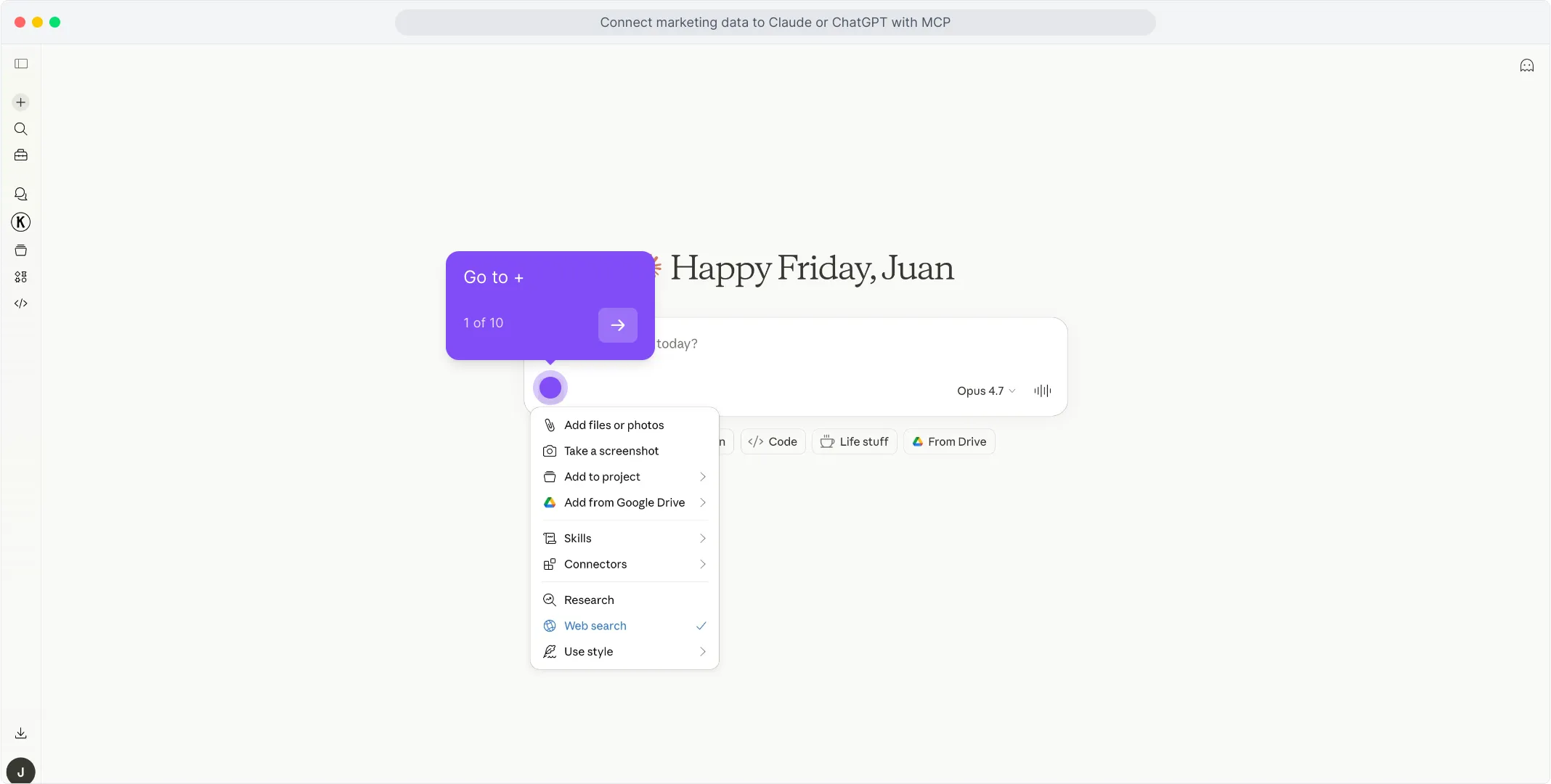
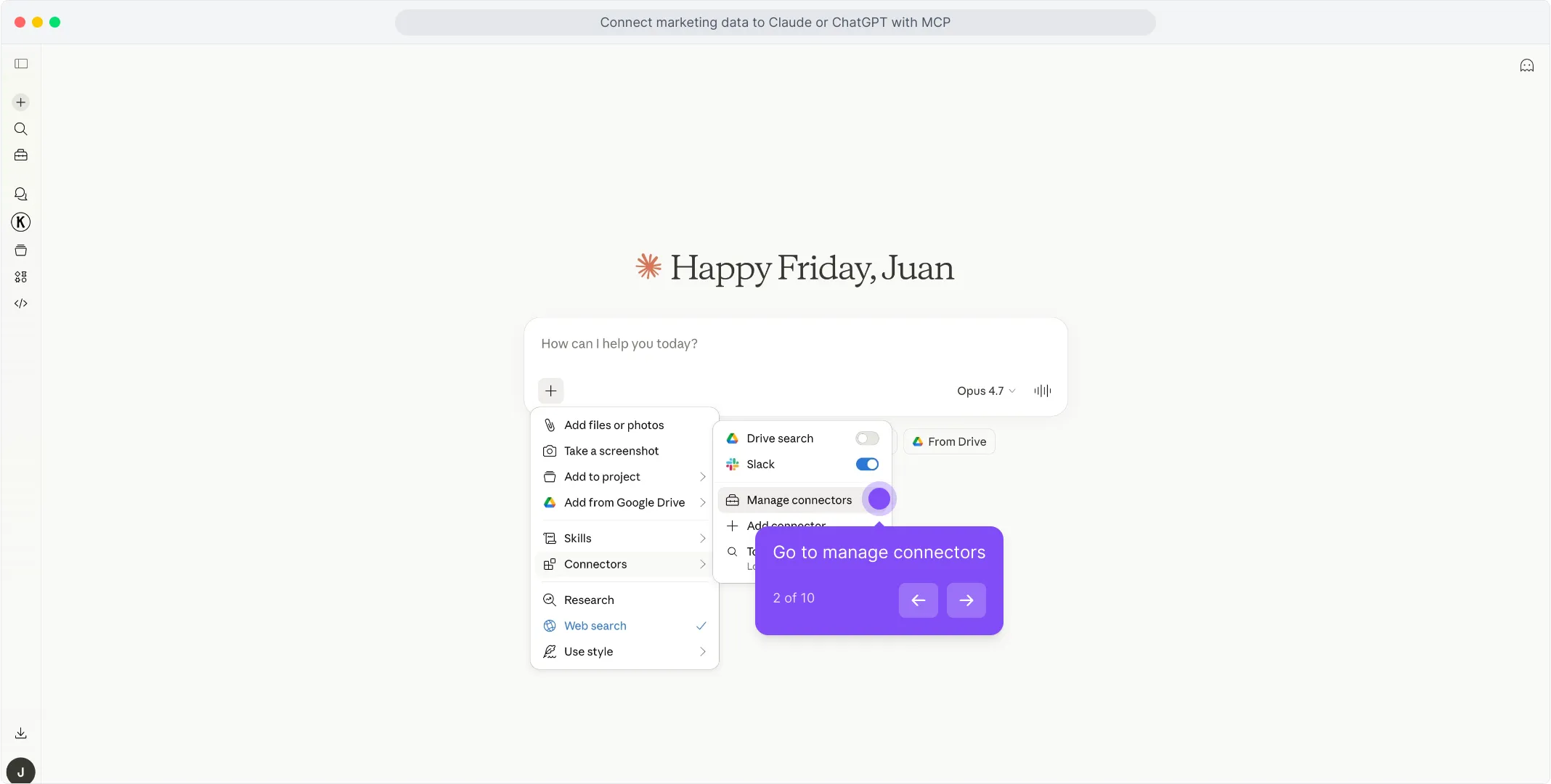
En el menú que se abre, pasa el cursor sobre Conectores y haz clic en Gestionar conectores.
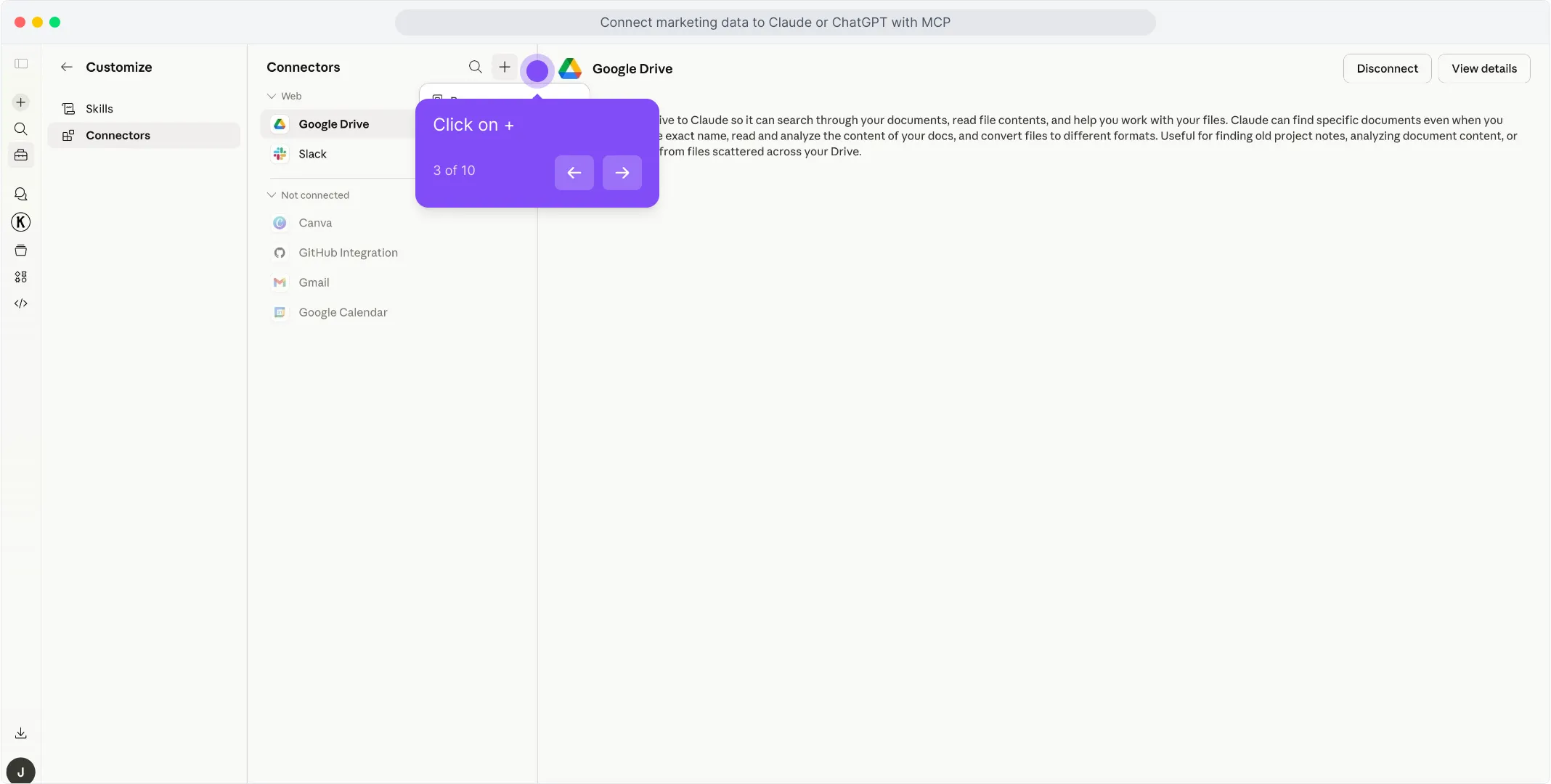
En el panel de Conectores, haz clic en el + botón en la parte superior de la lista para empezar a añadir un nuevo conector.
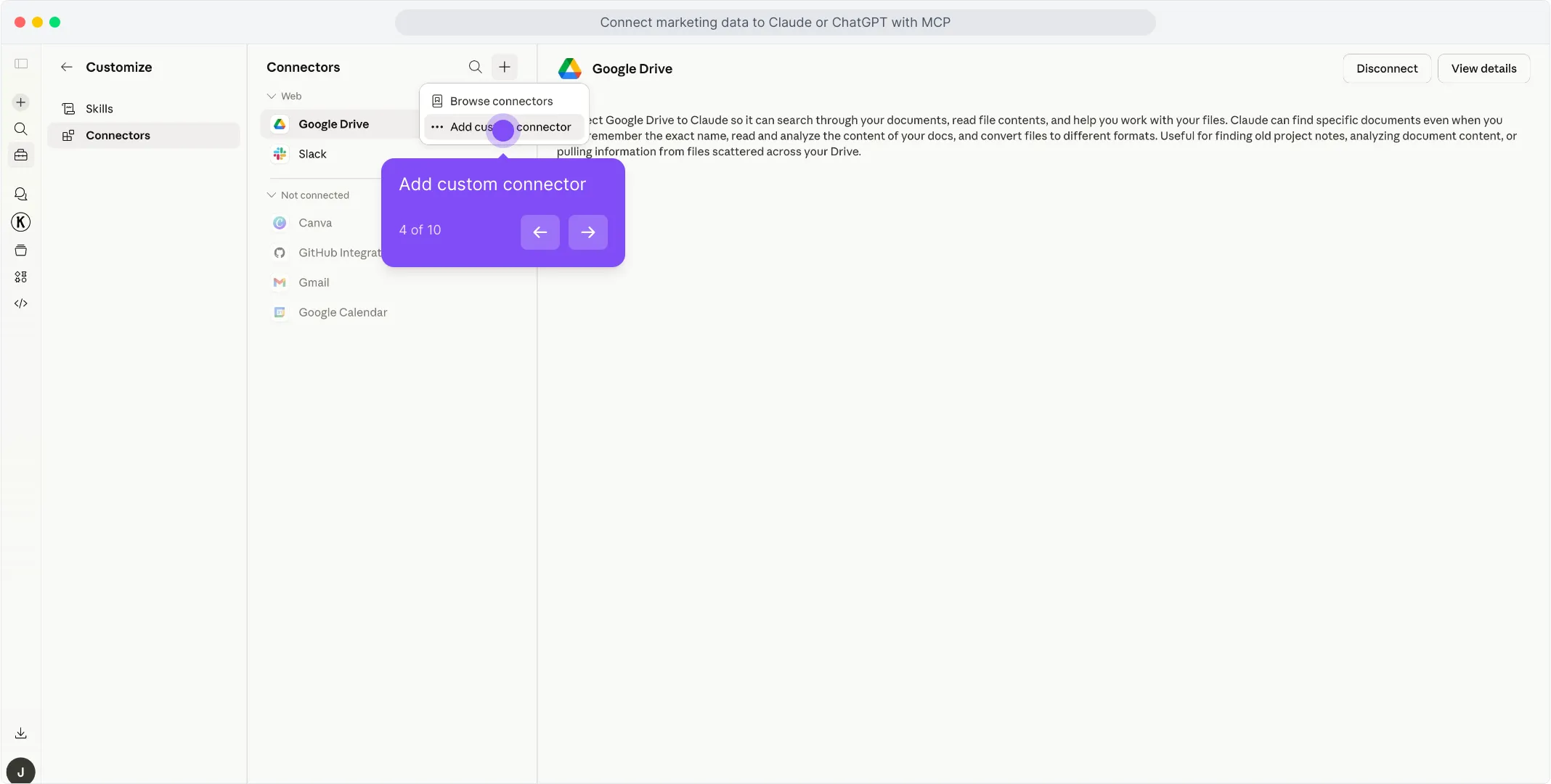
Elige Añadir conector personalizado del desplegable que aparece.
Se abre un diálogo con los campos de nombre y URL. Escribe Porter en el primer campo para nombrar el conector.
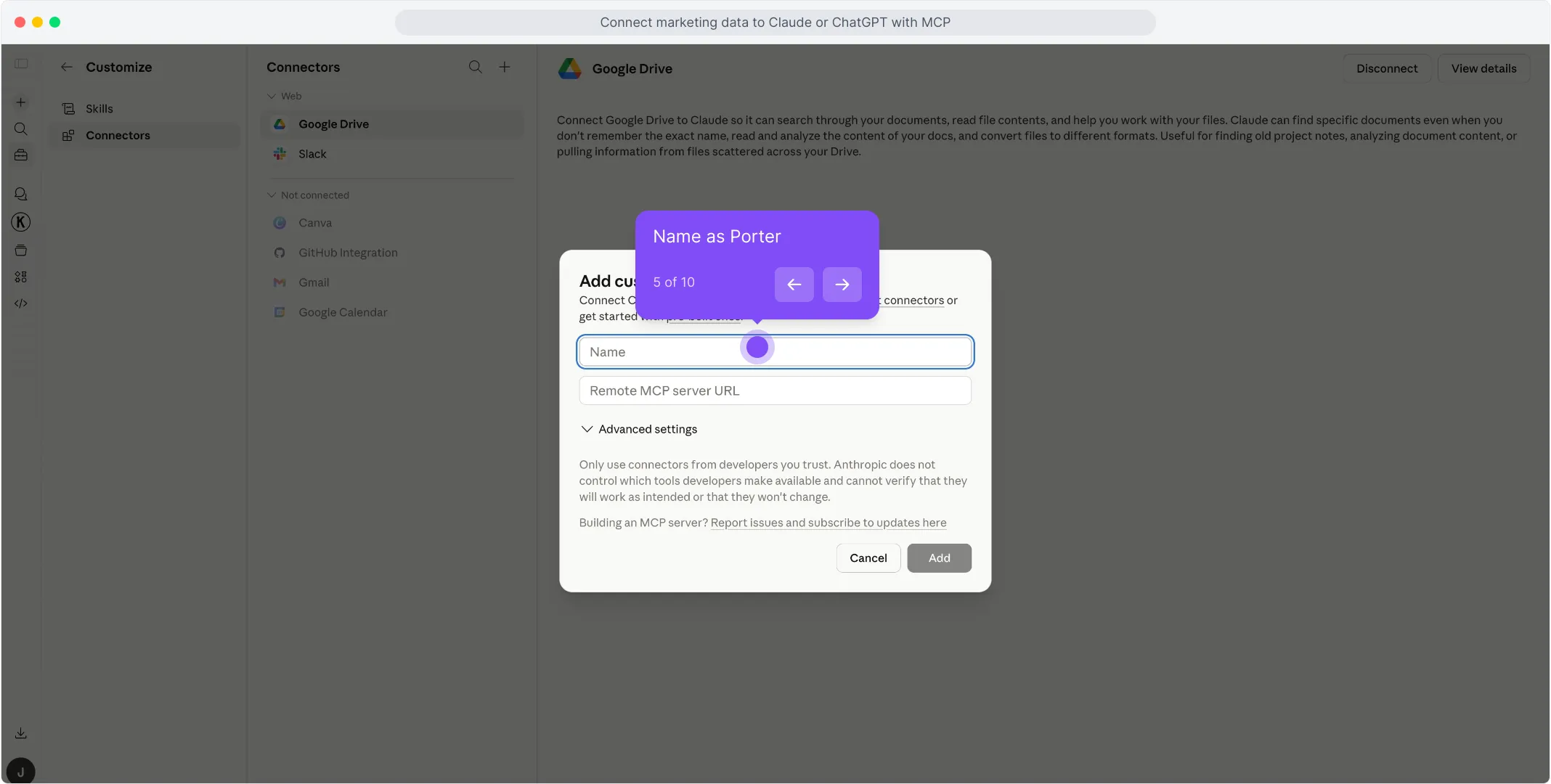
En el segundo campo, pega https://mcp.portermetrics.com/mcp. No toques la configuración avanzada.
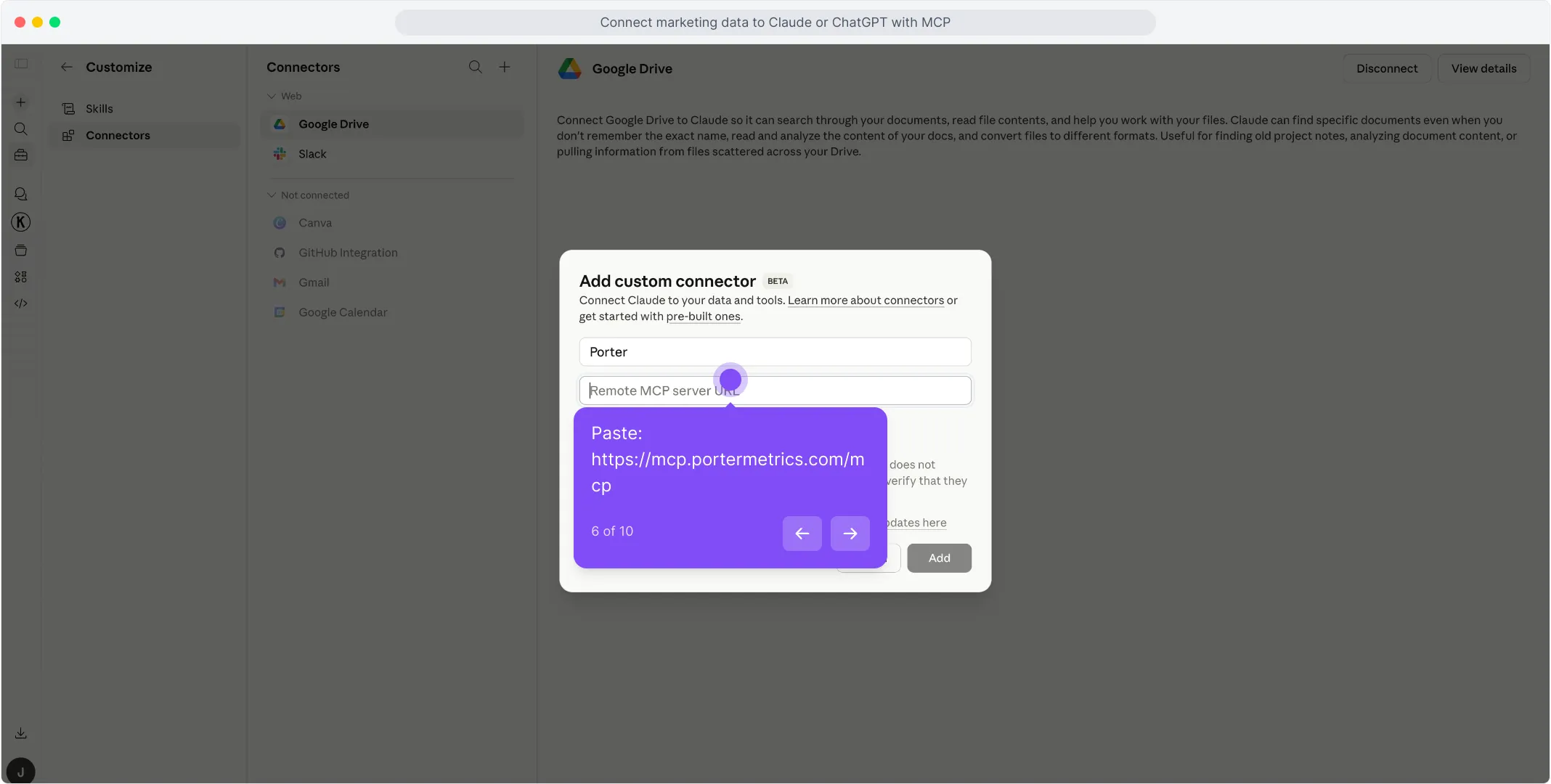
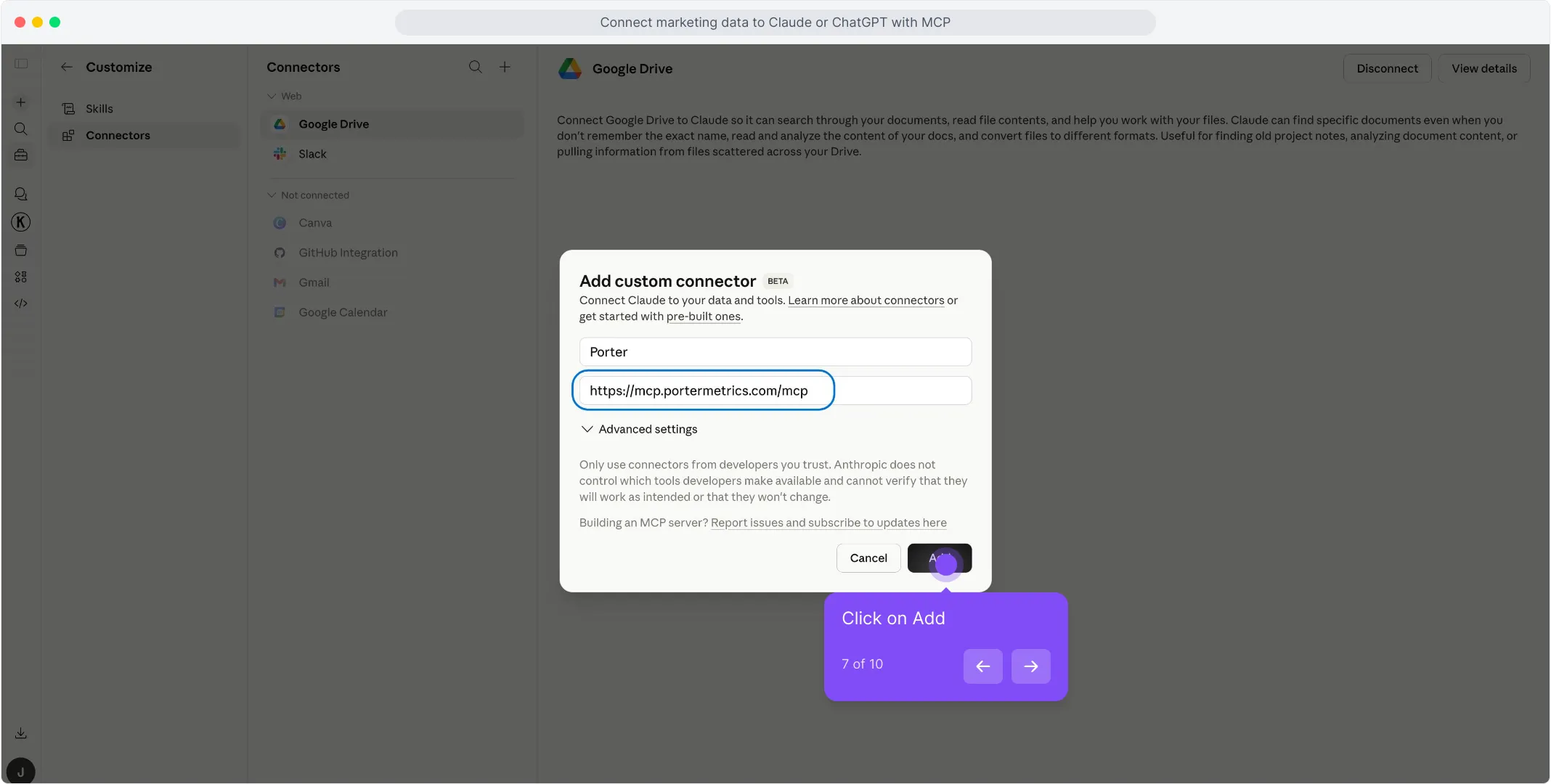
Haz clic en Añadir en la parte inferior derecha del diálogo. Claude abre una ventana de inicio de sesión: usa la misma cuenta de Google vinculada a tu espacio de trabajo de Porter y aprueba el acceso.
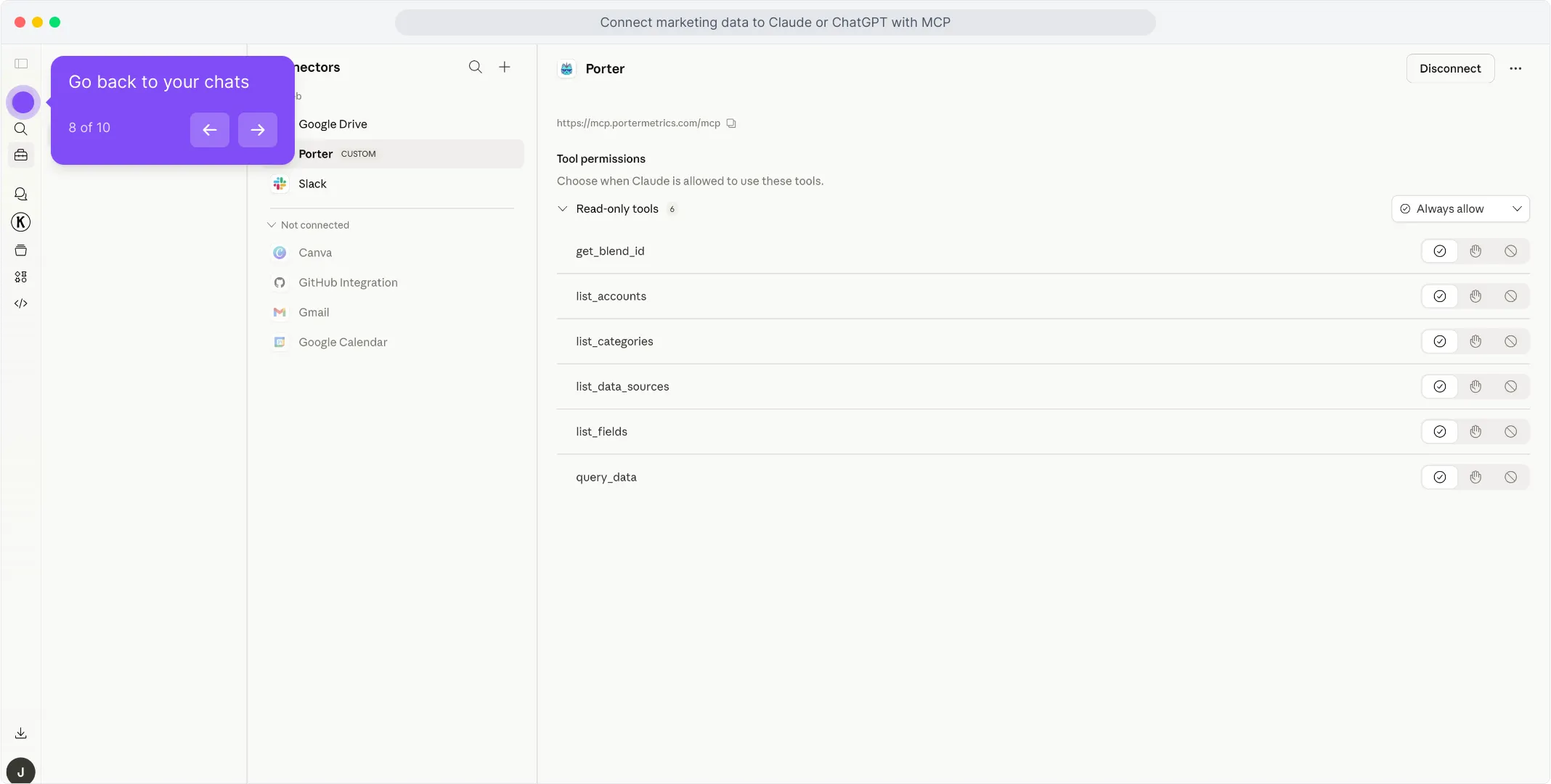
Una vez finalizada la autorización, verás que las herramientas de solo lectura de Porter aparecen en el panel de conectores. Estás listo para empezar a hacer preguntas.
Para un tutorial más completo con capturas de pantalla en cada paso, consulta el tutorial del MCP de Porter.
3. Empieza a crear preguntas y dashboards
Con Porter conectado, abre un nuevo chat de Claude y pregunta lo que sea sobre tu PartnerStack en lenguaje natural. Claude llama a Porter en segundo plano, extrae datos en vivo de PartnerStack y responde con tablas, gráficos o resúmenes.
Prueba una de estas para verificar que la configuración funciona:
Para un catálogo completo de prompts listos para copiar y pegar organizados por caso de uso (agencias, equipos de asociaciones, fundadores de SaaS, multicanal), salta a la sección de prompts de abajo.
Otras formas de conectar PartnerStack a Claude
MCP es el camino que acabamos de recorrer, y el que recomendamos para la mayoría de marketers. Pero no es la única forma de poner datos de PartnerStack frente a Claude. Las alternativas más comunes son la API directa de PartnerStack (o su MCP oficial si tiene uno), un puente en vivo con Google Sheets, y BigQuery para escalar. Cada una tiene sus pros y contras: elige la que se adapte a cómo trabaja tu equipo.
- 🔌 API directa de PartnerStack (o MCP oficial) — Habla directamente con la API de PartnerStack tú mismo, o instala el MCP nativo de PartnerStack si existe. Control máximo, pero tú te encargas de la autenticación, los límites de tasa y la paginación, y solo obtienes una fuente.
- 📊 Google Sheets — Hoja en vivo o carga puntual de CSV. Auditable, familiar, más rápido para grandes exportaciones, pero la agregación ocurre en la Hoja, no en la API.
- 🗄️ Google BigQuery — Para asociaciones grandes o agencias que ejecutan análisis multi-socio. BigQuery agrega; Claude solo consulta resúmenes preconstruidos.
Vía la API directa de PartnerStack (o MCP oficial)
Si estás construyendo un producto alrededor de PartnerStack, o eres un desarrollador que prefiere controlar cada capa de la integración, el camino más directo es hablar directamente con la API de PartnerStack tú mismo. PartnerStack no publica un servidor MCP oficial ni un repositorio SDK. Deberás seguir los límites de tasa y cuotas y solicitar un Developer Token / acceso a la API cuando aplique. De cualquier forma, omites Porter por completo y llamas a PartnerStack desde tu propio código o desde Claude Code con peticiones HTTP en bruto.
Vía Google Sheets (hoja en vivo o CSV manual)
Si tu equipo ya vive en Google Sheets, o quieres un rastro documental antes de que Claude toque nada, alimenta PartnerStack en una Hoja y luego deja que Claude lea la Hoja. Puedes automatizar el flujo PartnerStack → Sheets con Porter para que se actualice diariamente, o hacer exportaciones puntuales de CSV desde la interfaz nativa de PartnerStack para análisis estático.
Vía Google BigQuery (para escalar)
Este es el camino que la mayoría pasa por alto, y es el que te salva cuando tu asociación de PartnerStack se pone seria. Un solo socio grande o una agencia que gestiona más de 10 asociaciones alcanzará los límites de tasa de la API y tendrá problemas de latencia al consultar a Claude directamente. Claude literalmente te dirá que está tardando demasiado o que se agota el tiempo en extracciones grandes.
BigQuery soluciona eso. Cargas datos de PartnerStack en tablas de BigQuery de forma programada, luego conectas BigQuery a Claude, ya sea a través de un MCP de BigQuery o vía Claude Code con consultas SQL. En lugar de pedirle a Claude que extraiga datos en bruto de PartnerStack, dejas que BigQuery agregue en tablas pequeñas y optimizadas, y Claude solo consulta el resultado resumido. Problema de escala resuelto.
Conectar PartnerStack a Claude Code
La mayoría de los marketers agrupan a Claude y Claude Code juntos y pasan por alto la mayor ventaja de todo el ecosistema MCP. No son la misma herramienta, y la diferencia importa enormemente una vez que empiezas a trabajar seriamente con datos de PartnerStack.
Claude es una interfaz de chat. Haces una pregunta, Claude extrae datos en vivo a través del MCP, responde, tal vez crea un dashboard rápido dentro de la conversación. Ideal para análisis puntuales. El problema: todo es efímero. ¿Quieres actualizar el dashboard mañana? Lo regeneras desde cero. ¿Quieres el mismo informe cada lunes? Vuelves a hacer la pregunta cada lunes.
Claude Code es Claude ejecutándose dentro de la terminal de tu computadora. Como tiene acceso a tu sistema de archivos, tiempo de ejecución y otras herramientas de desarrollo, no solo responde preguntas: puede construir software real. Scripts persistentes, rutinas programadas, aplicaciones HTML, dashboards internos, integraciones que funcionan 24/7 sin tu intervención. Una vez conectado al MCP de Porter para PartnerStack, toda una categoría de trabajo se vuelve posible.
Lo que Claude Code desbloquea y Claude solo no puede
Aquí es donde el ecosistema MCP rinde más. Como Claude Code puede combinar el MCP de Porter con otros MCPs — Firecrawl para web scraping, Airtable para datos estructurados, Notion para wikis, Vercel para despliegue, Slack y Gmail para entrega — ya no estás consultando datos. Estás construyendo herramientas.
🛠️ Crea tu propio dashboard de analíticas de programa de socios
Stack: Porter MCP + Vercel MCP (o Cloudflare Pages, Netlify)
Alimenta a Claude Code con tus objetivos y metas de PartnerStack: objetivos de comisión, metas de valor de trato, umbrales de activación de socios, y pídele que genere un dashboard personalizado de ROI de socios para cada cliente. Construye el HTML, extrae datos en vivo, despliega en una URL. Sin embed de Data Studio que se rompa cuando el proveedor cambia precios, sin restricciones de plantilla. El dashboard se actualiza automáticamente porque consulta el MCP de Porter en cada carga de página.
Ideal para: agencias que quieren dashboards white-label para clientes sin depender de Looker ni Data Studio.
🔍 Monitoreo completo de competidores y rendimiento
Stack: Porter MCP + Firecrawl MCP
Combina tu propio rendimiento de PartnerStack desde Porter con programas de socios de la competencia y posicionamiento de mercado extraídos vía Firecrawl. Claude Code une ambos en un informe semanal de inteligencia competitiva: tus números junto a sus estructuras de comisión y niveles de socio, con un resumen de LLM sobre lo que cambió semana a semana. Se ejecuta en cron, llega a tu bandeja de entrada cada lunes por la mañana.
Ideal para: equipos internos que necesitan contexto de mercado, no solo números internos.
📚 Wiki interna de marketing con métricas en vivo
Stack: Porter MCP + Airtable MCP (o Notion MCP)
Usa Airtable o Notion como esquema, Porter como fuente de datos. Claude Code mantiene cada página poblada con Commission Amount, Total Revenue y Deal Stage actualizados para cada asociación: sin capturas de pantalla obsoletas, sin copiar y pegar desde Excel. Los nuevos empleados leen una entrada de la wiki y tienen contexto completo sobre la cuenta de un cliente.
Ideal para: agencias y equipos de operaciones que incorporan analistas o rotan gestores de cuentas con frecuencia.
🔔 Alertas 24/7 sobre caídas de comisión, estancamiento de tratos y churn de socios
Stack: Porter MCP + Slack MCP (o Gmail MCP)
Una rutina de Claude Code en cron extrae PartnerStack vía Porter, evalúa umbrales: Commission Amount cae por debajo del objetivo, la etapa de trato se estanca por más de 14 días, la tasa de activación de socios cae semana a semana, y envía alertas a Slack o Gmail en el momento en que algo cruza la línea. Dejas de revisar dashboards reactivamente; el dashboard se revisa a sí mismo y te dice cuándo mirar.
Ideal para: cualquier equipo que haya descubierto un problema 48 horas tarde porque nadie abrió el informe.
Conclusión: Claude es para preguntas rápidas y dashboards ad hoc. Claude Code es para construir aplicaciones, dashboards en vivo, alertas y herramientas reales: cualquier cosa que quieras que funcione por sí sola sin volver a preguntar. La misma URL del MCP de Porter funciona en ambos, así que no eliges una vez y te quedas atado.
Casos de uso: qué puedes hacer realmente una vez que PartnerStack está conectado a Claude
Conectar bien es la mitad de la batalla. El valor real aparece en lo que haces después. Aquí están los casos de uso que los usuarios de Porter construyen alrededor de sus datos de PartnerStack: desde preguntas y respuestas simples hasta flujos de trabajo completos orientados al cliente.
1. Chatea y haz preguntas directamente
El caso de uso más simple, y aún así el con el que empieza el 80% de los marketers. Abre Claude, haz una pregunta, obtén una respuesta basada en datos en vivo.
Es la forma más rápida de sustituir la revisión diaria del dashboard de PartnerStack. Pero el chat es lo básico: los casos de uso interesantes vienen después.
2. Mezcla PartnerStack con tus datos de ventas (HubSpot, Stripe, Salesforce)
Aquí es donde una visión 360° se vuelve real. Cuando conectas PartnerStack y tu fuente de ingresos (HubSpot para CRM y pipeline de tratos, Stripe para conciliación de pagos, Salesforce para mapeo de cuentas empresariales), Claude puede mapear tratos provenientes de socios a tratos cerrados-ganados o compras reales, usando UTMs, nombres de campaña y marcas de tiempo, y darte una atribución que ningún número de la plataforma puede ofrecer.
Claude se encarga del mapeo de UTMs y las uniones. Obtienes un informe de atribución listo para el cliente que ninguna plataforma individual puede generar por sí sola.
3. Alertas y notificaciones automatizadas en Slack o Gmail
Con Claude Code puedes convertir el monitoreo de PartnerStack en una rutina que funciona por sí sola. Conecta el MCP de Porter (para los datos) junto con un MCP de Slack o Gmail (para la entrega), luego escribe una tarea programada de Claude Code que extrae el rendimiento cada mañana y te avisa solo cuando algo realmente necesita atención.
Sin dashboards, sin revisiones diarias. El informe viene a ti, y solo cuando importa.
4. Presentaciones listas para el cliente con datos en vivo (Gamma, HTML, PDF)
Un dolor común de las agencias: envías a los clientes una exportación estática de hoja de cálculo, una actualización manual de CSV, y pasas una hora explicando un dashboard roto. Con Claude puedes construir la presentación misma, ya sea como un deck de Gamma, una página HTML personalizada o un PDF, poblada con números en vivo cada vez.
La presentación se convierte en un artefacto de entrega que envías al cliente, no en un dashboard que depende de que otra herramienta siga funcionando. Sin iframe roto, sin solicitudes de inicio de sesión, solo el contenido.
Campos y métricas de PartnerStack que puedes consultar con Claude
Antes de empezar a escribir prompts, ayuda saber qué datos están realmente disponibles. El MCP de Porter le da a Claude acceso a 67 campos y métricas de PartnerStack en cada nivel de informe, más desgloses por socio, etapa de trato, grupo y periodo de tiempo. Y la misma URL de MCP también desbloquea más de 25 fuentes adicionales, así que Claude puede mezclar PartnerStack con Google Ads, GA4, Shopify, HubSpot y más en un solo prompt.
 PartnerPartner KeyPartnership ArchivedPartnership KeyProgram Join Date+15 másMétricas de visibilidad<em>(ninguna disponible para este conector)</em>Métricas de engagement<em>(ninguna disponible para este conector)</em>Commission AmountCommission CurrencyCommission DescriptionCommission Earned DateCommission StatusCommission Subscription KeyCommission Trigger ActionDecline ReasonPartnerStack Fee PercentReward KeyCategory KeyProduct KeyTotal RevenueTransaction Amount+7 más<em>(ninguna disponible para este conector)</em>Desgloses de audienciaCreated At DateDateDay of week (Mon – Sun)Hour of dayQuarterWeekYearMonth and yearQuarter and yearFuentes multicanal (misma URL)Google AdsGoogle Analytics 4ShopifyLinkedIn AdsHubSpotSearch Console+15 más
Prompts que puedes copiar y pegar hoy
1. Para agencias
Las agencias que gestionan cuentas de PartnerStack para clientes necesitan clasificación rápida, detección de tendencias y entregables listos para el cliente.
2. Para equipos de asociaciones
Los equipos internos de asociaciones necesitan optimización, segmentación, diagnóstico y alertas de umbral para gestionar la salud de los socios.
3. Para fundadores de SaaS
Los fundadores que ejecutan programas de socios lean necesitan previsión, análisis de brechas y clasificaciones rápidas sin construir dashboards.
4. Multicanal
Los equipos que mezclan PartnerStack con otras herramientas necesitan informes cruzados, dashboards y detección de anomalías entre canales.
Límites, autenticación y mejores prácticas para PartnerStack vía Claude
No se encontró ningún hilo de Reddit ni post de foro verificado con esta cita exacta para PartnerStack específicamente (la búsqueda pública 2024-2026 devolvió cero anécdotas de baneos o abuso). Sin embargo, el patrón — truncamiento silencioso de datos debido a valores predeterminados de paginación — es un modo de falla bien documentado en APIs REST. Un caso paralelo de la comunidad de desarrolladores de HubSpot ilustra el costo: un marketer codificó en duro una API key en un repositorio público de GitHub, un bot la extrajo en 48 horas, y la cuenta acumuló $12,000 en cargos de computación antes de que se detectara la brecha. Para usuarios de PartnerStack, el costo equivalente no es financiero sino operativo: subreportar comisiones de socios, perder señales de churn, o tomar decisiones de pago sobre datos incompletos.
Por qué esto importa para usuarios de Claude/MCP: Los asistentes de IA están ansiosos por complacer. Si le pides a Claude “muéstrame todos los socios creados este mes,” puede que no pagine automáticamente a través de cada conjunto de resultados. El `limit` predeterminado de 10 significa que obtienes diez socios a menos que el prompt solicite explícitamente el máximo (250) o itere a través de las páginas. El riesgo no es un baneo: es un análisis silenciosamente roto.
El limitador de tasa de PartnerStack es basado en cuotas, no basado en comportamiento. La plataforma no banea cuentas porque usaste Claude, un servidor MCP o un conector de terceros. Limita las peticiones cuando se cruza el umbral de 4,000 peticiones por minuto por dirección IP devolviendo HTTP 429 (Too Many Requests) hasta que la ventana se reinicia. El uso analítico de solo lectura — listar socios, extraer transacciones, leer etapas de trato — es seguro y es improbable que se acerque a ese techo en flujos de trabajo normales de marketing. Lo que desencadena problemas es el tráfico en ráfagas y sin lotes: un script que dispara 100 peticiones paralelas para rellenar datos históricos, un conector que consulta cada 5 segundos en lugar de cada 5 minutos, o un agente de IA que reintenta agresivamente en cada 429 en lugar de retroceder. La página de cumplimiento está documentada en docs.partnerstack.com/reference/rate-limits.
Los dos patrones que llevan a informes inexactos de PartnerStack
Después de revisar documentación oficial e hilos de la comunidad, dos patrones aparecen una y otra vez.
1. Ignorar la paginación y aceptar el `limit` predeterminado de 10. Cada endpoint de lista en la API de PartnerStack (socios, transacciones, acciones, tratos) devuelve un máximo de 250 elementos por petición y tiene un predeterminado de 10. Si le pides a Claude “lista todos mis socios” y la herramienta MCP no pagina automáticamente, analizarás silenciosamente una muestra de 10 elementos en lugar del conjunto de datos completo. Esto no es un riesgo de baneo: es un riesgo de calidad de datos que puede llevar a comisiones subreportadas, churn de socios no detectado y cálculos de pago incorrectos. Establece siempre explícitamente `limit=250` e itera a través de los tokens `starting_after` hasta que la lista se agote. Fuente: docs.partnerstack.com/reference/get_v2-actions (parámetros de paginación).
2. Codificar en duro o exponer la API key de PartnerStack en prompts, repositorios o conversaciones compartidas. La API de PartnerStack usa un header estándar de API key (`Authorization: Bearer
3. Disparar peticiones paralelas sin lotes y sin manejo de 429. El límite de 4,000 peticiones/min es generoso para análisis a ritmo humano, pero un agente de IA o script de automatización puede agotarlo en segundos si genera trabajadores paralelos para “acelerar las cosas”. Cuando se alcanza el límite, PartnerStack devuelve HTTP 429. Si el cliente reintenta inmediatamente (bucle de reintento ingenuo), amplifica el problema y puede extender la ventana de limitación. Implementa retroceso exponencial empezando en 1 segundo, duplicando en cada 429, con un techo máximo de 5 intentos. Fuente: docs.airbyte.com/integrations/sources/partnerstack (guía de límites de tasa para conectores).
Ambos comportamientos desencadenan limitación basada en cuotas y truncamiento silencioso de datos. Si quieres usar Claude para PartnerStack de forma segura, usa un conector que imponga paginación, almacene credenciales en el servidor y procese peticiones en lotes con retroceso.
El protocolo de mejores prácticas de 5 reglas
Basado en los límites de tasa y cuotas documentados de PartnerStack y en los comportamientos que realmente han causado informes inexactos, no en conjeturas:
- Establece `limit=250` en cada petición de lista. La API de PartnerStack permite un máximo de 250 elementos por página y tiene un predeterminado de 10 [docs.partnerstack.com/reference/get_v2-actions]. Solicitar 250 reduce la sobrecarga de paginación 25 veces comparado con el predeterminado. Si ignoras esto, Claude puede analizar una muestra de 10 filas y presentarla como tu base completa de socios: un error silencioso que destruye la confianza.
- Nunca exportes el mismo informe personalizado de vendedor más de una vez cada 2 horas. La consulta agresiva de endpoints de informe desencadena errores 429 y desperdicia cuota en datos sin cambios. Para análisis en vivo, usa los endpoints de lista REST en lugar de exportaciones de informes.
- Limita las llamadas a la API concurrentes a 10 por lote. Las ráfagas paralelas son la forma más rápida de agotar la cuota por IP. El MCP de Porter impone lecturas secuenciales y por lotes de forma predeterminada: este es el comportamiento que la infraestructura de PartnerStack maneja con elegancia.
- Limita tu API key a operaciones de solo lectura a menos que la escritura sea explícitamente necesaria. Las API keys de PartnerStack están vinculadas a tu cuenta de vendedor y pueden crear, actualizar y eliminar socios, tratos y transacciones. Una key filtrada o con alcance excesivo en un contexto de asistente de IA es un riesgo para la integridad de datos y el PII. Si tu caso de uso es analítico (la propuesta de valor principal de Porter), restringe la integración solo a endpoints GET.
- Valida la integridad de los resultados antes de presentarlos a los interesados. Después de cualquier consulta multipágina, confirma que el recuento total de registros coincide con lo esperado. Si esperabas 1,200 socios y la API devolvió 250, quedan 4 páginas más. El MCP de Porter muestra metadatos de paginación automáticamente; revisa siempre `has_more` o `total_count` antes de construir un informe.
Qué hace diferente el MCP de Porter: impone estas salvaguardas a nivel de plataforma. El conector de PartnerStack de Porter:
- Tiene un predeterminado de `limit=250` y pagina automáticamente : cada petición de lista itera automáticamente a través de los tokens `starting_after` hasta que el conjunto de datos esté completo. Nunca analizas una base de socios parcial por accidente.
- Limita la tasa con retroceso adaptativo : Porter procesa peticiones en lotes y aplica retroceso exponencial en respuestas 429, manteniendo el rendimiento bien por debajo del techo de 4,000 peticiones/min sin intervención del usuario.
- Solo lectura de forma predeterminada : la URL del MCP de Porter expone primero endpoints de informes y analítica. Las operaciones de escritura (crear socio, actualizar trato) son opt-in y requieren una elevación explícita de alcance.
- Nunca expone tu API key en los prompts : la key se almacena en la bóveda de credenciales cifradas de Porter y se inyecta del lado del servidor. Claude solo ve la URL del MCP, nunca el token en bruto.
- Mezcla multicanal sin multiplicación de cuotas : como Porter gestiona PartnerStack, Shopify, HubSpot y GA4 a través de un solo endpoint MCP, no estás disparando peticiones paralelas desde múltiples conectores. Una conversación, un pipeline consciente de la limitación.
Ese es el comportamiento que los sistemas automatizados de PartnerStack manejan con elegancia: tráfico estable, por lotes, predominantemente de lectura, con paginación y retroceso adecuados.
Preguntas frecuentes
Un MCP de PartnerStack (Model Context Protocol) es un estándar abierto que permite que herramientas de IA — Claude, Claude Code, ChatGPT, Cursor — se conecten a tus datos de PartnerStack sin integraciones personalizadas. El servidor MCP de Porter pone a disposición tus socios, transacciones, tratos y clientes a través de una URL: sin tokens, sin scripts, sin configuración de desarrollador.
Claude es el producto conversacional (web, app, móvil). Claude Code es una herramienta de desarrollo basada en terminal que puede escribir scripts, guardar archivos y automatizar flujos de trabajo. Ambos pueden conectarse a PartnerStack vía MCP.
La API de PartnerStack se actualiza aproximadamente cada [NEEDS_VERIFY: intervalo exacto no encontrado en documentación oficial]. El MCP de Porter extrae en vivo, así que tus datos siempre están dentro de esa ventana.
Sí. PartnerStack impone un techo de 4,000 peticiones por minuto por dirección IP, devolviendo HTTP 429 cuando se supera. El MCP de Porter procesa peticiones en lotes y aplica retroceso exponencial automáticamente, así que raramente los alcanzas.
(Fuente: docs.partnerstack.com/reference/rate-limits y docs.airbyte.com/integrations/sources/partnerstack)
Dos razones comunes: (1) Valores predeterminados de paginación : la API devuelve 10 elementos por página de forma predeterminada (máx. 250). Si Claude no itera a través de cada página, analizas silenciosamente un conjunto de datos parcial. (2) [NEEDS_VERIFY: causas adicionales como redondeo de zona horaria, filtrado de estado o ventanas de atribución no confirmadas en documentación oficial]. La solución: establece siempre `limit=250` y pagina a través de los tokens `starting_after` hasta que la lista se agote.
No. PartnerStack no banea ni restringe cuentas por uso legítimo de la API, y el MCP de Porter es de solo lectura de forma predeterminada: se mantiene bien dentro de los límites normales de tasa de PartnerStack. Lo que hay que vigilar es el truncamiento silencioso de datos por los valores predeterminados de paginación y la exposición de la API key: consulta la sección de límites de arriba.
(Fuente: api_limits_research block 3 — modelo de cumplimiento de PartnerStack)
¿Listo para chatear con tu PartnerStack?
Abre Claude, añade el conector de Porter y haz tu primera pregunta. Si aún no tienes Porter, empieza una prueba gratuita y conecta tu cuenta de PartnerStack — estarás chateando con los datos de tus partners en menos de cinco minutos.
rocket_launch Pruébalo gratisopen_in_new Abre Claude